

Post Summary
You opened a new location. Then another one. Then a few more.
And somewhere along the way, training stopped being something you could personally manage.
Now you've got new hires at Location 6 learning from whoever isn't too busy to stop and explain things. Your updated allergen procedure is sitting in an email that half the team never opened. And your district manager spent most of last Tuesday's site visit correcting things that should have been covered in week one.
This is the reality of managing employee training across multiple locations without the right tools.
The good news is there's a fix. And it's not complicated.
This guide walks through every major training challenge multi-location operators face, and shows exactly how Xenia's employee training features solve each one. No generic advice. No vague best practices. Just the specific features, and what they actually do for your operation.
.svg)

Priced on per user or per location basis
Available on iOS, Android and Web


Related Resources
- Streamlining restaurant operations with SOPs
- Reduce employee training time across multiple retail locations
- Strategies for effective frontline employee communication
- Store walk training
The real problem with multi-location training
Most operators think the issue is content. Too long, too boring, too outdated.
It's almost never the content.
The real problem is two things: delivery and visibility. Training that exists but doesn't reach people is no different from training that doesn't exist. And training you can't verify might as well not have happened.
Here are the four failure points that show up constantly:
**
Failure point, What you actually see
Inconsistent delivery, One manager runs two-hour onboarding. Another hands new hires a binder.
Outdated materials, SOPs from 18 months ago sitting in a back-office folder no one checks.
One-and-done onboarding, Day one orientation happens. Nothing gets reinforced again.
Zero visibility, No way to know if Location 11 ran onboarding this week or skipped it.
**
Fix all four and your training works. Fix one or two and standards drift. That's not a criticism. It's just how the math works at scale.
What Xenia's employee training system covers
Before getting into each problem, here's what Xenia actually gives you:
**
Xenia training feature, What it does
Microlearning modules, 60-second video lessons that replace long manuals nobody reads
Knowledge retention quizzes, Short assessments after each module to verify actual understanding
AI SOP generation, Builds standardized procedures in minutes from your existing content
Courses and learning paths, Structured onboarding sequences assigned by role
Point-of-need QR guides, Equipment-specific training accessible by scanning a code on-site
Multi-language support, Automatic translation so every team member trains in their own language
Mandatory acknowledgment, Tracks who confirmed a policy update and who didn't
Mobile-first delivery, Built for phones-on the floor-during a real shift
**
These aren't separate apps. They all live inside Xenia, the same platform your team uses for daily checklists, audits, work orders, and communications. No second login. Training lives where the work happens.
Problem 1: Nobody watches your training videos
Here's the honest truth about long training videos.
Your team doesn't watch them. Not because they don't care. Because a 45-minute onboarding module is not something a new line cook does during a break at 11am. It's not realistic.
Xenia solves this with microlearning modules. Short, focused, 60-second video lessons that cover one topic at a time.
A new retail associate can complete a module on the refund procedure while waiting for their shift to start. A kitchen team member can watch the fryer cleaning steps on their phone between rushes. A c-store associate can get through the age-verification compliance module before opening.
Short content gets watched. That's the whole point.
Here's why microlearning works for frontline employee training specifically:
- No sit-down required. Workers complete modules anywhere.
- One topic per module means nothing gets buried.
- Short format matches how frontline workers actually consume information.
- You can assign only what's relevant to each role. No wasted time.
Compare that to the traditional approach:
**
Training format, Frontline-friendly?, Why
60-second microlearning module, Yes, Fits into real shifts-any device
40-minute onboarding video, No, Wrong length for the context
Printed training manual, No, Can't track-can't update-can't search
Group classroom session, Sometimes, Impossible to replicate consistently across sites
**
Microlearning is also the format that makes sense for training for kitchen staff, line cook training, POS system training, and any role where workers are on their feet and moving all day.
.webp)
Problem 2: Completion doesn't mean understanding
Someone watches a module. They click through to the end. You see a green checkmark.
But do they actually understand the allergen protocol?
You don't know. And that's the problem.
Xenia's knowledge retention quizzes attach a short assessment to the end of each training module. Three to five questions. Enough to verify whether the content actually landed.
This is what quiz data tells you that completion tracking never can:
**
What the data shows, What you can do
Low score on allergen module at Location 4, Reassign the module. Flag the manager.
Multiple team members fail the same question, The content needs to be clearer. Or the procedure needs to change.
New hire passes all quizzes in week one, They're ready for more responsibility earlier.
Consistent quiz failures across three locations, A training gap that needs fixing before your next inspection.
**
This matters for compliance. If a health inspector asks whether your team was trained on a specific food safety procedure, quiz scores with timestamps are documentation. A completion checkbox is not.
For allergy training for restaurants specifically, the difference between "they watched it" and "they demonstrated understanding" is a compliance gap you don't want to find out about during an incident.
.webp)
Problem 3: Building training content takes time nobody has
You know training needs to improve. But who has time to write SOPs?
Not the ops team who's already managing 12 locations. Not the GM who's covering shifts. Not you.
This is exactly why Xenia's AI SOP generation matters.
You give it the topic, the role, and the key steps. It builds a structured SOP in minutes. You review it, adjust anything specific to your operation, and publish it. Every location has the current version immediately.
Think about how many SOPs a typical multi-location operator actually needs:
- Opening and closing procedures by role
- Food safety and allergen handling steps
- Equipment cleaning protocols
- Cash handling procedures
- Customer complaint handling
- Loss prevention protocols
- Health and safety compliance checks
Done the old way, that's weeks of writing, reviewing, formatting, and printing. Done with Xenia's AI-powered SOP writer, a restaurant group can digitize 20 procedures in a single afternoon.
And when a procedure changes, you update it once. Every location gets the new version automatically. No reprinting. No emailing. No hoping the GM passes it along.
Related reading: Document management and SOP software for multi-location operators. Also worth checking out online automatic SOP writer tools if you're comparing options.
Problem 4: Onboarding depends on managers who are always too busy
Here is a situation every multi-location operator knows.
A GM is supposed to onboard a new hire today. But there's a vendor issue at 10am, a call-out at 11, and a customer complaint by 2pm. The new hire gets a partial walkthrough, a "just ask someone," and their first solo shift two days later without finishing.
Nobody planned for this. It just happens. Because traditional onboarding delivery depends on one person having uninterrupted time. In a busy operation, that almost never happens.
Xenia's courses and learning paths remove that dependency entirely.
Here's how onboarding works when it's built into Xenia:
- New hire joins the system. Their role-specific learning path is assigned automatically.
- They work through modules on their phone at their own pace, between tasks or before shifts.
- Each module ends with a quiz to confirm understanding.
- Manager gets notified at specific checkpoints to verify progress, not to deliver training from scratch.
- Operations leadership sees completion status for every new hire at every location.
The manager's job shifts from delivering training to confirming it happened. That's a much more realistic ask for someone running a busy location.
And because learning paths are built by role, a new server at Location 3 gets exactly the same onboarding sequence as a new server at Location 10. Consistent. Documented. Verifiable.
Starting points you can build from: employee onboarding checklist, restaurant employee onboarding checklist, server training checklist, retail employee training checklist, cafe training checklist.
The HR workflows integration with Workday and ADP means new users are provisioned automatically. Nobody falls through the cracks because someone forgot to add them.
For more on how restaurant groups specifically handle this problem, see restaurant manager training and restaurant staff training topics.
Problem 5: Your training doesn't work for non-English speakers
Walk through most multi-location restaurants, retail stores, or c-store chains and you'll find teams working in Spanish, Portuguese, Mandarin, Haitian Creole, and a dozen other languages.
The training materials? Almost always English only.
This is not a small problem. A team member who doesn't fully understand the allergen handling procedure because it was in a language they're still learning is a real compliance risk. Not theoretical. Real.
Xenia's multi-language support automatically delivers training in each team member's native language. The content stays consistent. The language adapts.
What this means in practice:
- A Spanish-speaking line cook reads the food safety SOP in Spanish.
- A Mandarin-speaking retail associate completes their onboarding in Mandarin.
- The quiz, the module, the acknowledgment notification. All in the language they actually understand.
You're not maintaining separate training libraries for each language. Xenia handles the translation. You manage one set of content.
For multi-location operators with diverse workforces, multi-language support is the feature that makes the biggest real-world difference in actual training retention and compliance. This directly supports food safety training for employees and customer service training for retail employees in a way that English-only tools simply can't.
Problem 6: Associates don't know where to find help on the floor
Training doesn't end at onboarding.
Three weeks into the job, a new associate runs into something they're not sure about. Do they find the manager, who's in the middle of five other things? Ask a coworker who may or may not know the right answer? Or guess?
Usually it's one of those three. And two of them are wrong answers a meaningful percentage of the time.
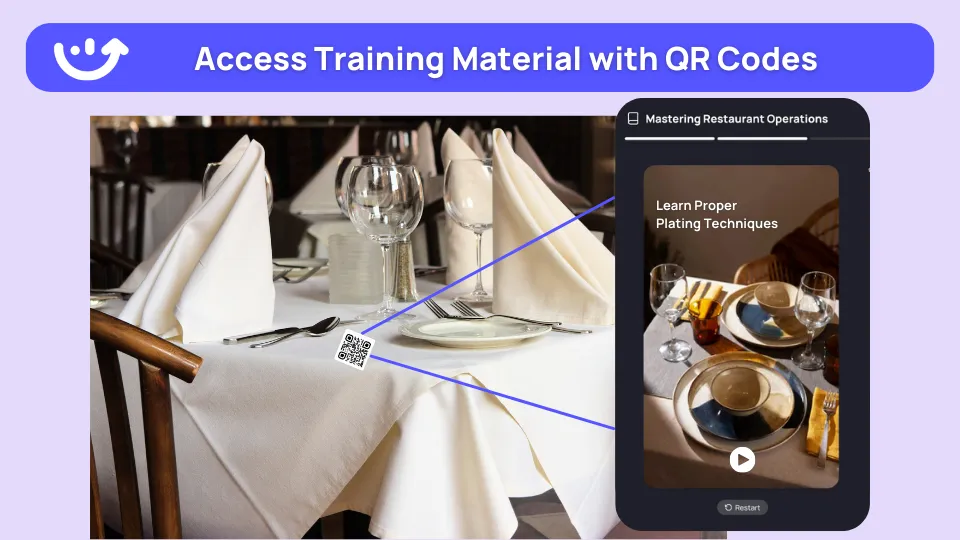
Xenia's point-of-need QR guides solve this without requiring anyone's time.
Here's how it works. You attach a QR code to a piece of equipment or a station. When an associate needs help, they scan the code. A short training module or SOP opens on their phone immediately, right there, at exactly the moment they need it.
Where this works best across different verticals:
**
Location, QR code placement, Training that loads
Restaurant kitchen, On the fryer-grill-dishwasher, Cleaning steps-safe temperatures-equipment safety
Retail store, At the POS terminal or fitting room, Refund process-customer service steps-loss prevention
Convenience store, On the fuel pump or ATM panel, Compliance checks-service procedures-error handling
Bar or cafe, On the espresso machine, Cleaning-calibration-drink preparation
Any location, At the allergen information station, Current allergen protocol-cross-contamination steps
**
Over time, associates become more self-sufficient. Managers spend less time answering the same questions on every shift. That's time they get back for actual management work.
This is a particularly strong use case for product knowledge training in retail and retail compliance training. The training is available exactly where the decision point happens.
Problem 7: Policy updates go out but nothing changes
You update a procedure. You send it to 15 locations. Two weeks later during an audit, you find out three locations are still doing it the old way.
This is not a people problem. It's a verification problem.
Sending an update and confirming it was received and understood are two completely different things. Email gets buried. Group chats get ignored. A PDF attachment that nobody opens is not training.
Xenia's mandatory acknowledgment feature closes this gap for good.
Here's how it works with Xenia's frontline communication platform:
**
Step, What happens
You publish a policy update, Assigned to all relevant team members by role and location
Each person gets a push notification, They read the update on their phone
They confirm receipt, System logs the acknowledgment with a timestamp
You see who's confirmed and who hasn't, Live view by person-role and location
Non-responders get an automatic reminder, After a time window you set
**
If Location 9 has 8 out of 30 team members who still haven't acknowledged a critical food safety update after 48 hours, you see it. You act. You have a timestamped record.
See how this works for real scenarios: allergen policy rollout and safety alert acknowledgment.
This matters most when compliance is on the line. If a health inspector asks whether your team was informed of a specific procedure change, documented acknowledgment with dates is actual evidence. A group chat message is not.
For more on getting communication infrastructure right so training can land: strategies for effective frontline employee communication and streamline communication between HQ and retail branches.
Problem 8: Your team isn't at a desk. Your training tools assume they are.
Most training platforms were built for office workers.
They assume someone has 45 minutes, a laptop, and a stable internet connection. Frontline workers have a phone, five minutes, and questionable WiFi in the back of a kitchen.
The tools don't match the environment. That's why adoption fails.
Xenia's entire training system is mobile-first. Not a desktop platform with a mobile app bolted on. Built for the phone as the primary device from the start.
What mobile-first actually means for deskless workers:
- A new hire completes their full onboarding sequence on their phone before their first shift
- A team member watches a training module during a 10-minute break without logging into anything
- A manager reviews quiz scores from the floor without going back to an office
- A shift lead checks acknowledgment status for the new policy update mid-shift
Training reaches people where they actually are. That's the difference between a training program that gets used and one that sits idle on a desktop nobody opens.
For platforms specifically built for frontline training delivery, see 7 best frontline LMS tools and frontline LMS features that actually matter. If you're comparing alternatives, Axonify alternatives, Trainual alternatives, EdApp alternatives, and Opus Training alternatives are worth reviewing for context.
Problem 9: You can't see what's actually happening with training across your locations
This is the one that ties everything together.
You can build the best onboarding learning path in your industry. You can create 30 microlearning modules. You can write clear SOPs with AI. And still have no idea whether any of it is actually happening at Location 12.
Visibility is the missing piece in most multi-location training programs.
Xenia's multi-unit operations dashboard gives you a real view of training across your entire network. Completion rates by location. Onboarding status by role. Quiz scores over time. Acknowledgment records with timestamps.
The patterns that show up in that data are genuinely useful:
- A location with low training completion and low audit scores at the same time is worth investigating.
- A newer site outperforming older ones on food safety audits usually means their onboarding is tighter.
- A role with consistently low quiz scores signals the content format isn't working for that job context.
- A manager who never verifies onboarding checkpoints is a risk you can catch before it becomes an incident.
Employee accountability software turns training from something you hope is happening into something you can actually measure and act on.
For retail operators specifically, reduce employee training time across multiple retail locations covers how visibility data helps you cut onboarding length without losing quality. And overcoming retail training challenges goes deep on the patterns that show up when training isn't working.
For restaurant groups, pairing dashboard data with a clear map of restaurant staff training topics helps you pinpoint exactly where content gaps cluster by role.
How a full training workflow looks inside Xenia
Here's what this actually looks like for a new hire at a multi-location restaurant group. Start to finish, no gaps.
Day 1: New hire is added to the system via the HRIS integration. A learning path built for their role is assigned automatically on the same day. Every module is available in their native language.
Days 1 to 3: They complete microlearning modules on their phone between tasks. Each one ends with a quiz. Their manager gets notified of completion and scores without having to chase anyone.
Week 1: They encounter new equipment and scan the QR codes at each station. Point-of-need training guides walk them through correct procedures right where they're standing.
Ongoing: When procedures update, they receive a mandatory acknowledgment notification. They confirm receipt. The system logs it. Operations leadership can see compliance across all locations from one dashboard.
The result is a new hire who reaches full operational confidence faster, with less direct manager time spent, and with documented proof that every training step happened.
Xenia's training features, mapped to the problems they solve
**
Problem, Xenia feature, What changes
Nobody finishes long training videos, Microlearning modules, Short content gets watched and completed
Completion doesn't mean understanding, Knowledge retention quizzes, Scores show actual retention-not just clicks
SOPs take too long to build, AI SOP generation, Structured procedures in minutes-not weeks
Onboarding depends on manager availability, Courses and learning paths, Self-directed-role-based-tracked automatically
Training doesn't reach non-English speakers, Multi-language support, Every team member trains in their own language
Associates don't know where to find help, Point-of-need QR guides, Training appears exactly where the question arises
Policy updates go unread, Mandatory acknowledgment, Every person confirms receipt with a timestamp
Training tools don't work on phones, Mobile-first delivery, Built for frontline devices-not adapted for them
No visibility across locations, Multi-unit dashboard, Real data on completion-quizzes-acknowledgment
**
Xenia is an operations execution system, not a standalone LMS. Training lives inside the same platform your team uses every shift for tasks, audits, and communications. That's what makes adoption real rather than aspirational. Start for free or book a demo.
Conclusion
Training across multiple locations gets harder as you grow. Manuals go out of date, emails don’t prove people understood the training, and busy managers can’t train every new hire the same way.
Xenia makes training easier with short lessons, quizzes, AI-generated SOPs, QR guides, multi-language support, and tracked acknowledgments. This helps every location train staff the same way without relying on managers to do everything manually.
Want to see how it works? Book a demo and see how Xenia can simplify training across all your locations.
Frequently Asked Questions
Got a question? Find our FAQs here. If your question hasn't been answered here, contact us.
Does Xenia replace a separate LMS for frontline training?

For most frontline operators, yes. Xenia includes training, quizzes, SOPs, acknowledgments, and mobile delivery in one platform, removing the need for a separate LMS.
Why does multi-language training matter for frontline operations?
Language barriers create compliance and operational risks. Multi-language training ensures every employee understands procedures, reducing mistakes and improving consistency.
How does Xenia's AI SOP generation work for operators running multiple locations?
You enter the topic, role, and key steps. Xenia creates a structured SOP in minutes, which you can edit and publish across all locations instantly. Updates sync automatically.
How do microlearning modules improve multi-location training consistency?
Microlearning delivers short, focused lessons in a consistent format across all locations. Quizzes confirm understanding, while mobile-first delivery improves completion rates for frontline teams.
What is the most effective way to manage employee training across multiple locations?
Use role-based, mobile-first training employees can complete independently, supported by centralized SOPs and completion tracking. Xenia combines learning paths, AI SOPs, quizzes, and reporting in one platform.


A Modern, AI-Powered Platform Built Specifically for Frontline Operations
Xenia brings daily operations, maintenance, audits, and compliance into one mobile-first platform. Frontline teams execute work consistently across locations while leadership gets real-time visibility.

Why Multi-Location Operators Choose Xenia:
🤖 AI-Powered Operations, Create digital checklists instantly or convert paper forms with AI. Verify compliance automatically with photo analysis and get instant answers from your operational data.
✅ Daily Operations & Maintenance, Assign work across hundreds of locations in minutes. Report and route issues instantly. Schedule preventive maintenance to catch problems before downtime.
📊 Real-Time Visibility, Track completion, work orders, and performance across all locations through dashboards. Filter by site or asset to spot trends and take action.
Manage operations, maintenance, and compliance across all your locations from one platform

.svg)
.webp)
%201%20(1).webp)

.svg)
%201%20(2).webp)





