


Post Summary
Food safety practices are the specific actions that prevent biological hazards and cross-contamination in commercial kitchens. We're talking about handwashing protocols, keeping raw meat away from ready-to-eat food, cooking to proper temps, and controlling storage temperatures.
If you operate multiple foodservice locations, you've probably seen what happens when just one site screws this up. A health violation at one location doesn't stay contained. It becomes a brand problem.
Millions of Americans get food poisoning annually. Most cases trace back to someone skipping a basic step. Not because they didn't know better. But because it was busy, they were short-staffed, or the thermometer wasn't handy.
The four core practices aren't complicated: Clean, Separate, Cook, Chill. Your kitchen managers already know these. The challenge? Getting them executed identically at every location, every shift, every day.
This guide walks through the tactical implementation. We're not covering the business case for food safety or ROI calculations. Just the actual procedures your teams need to follow.
.svg)

Priced on per user or per location basis
Available on iOS, Android and Web


The Four Core Food Safety Practices: What They Actually Mean
The FDA built modern food safety around four practices. They work together. You can't skip one and expect the others to compensate.
Here's the breakdown:
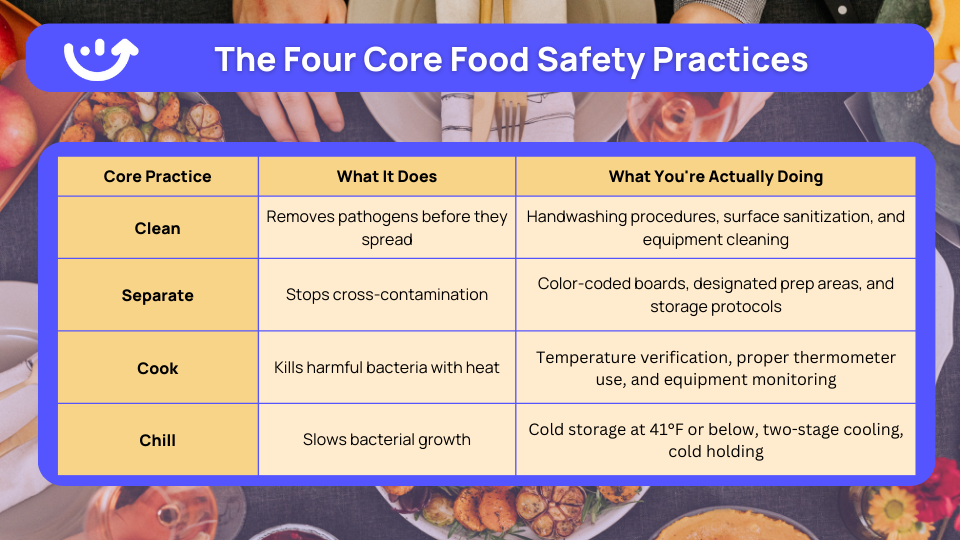
Think of it this way. Cooking chicken to 165°F doesn't matter if it touched the cutting board you just used for lettuce. Perfect handwashing doesn't help if your walk-in is running at 50°F.
For multi-location operators, the real issue is standardization. You need every cook at every location to follow the same procedures. Not similar procedures. Identical ones.
That's where digital food safety systems come in. But we'll get to that later.
1. Clean: The Foundation Practice
Cleaning removes the biological hazards before they become a problem. It's the foundation everything else builds on.
Handwashing: The 20-Second Rule Everyone Shortcuts
Handwashing is the single highest-impact action for preventing foodborne illness. The FDA Food Code spells out exactly when and how to do it.
When hands need washing:
- Starting a shift or returning from break
- After handling raw proteins (meat, poultry, seafood)
- After touching anything dirty (trash, soiled equipment, cleaning supplies)
- After touching your face, hair, or body
- After eating, drinking, or smoking
- After handling chemicals
The actual procedure:
- Wet hands with warm water (minimum 100°F)
- Apply soap and scrub for 20 seconds minimum
- Hit all surfaces: backs of hands, between fingers, under nails
- Rinse completely under running water
- Dry with a single-use paper towel or an air dryer
The most common failures? Not scrubbing long enough. Missing fingernails. Using a shared cloth towel. Skipping it entirely during a rush.
Here's what works for multi-unit operations: photo verification in digital checklists. Staff see exactly what proper handwashing looks like. Managers get timestamped proof that it happened. No guessing, no "I'm pretty sure they did it."
Visual reminders help too. Handwashing posters at every sink. Not the generic ones. Posters that show your actual handwashing stations with arrows pointing to soap, paper towels, and trash.
Surface Sanitization: Two Steps, Not One
A lot of operators think cleaning and sanitizing are the same thing. They're not.
Cleaning removes visible dirt and food particles. Sanitizing reduces pathogens to safe levels. You need both.
Standard procedure:
- Scrape or wipe off food debris
- Wash the surface with hot, soapy water
- Rinse with clean water
- Apply sanitizer at the right concentration
- Let it air dry (don't wipe it off)
The sanitizer concentration matters. Too weak and it doesn't work. Too strong and you're leaving chemical residue on food contact surfaces.
Common sanitizers:
Chlorine bleach
- Concentration: 50–100 ppm
- Contact time: 7 seconds
Quaternary ammonium
- Concentration: 200 ppm
- Contact time: 30 seconds
Iodine
- Concentration: 12.5–25 ppm
- Contact time: 30 seconds
Use test strips. Don't guess. A bottle of test strips costs $15 and prevents problems that cost thousands.
High-contact surfaces need sanitizing every four hours during continuous use. Also, whenever contamination happens. A cutting board that touched raw chicken gets cleaned and sanitized before anything else touches it.
Equipment Cleaning: What Gets Missed
Equipment cleaning is where things fall apart in busy kitchens. Not because people don't care. Because there's no clear system for who cleans what and when.
Critical items that need daily cleaning:
- Cutting boards (after each use with different food types)
- Knives and utensils (between tasks)
- Food prep surfaces (between different products)
- Thermometers (before each use)
- Can openers (every single day)
- Ice machines and bins (weekly minimum)
The three-compartment sink method still works best for manual washing:
- First sink: Hot soapy water at 110°F minimum
- Second sink: Clean rinse water
- Third sink: Sanitizer at proper concentration
Large equipment that doesn't fit in the sink? Clean it in place. Same sequence: wash, rinse, sanitize.
2. Separate: Preventing Cross-Contamination
Cross-contamination occurs when biological hazards transfer from one food or surface to another. This practice prevents those transfers through physical separation and designated workflows.
Which Food Safety Practice Will Help Prevent Biological Hazards Through Separation?
Physical separation of raw and ready-to-eat foods is the primary practice for preventing cross-contamination. This separation must occur throughout the entire food flow, receiving, storage, preparation, and service.
The Top-to-Bottom Storage Rule
Storage organization prevents raw food from dripping onto ready-to-eat items. The rule is simple: store foods based on their minimum cooking temperature.
Refrigerator storage order (top to bottom):
- Ready-to-eat foods (top shelf always)
- Seafood
- Whole cuts of beef and pork
- Ground meats
- Whole and ground poultry (bottom shelf always)
Why this order? If something drips, it drips onto food that requires a higher cooking temperature. Raw chicken (165°F) can't contaminate cooked food or salad greens if it's stored below them.
Other storage requirements:
- Use covered containers for everything
- Keep six inches of clearance from walls and floor
- Label containers with contents and date
- Store raw below ready-to-eat (always)
- Keep storage areas organized and clean
Sounds basic. But walk into most walk-ins, and you'll find raw meat stored next to prepped salads. Not because anyone planned it that way. Because it was busy, and someone put things where they fit.
Reference our cold food storage guide for proper refrigerator organization layouts.
Color-Coded Cutting Boards: Make It Obvious
Color coding eliminates the thinking during a rush. Grab the red board for raw meat. Green for produce. No reading labels. No confusion.
Standard color system:
- Red – Raw meat
- Yellow – Raw poultry
- Green – Produce
- Blue – Seafood
- White – Dairy and bread
- Brown – Cooked meats
Does the specific color matter? Not really. What matters is consistency across all your locations. Red means raw meat everywhere. Not red at Location 1 and blue at Location 2.
Reference our HACCP color coding guide when setting this up. Your health inspector already knows the system.
Other separation practices:
- Separate sinks for handwashing vs food prep
- Designated prep tables for raw vs ready-to-eat
- Clean and sanitize between food types
- Store utensils handle-up in containers
- Separate ice scoops for different uses
Kitchen Flow: Design Matters
Poor kitchen layout creates cross-contamination risks that no amount of training can fix.
Logical flow sequence:
- Receiving (separate from prep areas)
- Storage (organized by food type)
- Prep (raw, separate from ready-to-eat)
- Cooking (designated equipment)
- Holding (hot and cold separate)
- Service (protected from contamination)
The worst layouts make staff carry raw proteins through ready-to-eat prep areas. Or put the handwashing sink on the opposite side of the kitchen from where people actually need it.
Can't redesign your kitchen? Work with what you have. Designate specific times for raw prep vs ready-to-eat prep. Clean and sanitize everything between the two.
3. Cook: Destroying Biological Hazards
Cooking destroys biological hazards through heat. But only if you hit the right temperature in the right location for the right amount of time.
What Food Safety Practice Can Prevent Cross-Contamination During Cooking?
Using separate cooking equipment and utensils for different food types prevents cross-contamination during cooking. Never use the same thermometer, tongs, or spatula for raw and cooked foods without washing and sanitizing between uses.
Internal Temperature Requirements
Different foods require different minimum internal temperatures to destroy biological hazards.
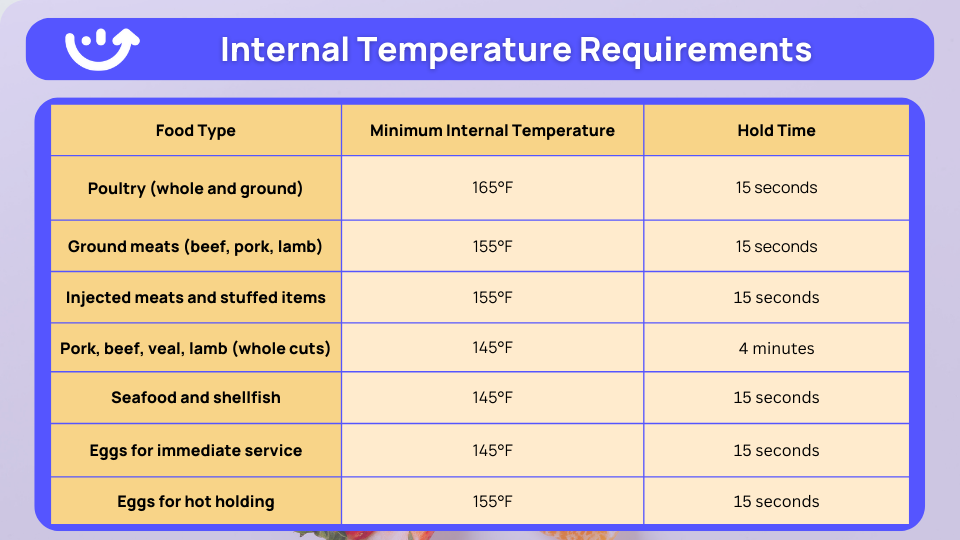
These temperatures represent the minimum required to destroy common pathogens. Some operations choose higher temperatures for quality or consistency reasons.
How to Actually Take Temperatures
Most temperature failures come from bad technique, not bad thermometers.
Correct placement:
- Insert into the thickest part
- Avoid bone, fat, gristle (they conduct heat differently)
- Go sideways on thin items
- Check multiple spots on large items
Calibrate thermometers daily. Ice water method (32°F) or boiling water method (212°F at sea level). Takes 30 seconds. Prevents problems all day.
Common mistakes:
- Taking the temp too early in the cooking process
- Not inserting deep enough
- Touching the pan instead of the food
- Using a broken or uncalibrated thermometer
- Reading before the thermometer stabilizes
Equipment Monitoring: Trust But Verify
Your oven says 350°F. Is it actually 350°F? Only one way to know: put an oven thermometer inside and check.
What to monitor:
- Ovens (use a separate oven thermometer)
- Grills (check surface temp regularly)
- Fryers (measure oil temp between batches)
- Steamers (verify steam temp and pressure)
- Holding cabinets (check food temp, not air temp)
If the equipment can't maintain proper temperatures, it needs repair or replacement. Don't try to compensate by cooking longer without verification. That's guessing.
Automated temperature monitoring systems track equipment 24/7. They alert managers when temps drift. Most equipment problems start small. Catch them early, and you're looking at maintenance, not emergency repair during dinner rush.
4. Chill: Controlling Bacterial Growth
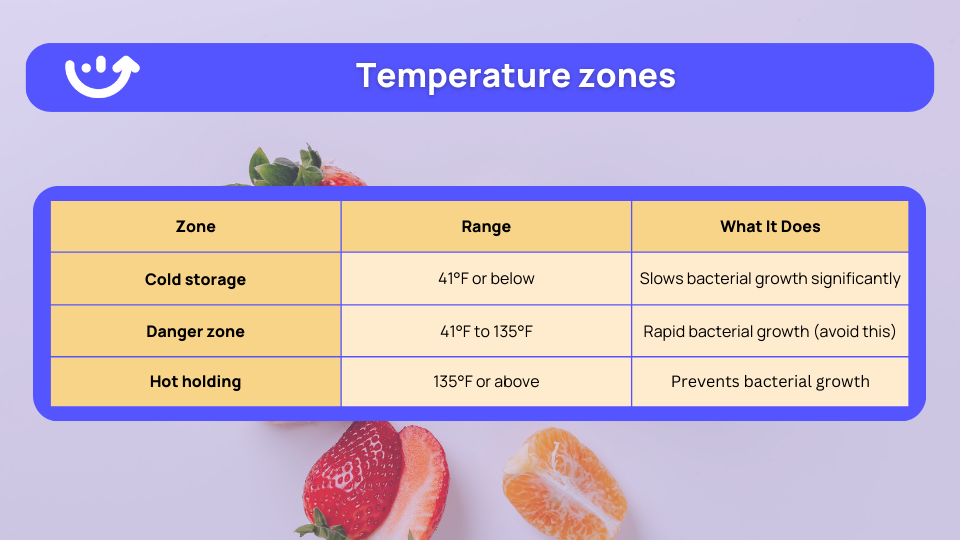
Bacteria multiply fast between 41°F and 135°F. Some can double every 20 minutes in that range. Your job is to keep food out of that zone as much as possible.
Storage Temperatures: The Baseline
Temperature zones:
Refrigeration requirements:
- Refrigerators at 41°F or below (38°F is better)
- Freezers at 0°F or below
- Check temps minimum twice daily
- Document every reading
- Put thermometers in the warmest part of each unit
That last point matters. The warmest spot in a walk-in is usually near the door. That's where your thermometer should be.
Use our temperature danger zone poster to train staff on safe temperature ranges.
Two-Stage Cooling: The Six-Hour Window
Cooling hot food properly is where a lot of operations fail. The FDA requires a specific timeline.
- Stage 1: Cool from 135°F to 70°F within 2 hours
- Stage 2: Cool from 70°F to 41°F within 4 more hours
- Total time allowed: 6 hours maximum
Miss these timeframes? Throw the food out. No exceptions. Slow cooling lets bacteria multiply to dangerous levels.
Cooling techniques that work:
- Shallow pans (2 inches deep maximum)
- Divide large batches into smaller portions
- Ice baths or cooling paddles
- Stir periodically during cooling
- Leave uncovered until cool (then cover)
- Blast chillers, if you have them
Never put hot food straight into the walk-in. A big pot of soup can raise the entire refrigerator temperature above safe levels. Now everything in there is at risk.
Reference our detailed two-stage cooling method guide and documentation templates to keep health inspectors happy.
Cold Holding: Maintaining Temp During Service
Cold holding is food being held at 41°F or below during service. Salad bars. Prep tables. Display cases.
Requirements:
- Keep food at 41°F or below (not the air around it)
- Check food temperature every 4 hours minimum
- Discard food that exceeds 41°F for more than 4 hours
- Keep units clean and organized
- Use proper equipment (not just ice)
Cold holding equipment:
- Refrigerated prep tables
- Cold holding cabinets
- Ice baths (ice must completely surround the food container)
- Refrigerated display cases
Don't use ice as an ingredient to cool food you're going to hold cold. Ice for consumption can't touch food containers.
Daily Food Safety Practice Checklist
Here's the checklist that covers minimum daily verification activities. Multi-location operators need this running at every site with digital tracking.
CLEAN
- Handwashing stations are stocked and working
Check: Opening, mid-shift, closing - Sanitizer concentration is correct (use test strips)
Check: Every 4 hours - Three-compartment sink is set up correctly
Check: Opening and closing
SEPARATE
- Color-coded equipment is in good condition
Check: Opening - Storage follows top-to-bottom protocol
Check: Opening and mid-shift - Prep areas maintain proper separation
Check: Continuously during service
COOK
- Thermometers are calibrated
Check: Opening - Cooking equipment reaches proper temperatures
Check: Opening - Food temperatures are documented
Check: Every batch
CHILL
- Refrigerator and freezer temperatures are recorded
Check: Opening and closing (minimum) - Cooling procedures were followed correctly
Check: Closing - Cold holding temperatures are checked
Check: Every 4 hours
Paper checklists don't work at scale. They get filled out wrong. Or filled out after the fact. Or not filled out at all.
Digital systems with automated photo verification, automatic timestamps, and manager dashboards solve this. Platforms like Xenia provide pre-built templates with automated reminders, corrective action workflows when something fails.
Which Employee Is Following Food Safety Practices?
Identifying proper execution requires understanding what correct practices look like in daily operations.
Employee following proper practices:
- Washes hands for the full 20 seconds with proper technique
- Uses color-coded cutting boards correctly for designated foods
- Checks internal food temperatures with a calibrated thermometer
- Records all required temperatures with accurate timestamps
- Stops work immediately to clean and sanitize after contamination
- Reports equipment problems that affect food safety
- Follows the cooling procedures for hot foods
- Maintains separation between raw and ready-to-eat foods
Employee not following proper practices:
- Rushes through handwashing (less than 20 seconds)
- Uses the same cutting board for raw meat and vegetables
- Estimates cooking completion without temperature verification
- Skips temperature recording during busy periods
- Continues working after contamination without cleaning
- Ignores equipment malfunctions that affect temperature control
- Places hot foods directly into refrigeration without cooling
- Stores raw foods above ready-to-eat items
Training must show staff what proper execution looks like. Demonstration, observation, and coaching work better than written procedures alone.
For multi-unit operations, photo verification in digital checklists provides concrete examples of proper vs improper execution. Staff see exactly what standards require. Managers can coach using specific photo evidence rather than subjective observations.
Food Safety and Hygiene Practices: Training Requirements
You can have perfect procedures. But if your team doesn't know them or doesn't follow them, you've got nothing.
Initial Training: Before They Touch Food
New employees need comprehensive food safety training before they start handling food. Not a quick video. Actual training with demonstration and practice.
Required topics:
- Personal hygiene and proper handwashing
- Cross-contamination prevention
- Time and temperature control
- Cleaning and sanitizing procedures
- Allergen awareness
- Proper equipment use
Training needs three components: demonstration (show them), practice (have them do it), and verification (test their knowledge). Written tests confirm they understand. Observation during actual work confirms they can execute.
Ongoing Training: Because People Forget
Food safety training isn't one-and-done. People forget. New issues come up. Procedures change.
Ongoing schedule:
- Quarterly refreshers on core practices
- Immediate retraining after any violation
- Updates whenever procedures change
- Seasonal reminders during high-risk periods
Document everything. Employee name, topics covered, date completed, and who trained them. Health inspectors ask for these records.
The Multi-Location Challenge
Getting different trainers at different locations to teach the same thing the same way? Good luck with that.
Common problems:
- Different trainers teach different methods
- Training materials are outdated or inconsistent
- No proof that training actually happened
- Language barriers with a diverse workforce
- High turnover means constant retraining
Digital training platforms solve most of this. Centralized content ensures consistency. Video demonstrations show the exact technique. Knowledge checks verify comprehension. Completion tracking provides compliance documentation.
Xenia's training features let managers create courses once and deploy them across all locations. Managers can assign training to specific roles, track completion status in real-time, and see exactly which employees have finished required modules. The platform includes document management for training materials with employee-level tracking, making it easy to generate compliance reports for inspections.
Food Safety Guidelines Implementation
Standard operating procedures document exactly how to execute each practice. But SOPs need to match reality, not some ideal version of your operation.
Writing SOPs That Work
Effective SOPs include:
- Step-by-step instructions (no skipping steps)
- Visual aids showing proper technique
- Required equipment and supplies
- Time requirements for each step
- Quality checkpoints
- What to do when problems occur
If your SOPs look good on paper but don't fit your actual workflow, nobody will follow them. Write them based on how work actually flows in your kitchens.
Verification: Proving It Happened
Verification confirms practices happen as intended. Not as documented. As actually intended.
Verification methods:
- Manager observations during operations
- Temperature log review
- Checklist completion tracking
- Photo documentation of critical steps
- Equipment calibration records
- Corrective action follow-up
Manual verification creates gaps. Managers can't be everywhere simultaneously. Paper logs get completed incorrectly or filled out retroactively.
Digital verification systems improve consistency dramatically. Required photo verification eliminates guessing. Automatic timestamps prevent backdating. Real-time alerts notify managers immediately. Centralized reporting dashboards show compliance across all locations.
When shifting to a digital platform like Xenia, teams don’t lose their existing PDFs or paper forms. Legacy documents can be instantly converted into digital checklists using built-in AI features, allowing operators to modernize verification without disrupting established workflows.
Corrective Actions: When Things Go Wrong
Problems will happen. Equipment fails. People make mistakes. What matters is how fast you respond, whether you fix the root cause.
Corrective action requirements:
- Stop the unsafe practice immediately
- Fix the immediate problem
- Figure out why it happened
- Prevent it from happening again
- Document everything
Xenia connects failed checklist items directly to corrective action workflows. When staff document a violation, the system automatically generates the corrective action, assigns it based on role, sets completion requirements, and links resolution back to the original issue for pattern analysis.
How Xenia Supports Essential Food Safety Practices
Implementing these practices consistently across multiple locations requires systems that standardize execution and provide visibility.
Xenia is a food safety automation platform that provides tools specifically designed for multi-location operations.
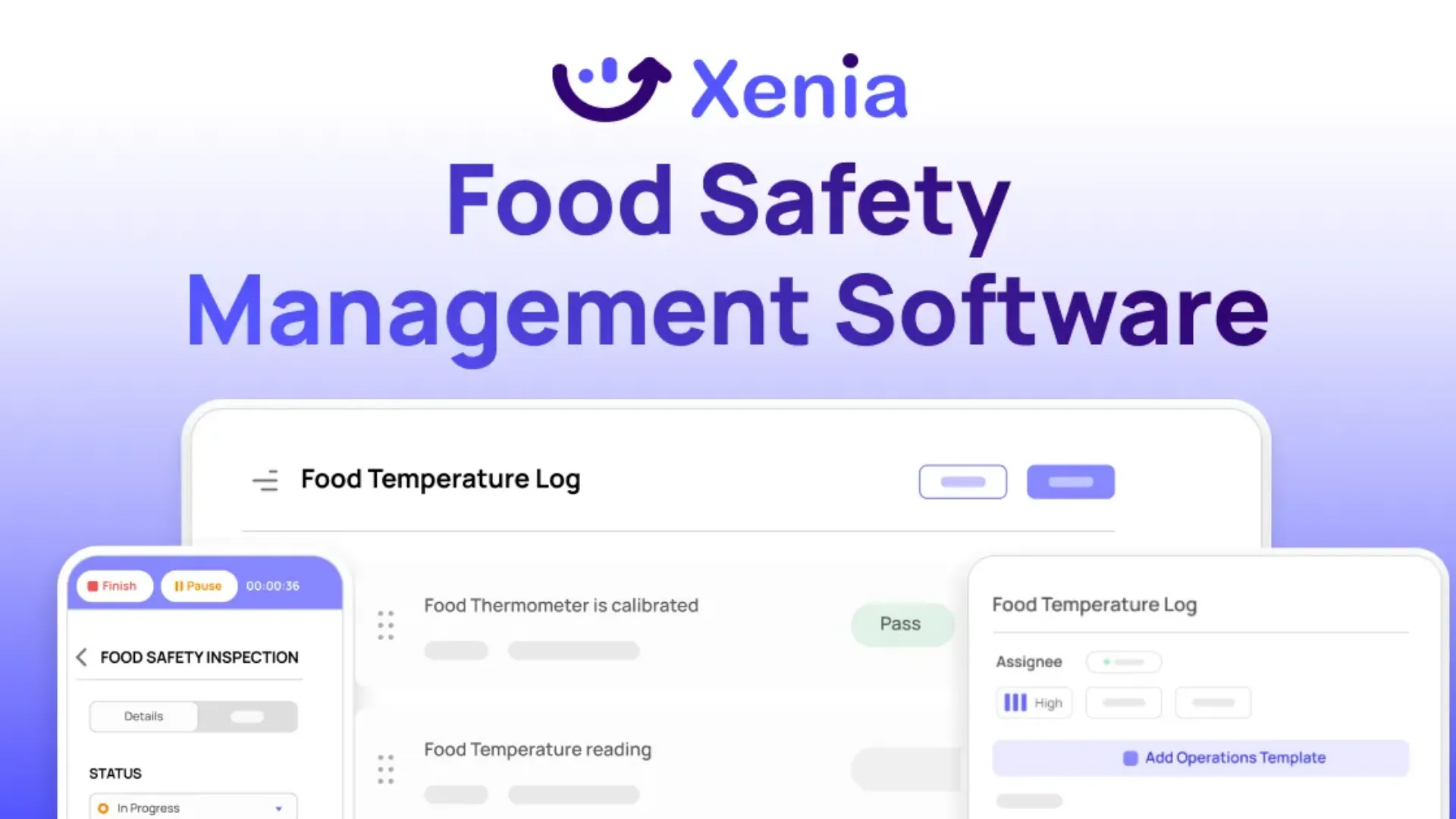
Digital Temperature Monitoring
Temperature control represents the highest risk area for biological hazards. Xenia supports both manual logging and automated monitoring.
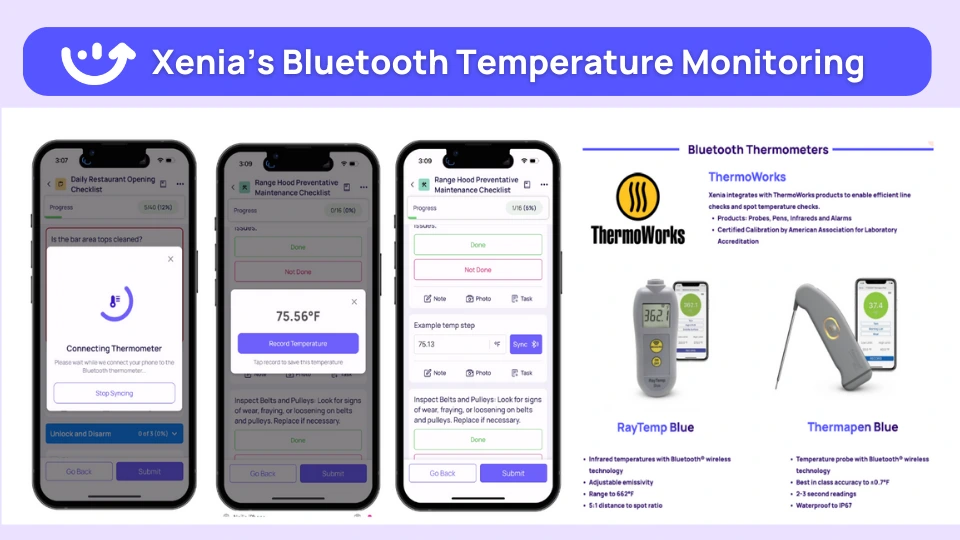
Bluetooth thermometer integration enables fast, accurate temperature recording. Staff take temperature, results sync automatically to digital logs with timestamp and location. No manual recording creates errors or compliance gaps.
Continuous temperature sensors monitor refrigeration 24 hours a day, 7 days a week. Alerts notify managers immediately when temperatures exceed safe ranges. This prevents loss from equipment failures and ensures intervention before biological hazards develop.
Standardized Food Safety Checklists
Pre-built templates cover all essential food safety practices. Templates include:
- Opening and closing food safety verifications
- Line check procedures with proper temperature points
- Cleaning and sanitizing schedules
- Cooling log templates following the two-stage method
- Cross-contamination prevention checklists
Templates can be customized for specific operations while maintaining core food safety requirements. Assign checklists by role, location, or shift. Schedule recurring completion requirements. Track performance across all locations.
Photo Verification
Photo requirements ensure practices occur as documented. Staff must photograph:
- Sanitizer test strip results
- Food temperatures are being taken
- Proper storage organization
- Cleaning verification
- Equipment conditions
Photos provide objective evidence during health inspections. They enable coaching using specific examples rather than subjective observations. They identify training gaps that written logs miss.
Corrective Action Workflows
When food safety verifications reveal problems, automated workflows ensure resolution.
If a refrigerator temperature exceeds 41°F, the system:
- Creates corrective action automatically
- Assigns to the responsible manager
- Sets completion deadline
- Sends reminders if not completed
- Links resolution back to the original temperature log
- Generates reports showing the pattern of issues
This closed-loop process ensures problems receive attention and provides documentation for compliance verification.
Multi Location Visibility
Executive dashboards provide real-time visibility across all locations.
View performance by:
- Location (identify sites needing support)
- Employee (recognize top performers, coach others)
- Practice area (identify systematic training needs)
- Time period (track improvement trends)
Export compliance reports for health department inspections, internal audits, or franchise requirements. Reports include all verification records, photo documentation, and corrective action resolution.
Book a live demo to see how Xenia digitizes your current food safety processes, or start a free trial to experience automated monitoring, photo verification, and closed-loop corrective actions in your own operations.
FAQs
What food safety practice can prevent cross-contamination?
Physical separation of raw foods from ready-to-eat foods prevents cross-contamination. This includes using separate cutting boards and utensils for different food types, storing raw foods below ready-to-eat foods in refrigeration, and designating separate preparation areas. Color-coded equipment helps staff identify proper tools quickly during busy service periods.
What are the five key food safety practices?
The five key food safety practices are:
(1) Proper handwashing using correct technique and timing
(2) Preventing cross-contamination through the separation of raw and ready-to-eat foods
(3) Cooking to proper internal temperatures verified with calibrated thermometers
(4) Chilling foods properly using two-stage cooling and maintaining cold storage at 41°F or below
(5) Maintaining time and temperature control by minimizing the time foods spend in the danger zone between 41°F and 135°F
Which food safety practice will help prevent biological hazards?
Proper cooking to minimum internal temperatures prevents biological hazards by destroying harmful bacteria. Poultry must reach 165°F, ground meats 155°F, and whole cuts of beef, pork, and seafood 145°F.
Accurate temperature measurement with calibrated thermometers and verification at multiple points ensures biological hazards are eliminated. Time at temperature also matters, with most foods requiring 15 seconds at a minimum temperature.
How do you implement food safety practices across multiple locations?
Implementation across multiple locations requires standardized procedures, consistent training, and verification systems that provide visibility. Digital checklists ensure the same practices occur at every location, regardless of who is working.
Photo verification provides objective evidence of execution. Centralized reporting identifies locations needing additional support. Automated corrective actions ensure problems receive attention immediately. Platforms like Xenia provide these capabilities specifically designed for multi-unit operations.
What is the difference between food safety practices and food safety programs?
Food safety practices are specific actions that prevent hazards, such as proper handwashing, temperature control, and cross-contamination prevention.
Food safety programs are comprehensive management systems that organize these practices, including written procedures, training requirements, verification methods, and corrective action processes. Practices are the tactical execution. Programs are the strategic framework ensuring practices occur consistently across all operations.
Conclusion
Essential food safety practices protect customers and keep operations consistent across multi-location foodservice businesses. The four core practices, Clean, Separate, Cook, and Chill, help prevent most foodborne illness risks and health violations. But for growing operators, success depends on more than having procedures written down.
Paper-based systems break down as locations scale, creating gaps in visibility and execution. Digital food safety systems make it easier to standardize processes, verify compliance in real time, and maintain control across every site.
Xenia’s operations platform is built for multi-location foodservice teams, combining digital checklists, automated temperature monitoring, AI photo verification, and corrective action workflows in one system. The result is fewer disruptions, stronger compliance, and confidence that food safety standards are met every day.
See how Xenia can support consistent food safety execution and scalable growth, book a demo today.
Frequently Asked Questions
Got a question? Find our FAQs here. If your question hasn't been answered here, contact us.

Looks like there's no data available in our FAQ section at the moment.

A Modern, AI-Powered Platform Built Specifically for Frontline Operations
Xenia brings daily operations, maintenance, audits, and compliance into one mobile-first platform. Frontline teams execute work consistently across locations while leadership gets real-time visibility.

Why Multi-Location Operators Choose Xenia:
🤖 AI-Powered Operations, Create digital checklists instantly or convert paper forms with AI. Verify compliance automatically with photo analysis and get instant answers from your operational data.
✅ Daily Operations & Maintenance, Assign work across hundreds of locations in minutes. Report and route issues instantly. Schedule preventive maintenance to catch problems before downtime.
📊 Real-Time Visibility, Track completion, work orders, and performance across all locations through dashboards. Filter by site or asset to spot trends and take action.
Manage operations, maintenance, and compliance across all your locations from one platform

.svg)
.webp)
%201%20(1).webp)

.svg)
%201%20(2).webp)




