


Post Summary
Your equipment breaks during busy times.
Kitchen fryers stop working during dinner rush. AC units fail on hot days. Machines break when you need them most.
Fixing broken equipment costs 3x more than preventing problems.
You need software that schedules maintenance automatically. Tracks equipment history. Prevents breakdowns before they happen.
The best preventative maintenance software does three things: schedules maintenance automatically, sends reminders when tasks are due, keeps all equipment records in one place.
This guide explores the 5 best preventative maintenance software options.
Best Preventative Maintenance Software Comparison
**
Rank, Platform, Free Version, AI Capabilities, Mobile App, Best For
#1, Xenia, FREE Forever, AI photo analysis & auto-scheduling, Native iOS/Android, Multi-location operations
#2, Limble CMMS, No, Basic automation, Native mobile app, Equipment-heavy operations
#3, AUTOsist, No, Smart reminders, Mobile-optimized, Small to mid-size facilities
#4, Hippo CMMS, No, Visual scheduling, Web + mobile, Operations needing equipment maps
#5, FMX, No, Recurring templates, Mobile calendars, Multi-site facility management
**
.svg)
.webp)
1. Xenia - Best Preventative Maintenance Software
- What it's for: Complete preventative maintenance with AI-powered scheduling integrated into daily operations
- Free Version: FREE Forever (25 tasks, 5 users)
- Platforms supported: Web, iOS, and Android
- Trial: Start free immediately
- G2 rating: 5/5
- Capterra rating: 4.9/5
- Who uses it: Multi-location businesses across hospitality, retail, healthcare, and facilities management
- What makes it different: Only preventive maintenance software that creates maintenance schedules automatically from daily inspections. Equipment problems get fixed before they cause breakdowns.
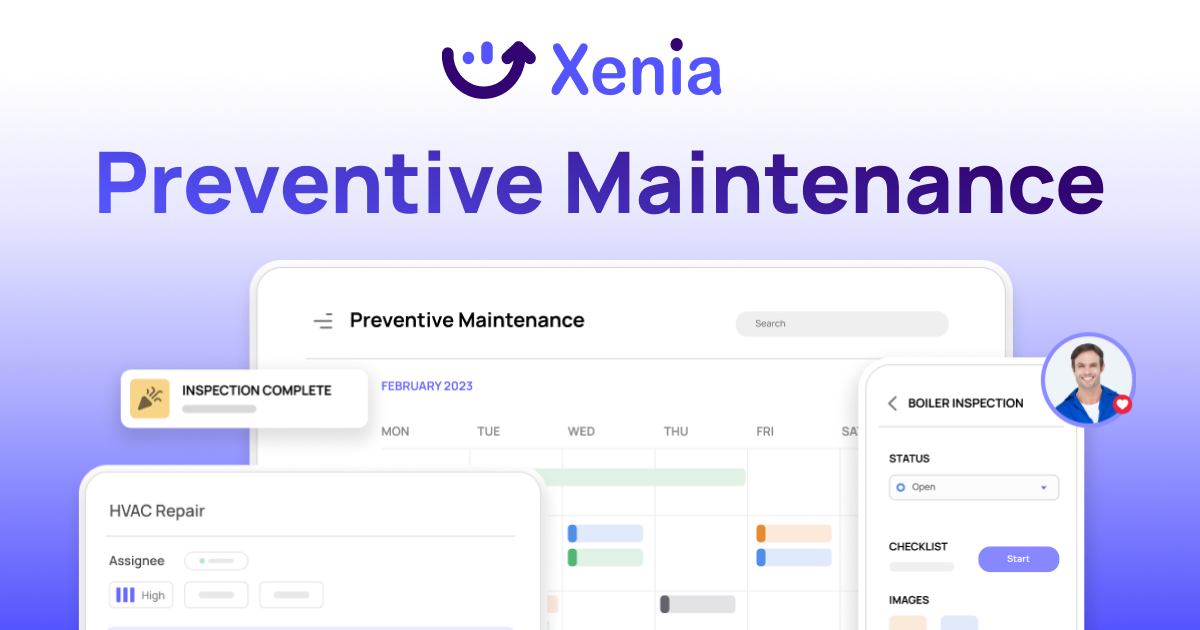
Most preventative maintenance software works separately from operations. You schedule maintenance in one system. Run daily operations in another. Nothing connects until equipment fails.
Xenia connects everything automatically. Daily inspections spot problems early. AI creates maintenance schedules based on equipment condition. Everything tracked in one system.
How Xenia's Preventative Maintenance Works
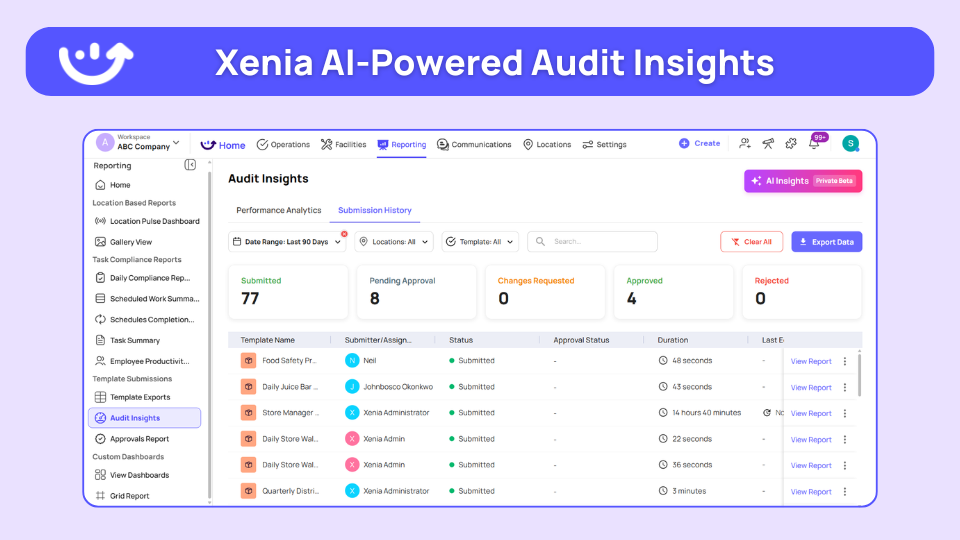
AI-Powered Maintenance Scheduling: Equipment issues found during inspections and audits automatically create preventive maintenance schedules.
Facility manager completes daily checklist. Equipment shows wear signs? Xenia AI schedules maintenance automatically. No manual scheduling needed. Problems caught before failures occur.
Automated Planned Maintenance Programs: Set maintenance frequency once. System handles scheduling forever.
HVAC filters every 6 months. Equipment deep cleaning monthly. Safety systems quarterly. Manufacturer recommendations built into schedules. Create your preventive maintenance calendar in minutes.
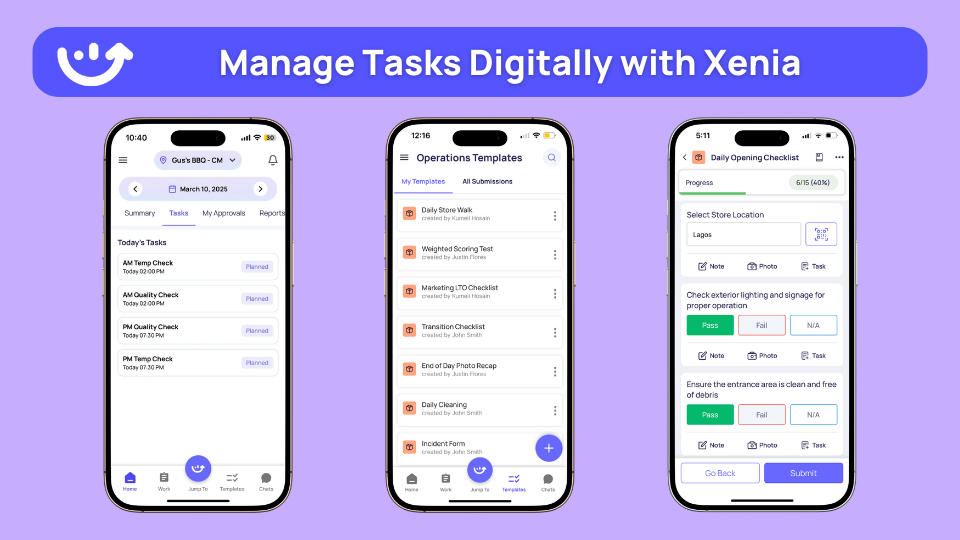
Mobile Preventative Maintenance App: Technicians complete maintenance tasks on phones with photo proof required.
Maintenance worker arrives on-site. Opens work order on phone. Follows step-by-step checklist. Takes before/after photos. Updates completion status. Everything syncs automatically.
Equipment History Tracking: Every completed maintenance task joins permanent equipment records. This is your equipment management system working the way it should.
Equipment serviced last month? Full history shows maintenance dates, repairs, and warranty info. System shows last service, technician notes, and parts used. Complete asset tracking is built in.
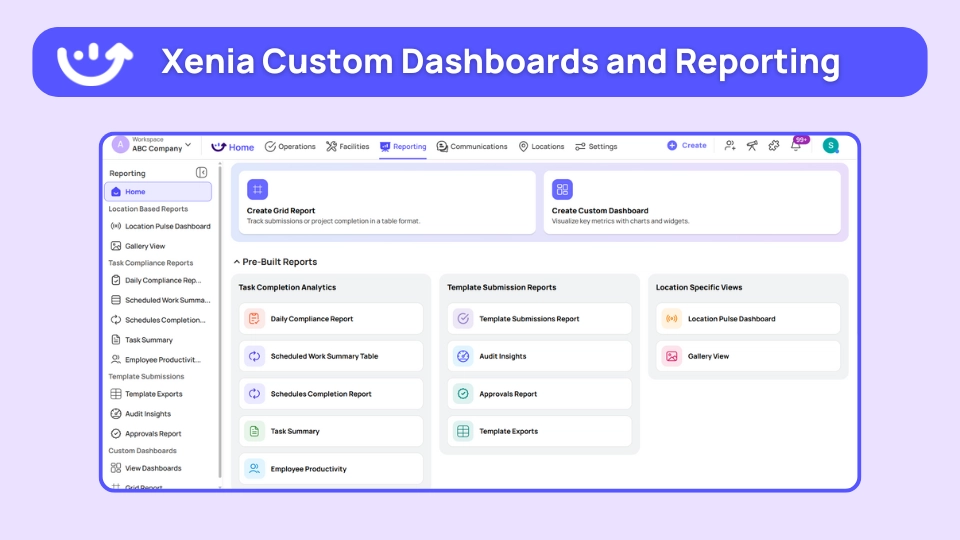
Real-Time Multi-Location Dashboards: See maintenance status across all locations instantly. This is where multi-unit operations teams get their edge.
Which sites have overdue maintenance? What equipment needs attention this week? Where are recurring problems? Operations managers see everything in real-time dashboards.
AI Photo Analysis: AI analyzes maintenance photos to verify task completion and identify potential issues. Part of Xenia's AI Photo Rollouts capability.
Technician takes photo of serviced equipment. AI verifies completion. Spots potential problems automatically. Get maintenance recommendations before issues become emergencies.
.webp)
How Xenia Compares to Traditional PM Software
**
What You Need, Xenia, Traditional PM Software
Free version, 25 tasks forever, Trials only
Operations integration, Inspections create maintenance automatically, Separate maintenance system
Mobile during operations, 90% find it easy during busy periods, Complex interfaces - slow adoption
AI capabilities, Photo analysis - auto scheduling, Basic reminders only
Multi-location, Real-time dashboards across all sites, Limited reporting
**
Bottom line: Use Xenia for preventative maintenance that connects to daily operations. Problems found during inspections get scheduled automatically before equipment fails.

Priced on per user or per location basis
Available on iOS, Android and Web


2. Limble CMMS

- What it's for: Preventive maintenance solutions with advanced analytics and mobile-first design
- Free Version: Not available
- Platforms supported: Web, iOS, and Android
- Trial: 30-day free trial
- G2 rating: 4.8/5
- Capterra rating: 4.8/5
- Best for: Operations needing detailed maintenance analytics and reporting
Limble CMMS is a reliable preventative maintenance software with proven 37% downtime reduction and 89% mobile satisfaction.
Key features:
- Time/meter/condition-based scheduling
- QR code equipment checklists
- MTTR/MTBF analytics and reporting
- Voice notes for maintenance tasks
- Inventory and parts tracking
- 50+ vendor integrations
Good if: You need detailed maintenance analytics and comprehensive reporting capabilities.
Not good if: Setup complexity requires significant training time. Limited customization options mentioned in reviews.
3. AUTOsist
- What it's for: Simple preventative maintenance app with unlimited users
- Free Version: Not available
- Platforms supported: Web, iOS, and Android
- Trial: Free trial available
- Rating: 4.7/5
- Best for: Small to medium operations needing basic maintenance tracking
AUTOsist offers excellent value with unlimited staff access and straightforward maintenance scheduling.
Key features:
- Simple maintenance reminders
- Work order history tracking
- Unlimited staff access
- Basic mobile app (82% ease rating)
- Equipment service records
- Export capabilities
Good if: You need straightforward maintenance tracking without complex features.
Not good if: You have extensive equipment fleets or need advanced automation features.
4. Hippo CMMS

- What it's for: Preventative maintenance systems with visual calendars and equipment mapping
- Free Version: Not available
- Platforms supported: Web, iOS, and Android
- Trial: Free trial available
- Capterra rating: 4.5/5
- Best for: Operations managers who prefer visual scheduling and equipment layout views
Hippo CMMS focuses on visual scheduling with 70% of users praising mobile visual features.
Key features:
- Visual maintenance calendars
- Equipment location mapping
- Color-coded scheduling
- Staff request portal
- Basic accounting integration
- Simple mobile interface
Good if: Your team prefers visual interfaces and you manage multiple facilities.
Not good if: You need predictive analytics or advanced automation features.
5. FMX

- What it's for: PM maintenance software with recurring inspections and maintenance templates
- Free Version: Not available
- Platforms supported: Web and Mobile
- Trial: Demo available
- Best for: Multi-site operations needing inspection and maintenance integration
FMX combines facility inspections with preventive maintenance scheduling for comprehensive operations management.
Key features:
- Recurring inspections create maintenance automatically
- Pre-built maintenance templates
- System maintenance bundles
- Mobile calendars with instruction sets
- SSO and API integrations
- Multi-location dashboards
Good if: You operate multiple sites and need inspection-maintenance integration.
Not good if: Setup requires custom configuration and training time.
What is Preventative Maintenance Software?
Preventative maintenance software schedules equipment maintenance before things break. Instead of waiting for equipment to fail, the software creates automatic schedules based on time or usage.
How it works: Set maintenance frequency once. Weekly cleaning. Monthly checks. Quarterly inspections. Software creates work orders automatically. Technicians complete tasks on phones. System tracks what's done and schedules next maintenance.
The problem it solves: Manual tracking doesn't work for lots of equipment. Spreadsheets get old. Paper logs get lost. Text reminders get ignored. Equipment breaks during busy times because maintenance was forgotten. That's what reactive maintenance looks like, and it's expensive.
Common examples:
- Change HVAC filters every 6 months with automatic reminders
- Clean equipment monthly with photo proof
- Check safety systems quarterly with tracking
- Annual full service with complete records
Learn how to set up your preventive maintenance calendar for any equipment.
Benefits of Preventative Maintenance Software
Cuts Equipment Downtime by 30-40%
Regular maintenance prevents equipment from breaking. Equipment lasts longer when you take care of it. Preventive maintenance solutions catch problems before they cause expensive breakdowns.
Example: Monthly equipment care prevents big failures during busy times. $200 maintenance prevents $3,000 emergency repair plus lost business. Learn more about the phases of planned maintenance and how to sequence them properly.
Cuts Maintenance Costs by 25-30%
Regular maintenance costs less than emergency fixes. Planned maintenance uses normal rates. Emergency service costs more during nights and weekends.
Cost comparison: Regular maintenance $150. Emergency repair during busy operations $800 plus lost money. Understanding deferred maintenance is how you start quantifying this gap for leadership.
Makes Equipment Last 20-25% Longer
Regular care makes equipment last longer. Clean equipment works better. Proper oil changes prevent wear. New filters protect inside parts.
Equipment life: Well-cared-for equipment lasts 8-10 years. Poorly maintained equipment needs replacing after 4-5 years. This directly impacts your equipment life metrics.
Keeps You Safe and Legal
Automatic schedules keep you following rules. Safety equipment gets checked on time. Regular maintenance meets local laws. Teams managing this at scale lean on safety compliance tools to stay audit-ready.
Keeps Complete Equipment Records
Every maintenance task creates permanent records. Track warranty info, service dates, parts changed, technician notes. Old data helps find repeat problems. This is what separates proactive operations from run-to-failure maintenance.
Makes Staff More Productive
Automatic scheduling removes manual tracking. Mobile apps let technicians work faster. No more hunting for maintenance records or making phone calls. A proper task management system handles all of this in the background.
How to Choose Preventative Maintenance Software
Start by counting your equipment: List all important equipment that needs regular care. Include AC systems, machines, safety gear, and anything that needs scheduled service.
Equipment categories:
- HVAC: Air conditioning units, exhaust systems, air filters
- Machinery: Production equipment, motors, pumps
- Safety: Fire suppression, emergency lighting, security systems
- Facilities: Elevators, generators, building systems
Match software to operation size:
- 1-3 locations: Simple apps like Xenia's free version
- 5-20 locations: Feature-rich platforms
- 20+ locations: Enterprise solutions with advanced analytics and integrations
Essential features for any operation:
- Mobile-first design for field technicians
- Photo requirements for task completion
- Integration with daily operations and inspections
- Multi-location dashboards for managers
- Equipment history and warranty tracking
- Automated scheduling based on time or usage
Calculate ROI before choosing:
- Emergency repair frequency: How often do you pay premium rates?
- Equipment replacement costs: Early failure vs normal lifespan
- Staff time savings: Manual tracking vs automated systems
- Compliance costs: Violations avoided through scheduled maintenance
Test mobile usability: Maintenance happens on phones, not desktop computers. Choose preventative maintenance software that technicians actually use during operations.
If you want to see how this plays out in practice, our mobile CMMS guide walks through what good mobile UX actually looks like in the field.
Resources for Preventative Maintenance
Free Tools & Templates:
- Preventive Maintenance Calendar
- Equipment Maintenance Log
- Maintenance Work Order Log
- HVAC Maintenance Checklist
AI-Powered Tools:
Operations Management:
Conclusion
Equipment failures destroy operational efficiency.
Systems break during peak hours. Critical equipment fails when you need it most. By the time you discover problems, you're already losing money and productivity.
The best preventative maintenance software prevents breakdowns before they happen. Automated schedules catch problems early. Mobile apps let technicians work efficiently. Complete equipment history guides maintenance decisions.
Xenia goes further. Daily inspections automatically create maintenance schedules. AI analyzes photos for equipment problems. Everything integrates with operations seamlessly.
Start free with 25 tasks and 5 users. Schedule a demo to see how Xenia prevents equipment breakdowns.
Frequently Asked Questions
Got a question? Find our FAQs here. If your question hasn't been answered here, contact us.
Do I need special software for commercial HVAC preventative maintenance?

Most preventative maintenance software handles commercial HVAC preventative maintenance schedules. HVAC systems need filter changes every 6 months, coil cleaning quarterly, and annual full service. Choose software that schedules based on operating hours, sends filter reminders, and tracks energy usage. Photo requirements help verify completion.
Can preventative maintenance software integrate with existing business systems?
Yes, most preventative maintenance systems integrate with other business software. Like accounting apps, chat tools, and management systems. Xenia integrates with Slack, Zapier, and most business apps through its integrations hub. Everything works together smoothly.
What features are most important in preventative maintenance software?
Mobile design, photo requirements, automatic scheduling, equipment history tracking, and dashboards for multiple locations.
Important features include connecting with daily operations, tracking compliance, and QR code equipment access. Choose preventative maintenance software programs that technicians actually use during operations.
How much does preventative maintenance software typically cost?
Costs range from free to expensive. Preventative maintenance software free options like Xenia include basic scheduling and mobile access. Affordable options work for small businesses. Premium ones have more features and connect to other systems. Calculate savings from preventing emergency repairs and making equipment last longer.
What is the best preventative maintenance software for multi-location operations?
Xenia works best for multi-location operations because it connects maintenance with daily operations. Equipment problems found during inspections create maintenance schedules automatically. Free version includes 25 tasks and 5 users with full mobile features.
Why use preventative maintenance software instead of spreadsheets?
Spreadsheets break when you have lots of equipment. They don't work on phones either. Preventative maintenance software programs schedule tasks automatically. Send reminders. Track what's done. Work on phones where maintenance happens. Equipment history stays organized. Spreadsheets get messy and lost.
If you're still running on spreadsheets, our best preventative maintenance Excel template is a good bridge while you evaluate modern options.

A Modern, AI-Powered Platform Built Specifically for Frontline Operations
Xenia brings daily operations, maintenance, audits, and compliance into one mobile-first platform. Frontline teams execute work consistently across locations while leadership gets real-time visibility.

Why Multi-Location Operators Choose Xenia:
🤖 AI-Powered Operations, Create digital checklists instantly or convert paper forms with AI. Verify compliance automatically with photo analysis and get instant answers from your operational data.
✅ Daily Operations & Maintenance, Assign work across hundreds of locations in minutes. Report and route issues instantly. Schedule preventive maintenance to catch problems before downtime.
📊 Real-Time Visibility, Track completion, work orders, and performance across all locations through dashboards. Filter by site or asset to spot trends and take action.
Manage operations, maintenance, and compliance across all your locations from one platform

.svg)
.webp)
%201%20(1).webp)

.svg)
%201%20(2).webp)




