

Post Summary
Your staff gets injured. Customer slips. Equipment breaks. Paper incident reports go nowhere.
By the time you file reports, similar incidents already happened again.
Manual incident tracking doesn't work. Paper forms get lost. No one follows up. Patterns go unnoticed until lawsuits arrive.
You need incident management software that captures incidents on mobile, triggers corrective actions automatically, and prevents repeat incidents.
The best incident management software does three things: captures incidents with photo proof on mobile, creates corrective action tasks automatically, and tracks patterns to prevent future incidents.
This guide shows 5 incident management tools that actually prevent incidents instead of just documenting them.
Best Incident Management Software Comparison
**
Rank, Platform, Focus, Key Strength, Best For
#1, Xenia, Operations + Safety, Auto corrective actions/pattern tracking - PM integration, Multi-location operations (5-500+ sites)
#2, FoodReady, Food Safety, CAPA workflows - HACCP integration, Food safety incidents
#3, Notify Technology, Safety Culture, Anonymous reporting - near-miss tracking, Building reporting culture
#4, VelocityEHS, EHS Compliance, OSHA reporting - root cause analysis, Compliance-heavy operations
#5, Intelex EHSQ, Enterprise Risk, Risk assessment - analytics - global scale, Large enterprises (1000+ employees)
**
.svg)
.webp)

1. Xenia - Best Incident Management Platform
- What it's for: Complete incident management software with automated corrective actions, root cause analysis, and pattern tracking integrated into operations
- G2 rating: 4.9/5
- Who uses it: Demos Restaurants, Power Market, Slim Chickens, multi-location restaurant and retail chains
- What makes it different: Only incident management platform that automatically triggers corrective actions when incidents are reported, creates work orders for hazard fixes, and tracks issues until resolved, not just documenting what happened
Most incident tracking software just documents incidents. Staff reports what happened, submits the form, and then someone manually follows up.
Xenia prevents repeat incidents automatically. Employee injured? Corrective action task created instantly.
Equipment hazard found? Work order assigned to maintenance. Pattern identified across locations? District managers alerted. Everything tracked until hazard eliminated.
How Xenia's Incident Management Works
Custom Incident Report Forms with Photo Proof: Create custom incident report forms with required fields and mandatory photo documentation. Staff can't skip photos or submit without them.
Employee injury requires photos of hazard. Customer incident needs scene documentation. Equipment failure captured with before/after shots. Everything timestamped and GPS-stamped automatically.
Real-Time Manager Alerts: Manager alerted instantly when incident reported. Push notification on phone. Email alert. Manager sees incident details, photos, location immediately.
No waiting for shift end or next day to discover critical incidents. Response starts within minutes, not hours.
AI Photo Analysis: AI automatically analyzes incident photos to identify hazards and verify compliance. Wet floor in slip incident? AI flags it. Missing safety equipment? Detected automatically. Hazardous conditions? AI highlights them in photos.
AI compares incident photos against safety standards. Identifies patterns in visual data across incidents. Helps investigators spot issues they might miss manually.
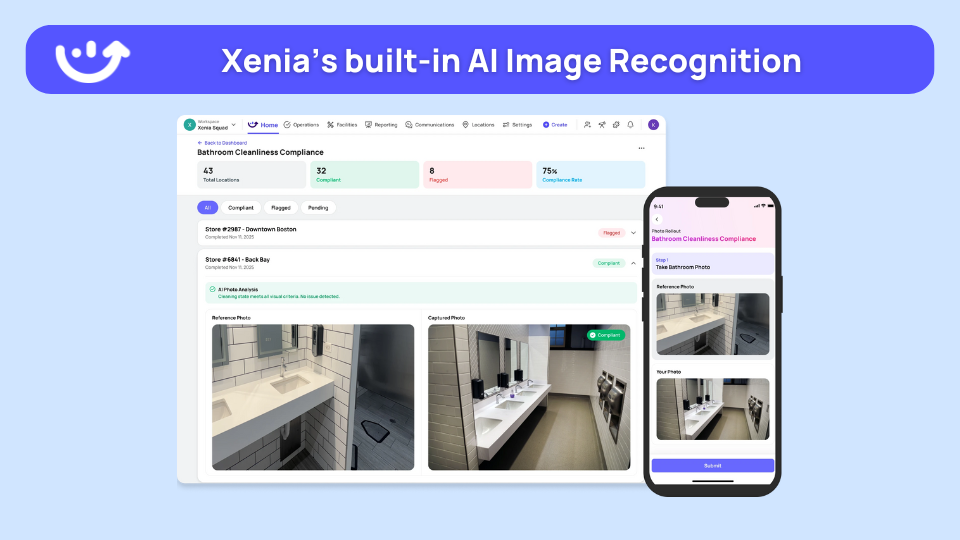
Automated Corrective Actions: Failed inspection items trigger corrective action tasks automatically.
Kitchen slip? Task assigned to fix wet floors immediately. Equipment injury? Work order created for maintenance repair. Customer complaint? Manager investigation triggered instantly.
No manual follow-up needed. System handles it automatically.
Root Cause Analysis: Document why incidents happened, not just what happened. Identify underlying causes. Fix systemic issues, not just symptoms.
Track corrective actions until root cause eliminated. Verify fixes prevent repeat incidents. Close loop completely.
AI-Powered Incident Summaries: AI generates daily and weekly summaries of all incidents across locations automatically. District managers see patterns, trends, and high-risk areas without pulling reports manually.
Which location has the most incidents? What time of day do injuries happen most? What types of hazards are recurring? AI answers these questions automatically in plain language.
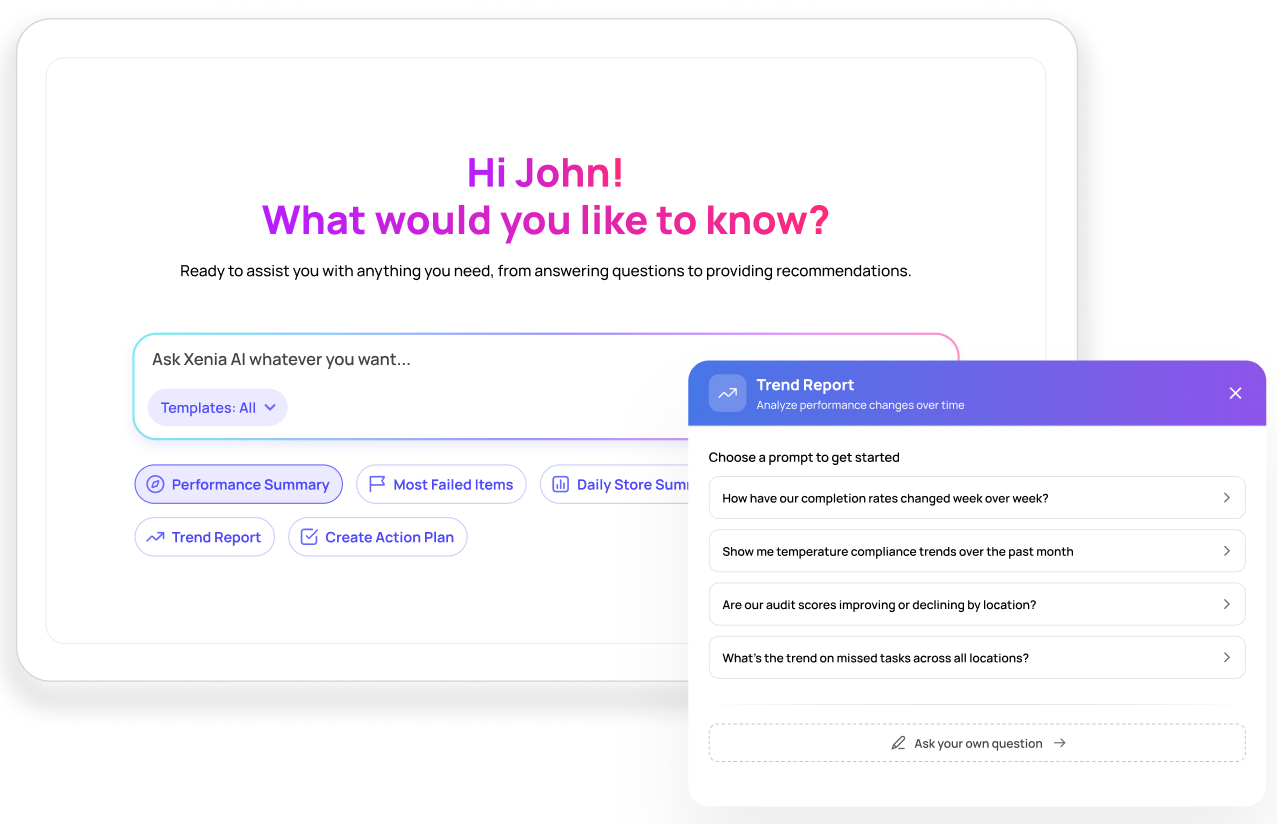
Pattern Tracking Across Locations: Same hazard causing multiple incidents? System flags pattern automatically. District managers see recurring issues across all sites.
Three slip incidents at one location? Pattern identified. Same equipment failing across multiple stores? Systemic fix implemented. Data shows where problems concentrate.
AI Predictive Analytics: AI predicts high-risk periods and locations based on historical incident data. Peak injury times identified. High-risk locations flagged. Patterns that lead to incidents spotted before they cause harm.
Proactive prevention instead of reactive response.
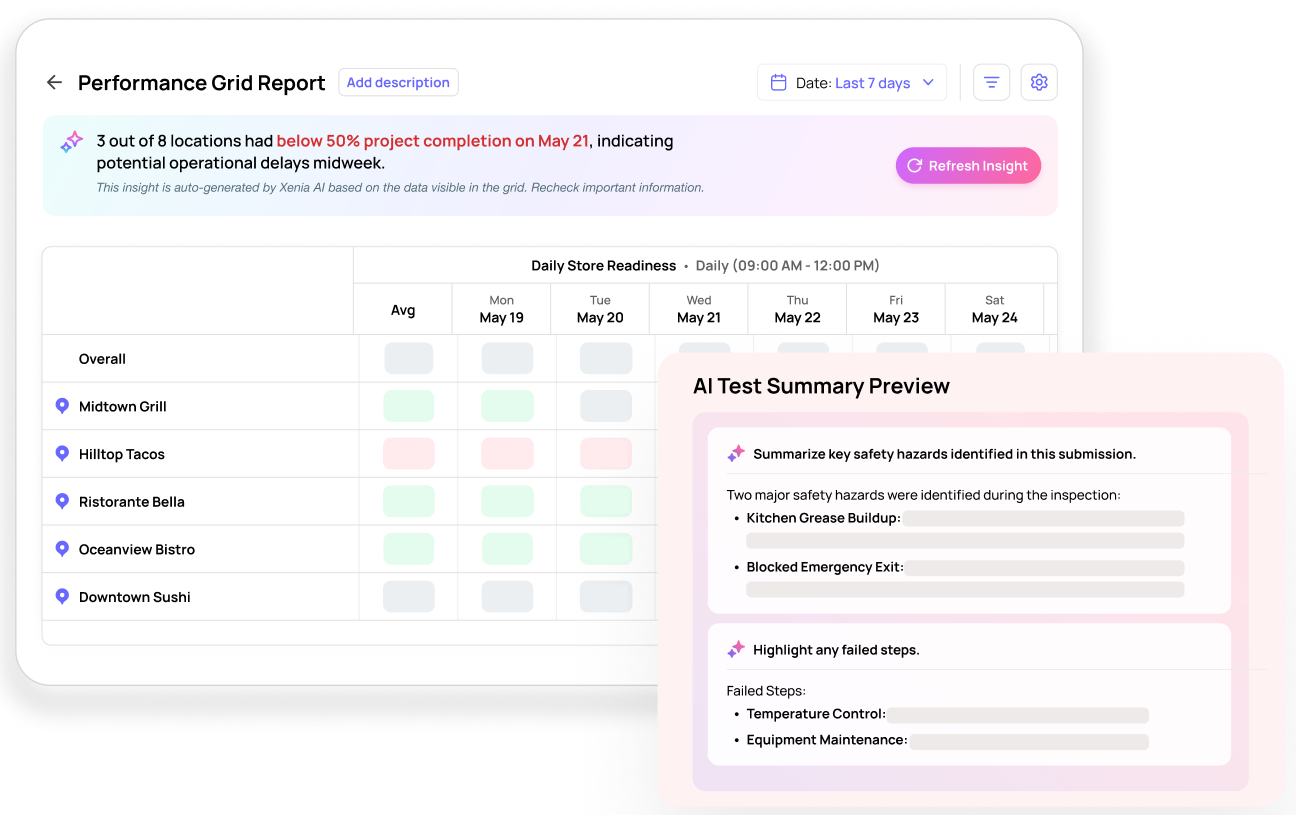
Multi-Location Dashboards: District managers see incident status across all locations in real-time.
Which stores have open incidents? What locations have recurring hazards? Where are response times slowest? Everything visible instantly in real-time dashboards.
Offline Mobile Reporting: Report incidents offline. No internet required during incident.
Staff reports incidents from any location. Photos captured offline. Details saved locally. Everything syncs automatically when connection returns.
Complete Audit Trail: Every incident documented with photos, timestamps, investigations, corrective actions, and resolution verification. Export for OSHA, insurance, legal.
Track from initial report through corrective action to final resolution. Complete compliance documentation maintained automatically.
How Xenia Compares to Standalone Incident Software
**
What You Need, Xenia, Standalone Incident Software
Best for, Incident prevention + operations integration, Incident documentation only
When incidents reported, Auto corrective actions triggered, Manual follow-up required
Photo documentation, Required photos - can't skip, Optional photo attachments
Pattern tracking, Automatic across all locations, Manual analysis required
Offline capability, Full offline incident reporting, Limited offline access
Multi-location, Real-time dashboards across all sites, Basic reporting
Operations integration, Tasks - work orders - inspections combined, Standalone incident tool
**
Bottom line: Use Xenia incident management software that prevents repeat incidents. Problems don't just get documented, they get assigned, tracked, and resolved automatically.

Priced on per user or per location basis
Available on iOS, Android and Web


2. FoodReady

Best for: Restaurant food safety and HACCP incidents
FoodReady focuses on food-related incidents like contamination, spoilage, and food safety violations with CAPA workflows.
Key features:
- Food incident reporting
- CAPA workflows
- Root cause analysis
- HACCP integration
- Risk tracking
Good if: Your incidents are mostly food safety related.
Not good if: You need general workplace incident tracking beyond food.
3. Notify Technology

Best for: Building safety culture with anonymous reporting
Notify Technology lets employees report incidents anonymously on mobile to encourage a reporting culture.
Key features:
- Anonymous mobile reporting
- Real-time alerts
- Near-miss tracking
- Analytics dashboards
- Custom forms
Good if: You want to encourage reporting culture with anonymity.
Not good if: Enterprise-focused with longer sales process.
4. VelocityEHS

Best for: Compliance-heavy multi-unit operations
VelocityEHS offers comprehensive EHS incident management solutions with OSHA and regulatory compliance built-in.
Key features:
- Incident tracking
- Root cause analysis
- OSHA compliance reporting
- Mobile app
- Risk management
Good if: Regulatory compliance is your top priority.
Not good if: Setup and training are intensive for frontline teams.
5. Intelex EHSQ

Best for: Large chains (1000+ employees)
Intelex offers enterprise-scale incident management software solutions with risk assessment and analytics.
Key features:
- Incident management with CAPA
- Risk assessment
- Analytics and reporting
- Multi-site tracking
- Audit integration
Good if: You're a large enterprise needing global incident management.
Not good if: Complex for small and mid-size operations.
What is Incident Management Software?
Incident management software helps you track, investigate, and prevent workplace incidents.
It replaces paper incident report forms with mobile apps. Staff reports incidents on phones. Photos captured for proof. Managers alerted instantly. Corrective actions triggered automatically.
The best incident management systems don't just document, they prevent repeat incidents through pattern tracking and automated corrective actions.
Why is Incident Management Software Important?
Paper doesn't prevent incidents. Paper forms get filed away. No one sees patterns. Similar incidents keep happening.
Digital prevents repeat incidents. Incident management tools track patterns automatically. Same hazard causing multiple incidents? System flags it. Corrective action triggered.
Reduces liability. Complete incident tracking with photos, timestamps, and corrective actions shows you took reasonable steps to prevent incidents.
Faster response. Manager alerted instantly when the incident is reported. No waiting for shift end or the next day to discover what happened.
Better compliance. Digital audit trail of every incident, investigation, and corrective action. Ready for OSHA inspections or insurance audits.
What is Incident Management Software For?
Employee injuries: Staff reports injury on phone. Photo of hazard taken. Root cause identified. Corrective action assigned. Similar injuries prevented.
Customer incidents: Guest slips, gets injured, or complains. Incident report created immediately with photos. Manager investigates. Corrective action taken.
Equipment failures: Equipment breaks, causes safety risk. Incident logged with photos. Work order created for repair. Pattern tracked across locations.
Safety violations: Near-miss incidents, safety violations, hazards identified. Reported before someone gets hurt. Corrective action prevents actual incident.
Property damage: Damage to facilities or equipment. Documented with photos. Insurance claims supported with complete records.
How Does Incident Management Software Work?
Report incident on mobile: Staff opens app on phone. Selects incident type. Fills out incident report form. Takes photos of scene. Adds witness statements. Submits.
Manager alerted instantly: Real-time notification sent to manager. Push alert on phone. Email notification. Manager sees incident details, photos, location immediately.
Investigation starts: Manager reviews incident. Adds investigation notes. Identifies root cause. Interviews witnesses. Documents findings.
Corrective action assigned: System creates task automatically. Assigned to right person. Deadline set. Task tracked until complete. Hazard fixed.
Pattern tracking: Same hazard causing multiple incidents? System flags pattern. District managers see recurring issues across locations. Systemic fixes implemented.
Compliance reporting: Complete audit trail. Every incident documented with photos, timestamps, investigations, corrective actions. Export for OSHA, insurance, legal.
Best Practices for Incident Management Systems
Make reporting easy. Simple mobile forms staff can complete in 2 minutes. Not 20-page paper forms no one fills out.
Require photos. Photos prove what happened. Show hazard conditions. Support insurance claims. Can't be disputed later.
Report near-misses too. Don't wait for actual injuries. Report hazards and near-misses before someone gets hurt.
Automate corrective actions. Failed safety check? Task created automatically. No manual follow-up needed.
Track patterns. Same location having repeated incidents? Same hazard across multiple sites? Incident tracking software flags patterns automatically.
Investigate root causes. Don't just document what happened. Figure out why. Fix the underlying cause, not just the symptom.
Close the loop. Track corrective actions until complete. Verify hazard fixed. Document resolution. Close incident only when actually resolved.
Incident Management Software Reviews: What to Look For
Mobile-first design: Staff needs to report from phones, not desks. Look for native mobile apps with offline capability.
Photo requirements: Enforce photo documentation. Incident management system software should make photos mandatory for incidents.
Automated workflows: Incidents should trigger corrective actions automatically. No manual task creation needed.
Pattern tracking: Best incident management software identifies recurring hazards across locations automatically.
Integration capability: Connect to existing operations systems. Incident management solutions work best when integrated with task management and maintenance.
Real-time alerts: Managers notified instantly when incidents reported. Not hours or days later.
Compliance reporting: Export capabilities for OSHA, insurance, legal. Complete audit trails maintained automatically.
Conclusion
Paper incident reports don't prevent accidents. They just document them after people get hurt.
Manual tracking doesn't work. Forms get lost. Patterns go unnoticed. The same hazards keep causing injuries. By the time you realize there's a problem, it's already happened multiple times.
The best incident management software captures incidents on mobile, triggers corrective actions automatically, and tracks patterns to prevent repeat incidents.
Xenia takes it further by connecting incidents to your entire operation. The result? Fewer repeat incidents. Lower insurance premiums. Better compliance. Safer workplaces.
Start with Xenia's free tier for up to 5 users. Test it at 1-2 locations. See how automated incident management actually prevents accidents. Book a demo for the complete scalable solution.
Frequently Asked Questions
Got a question? Find our FAQs here. If your question hasn't been answered here, contact us.
What is incident management software for?

Incident management software handles employee injuries, customer incidents, equipment failures, safety violations, near-misses, and property damage. It documents incidents with photos, investigates root causes, assigns corrective actions, tracks patterns across locations, and maintains compliance records for inspections and insurance.
How does incident management software work?
Staff reports incidents on mobile with photos. Manager alerted instantly. Investigation documented in app. Root cause identified. Corrective action task created automatically. Assigned with deadline. Tracked until hazard fixed. Patterns tracked across locations. Complete audit trail maintained for compliance.
What is the best incident management software?
Xenia is the best incident management software because incidents trigger corrective actions automatically. Staff reports on mobile with photos. Manager alerted instantly. Tasks created automatically. Hazards fixed before repeat incidents.

A Modern, AI-Powered Platform Built Specifically for Frontline Operations
Xenia brings daily operations, maintenance, audits, and compliance into one mobile-first platform. Frontline teams execute work consistently across locations while leadership gets real-time visibility.

Why Multi-Location Operators Choose Xenia:
🤖 AI-Powered Operations, Create digital checklists instantly or convert paper forms with AI. Verify compliance automatically with photo analysis and get instant answers from your operational data.
✅ Daily Operations & Maintenance, Assign work across hundreds of locations in minutes. Report and route issues instantly. Schedule preventive maintenance to catch problems before downtime.
📊 Real-Time Visibility, Track completion, work orders, and performance across all locations through dashboards. Filter by site or asset to spot trends and take action.
Manage operations, maintenance, and compliance across all your locations from one platform

.svg)
.webp)
%201%20(1).webp)

.svg)
%201%20(2).webp)




