

.webp)
Post Summary
Your restaurant operations face constant risks.
Food safety violations during health inspections. Equipment breakdowns during peak hours. Staff shortages on busy weekends. Supply chain disruptions affecting inventory.
You need operational risk management software that identifies risks early, tracks incidents automatically, and prevents problems before they hurt business.
The best software for operational risk management does three things: monitors operations continuously, creates incident workflows automatically, and provides risk dashboards across all locations.
This guide explores the 5 best operational risk management solutions.
Best Operational Risk Management Software Comparison
**
Rank, Software, Key Risk Prevention, Integration Capabilities, Best For
#1, Xenia, AI-powered operations monitoring, Native ops integration, Multi-location risk prevention
#2, Operandio, HACCP execution control, Task-based compliance, Franchise compliance
#3, Pirani, Enterprise risk mapping, Custom enterprise systems, Large chain governance
#4, 7shifts, Staff shortage prediction, POS and labor systems, Labor risk management
#5, Protecht ERM, GRC workflow automation, Document and policy systems, Medium business governance
**
.svg)


1. Xenia - Best Operational Risk Management Software
- What it's for: Complete operational risk management solutions with AI-powered risk prevention integrated into daily operations
- G2 rating: 4.9/5
- Capterra rating: 4.9/5
- Best for: Multi-location operations needing integrated risk prevention
Most operational risk software works separately from daily operations. You track risks in one system. Run operations in another. Problems get missed until incidents occur.
Xenia connects everything automatically. Daily operations spot risks early. AI creates incident workflows based on risk patterns. Everything is tracked in one platform.
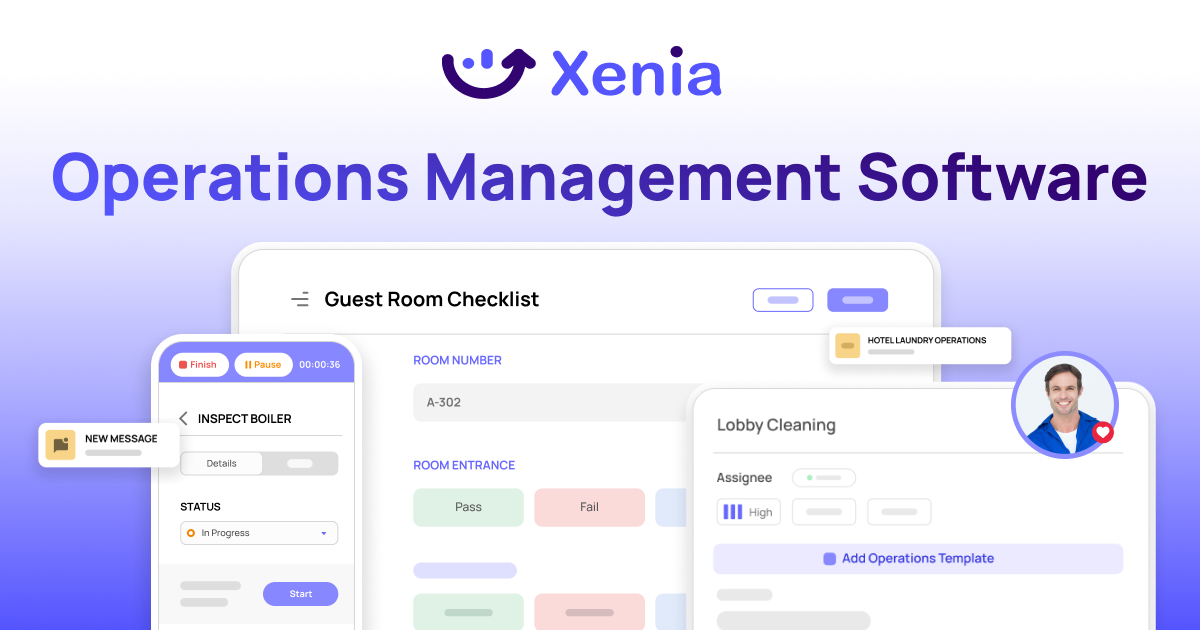
How Xenia's Risk Management Works
Automated Risk Detection from Operations: Xenia's AI engine monitors checklist responses in real time as your team completes their daily tasks.
Manager logs an equipment temperature above threshold during the opening checklist? The system flags it instantly, triggers a corrective action, and notifies the right person. Problems get solved before they become failures.
Advanced Trigger System and Workflow Automation: System creates action plans when problems happen. Failed food safety inspection? Corrective action starts instantly. Equipment maintenance overdue? Work order assigned automatically.
AI Photo Analysis for Risk Verification: AI checks photos to verify safety rules followed. Take photo of emergency exit. AI confirms path clear. Damaged product detected? Action triggered before customers see it.
.webp)
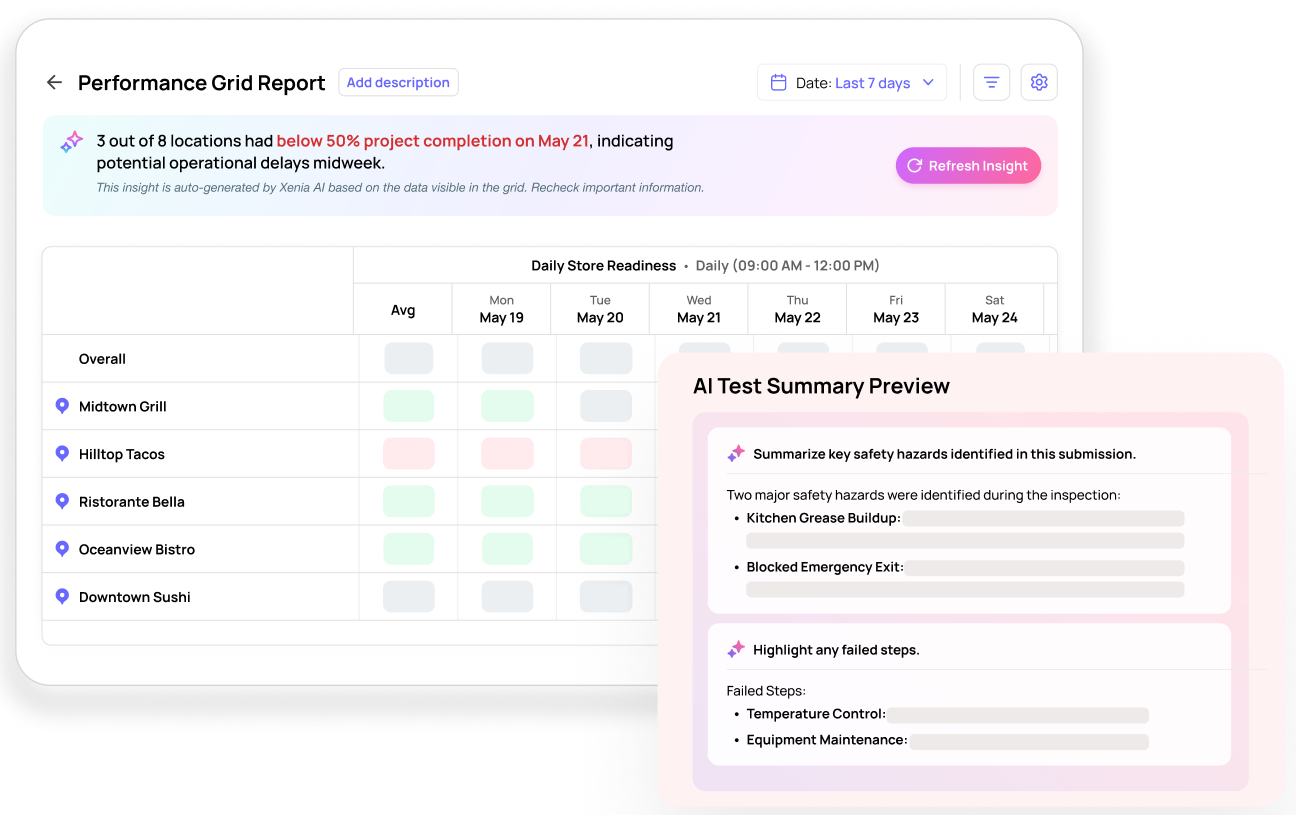
AI-Powered Risk Summaries: AI creates summaries showing problem patterns across locations. Which sites have recurring incidents? What times show highest risks? AI identifies trends automatically.
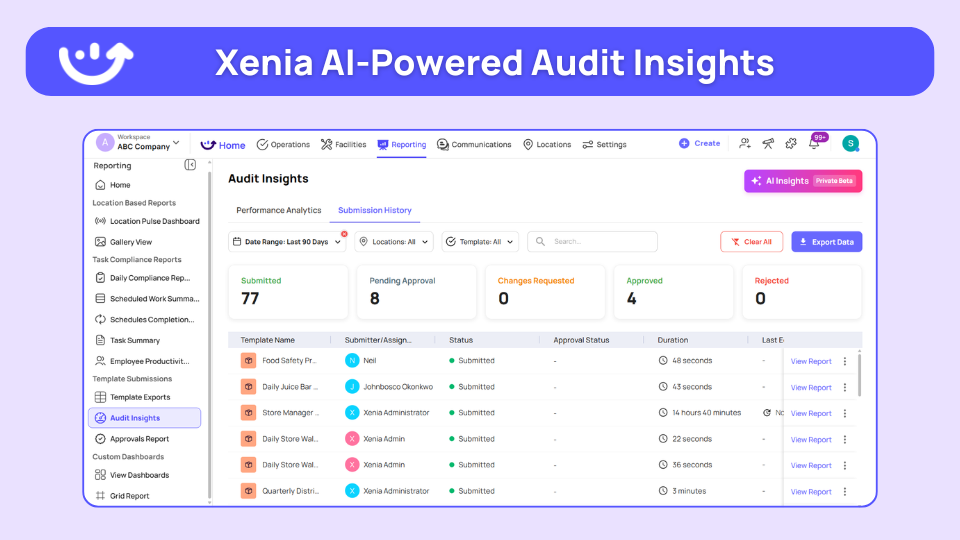
Comprehensive Incident and Case Management: Track all incidents in one place. Safety incident reported? Full documentation starts. Root cause analysis assigned. Complete audit trail for compliance.
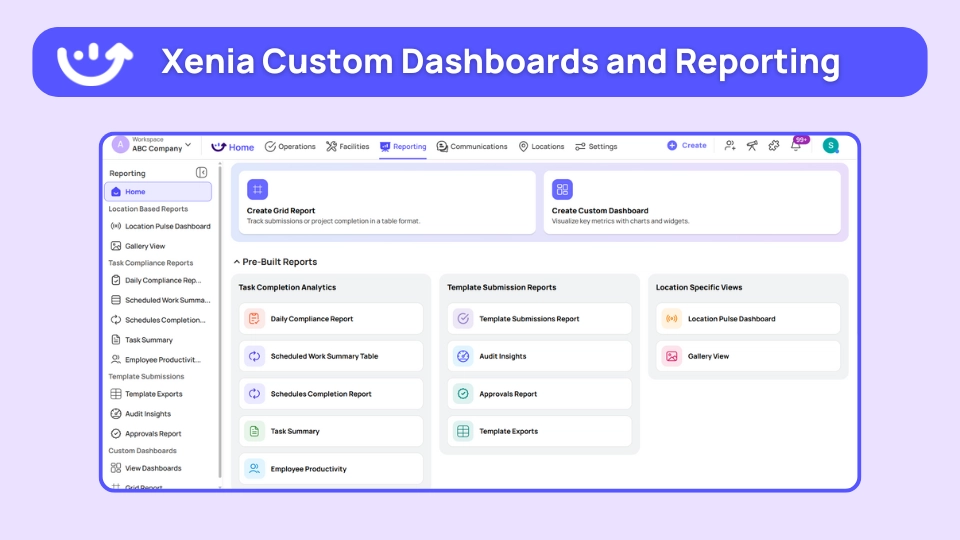
Real-Time Multi-Location Risk Dashboards: See risk status across all locations via real-time analytics and reporting. Which sites have overdue inspections? What locations show increasing incidents? Managers see everything real-time.
IoT Risk Monitoring and Sensor Integration: Connect sensors for continuous monitoring. Freezer temperature rises? Automatic temperature alert with action plan. Equipment shows failure signs? Maintenance request created automatically.
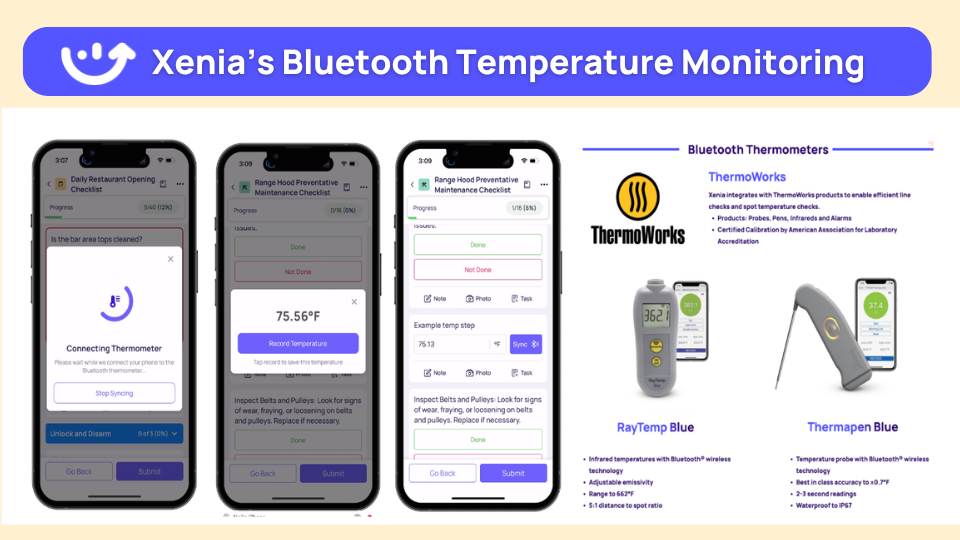
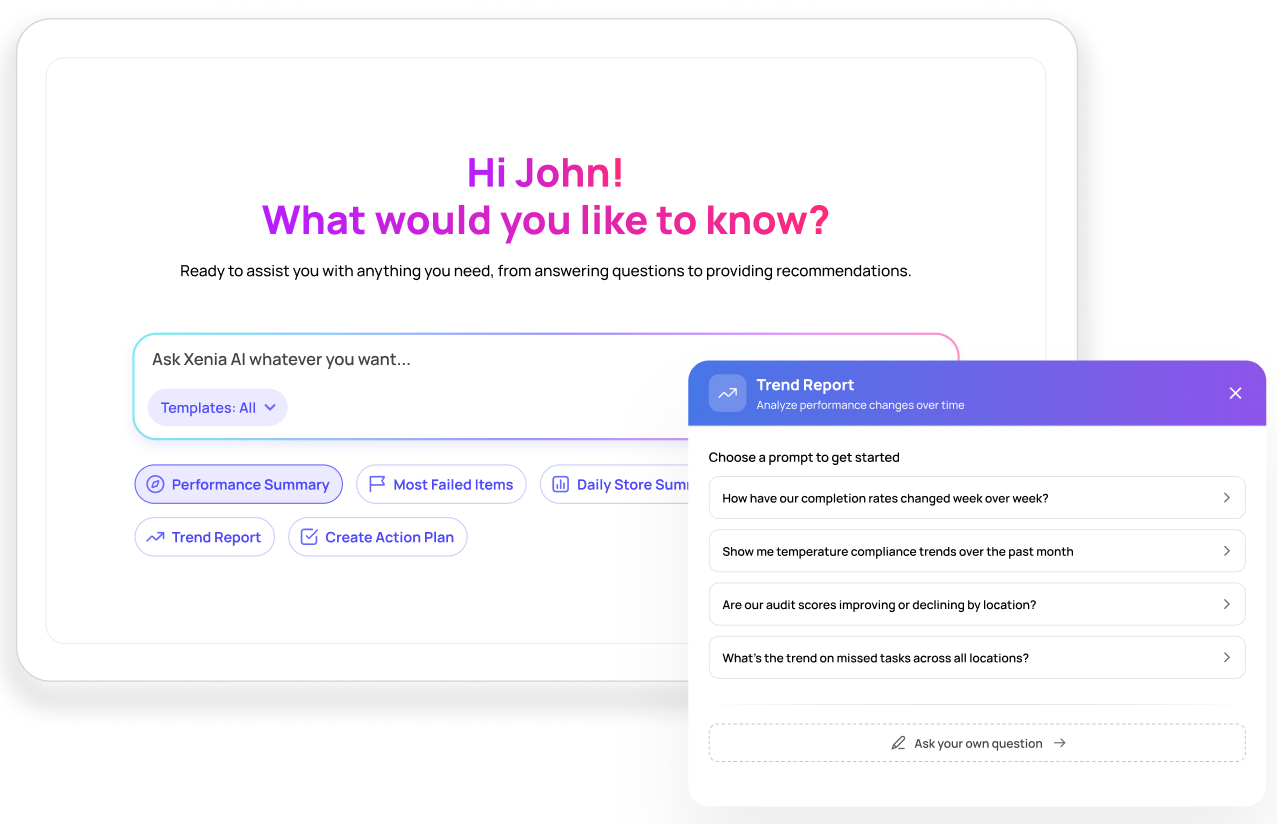
Analytical Agent for Predictive Risk Intelligence: Using the Xenia AI Analytical Agent feature, you can ask questions in plain English like "Which locations have most incidents?" Get instant answers. Generate reports automatically. Get predictions for maintenance needs.
How Xenia Compares to Traditional Risk Software
**
What You Need, Xenia, Traditional Risk Software
Operations integration, Risks detected during daily workflows, Separate risk tracking systems
AI capabilities, Heat maps-NLP insights-IoT monitoring, Basic incident logging
Real-time alerts, Instant notifications across all locations, Periodic risk reports
Free version, 25 tasks-5 users forever, Trials only
Mobile access, Native apps with offline capabilities, Limited mobile features
**
Bottom line: Use Xenia for operational risk management that connects to daily workflows. Risks get identified and managed automatically before they become incidents.

Priced on per user or per location basis
Available on iOS, Android and Web


2. Operandio

- What it's for: Multi-unit restaurant execution and compliance risk management with HACCP focus
- Best for: Franchise chains needing standardized risk compliance
Task-based platform ensuring standardized execution across locations, preventing operational deviations that create risks.
Key features:
- HACCP checklists and temperature monitoring
- Execution audits with risk scoring
- Multi-site compliance dashboards
- Mobile task enforcement for frontline teams
- Corrective action workflows
- Food safety violation prevention
Good if: You operate multiple franchise locations with heavy compliance requirements and need standardized risk prevention.
Consider if: Custom pricing requires enterprise budget and franchise-scale operations.
3. Pirani
.webp)
- What it's for: Enterprise risk assessment with KRIs for supply chain and quality risks in large operations
- Best for: Large regulated chains needing comprehensive risk governance
Risk mapping platform designed for food sector compliance with enterprise-grade risk assessment capabilities.
Key features:
- Risk matrix and heat map visualization
- Key Risk Indicators (KRIs) with controls
- Supply chain risk tracking
- Causes and consequences analysis
- Regulatory compliance automation
- Enterprise-scale risk governance
Good if: You operate large-scale regulated operations requiring comprehensive enterprise risk management.
Consider if: High enterprise pricing and complexity may be excessive for smaller operations.
4. 7shifts

- What it's for: Labor operational risks including staff shortages and scheduling compliance
- Best for: Operations needing staffing risk forecasting and labor shortage prevention
Restaurant scheduling platform that prevents labor risks through predictive staffing and shortage alerts.
Key features:
- Shift shortage alerts and predictions
- Staff trade and communication tools
- Labor cost forecasting
- No-show and overtime risk prevention
- Compliance scheduling
- POS system integrations
Good if: Your primary operational risk concern involves staffing shortages and labor cost control.
Consider if: Platform focuses only on labor risks rather than comprehensive operational risk management.
5. Protecht ERM
.webp)
- What it's for: Governance, risk, and compliance workflows for medium business operational risk management
- Best for: Medium businesses needing integrated risk governance workflows
Complete ERM suite combining risk management with compliance and incident workflows for medium-scale operations.
Key features:
- Risk workflows and policy management
- Incident and KRI tracking systems
- Document management and validation rules
- Compliance reporting automation
- Risk governance integration
- Medium business scale optimization
Good if: You need integrated governance, risk, and compliance management with document workflows.
Consider if: Annual pricing starts at $45,000+ and may be excessive for smaller operations.
Why Operational Risk Management Tools Matter
Your business has problems every day.
Machines break when you don't expect it. Workers call in sick during busy times. Delivery trucks come late. Inspectors show up without warning.
Without good tools, small problems become big disasters.
Writing things down on paper doesn't work well. Forms get lost easily. Computer files get old and wrong. Teams can't talk fast enough when problems happen.
Smart operational risk management solutions help you:
- Find problems before customers see them
- Fix things faster when they break
- Keep records ready for inspections
- Watch patterns across all your locations
- Stop small problems from becoming expensive ones
Good tools help you stay ahead of problems instead of always fixing them after they happen.
What to Look For in ORM Tools
Picking operational risk management software means knowing what works best.
Real-Time Monitoring
Keeps an eye on important things all the time. You get instant messages when something goes wrong. Phone alerts tell you what to do right away.
Easy Connection
Works with the software you already use. It talks to your cash register systems, worker management tools, and chat apps. No hard computer setup needed.
Phone-First Design
Apps work great on phones and tablets. They work even when internet is bad. Simple screens anyone can use without learning complicated stuff.
Auto Workflows
Make action plans when problems show up. They assign tasks to the right people automatically. Track when things get done without extra work.
Multi-Location Management
Handles problems across all your business spots. One main screen shows everything. Custom settings work for each location's special needs.
The best operational risk tools put all these things together in one easy platform.
Benefits of Using an ORM Tool
Operational risk management software gives you real business results.
Prevent Big Problems
Finding problems early stops big incidents before they happen. Temperature monitoring prevents food from going bad automatically. Machine alerts stop breakdowns during busy hours.
This stopping approach saves thousands in money you might lose.
Faster Responses
Auto workflows make responses much faster. Response times go from hours to minutes. Smart alerts reach the right people instantly. Problems get solved before affecting customers.
Better Rule Following
Regular monitoring keeps you following rules easily. Scheduled checks prevent violations automatically. Papers update without extra work. Getting ready for inspections becomes normal instead of stressful.
Less Business Interruptions
Problem prevention reduces business interruptions a lot. Machines last longer with proper monitoring. Teams work better when systems run smoothly. Customer happiness goes up with steady service.
Software for operational risk management pays for itself through stopped incidents. One big violation costs $10,000-50,000. Machine failure during busy hours loses thousands in sales.
Common Challenges in Implementing ORM Tools
Understanding setup challenges helps make sure your new systems work well.
Getting Workers to Use New Tools
This creates the biggest problem for most businesses. Workers don't like technology changes naturally. Hard systems make people not want to use them daily. Bad training leads to low use rates across teams.
The Solution: Pick easy-to-use phone apps first. Run hands-on training sessions often. Start with simple workflows before adding hard stuff. Show clear benefits for daily work to get people to use it.
System Integration Problems
Integrating new tools with old systems creates technical problems. Information formats don't match properly between platforms. Old systems don't have modern abilities.
What Works: Choose tools with strong integration history. Work with companies providing dedicated setup help. Plan integration in careful steps rather than all at once. Test all integrations well before going live.
Information Quality Problems
Bad information input creates unreliable insights. Missing records hide important problem patterns. Inconsistent entry affects analysis accuracy a lot.
Best Practices: Use information validation rules automatically. Make clear entry guidelines for all users. Run regular quality checks and cleanup. Automate information capture when possible to reduce mistakes.
How to Choose the Right Risk Management Software
Pick the best operational risk management software through systematic evaluation.
Step 1: Find Your Biggest Risk Areas
List problems affecting operations most often. Note current pain points and repeating issues. Calculate which risks cost the most money yearly. This analysis guides feature requirements effectively.
Step 2: Define What You Need
Determine essential features needed most urgently. Consider team size and location count carefully. Set realistic budget limits for total investment. Include setup costs in planning.
Step 3: Check Connection Abilities
List current software platforms in use. Identify which systems need information connections. Plan information sharing between platforms carefully. Poor connection creates workflow problems later.
Step 4: Think About User Experience
Consider who uses software daily. Check technical skill levels realistically. Put ease of use over advanced features first. Hard systems reduce adoption rates a lot.
Step 5: Test Before Buying
Use free trials and demo opportunities fully. Test software with real users and workflows. Check support quality and response times. Verify offline abilities work properly.
Step 6: Start Small
Begin with operational risk management solutions offering free trials to test workflows before investing in paid options. This approach reduces setup risks while ensuring good fit.
Conclusion
Operational risks affect business success.
Food safety issues can interrupt operations. Equipment problems affect customer service during busy times. Staff shortages impact service quality. Supply issues create inventory challenges.
The best operational risk management software helps prevent problems before they affect the business.
Xenia helps even more. Risk monitoring works with daily operations automatically. Problems get spotted and managed before they become bigger issues. AI analytics show risk patterns across all locations.
Start free with 25 tasks and 5 users. Book a demo to see how Xenia helps prevent operational risks.
Frequently Asked Questions
Got a question? Find our FAQs here. If your question hasn't been answered here, contact us.
Can operational risk management software integrate with existing systems?

Yes, most modern operational risk solutions connect with POS systems, maintenance software, and communication tools. Xenia integrates with Slack, Zapier, and most business systems. Integration eliminates manual data entry between platforms.
What features are most important in operational risk tools?
Real-time monitoring, mobile access, automated workflows, and integration with daily operations. Look for platforms that identify risks during normal work rather than requiring separate risk tracking. Risk analytics help identify patterns across locations.
How much does operational risk management software cost?
Costs range from free (Xenia FREE Forever) to enterprise solutions starting at $45,000+ annually. Calculate ROI based on prevented incidents and compliance violations.
Why do businesses need operational risk management software?
Manual risk tracking misses problems until they become costly incidents. Operational risk management solutions prevent food safety violations, equipment failures, and compliance issues before they affect customers or operations.
What is the best operational risk management software?
Xenia works best for operational risk management because it integrates risk monitoring with daily operations. Risks get identified automatically during normal workflows instead of separate risk tracking.

A Modern, AI-Powered Platform Built Specifically for Frontline Operations
Xenia brings daily operations, maintenance, audits, and compliance into one mobile-first platform. Frontline teams execute work consistently across locations while leadership gets real-time visibility.

Why Multi-Location Operators Choose Xenia:
🤖 AI-Powered Operations, Create digital checklists instantly or convert paper forms with AI. Verify compliance automatically with photo analysis and get instant answers from your operational data.
✅ Daily Operations & Maintenance, Assign work across hundreds of locations in minutes. Report and route issues instantly. Schedule preventive maintenance to catch problems before downtime.
📊 Real-Time Visibility, Track completion, work orders, and performance across all locations through dashboards. Filter by site or asset to spot trends and take action.
Manage operations, maintenance, and compliance across all your locations from one platform

.svg)
.webp)
%201%20(1).webp)

.svg)
%201%20(2).webp)




