

.webp)
Post Summary
You spotted the problem. Someone logged it somewhere. And then three weeks passed.
No one followed up. No one owned it. No one can prove anything was done. And now the same issue showed up at two more locations.
That is the corrective action problem most multi-location businesses are actually living with. It is not that teams miss problems. It is that there is no system to handle what comes after.
Corrective action tracking software fixes that. It takes "we found an issue" and turns it into an assigned task, a documented fix, a verified closure, and a timestamped audit trail.
The tricky part? Most corrective action management software on the market is built for pharma companies and regulated manufacturers. Six-month implementations. Complex QMS workflows. Enterprise pricing that does not make sense for a 40-location restaurant group or a regional retail chain.
This guide covers 7 corrective action apps worth evaluating in 2026. Each one is covered with real detail: what it does, what it does not do, who it is for, and what you should actually buy.
What Is Corrective Action Tracking Software?
Corrective action tracking software is a system for finding operational problems, assigning responsibility, documenting the fix, and verifying it worked.
It covers the full loop. Problem detected. Root cause identified. Action assigned with a deadline and evidence requirement. Action completed. Closure verified. Follow-up scheduled.
That process is what CAPA means: corrective and preventive action. Most quality management frameworks require it. ISO 9001 mandates it. FDA-regulated industries have detailed documentation rules around it. But even if you are not facing a formal audit, a corrective action system creates the accountability structure that stops problems from repeating across locations.
Before you evaluate any CAPA software, understand this distinction:
**
Term, What it means, ISO 9000:2015 basis
Correction, Fix the specific problem that already happened, Eliminates the detected nonconformity
Corrective action, Fix the root cause so it cannot happen again, Eliminates the cause of nonconformity
Preventive action, Address potential problems before they happen, Eliminates the cause of a potential nonconformity
**
A correction and a corrective action are not the same thing. Most teams handle corrections. Very few have a proper corrective and preventive action software workflow that actually prevents recurrence.
What to Look for in a Corrective Action App
Get clear on these six things before you evaluate a single tool.
How issues get captured. Some corrective action apps only let you create actions manually. Better ones auto-generate them from failed inspection steps. If your team runs audits and inspections across dozens of locations every week, manual entry will not hold.
Mobile experience. Your frontline workers are not at desks. A corrective action system that is not genuinely mobile-first with offline support will not get adopted. Period.
Multi-location architecture. Can corporate push templates to all locations? Can regional managers filter by site? Can you compare location performance on one dashboard? If the answer to any of those is no, you will outgrow the tool. This is where multi-unit operations software architecture really matters.
Depth of workflow. There is a real difference between tracking "open" and "closed" versus running a proper corrective action tracking system with investigation, assignment, evidence submission, verification, and closure stages.
Compliance fit. A restaurant chain needs food safety documentation and ISO-friendly audit trails. A pharma company needs 21 CFR Part 11 validation. Match the tool to your actual compliance environment, not the marketing copy.
Integration with your existing stack. The best corrective action management software connects to your CMMS, HRIS, ERP, and inspection tools. A system that sits in isolation creates more admin work, not less. See how Xenia handles integrations with the tools you already use.
7 Best Corrective Action Software Tools in 2026
.svg)
.webp)
.webp)
Here is how all 7 tools compare at a glance before the full breakdown.
**
Tool, Multi-site strength, CAPA depth, Compliance level, Mobile UX, Best buyer
Xenia, High, Ops CAPA + work orders, ISO-friendly-food safety, Frontline-first-offline, Multi-site QSR-retail-c-stores-facilities
Certainty Software, High, Multi-step inspection-driven, ISO-friendly, Manager-focused, Manufacturing-facilities-supplier compliance
Intelex, High, Full EHS CAPA, OSHA-ISO 14001/45001, EHS professional, Industrial-energy-utilities
AssurX, High, Full regulated CAPA, 21 CFR Part 11-ISO 13485, QA manager, Life sciences-pharma-MedTech
Isolocity, Medium, QMS CAPA + training link, FDA/ISO, Mobile-friendly, Regulated mid-size manufacturers
Ideagen, High, PDCA + AI analytics, Multi-country, Offline capable, Global enterprise quality
Notify, Medium, Hazard-to-action, Basic compliance, Frontline-first, Frontline retail-logistics-facilities
**
1. Xenia
Best for: Multi-location QSR, retail, convenience stores, facilities, and hospitality
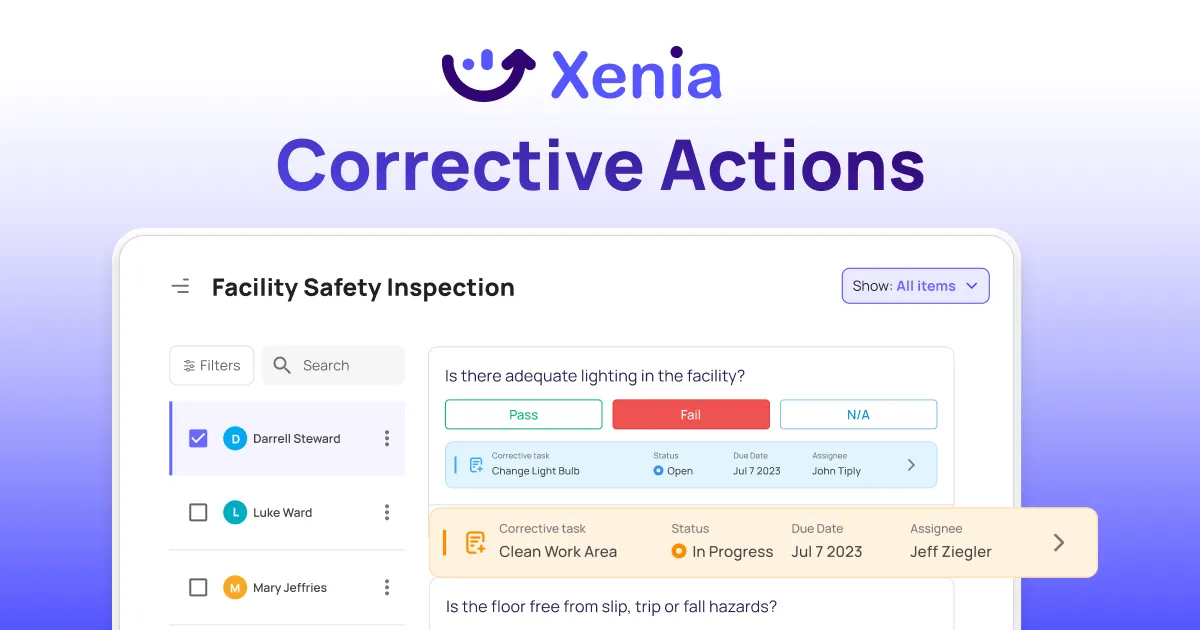
Xenia is a mobile-first, AI-powered frontline operations execution platform. Corrective action management is one of the core things it does, alongside task management, daily inspections, and compliance workflows.
Here is why that framing matters.
Most corrective action apps sit on top of the work. You find a problem, open a separate tool, and manually create a ticket. Xenia connects directly to the inspection or audit that found the problem.
When a checklist step fails, a corrective action work order can fire automatically. The right person gets assigned. Priority and due date are set. Photo evidence is required on completion. The whole chain is documented without a manager touching anything manually.
For multi-location operators, that means a brand standards audit flagging 12 issues at location 47 does not end with a PDF report nobody acts on. It ends with 12 assigned tasks, tracked in real time, with timestamped completion evidence stored automatically.
How the corrective action workflow actually runs:
A failed inspection step, hazard, or near-miss captures the issue. It gets tagged with category, severity, location, shift, and asset. If auto-trigger rules are configured, a corrective action work order fires immediately at the right priority level.
The assigned worker gets a mobile notification, completes the task with required photos and notes, and submits. The manager verifies. The full trail is stored and exportable.
Multi-site architecture:
Corporate creates and pushes corrective action templates to all locations or specific groups. Location hierarchy and permissions manage what each level sees and does: corporate admin, regional manager, site manager, team lead, frontline worker.
Dashboards compare site vs site and region vs region on open actions, overdue items, and average resolution times. You can read more about how this works in the multi-unit operations execution guide.
The mobile app works offline. Everything syncs automatically when connectivity returns.
Where Xenia is honest about limits:
Xenia is not a full FDA-validated QMS. It supports ISO 9001, ISO 45001, and food safety frameworks, but pharma and life sciences teams needing 21 CFR Part 11 validation should look at AssurX or Isolocity instead. Xenia also does not do scheduling, payroll, or time tracking. It works alongside your HRIS and scheduling tools.
Key features:
- Auto-generation of corrective action work orders from failed inspection steps
- Location hierarchy from corporate level down to individual team
- Role-based access control across all user levels
- Mandatory photo and video evidence required on task completion
- In-task chat so workers and managers communicate without leaving the workflow
- Weighted scoring for inspection and audit templates
- Multi-site dashboards with site-to-site comparison views via frontline reporting
- Offline-capable mobile app with automatic sync
- AI template builder with 1,000+ prebuilt templates including CAPA audit and corrective action plan templates
- Brand standards compliance tools built in alongside corrective action workflows
Who should get it:
Multi-location QSR, retail, c-stores, facilities, or hospitality teams that want corrective actions, inspections, daily ops, and compliance in one platform without a long implementation or an enterprise contract.
Pricing:
Xenia has a free plan you can start with today, no credit card required. For larger teams and multi-location rollouts, paid plans are available with full access to corrective action workflows, multi-site dashboards, and all core features.
Start for free or book a demo to see how it works across your locations.

Priced on per user or per location basis
Available on iOS, Android and Web


2. Certainty Software
Best for: Multi-site manufacturing, facilities, and supplier compliance
Certainty is an audit and compliance platform. Run an inspection, flag a problem, and it creates a corrective action on the spot. You can set up multi-step workflows with approvals and sign-offs at each stage. Power BI integration gives compliance managers reporting by location and inspection type.
The gap: it is an audit tool, full stop. No daily task management, no frontline communication, no shift-level workflows. You will need other systems running alongside it, which means more tools to manage, not fewer. The UX is also built for compliance managers, not workers on a phone.
Key features:
- Inspection-triggered corrective action creation
- Multi-step approval workflows with escalation rules
- Power BI analytics with location and inspection drill-down
- SSO and OData/SQL integrations
- Offline mobile data collection
Pricing: Per-user pricing. Contact for a quote.
Who should buy it: Manufacturing or facilities teams running formal audit programs that already have separate tools for daily ops.
3. Intelex EHS and Quality

Best for: Large industrial, energy, and utilities organizations
Intelex is a global EHS platform. CAPA connects to incidents, risk assessments, audits, and training records. If environmental and safety compliance is your primary need, that connection has real value.
The gap: it is built for safety officers and QA managers at desks, not frontline ops teams in stores or restaurants. If you run QSR, retail, or hospitality, this tool solves a compliance problem you probably do not have.
For Intelex alternatives worth considering, see the best Intelex alternatives guide.
Key features:
- CAPA connected to incidents, audits, training, and risk data
- 5-Whys and fishbone root cause analysis
- Effectiveness checks with post-closure follow-up
- OSHA, EPA, ISO 14001, and ISO 45001 support
- Global multi-site dashboards
Pricing: Custom quote.
Who should buy it: Large industrial or energy organizations where EHS compliance is the core need.
4. AssurX CAPA Management Software
.webp)
Best for: Pharma, life sciences, biotech, and medical devices
AssurX is built for FDA and ISO compliance. It covers the full CAPA lifecycle with electronic signatures, validated audit trails, and 21 CFR Part 11 support. For pharma and MedTech teams, that level of documentation is non-negotiable.
The gap: there is no task management, no daily checklist layer, no shift workflows. It is a compliance tool for regulated manufacturing. For any team outside that world, it is simply the wrong category of tool. Plan for 6 to 12 weeks to go live.
Key features:
- Full regulated CAPA lifecycle with electronic signatures
- 21 CFR Part 11 and ISO 13485 compliance
- Validated audit trails and cloud infrastructure
- Global CAPA log with site-level filtering
- Root cause analysis with 5-Whys and fishbone
Pricing: Enterprise custom-quote pricing.
Who should buy it: Life sciences, pharma, or medical device organizations with FDA/ISO compliance requirements.
5. Isolocity
Best for: Mid-size regulated manufacturers in medical devices, food and beverage, and cannabis
Isolocity is a cloud-based QMS with a dedicated CAPA module. It is more affordable than most enterprise QMS options and links corrective actions to training records. When retraining is part of your corrective action process, that connection saves time.
The gap: it is a product quality tool. Daily operational checklists, brand standard audits, frontline task management, and shift-level accountability are not in scope. Pricing also adds up quickly as your team grows because of per-admin fees on top of the base plan.
Key features:
- CAPA module covering deviations, non-conformances, and complaints
- CAPA linked to training records
- Custom CAPA template builder
- Supplier quality management portal
- ISO 9001, ISO 13485, 21 CFR Part 11, HACCP support
Pricing: Starts at $159/month. Additional per-admin fees apply.
Who should buy it: Regulated mid-size manufacturers where CAPA needs to connect to product quality and training records.
6. Ideagen Quality Management
Best for: Global, multi-country enterprises with dedicated quality teams
Ideagen is a multi-site quality management platform with an embedded PDCA framework and AI analytics. It consolidates quality data across locations, tracks multi-country regulatory requirements, and alerts sites before upcoming audits.
The gap: this is a long-cycle enterprise tool. Pricing is not publicly available. If you need corrective action workflows running in weeks rather than months, or you do not have a dedicated quality management team to run it, Ideagen is not the right fit.
Key features:
- PDCA framework for quality improvement cycles
- AI-powered deviation detection
- Multi-country regulatory tracking with audit alerts
- Automatic quality data consolidation across locations
- Offline mobile audit and reporting
Pricing: Enterprise custom pricing.
Who should buy it: Global enterprises with dedicated quality teams, budget for enterprise pricing, and a full implementation timeline.
7. Notify Technology
Best for: Frontline teams in retail, logistics, and facilities
Notify is a simple corrective action tool. A worker logs a hazard on the mobile app, the system creates a corrective action, and managers track open items by location. Dashboards show completion rates and problem spots. It takes 1 to 2 weeks to set up.
The gap: that is basically all it does. No inspection templates, no audit workflows, no task management, no SOP library, no HRIS integration. If you just need a digital version of a paper hazard log, it works fine. If you need inspections, audits, daily checklists, and corrective actions in one place, this covers too little.
Key features:
- Hazard-to-corrective-action auto-creation
- Multi-site dashboards with location filtering
- Photo and document evidence upload
- Trend analysis and hot-spot identification
- Slack, Teams, SMS, and email integrations
Pricing: Per-user subscription. Contact for a quote.
Who should buy it: Teams that only need a basic digital hazard log and are not ready for a full operations platform yet.
How Corrective Action Software Actually Improves Quality
A lot of articles list benefits in generic terms. Here is what each one actually means for a multi-location operation.
It creates accountability where there was none before
Manual processes depend on someone remembering to follow up. CAPA software assigns ownership, sets deadlines, sends reminders, and requires evidence before marking something closed. No more "I thought someone else handled it." This is one of the core reason employee accountability tools have become standard in multi-location ops.
It makes patterns visible across locations
One failed health inspection at one location is an incident. The same failure category appearing at 14 locations over 90 days is a systemic problem. Corrective action tracking software surfaces those patterns. Without it, you manage symptoms and never touch the actual cause. This is exactly the kind of visibility covered in multi-site inspection software.
It gives you a defensible audit trail
When a regulator, franchisor, or internal auditor asks for evidence of corrective action, you need documentation. Timestamps, user IDs, photos, notes, and closure verification stored automatically in your corrective action management software. A screenshot in a group chat does not hold up. See how audit and inspection software handles this in practice.
It scales without adding headcount
Manual CAPA tracking breaks down fast past a handful of locations. Software that handles multi-site workflows, location hierarchies, and centralized reporting lets your operations execution process grow without adding people to manage it.
It actually prevents recurrence
Effectiveness checks, built into good corrective and preventive action software, schedule a follow-up after closure to confirm the fix worked. That step is what turns a closed ticket into a genuine improvement rather than a documented repeat.
Key Features Every Corrective Action System Needs
**
Feature, Why it matters for multi-location ops
Auto-generation from inspections, Manual entry does not scale at multi-location audit volume
Mandatory evidence on completion, Creates the audit trail without relying on staff to remember
Multi-step workflow stages, Issue capture-investigation-action-verification and closure are separate trackable stages
Multi-site dashboards, See performance by site-region and chain in one view
Mobile and offline capability, Frontline teams work in low-connectivity environments every day
Root cause analysis tools, Addresses causes-not just the symptom that was visible
Full audit trail, Required for any compliance-sensitive operation
HRIS and CMMS integration, Keeps your corrective action system connected to your broader stack
**
Conclusion
Most operational problems do not stay fixed because nobody built a system around fixing them. A problem gets found, someone handles it in the moment, and three months later the same issue shows up at a different location. Or the same one.
Corrective action software is what breaks that cycle.
The right tool depends on who you are. If you run restaurants, retail stores, convenience stores, or hospitality units, you need a mobile-first corrective action app your frontline teams will actually use on a phone. Not a 12-week QMS rollout. If you are in pharma or life sciences, you need full regulatory validation and electronic signatures.
For most multi-unit operators, Xenia hits the right balance. Real corrective action workflows, multi-location architecture, and a free plan to start with today.
See how Xenia works across your locations. Start for free or book a demo.
Frequently Asked Questions
Got a question? Find our FAQs here. If your question hasn't been answered here, contact us.
What is the difference between corrective action software and corrective action preventive action software?

They are the same category. CAPA software covers both sides: fixing problems that already happened and preventing ones that have not yet. Some tools focus only on the reactive side. Better ones handle both with structured workflows and follow-up verification built in.
What should I look for in a corrective action app for multi-location teams?
Five things matter most. Mobile-first design that works offline. Auto-generation of corrective actions from failed inspections. Multi-site dashboards so you can see every location at once. Role-based access so the right people see the right things. And a full audit trail on every action.
Is there a free corrective action tracking software?
Yes. Xenia has a free plan for up to 5 users with core corrective action workflows, inspections, and task management included. It is one of the only tools with a free tier that is actually usable day to day, not just a limited trial.
What are the four stages of CAPA?
First, you identify the issue. Second, you investigate the root cause. Third, you implement the fix. Fourth, you verify the fix worked. Some frameworks add a fifth step for management sign-off and documentation review.
What is the difference between a correction and a corrective action?
A correction fixes what already went wrong. A corrective action finds why it went wrong so it cannot happen again. You need both, but only the second one actually stops repeat problems.
What is CAPA management software?
CAPA software helps you catch problems, fix them, and stop them from coming back.
That's really it. Someone finds an issue. The system assigns it to the right person. That person documents the fix. A manager verifies it actually worked.
For teams running multiple locations, the one thing that matters most: it has to show you everything across all your sites in one place. Not location by location. All of it, at once.
What does CAPA stand for?
Corrective and preventive action. It is a structured process for finding why a problem happened, fixing it, and confirming it will not repeat. ISO 9001 requires it as part of any quality management system.


A Modern, AI-Powered Platform Built for Facility Operations
Xenia connects maintenance, safety, inspections, and daily operations into one mobile-first platform. Facility teams respond faster, prevent downtime, and maintain compliance, while leadership tracks performance across all buildings in real time.

Why Facility Managers Choose Xenia:
🤖 AI-Powered Inspections, Verify safety equipment and compliance automatically with AI photo analysis. Surface critical maintenance issues instantly with AI-powered summaries.
🛠️ Work Orders & Maintenance, Report issues via mobile or QR codes. Route requests to teams or vendors. Schedule preventive maintenance for HVAC, elevators, and emergency systems to reduce downtime.
📊 Safety & Visibility, Deploy fire safety and hazard inspection workflows. Monitor work order resolution times and asset health across all facilities.
Manage work orders, maintenance, and safety inspections across all facilities from one platform.

.svg)
.webp)
%201%20(1).webp)

.svg)
%201%20(2).webp)





