


Post Summary
Most operations teams manage maintenance the same way.
Something breaks. Someone calls someone. That person calls someone else. By the time the right person shows up, the damage is already done.
There is a better way. It is called a CMMS.
This guide explains exactly what it is, what it does, and how to implement it across your locations.
.svg)

Priced on per user or per location basis
Available on iOS, Android and Web


What Is CMMS?
CMMS stands for Computerized Maintenance Management System.
In plain terms: software that runs your maintenance operation.
Work orders. Equipment records. Preventive maintenance. Vendor tracking. Reporting. All in one place instead of spread across emails, phone calls, and spreadsheets.
Before CMMS, teams did this manually. Paper logs. Phone calls. Folders nobody could find. That approach falls apart the moment you scale beyond one location.
A CMMS keeps it all together from start to finish.
- Work order creation and tracking
- Equipment and asset records
- Preventive maintenance scheduling
- Vendor management
- Reporting and analytics
What Does a CMMS Do?
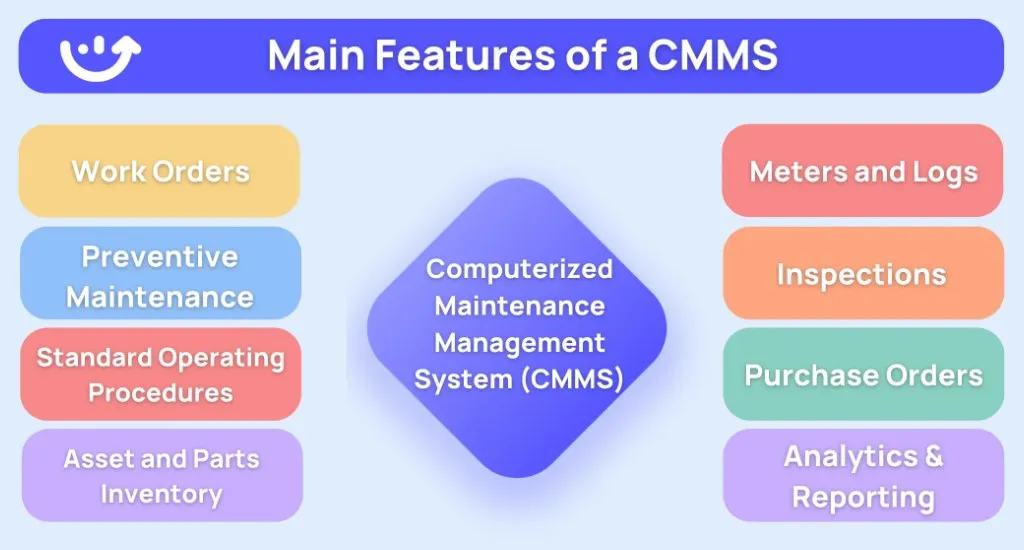
A CMMS connects your entire maintenance operation in one place.
Here is what it handles every day:
Maintenance requests. Team member spots an issue, submits it from their phone in under a minute. Description, photo, location, priority. Logged instantly. No texts, no calls, no lost emails.
Work order tracking. The work order goes to the right technician or vendor automatically. Everyone sees the status in real time.
Preventive maintenance. Recurring tasks schedule themselves. Monthly checks, quarterly servicing, annual inspections. All on the calendar without anyone having to remember.
Asset history. Every completed work order joins that equipment's permanent record. Next time something breaks, the full history is right there.
**
Function, What It Does
Work Orders, Creates - assigns - tracks and closes maintenance tasks
Asset Records, Stores service history - warranty info and equipment details
Preventive Maintenance, Auto-schedules recurring maintenance tasks
Vendor Management, Assigns vendors and tracks completion with photo verification
Reporting, Tracks resolution times - costs and equipment performance
**
CMMS vs EAM: What Is the Difference?
You will hear both terms. Here is the simple breakdown.
A CMMS focuses on maintenance. Work orders, equipment service history, preventive maintenance scheduling. It is built for operations and maintenance managers who need to keep equipment running day to day.
An EAM, which stands for Enterprise Asset Management, goes much wider. It covers the entire lifecycle of an asset from purchase to disposal. That includes financial tracking, depreciation, and capital planning.
**
Aspect, CMMS, EAM
Focus, Maintenance operations, Full asset lifecycle
Best for, Ops and maintenance teams, Finance and enterprise leadership
Complexity, Simple to implement, Complex and expensive
Typical users, Multi-location ops teams, Large enterprises
**
The difference between CMMS and EAM comes down to one thing. Scope.
For most operations teams managing restaurants, retail stores, hotels, or convenience stores, a CMMS is exactly what you need. EAM is built for a different scale entirely.
Why Operations Teams Use a CMMS
At some point, the old way stops working.
Sound familiar?
- Work orders disappear into email threads
- The same equipment fails repeatedly with no record of why
- Vendors miss deadlines and there is no paper trail to hold them accountable
- Scheduled maintenance gets skipped because nobody owns it
There are hundreds of CMMS systems available today. But most teams come to them for one reason.
They are tired of reacting. They want to prevent.
Reactive maintenance costs more, disrupts operations, and burns out your team. Preventive maintenance through a CMMS changes that. Equipment lasts longer. Fewer emergencies. Less time in crisis mode.
That is why teams make the switch.
How a CMMS Is Implemented
Getting started is simpler than most teams expect. Here is the standard approach:
Start with work orders. Get your team logging maintenance requests digitally from day one. This builds the habit quickly and starts creating useful data right away.
Add your equipment. Enter your critical assets into the system. HVAC units, refrigeration, POS systems, generators. Include model numbers, purchase dates, and warranty details. This is the foundation of your asset history.
Set up your preventive maintenance schedule. Decide which equipment needs recurring attention and how often. The CMMS creates the work orders automatically from there. Learn more about preventive maintenance scheduling.
Bring your vendors in. Give vendors access to receive assignments and submit completion photos directly through the platform. This removes the need to chase anyone for updates.
Turn on reporting. Set the metrics you care about. Resolution time. PM compliance. Work order volume by location. Your data starts building from the moment you go live.
Most teams are fully up and running within a few weeks. Start with the basics and build from there.
CMMS Reporting: What You Can Track
This is where a CMMS pays for itself over time.
Once your maintenance data lives in one place, you stop guessing and start seeing patterns clearly.
**
Report, What It Tells You
Work Order Volume, Which locations generate the most maintenance requests
Resolution Time, How long it takes to close issues by priority level
Equipment Failure Frequency, Which assets keep breaking down
PM Compliance, How much of your scheduled maintenance is actually getting done
Vendor Performance, Which vendors resolve issues fastest and most reliably
Cost Tracking, What you are actually spending on maintenance per asset
**
A good CMMS report answers the questions that used to take hours to pull together. Which equipment should you replace? Which location needs more support? Which vendor keeps missing deadlines?
The answers are in your data. A CMMS surfaces them automatically.
Conclusion
Maintenance does not manage itself.
But with the right CMMS system, it gets a lot closer.
Issues get reported fast. Work gets assigned and tracked. Equipment histories stay current. Preventive maintenance runs on schedule. And reporting tells you what needs attention before it becomes a real problem.
That is the shift from reactive to proactive. And that is exactly what a CMMS maintenance system is built to deliver.
Want to see how it works for your team? Book a demo.
Frequently Asked Questions
Got a question? Find our FAQs here. If your question hasn't been answered here, contact us.
Do I need a CMMS if I only manage a few locations?

Yes. Even five locations benefit from having work orders, asset history, and preventive maintenance in one system instead of scattered across emails and spreadsheets.
What are some CMMS examples?
A restaurant group uses it to route work orders to vendors automatically and schedule preventive maintenance across 40 locations. A retail brand uses it to track equipment service history and catch recurring failures before they cause downtime.
What are CMMS programs used for?
Logging maintenance requests, tracking equipment history, scheduling preventive maintenance, managing vendors, and reporting on performance across locations.
What is the difference between CMMS and EAM?
A CMMS handles day-to-day maintenance. Work orders, service history, preventive scheduling. An EAM covers the full asset lifecycle including financials and depreciation. For most operations teams, a CMMS is all you need.

A Modern, AI-Powered Platform Built Specifically for Frontline Operations
Xenia brings daily operations, maintenance, audits, and compliance into one mobile-first platform. Frontline teams execute work consistently across locations while leadership gets real-time visibility.

Why Multi-Location Operators Choose Xenia:
🤖 AI-Powered Operations, Create digital checklists instantly or convert paper forms with AI. Verify compliance automatically with photo analysis and get instant answers from your operational data.
✅ Daily Operations & Maintenance, Assign work across hundreds of locations in minutes. Report and route issues instantly. Schedule preventive maintenance to catch problems before downtime.
📊 Real-Time Visibility, Track completion, work orders, and performance across all locations through dashboards. Filter by site or asset to spot trends and take action.
Manage operations, maintenance, and compliance across all your locations from one platform

.svg)
.webp)
%201%20(1).webp)

.svg)
%201%20(2).webp)




