Post Summary
Best Store Management Software for Multi-Location, Multi-Unit Retail, and Convenience Store Businesses
The best store management software for multi-location operators depends on which store problem you are solving. For daily store execution across many locations (opening and closing checklists, audits, work orders, and team announcements with photo proof), a store operations platform like Xenia fits. For stock counts and reorders, inventory tools like inFlow, Sortly, SalesBinder, or Odoo Inventory fit. For finance plus inventory at enterprise scale, an ERP like NetSuite fits. Most multi-unit chains run a POS for transactions and an operations platform for everything the store team does between transactions.
That split matters more with every store you add. NRF's 2023 National Retail Security Survey put the average retail shrink rate at 1.6% in FY2022, equal to $112.1 billion in losses. Theft is part of that story. So are the store routines that protect margin: closing checks, cash counts, and receiving checks. When those routines live on paper, nobody above the store can see whether they happened.
This guide ranks 8 store management software tools for multi-location retail and convenience store businesses. Each entry has a best-for label, key features, pricing checked in October 2026, and an honest note on where it falls short. If your biggest gap is task follow-through rather than stock, pair this list with our breakdown of retail task management software.
Our Picks at a Glance
The table below sorts the 8 tools by the store problem each one solves best. Read the "Category" column first. Most buying mistakes happen when a chain buys an inventory tool to fix an execution problem, or an ERP to fix a checklist problem.
| # | Tool | Best for | Category | Multi-location handling | Starting price (checked Oct 2026) |
|---|---|---|---|---|---|
| 1 | Xenia | Daily store execution: checklists, audits, work orders, announcements | Store operations platform | Location hierarchy, tasks scheduled by location attribute, region, or role, completion % by location | Quoted per location, 14-day free trial |
| 2 | UpKeep | Store maintenance, assets, and preventive maintenance | CMMS | Unlimited locations on Essential, multi-site modules on Enterprise | $24 per user per month (Essential) |
| 3 | SafetyCulture (now Mitti) | Inspections and issue reporting | Inspection and frontline ops | Fixed per-location option with unlimited seats | Free up to 10 seats, Premium $24 per seat per month billed annually |
| 4 | Sortly | Simple supply and equipment counts | Inventory | Folders organized by location | Free (100 items), Advanced $24 per month billed yearly in year one |
| 5 | inFlow | Inventory plus B2B order management | Inventory | 1 location (Lite), 5 (Core), unlimited (Pro, Max) | $99 per month billed annually |
| 6 | Odoo Inventory | Modular ERP with multi-warehouse inventory | Open-source ERP | Multi-warehouse and multi-company | One App Free, paid plans per user priced by region |
| 7 | SalesBinder | Low-cost inventory, invoicing, and CRM | Inventory | Unlimited locations on every plan | $9 per month |
| 8 | NetSuite | Finance plus inventory at enterprise scale | ERP | Real-time inventory across locations and channels | Custom annual quote |
Two pricing patterns stand out. Per-user pricing (UpKeep, Mitti Premium) grows every time you add a store manager or shift lead. Item and record caps (Sortly, SalesBinder) grow with your catalog. Per-location pricing (Xenia, Mitti's multi-site option) grows only when you open a store. Run the math at the store count you expect in three years, not the count you have today.
1. Xenia - Overall No. 1 Store Management Software

Best for: multi-location store execution. Opening and closing checklists, audits, work orders, and announcements, with proof that every store did the work.
Picture a DM with 12 stores. A store manager opens at 6am. The opening checklist on the tablet has a photo and timestamp on each item. By 7am the DM can see that 11 of 12 stores are at 100%. One store is at 73%, with the missing items flagged. The DM calls that store first, instead of driving to all 12 to find out.
That is the job Xenia does. Xenia's multi-unit operations tools cover recurring and ad hoc task scheduling, location attribute targeting, and different frequencies by region or store. Work auto-assigns by role and issue type. Real-time dashboards show completion rates by location and team, and overdue items trigger alerts with auto-escalation. Store teams can complete work offline, and it auto-syncs when the connection comes back.
Key features
- Scheduled tasks and daily checklists: opening, mid-shift, and closing digital checklists with photo proof, timestamps, and completion tracking. The completion % becomes the store's pulse.
- Audits and inspections: store walks and brand standards audits with photo evidence captured at the moment an item fails.
- Work orders and QR-code work requests: store staff scan a QR code on a broken fixture and submit a request with no login required. The request routes to maintenance by location and priority.
- Announcements with acknowledgment and team chat: broadcast a policy change and see which stores acknowledged it, and when.
- Location hierarchy and scoped permissions: DMs see only their district. Regional managers see all regions. Store managers see their store.
- AI-powered SOP writer: draft store SOPs with AI instead of starting from a blank page.
- Task management with a status trail: assign one-off tasks to a store team and see every status change, the same accountability a digital log book gives a shift lead.
Inventory at store level. Xenia's frontline inventory management tracks par levels and stock visibility across every location. You can set minimum stock levels, get automated low-stock alerts, organize items in folders, create items from a phone, and export to PDF or Excel. Use it for back-room supplies, cleaning chemicals, and store-level par counts. It is not a POS stock ledger or an ERP.
Pricing: Xenia pricing has three plans (Basic, Pro, and Enterprise), each quoted per location. Pro adds custom dashboards, communication tools, integrations, and location hierarchy with custom roles. Enterprise adds SSO, HRIS integrations, a public API, and priority support with an SLA. Add-ons include sensors and continuous monitoring, facilities ticketing and work orders, asset management and QR codes, and food prep label printing. You can start with a 14-day free trial, no credit card required.
Where it falls short: Xenia is not a POS and does not process transactions. It tracks par levels and supplies, not a full SKU stock ledger with purchase-order costing. It handles work orders at frontline depth, not at the parts inventory or depreciation depth of a dedicated CMMS. Most chains run it next to their POS.
Proof from the field: G&M Oil replaced fragmented manual processes with Xenia across 220 stores.
2. UpKeep

Best for: store maintenance, assets, and preventive maintenance.
UpKeep describes itself as "CMMS & AI Maintenance Management Software" on its homepage. A CMMS (computerized maintenance management system) tracks work orders, preventive maintenance, assets, and parts. UpKeep earns its spot on this list for the maintenance side of store management: the rooftop HVAC, the walk-in compressor, the parking lot lights. Its homepage cites a Raceway Car Wash case covering centralized maintenance across 44 locations.
Key features
- Real-time work order and request management
- Usage-based preventive maintenance schedules
- Parts and inventory management with costing (Premium and up)
- Asset lifecycle tracking (Professional)
- Multi-site module support (Enterprise)
- Nova AI
Pricing (per UpKeep's pricing page, checked October 2026)
- Essential: $24 per user per month, with unlimited work orders and locations
- Premium: $55 per user per month, adding PM scheduling, custom checklists, and parts and inventory with costing
- Professional: custom quote, adding offline mode, a request portal, and signature capture
- Enterprise: custom quote, adding multi-site modules, PO management, SSO, and custom dashboards
Where it falls short: UpKeep is built for maintenance teams, not store teams. It is not designed around store opening and closing routines or store announcements at the store-manager layer. Per-user pricing also grows with every store manager you add. For a side-by-side, see Xenia vs UpKeep for multi-location maintenance.
3. SafetyCulture

Best for: inspections and issue reporting.
SafetyCulture rebranded as Mitti in August 2026. IT Brief Australia reports the company is moving beyond safety management into frontline operations software. The same report says Mitti is used by more than two million frontline workers across 80,000 organizations. The rebrand launched 5 Star Benchmarking, which gives operators with multiple sites a single score for each location. Many buyers still search for the old name, and the old safetyculture.com pricing page now redirects to mitti.com.
One correction for anyone who read older roundups, including an earlier version of this page. SafetyCulture is not warehouse inventory software. It is an inspection, issue reporting, training, and maintenance platform.
Pricing (per Mitti's pricing page, checked October 2026)
- Free: $0 for up to 10 seats, with 5 active inspection templates and basic analytics
- Premium: $24 per seat per month billed annually, or $29 billed monthly, with unlimited templates, advanced analytics, SSO, and integrations
- Enterprise: custom quote, adding SCIM, a sandbox, and 24/7 priority support
- Multi-site option: a fixed cost per location with unlimited seats
Where it falls short: Mitti is a horizontal platform built for every industry, from mining and construction to manufacturing and restaurants. Store-specific scoring is not its focus. In Xenia, conditional visibility lets you ask different questions at different locations without penalizing stores for N/A items. Smaller-format stores don't get penalized for missing departments that larger formats have. Compare the two in Xenia vs SafetyCulture, or browse more SafetyCulture alternatives for multi-location teams.
4. Sortly

Best for: simple supply and equipment counts.
Sortly calls itself "Simple Inventory Management Software" for small businesses that track supplies, materials, tools, and equipment. For a multi-store operator, the fit is the back room: cleaning chemicals, bags and receipt paper, store equipment, and anything else that should be counted per location.
Key features
- In-app barcode and QR scanner
- Folders organized by location
- Low-stock and date-based alerts
- Mobile app that works offline
Pricing (per Sortly's pricing page, checked October 2026)
- Free: 100 unique items, 1 user
- Advanced: $49 per month, or $288 per year, for 500 items and 2 users
- Ultra: $149 per month, or $888 per year, for 2,000 items, 5 users, and purchase orders
- Premium: $299 per month, or $1,788 per year, for 5,000 items, 8 users, role permissions, and QuickBooks Online
- Enterprise: quote
Yearly prices reflect a first-year 50% discount, then 20% off yearly after year one. Paid plans include a 14-day trial.
Where it falls short: Sortly tracks things, not tasks. Item and user caps bite fast for a 20-store chain. It is not a POS.
5. inFlow
Best for: inventory plus B2B order management.
inFlow gives retailers and manufacturers inventory tracking, purchasing, and fulfillment in one place. Its strongest features include barcode support, automated purchasing, dropshipping, and multiple warehouses, so you can track components, assemblies, and finished units. It also covers wholesale work that most store tools skip, including B2B quotes, sales rep order routing, and production workflows.
Key features
- B2B quotes and invoicing: built for wholesale orders, from quote to invoice.
- Sales rep order routing: send each order to the right rep for faster processing.
- Production workflows: track manufacturing steps and schedules from start to finish.
Pricing (per inFlow's pricing page, checked October 2026)
- Lite: $99 per month billed annually, or $129 monthly, for 2 team members and 1 inventory location
- Core: $299 per month billed annually, or $379 monthly, for 5 members and 5 locations
- Pro: $499 per month billed annually, or $629 monthly, for 10 members and unlimited locations
- Max: $699 per month billed annually, or $879 monthly, for 20 members and unlimited locations
Most plans carry a $499 one-time onboarding fee. inFlow offers a 14-day free trial with no credit card.
Where it falls short: location limits on the lower tiers matter for multi-store use. inFlow is built for wholesale and inventory, not store-floor execution.
6. Odoo Inventory

Best for: a modular ERP with multi-warehouse inventory.
Odoo is an open-source suite of business apps. You pick the apps you need, such as inventory, accounting, CRM, or e-commerce, and add more later. Odoo Inventory handles the stock side. Odoo POS Shop and POS Restaurant are separate apps.
Key features
- Stock lookup across multiple warehouses or multiple companies
- Barcode, QR, and GS1 scanning, with most operations working offline
- Replenishment through min-max rules, make-to-order, and a master production schedule
- Automated transfer routes between locations
Pricing: the One App Free plan gives you one app at no cost. The Standard plan (all apps) and the Custom plan (adds Studio, multi-company, and an external API) are billed per user per month. Odoo shows prices by region, so check Odoo's pricing page for your local currency.
Where it falls short: open-source flexibility comes with implementation work. Odoo is the strongest pick when you have an in-house IT team to configure and maintain it. It manages stock and paperwork, not the opening walk or the closing count.
7. SalesBinder

Best for: low-cost inventory, invoicing, and CRM.
SalesBinder positions itself as "Easy Inventory Management for Growing Businesses." It combines stock tracking with the sales paperwork a small chain needs: estimates, invoices, purchase orders, and customer records. Every plan includes unlimited locations, which makes it an affordable entry point for an operator with a handful of stores.
Key features
- Locations and zones for organizing stock
- Barcode scanning
- Invoices and estimates
- Built-in CRM with purchase history
- Purchase orders
- iPhone and iPad app
Pricing (per SalesBinder's pricing page, checked October 2026)
- Starter: $9 per month, 2,500 active records, 1 user
- Bronze: $19 per month, 5,000 records, 5 users
- Silver: $49 per month, 25,000 records, 25 users
- Gold: $99 per month, 100,000 records, 50 users
Extra users cost $3 per month. SalesBinder offers a 30-day free trial with no card required.
Where it falls short: SalesBinder covers inventory and sales paperwork only. It has no store tasks or checklists.
8. NetSuite

Best for: finance plus inventory at enterprise scale.
NetSuite is an ERP (enterprise resource planning system) that ties finance and supply chain data together. For a multi-store business, NetSuite Inventory Management gives one real-time view of stock across sales channels and locations. Buyers and finance teams use it to plan demand, set restocking strategy, and keep inventory costs in check.
Key features
- Real-time inventory: stock levels across channels and locations in one view.
- Order routing: send each order to the nearest or best-suited location for fulfillment.
- Cycle counts: run ongoing counts to catch discrepancies early.
- Demand planning: forecast what each location needs before it runs out.
Pricing: NetSuite does not publish list prices. Its own ERP pricing explainer describes a custom annual subscription built from the core platform, optional modules, and number of users, plus a one-time implementation fee.
Where it falls short: NetSuite is an ERP for finance and supply chain. Store teams rarely live in it day to day.
Where Does a POS Fit?
A POS is the right first purchase if your store problem is ringing sales, moving stock between stores, and syncing online and in-store inventory. Square for Retail's Premium plan, for example, adds cross-location returns and fulfillment plus transfer orders, per Square's retail pricing page. Shopify POS, Lightspeed, and KORONA are the other common multi-store POS picks, and KORONA POS's multi-store retail roundup compares them in detail.
That is why this list does not rank POS systems. The POS handles the transaction. The 8 tools above cover what happens around it: the opening walk, the cooler check, the broken door, the new policy, and the stock count. If you are still sorting out the transaction layer, see our guide to the best retail management systems.
What is Multi-Location Store Management?

Multi-location store management is the work of running the same store standard in every location at once: what gets opened, counted, cleaned, fixed, sold, and reported, and proof that it happened. Software for it falls into four main categories: POS, inventory, ERP, and store operations platforms. Chains that own their buildings and equipment usually add a fifth, a maintenance system (CMMS).
Older definitions, including the one on earlier versions of this page, treated multi-location store management as inventory only. Inventory is one piece. Ask any DM what fills the week and you will hear about store walks, missed closing tasks, and repair tickets long before stock levels.
| Category | What it manages | Examples from this list | Who uses it daily |
|---|---|---|---|
| Store operations platform | Opening and closing checklists, audits, store walks, work orders, announcements, completion % by store | Xenia, plus SafetyCulture (Mitti) for inspections | Store managers, shift leads, DMs |
| Maintenance (CMMS) | Work orders, preventive maintenance, assets, parts | UpKeep | Facilities and maintenance techs |
| Inventory | Stock counts, reorder points, barcodes, purchase orders | Sortly, inFlow, SalesBinder, Odoo Inventory | Inventory leads, buyers, back room |
| ERP | Finance, supply chain, inventory, and orders across channels | NetSuite, Odoo | Finance, supply chain, HQ |
| POS (not ranked here) | Sales, payments, stock movements per sale, transfers | Square, Shopify POS, Lightspeed | Cashiers, store managers |
Shopify's own advice on managing multiple retail stores backs up the operations side. It tells chains to "Document how to open and close the store, and share checklists with each store manager." It also recommends benchmarking store-level numbers across locations, because "Benchmarking these KPIs across locations makes underperformance visible early."
So the practical question is not "which store management software is best?" It is "which category covers my biggest gap?" If stock accuracy is the gap, start with an inventory tool or Xenia's store-level par and supply tracking. If store execution is the gap, start with an operations platform. Convenience store operators with forecourt, cooler, and fuel price routines should also read our c-store specific guide to convenience store management software.
.svg)


Why Expanding Businesses Need Multi-Location Store Management Software
Expanding businesses need multi-location store management software because the DM cannot be in every store, and paper cannot report itself. At three stores, an owner can drive the loop and see everything. At 12, 40, or 200 stores, the standard only holds if every store's work shows up somewhere the DM can see it, the same day.
Complexities of Managing Multiple Locations
A DM with 12 stores visits maybe three a day. The other nine are running on trust. A binder of paper checklists cannot tell that DM at 8am which store skipped the cooler temp or left the back door unlocked.
The math of growth makes this worse. NACS reports there were 151,975 convenience stores in the United States as of December 31, 2025. Companies with 10 or fewer stores own 95,672 of them, or 63% of the total. Companies operating 500-plus stores own 33,810, or 22.2%. Most c-store operators are small multi-unit groups growing from a handful of stores. That growth is exactly when the spreadsheet stops working.
Here is how the gap shows up by vertical:
- Retail: a planogram reset goes out Monday. By Thursday, three stores have not done it, and nobody knows until the DM walk. Retail brands now run this check digitally. Adidas digitized visual merchandising audits and retail execution across 100+ stores.
- C-store: the closing attendant finds a pump down at 11pm. With paper, it waits for a phone call in the morning. With a QR code on the pump, the attendant scans it, and the request routes to the area tech by region and notifies the DM, photo attached.
- QSR: the opening line check and walk-in temps sit on a clipboard that nobody above the store ever sees. The same blind spot hits cafe operations and restaurant task management across every unit.
Operational Efficiency and Scalability
In operator terms, scaling means one template deployed to every store. Location attributes decide which questions show up at which store. Completion % per store sits on one dashboard, and overdue items escalate to the DM automatically. Nobody rebuilds a checklist for store 41.
Xenia's location hierarchy is built for this. DMs see only their district. Regional managers see all regions. Store managers see their store. One account, multiple scopes, no over-visibility, and no data silos. Combine that with daily checklists that carry photo proof, timestamps, and completion tracking, and the completion % becomes each store's pulse.
That pulse is what makes growth manageable. When you open a new store, it inherits the same opening, closing, and audit routines on day one. The DM sees its completion % next to the stores that have run the routine for years. You can find more opening, closing, and shift routines in our daily ops checklists library. Our retail operations software and convenience store operations software pages show how those routines fit each vertical.
What to Look for in Multi-Location Store Management Software
Use this list to score any tool on a demo call. A tool that misses three or more of these will push work back onto your DMs.
- Location hierarchy: DMs see only their district, and regionals see the rollup.
- Scheduled recurring tasks by store, region, or store format.
- Photo and timestamp proof on checklist items.
- Completion % by location, with overdue escalation.
- Offline mode for back rooms and rural sites, with auto-sync.
- Work requests from the store floor by QR code, with no login.
- Announcements with acknowledgment, so you know which stores saw the new policy.
- Inventory or par-level tracking at the store level, or a clean handoff to your POS or ERP.
- Pricing that does not punish growth. Do the per-location versus per-seat math.
- Integrations with HRIS for provisioning and SSO at enterprise scale.
Two items deserve extra weight. Escalation turns a missed task into a corrective action someone owns. Photo proof turns a DM walk into a check of exceptions, which is the core idea behind store visit software.
Sample Multi-Location Store Opening Checklist
This opening checklist works for most retail and convenience store formats. Load it once, schedule it for every store, and require a photo on the items that matter most.
- Disarm the alarm, walk the exterior, and log any damage or graffiti with a photo.
- Count the opening till and log the amount.
- Check cooler and freezer temps and log the readings.
- Confirm lights, HVAC, and music are on.
- Walk the sales floor for spills, trip hazards, and blocked exits.
- Check endcaps and promo signage against this week's reset.
- Review the shift handoff note from last night's close.
- Check restrooms for supplies and cleanliness.
- Confirm POS terminals and card readers are working.
- Submit the checklist with photos before doors open.
Adapt it by vertical. Forecourt, pump, and fuel price checks are in the convenience store opening checklist. The end-of-day counterpart, with cash counts and lock-up, is the retail closing checklist.

Priced on per user or per location basis
Available on iOS, Android and Web


Key Takeaways
Pick store management software by the problem, not the category name. Here is the short version for a multi-unit operator:
- Match the tool to the problem. Use a POS for transactions, inventory tools for stock, an ERP for finance, and a store operations platform for what the store team does between transactions.
- If you run 10+ stores and the question is "did every store actually do it," you need photo proof, completion % by location, and escalation. Another inventory ledger will not answer that question.
- Know what each tool on this list really is. UpKeep is a maintenance pick. SafetyCulture (now Mitti) is an inspection pick. Sortly, inFlow, SalesBinder, and Odoo are inventory picks. NetSuite is an ERP. Xenia is the store execution pick.
- Check how pricing scales. Some tools charge per user (UpKeep, Mitti Premium). Some cap items or records (Sortly, SalesBinder). Some charge per location (Xenia, Mitti's multi-site option).
- Trial with real stores before you roll out. Pick two or three stores, load one real checklist, and run it for two weeks. You will learn more than any feature grid can tell you.
Small chains get the same benefit as large ones. Flirt Retail Stores uses Xenia across 14 stores, right at the size where a DM's driving loop stops covering every store each week.
If your gap is store execution, book a demo of Xenia and bring your current opening checklist. Every plan starts with a 14-day free trial, no credit card required.
Frequently Asked Questions
Got a question? Find our FAQs here. If your question hasn't been answered here, contact us.
How should a multi-unit operator trial store management software before rollout?

Can store management software work offline?
How do district managers know every store completed its checklists?
How much does store management software cost?
Is a POS system the same as store management software?
What is the best software for managing multiple store locations?

A Modern, AI-Powered Platform Built Specifically for Frontline Operations
Xenia brings daily operations, maintenance, audits, and compliance into one mobile-first platform. Frontline teams execute work consistently across locations while leadership gets real-time visibility.
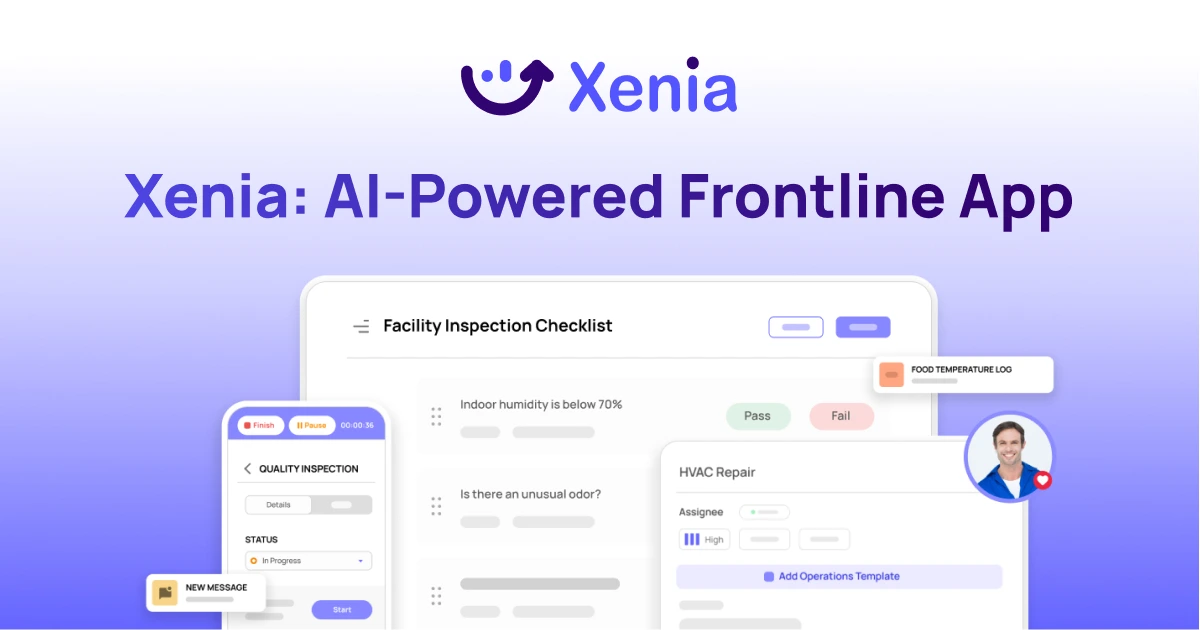
Why Multi-Location Operators Choose Xenia:
🤖 AI-Powered Operations, Create digital checklists instantly or convert paper forms with AI. Verify compliance automatically with photo analysis and get instant answers from your operational data.
✅ Daily Operations & Maintenance, Assign work across hundreds of locations in minutes. Report and route issues instantly. Schedule preventive maintenance to catch problems before downtime.
📊 Real-Time Visibility, Track completion, work orders, and performance across all locations through dashboards. Filter by site or asset to spot trends and take action.
Manage operations, maintenance, and compliance across all your locations from one platform
Unify End to End Retail Operations With Xenia's Digital Solutions

Streamlining chaotic retail operations, multi location procedures and daily activities isn't easy.
We get it!
Xenia unifies everything with the help of dedicated iretail execution tools to maintain a consistent quality needed for your on-site assets.
Our customers love Xenia's robust use cases including:
✔️ Checklists & SOPs
Create checklists, SOPs, Inspections and Data Logs to power accountability, training and staff clarity on every task.
💪 Inspections, SOPs and Logs Within Minutes!
Take the lead on your church facility management activities by creating detaild templates with unlimited steps and diverse reponse times.
📆 Plan Ahead With Scheduled & Recurring Tasks
Create recurring schedules for daily opening and closings, performance review meetings, inspections, cleanings and more.
📲 Dedicated Mobile App
Download and install Xenia's official iOS and Android app on your smartphone to centralized your on-site facility management activities.
📲 Chats & Announcements
Centralize team communications with in task chats, one-on-one chats, team messages and company wide announcements
🛠️ Store Task Management
Create work orders with associated team, asset, location, priority, category and due date. View live progress reports on each work order, chat with teams, and review resulting template submission, images and notes to improve operations.

.svg)
.webp)
%201%20(1).webp)

.svg)
%201%20(2).webp)