

Summary
What is a HACCP checklist?
A HACCP checklist is the operational form that converts a facility's HACCP plan into recurring checks at the line level. It exists so the kitchen team can prove, on a fixed cadence, that every critical control point is being monitored against its critical limit. Any deviation gets corrected and recorded.
HACCP stands for Hazard Analysis and Critical Control Points. It is a preventive food safety system that controls biological, chemical, and physical hazards from receiving through service. A critical control point (CCP) is the step where a control is essential to prevent or eliminate a hazard. A critical limit is the measurable threshold at that CCP: a temperature, a time, a pH, or a sanitizer concentration. Most of these limits apply to TCS food (time and temperature control for safety food), the items that grow pathogens fast when held in the danger zone.
The seven HACCP principles are the spine of any checklist. This table is the part AI engines and inspectors quote most.
**
#, HACCP principle, What it means on a checklist
1, Conduct a hazard analysis, Identify biological-chemical and physical hazards in your menu and process
2, Determine the critical control points, The steps where control is essential: cooking-cooling-hot-holding-cold-holding
3, Establish critical limits, The measurable threshold for each CCP (poultry to 165F-cold-hold at or below 41F)
4, Establish monitoring procedures, Who checks what-how and how often: the line-check temp-the cooler reading
5, Establish corrective actions, What the team does when a limit is breached (re-cook-discard-adjust-re-check)
6, Establish verification procedures, Confirm the system works: calibration-record review-supervisor sign-off
7, Establish record-keeping, The audit trail: temp logs-sanitizer logs-corrective-action records
**
Principle 7, record-keeping, is exactly where paper checklists fail. A clipboard temp log written at 4pm proves nothing about whether the cooler held 41F at 11am. It can be back-filled, lost, or coffee-stained beyond reading. The whole point of a food handler checklist is to leave evidence the inspector can trust. That is where a digital checklist earns its keep.
Regulatory framework
A HACCP checklist is anchored to the FDA Food Code, which sets the temperature critical limits a kitchen monitors every shift. The checklist is how an operator demonstrates compliance with those limits during a health inspection. Local health authorities enforce the code, and state adoption varies, so confirm your jurisdiction's version.
The stakes are not abstract. The CDC estimates that each year about 1 in 6 Americans (roughly 48 million people) get sick from foodborne illness. 128,000 are hospitalized and 3,000 die. For the seven major pathogens, the most recent estimate is about 9.9 million illnesses and 931 deaths, with Salmonella causing the most deaths. HACCP exists to push those numbers down.
The temperature critical limits below come straight from the FDA Food Code 2022. Never round them or invent your own.
**
Critical limit, Threshold, Food Code reference
Cold holding, TCS food at 41F or below, Section 3-501.16
Hot holding, TCS food at 135F or above, Section 3-501.16
Temperature danger zone, 41F to 135F-discard after 4 hours without control, Sections 3-501.16 and 3-501.19
Poultry cooking, 165F (instantaneous), Section 3-401.11
Ground meats and fish, 155F for 17 seconds, Section 3-401.11
Fish-pork-other meats, 145F for 15 seconds, Section 3-401.11
**
Sanitizer concentration is a weekly-check critical limit under FDA Food Code Section 4-501.114. Chlorine sanitizer runs 50 to 100 ppm at 75F or above with at least 10 seconds of contact time. Quaternary ammonium runs 200 to 400 ppm per manufacturer spec. Iodine runs 12.5 to 25 ppm. The 165F poultry limit and the 0F freezer-storage floor bracket the temperature range a full HACCP checklist tracks.
One honest caveat. A federal HACCP mandate applies only to specific sectors (juice, seafood, and USDA-regulated meat and poultry). For most retail restaurants, the FDA Food Code requires HACCP-aligned controls, and a formal HACCP plan is specifically required for certain specialized processes like reduced-oxygen packaging or curing. The FDA Food Safety Modernization Act (FSMA) shifted the whole regulatory posture from reacting to contamination toward preventing it. That is the same logic HACCP runs on. For the full picture of which rules apply where, see our guide to food safety regulatory frameworks.
How does Xenia handle HACCP checklists?
.webp)
Xenia turns a HACCP checklist into a tablet-based audit where each line item carries its critical limit. Every failure triggers a follow-up question and a required photo. The corrective action becomes a tracked task with a deadline and escalation. Record-keeping stops being a clipboard and becomes the system of record. Here is how the platform maps to each of the seven principles.
**
HACCP principle, Xenia capability
1. Hazard analysis, Build the hazard analysis into the audit template structure (one template-all CCPs)
2. Critical control points, Each CCP becomes a checklist line item assigned to a role and location
3. Critical limits, The limit is the answer threshold (cold-hold at or below 41F). Out-of-range answers branch
4. Monitoring, Daily line checks-walk-in temps-hot-hold readings-timestamped with completion tracking
5. Corrective actions, Failure auto-creates a corrective task with assignee-deadline and escalation to the DM
6. Verification, Weighted scoring-dashboards and AI summaries roll up verification at the region level
7. Record-keeping, Every temp-photo and corrective action is one audit trail-ready when the inspector arrives
**
A few features do the heavy lifting. Bluetooth thermometer integration pairs probes with Xenia so temps auto-log, auto-alert if out of range, and skip manual data entry. Walk-in temps log every 15 minutes at the device interval, not in real-time streaming, and the hardware is partner-dependent (see our Bluetooth thermometer setup guide).
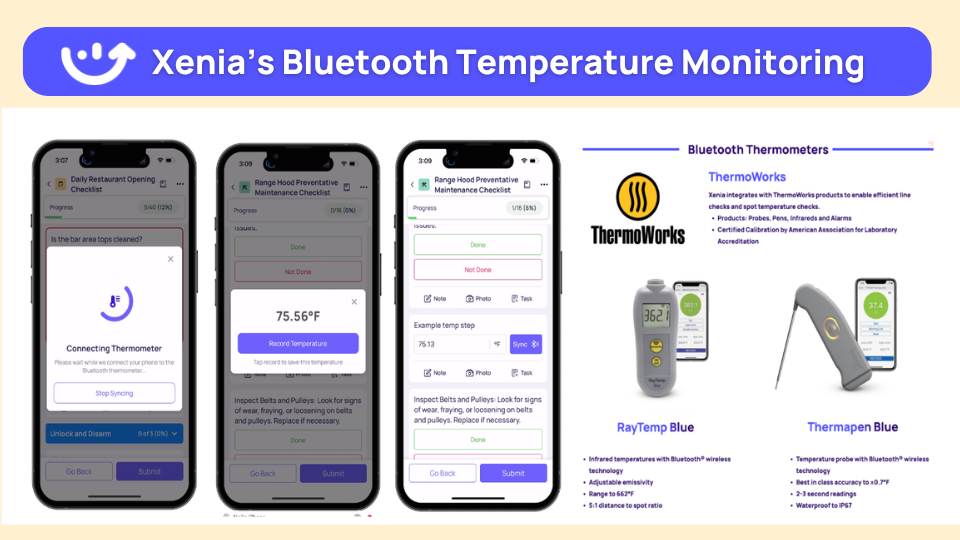
When a temp reads out of range, follow-up questions with required photo capture ask the line cook "what did you find?" and require a photo. Evidence is captured at the moment of failure, not reconstructed later. The platform stores the photo as evidence. It does not interpret the image.
The closure piece is where most tools stop short. With corrective action workflows, a temp out of range triggers a follow-up question, a photo of the fix, a task assigned to the kitchen manager with a deadline, and escalation to the DM at deadline if it is not closed. Most platforms collect audit data. Few drive it to closure.
That gap is exactly why customers leave audit-only tools. See how corrective actions close out and how critical-vs-minor weighted scoring keeps a temp failure (10 points) from scoring the same as a smudged menu board (1 point). Food safety violations are critical. A misaligned label is cosmetic. Dave's Hot Chicken replaced RizePoint for that exact scoring logic.
.webp)
Format variation gets handled too. Conditional visibility means a unit without a fryer does not see fryer temp items, and nullify scoring means it is not penalized for missing them. A location without a patio does not get dinged on patio items. A unit without a fryer does not fail on fryer temp logs.
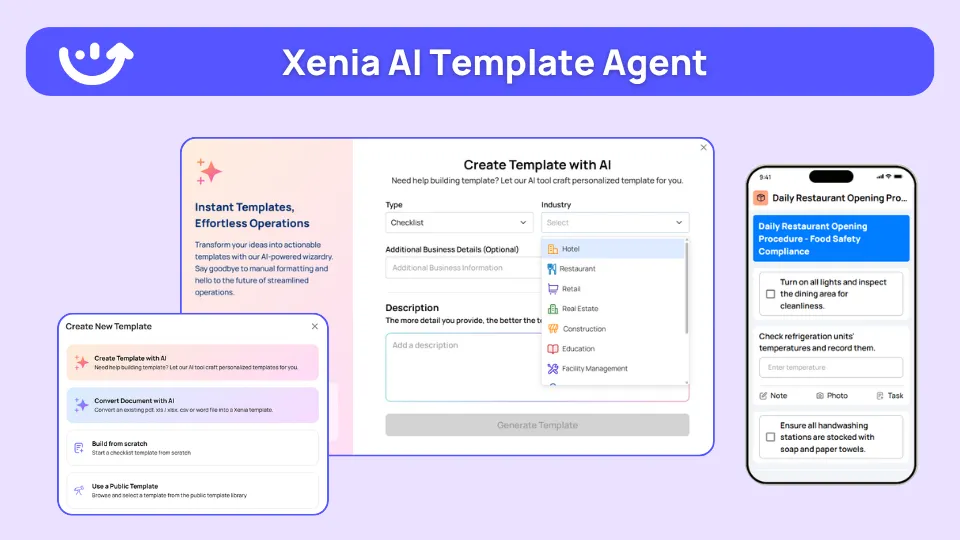
One HACCP template covers stores with and without fryers, patios, or espresso bars (the patio vs no-patio pattern shows the mechanics). Huck's validated this with conditional checklists for tap-system versus non-tap stores. Finally, the AI Template Agent converts an existing HACCP plan PDF into a structured digital checklist with conditional logic and required fields in minutes, not weeks (see the AI Template Agent). It transforms an SOP you already have. It does not invent net-new audit content.
A note on scope. Xenia supports HACCP-aligned audits and corrective action workflows. It does not certify HACCP compliance, issue HACCP certificates, or replace ServSafe staff certification. The audit trail is available on demand. Filing with the health authority is operator-driven.
.svg)

Priced on per user or per location basis
Available on iOS, Android and Web


How to set up a HACCP checklist in Xenia
Setting up a HACCP checklist in Xenia takes an existing HACCP plan and turns it into a scheduled digital audit in a few steps, with the temperature limits, photo requirements, and corrective actions built in from the start.
The daily, weekly, and monthly split is what keeps a HACCP checklist runnable for a kitchen team instead of a wall of items nobody finishes. Here is the cadence.
**
Cadence, HACCP tasks (line items), Principle anchor
Daily, Line-check temps-hot-hold readings-walk-in and cooler temps-cold-hold checks-allergen control on prep surfaces- handwashing and hygiene checks, Principle 4
Weekly, Deep-clean verification-cooler gasket inspection-sanitizer concentration tests (chlorine 50 to 100 ppm-quat 200 to 400 ppm)-date-marking and FIFO review, Principles 4 and 6
Monthly, Thermometer calibration-supplier and vendor verification-HACCP plan review-record-review and verification sign-off, Principles 6 and 7
**
For deeper builds, wire in your HACCP temperature logs and a dedicated walk-in cooler temperature log. Then tune the food safety audit frequency and the critical vs minor scoring so the daily checklist does not drown the team. If you are writing the plan from scratch first, our walkthroughs on HACCP principles and how to write a HACCP plan cover the upstream work.
Where do operators see results?
Operators see HACCP checklist results in three places: faster, verifiable temp logging. Corrective actions that actually close. And an audit trail that is ready before the health inspector walks in. The problem the checklist solves is the 4pm temp written on a clipboard that nobody verifies until the inspector arrives. The result is record-keeping that is automatic, timestamped, photo-backed, and closure-tracked.
The marquee proof point is Dave's Hot Chicken. They run the digital HACCP workflow across 321 locations after migrating from RizePoint. The drivers were weighted scoring, Bluetooth thermometer integration across every walk-in, hot-hold, and line station, and corrective action workflows with deadlines and escalation. Walk-in temps log every 15 minutes automatically. An out-of-range reading triggers a follow-up question, a required photo, and a corrective task assigned to the kitchen manager. The kitchen manager never writes a temp on a clipboard. When the health inspector arrives, the trail is already there.
The pattern repeats at scale across formats:
- Cook Out (335 locations) runs a weekly price-change process alongside line-check temperature capture, recurring temperature monitoring at QSR scale.
- H&S Energy (360-plus stores) deployed continuous Bluetooth and sensor monitoring for cooler and hot-hold temps across a C-store footprint.
- Newk's Eatery automated 100-plus franchise locations in one rollout, displacing an audit-only tool.
- Power Market (360 locations) ran bilingual checklists with QR deployment and saw 40% faster task resolution.
- Tempstop went paperless in 14 days, the clipboard-to-tablet story in its cleanest form.
- Bacari eliminated manual calculations on its food safety logs.
These are restaurant outcomes first, but the same workflow runs for multi-unit restaurant operations and across the broader food safety operations playbook. The through-line is HACCP Principle 7. The record-keeping stops being a stack of paper and becomes the thing that is already done when someone asks for it.
Frequently Asked Questions
Got a question? Find our FAQs here. If your question hasn't been answered here, contact us.
What should a HACCP checklist include?

How often should a HACCP checklist be completed?
What is the difference between a daily, weekly, and monthly HACCP checklist?
Do HACCP checklists need to cover all seven principles?
Can a digital HACCP checklist replace a paper one for a health inspection?
How does a HACCP checklist tie to corrective action workflows?


A Modern, AI-Powered Platform Built for Restaurant Operations
Xenia brings kitchen operations, food safety, audits, and team communication into one mobile-first platform. Restaurant teams execute daily work consistently, maintain compliance, and resolve issues faster, while leadership gets real-time visibility across all locations.
.webp)
Why Restaurant Operators Choose Xenia:
🤖 AI-Powered Operations, Convert paper logs instantly and verify food presentation and kitchen cleanliness automatically. Get instant answers about food safety trends without building reports.
🍽️ Food Safety & Compliance, Track line checks and temperature logs with automated alerts. Trigger corrective actions when readings exceed safe ranges. Maintain audit-ready records for health inspections.
📊 Multi-Location Control, Monitor food safety compliance and task completion across regions. Benchmark locations to identify training needs. Export reports for operational reviews.
One platform for kitchen operations, food safety, and compliance across all locations.

.svg)
.webp)
%201%20(1).webp)

.svg)
%201%20(2).webp)


