
Post Summary
Why is Restaurant Equipment Maintenance Necessary?
Restaurant equipment maintenance software keeps a record of every fryer, walk-in, ice machine, hood and dish machine. It puts each one on a preventive maintenance schedule and turns breakdowns into tracked work orders with photos, owners and due dates. For a multi-unit group, it replaces the clipboard, the group text and the vendor's paper ticket with one service history per asset.
Restaurant equipment maintenance is necessary because the kitchen runs on a handful of machines. Each one carries a food safety, fire or revenue risk when it fails. A missed service date is cheaper to fix than a fryer that quits at 7:40pm on a Friday.
The money is real. 86 Repairs, a restaurant repair and maintenance vendor, estimates U.S. restaurants spend $28 billion a year on repairs and maintenance. It estimates they lose another $46 billion to equipment or infrastructure downtime (86 Repairs analysis of restaurant repair and maintenance costs). Treat that as vendor data. The same source puts the average 2021 HVAC repair invoice at $1,019.90.
Margins leave little room for surprise invoices. In the National Restaurant Association's 2026 State of the Industry report, 42% of operators said their business was not profitable in 2025, and 60% said conditions had gotten worse (Nation's Restaurant News on the NRA 2026 outlook).
There is also a code reason. The FDA Food Code requires equipment to be kept in good repair. Section 4-501.11 says components "such as doors, seals, hinges, fasteners, and kick plates" must stay intact, tight and adjusted to manufacturer specs (Food Code 4-501.11 as adopted in Washington). A torn walk-in gasket is a citable violation, not just an energy leak.
Restaurant equipment maintenance covers three jobs. You track and manage every asset in the building. You service and inspect it on schedule. And you keep a working relationship with local service vendors. If you are still building the asset list, start with this commercial kitchen equipment list.
Reactive maintenance of restaurant equipment keeps you playing catch-up. A planned program gets you:
- Longer equipment life, because small problems get fixed before they become replacements.
- Lower utility bills, because clean coils and tight seals waste less energy.
- Consistent food quality, because fryers and ovens hold the temps your recipes assume.
- Cleaner inspections, because the health inspector and fire marshal see equipment in good repair.
- Steadier guest counts, because the menu item a guest drove in for is actually available.


Priced on per user or per location basis
Available on iOS, Android and Web


What Are The Key Challenges of Restaurant Kitchen Equipment Maintenance?

The hardest part of restaurant equipment maintenance is not the repair. It is knowing what is due, who saw the problem, and whether the vendor actually fixed it, across every location at once. Five challenges come up again and again.
1. Maintaining Consistency
For restaurant owners, a consistent guest experience is the job. One broken machine breaks it. Picture the espresso machine failing during the morning rush. The line backs up, regulars walk out, and the store feels less reliable for weeks. Routine espresso machine maintenance is boring. That is the point.
2. Scaling and Operational Challenges
Multi-unit operators feel this one most. Twelve stores can mean twelve hood vendors and twelve stacks of paper invoices. Each store's PM calendar lives in a different GM's head. When a GM leaves, the calendar leaves too. Multi-location work order management fixes this by putting every store's assets, schedules and open tickets in one view.
3. Compliance Management Challenges
Equipment failures turn into food safety violations fast. The FDA's restaurant risk factor study (2017 to 2018 data, released June 2023) found improper holding time and temperature was one of the two most common foodborne illness risk factors. A food safety management system was the strongest predictor that those risks were under control (Keller and Heckman summary of the FDA risk factor report).
A walk-in that drifts to 45°F is an equipment failure before it is a food safety violation. A faulty sensor or a worn door seal is usually the cause. Catch it on a weekly check and you protect the product. Miss it and an inspector may flag your HACCP or HARPC program. An outbreak can also damage the reputation of the restaurant for years.
4. Ensuring Efficient Servicing
It is the hottest day of the summer. Guests are lined up for soft serve. The ice cream machine quits mid-rush, and no tech is free until tomorrow. The guests leave and some don't come back. Getting a tech out fast is only half the problem. You also need proof the tech came, a record of what they did, and a flag if the same unit fails again in 30 days.
5. Enhancing Team Accountability
Skipping maintenance procedures for the hood's ventilation system lets grease build up until it becomes a fire risk. Safety rules apply to the people doing the work, too. OSHA's lockout/tagout standard "covers the servicing and maintenance of machines and equipment." It requires the employer to inspect its energy control procedure "at least annually" (OSHA 29 CFR 1910.147). That covers staff who clear jams or clean slicers and mixers. If you employ teens, OSHA's Young Worker Safety in Restaurants eTool lists the hazards to train for.
The reporting gap. The line cook who hears the fryer pilot click off at 7:40pm is the first to know. That cook is also the last person likely to file a ticket. If reporting needs a login, an app install or a call to the GM, the failure gets reported at close or the next morning. By then you have lost a shift of fryer capacity.
Why Do Managers Need Restaurant Kitchen Equipment Maintenance?

Managers need a maintenance program because it protects the four things they are measured on: food cost, labor hours, inspection results and guest counts.
1. Save Money
Small problems are cheap. Big ones are not. Go back to the ice cream machine. Regular maintenance checks might not have prevented every breakdown, but they would have caught the warning signs first. Energy is the other line item. ENERGY STAR reports that keeping condenser and evaporator coils clean saves "almost a thousand dollars per year for an average-sized food service facility." In a Food Service Technology Center test of 10 refrigeration units, basic coil cleaning cut energy use by 2% to 49%, an average of 17% (ENERGY STAR on commercial kitchen refrigeration costs).
2. Enhance Operational Activities
Restaurant equipment maintenance keeps the line moving. Fewer breakdowns mean shorter downtime and fewer menu 86s. Your crew spends the shift cooking, not working around a dead station.
3. ROI on Old Kitchen Equipment
Timely tune-ups extend equipment lifespan and push back capital spend. At some point, though, repair stops making sense. A common rule of thumb is to replace a unit when its maintenance costs exceed 50% of its replacement value (OpenWrench restaurant facilities guide). You can only run that math if you have a service history and cost total per asset.
4. Improved Health and Hygiene
Refrigeration and hot-holding equipment exist to hit Food Code numbers. Cold holding is 41°F (5°C) or below. Hot holding is 135°F (57°C) or above (Food Code 3-501.16, published by the FDA Food Code program). States enforce whichever edition they adopted. A walk-in cooler temperature log is the earliest warning that a compressor or seal is going.
5. Reduced Fire Incidents
U.S. fire departments responded to an estimated 5,600 restaurant fires a year from 2011 to 2013, and cooking caused 64% of them (USFA restaurant fire snapshot). NFPA data for eating and drinking establishments (2010 to 2014) shows about 7,410 fires a year. Cooking equipment was involved in 61%, deep fryers in 21%, and failure to clean was a factor in 22% (Warren Forensics summary of the NFPA report). "Failure to clean" is the maintenance line in that list.
Build the calendar once. A restaurant team that sets up its PM calendar one time (hood vendor quarterly, coils on a set cycle, suppression twice a year) gets reminders, photo proof and a service log per asset. That beats a sticky note on the office door. In Xenia, recurring PM tasks for refrigeration and kitchen equipment come with reminders, and every completed job lands in that asset's history. Skoops Ice Cream achieved 100% scheduled task completion across two locations with Xenia.
What is Restaurant Equipment Maintenance Software?

Restaurant equipment maintenance software is a tool that stores an asset record for each piece of kitchen equipment, schedules preventive maintenance, and converts breakdowns into work orders. Those work orders get assigned, tracked and closed with photos and timestamps. Most products in this space are CMMS tools. Some, like Xenia, are frontline operations platforms with work orders built in.
A few terms worth pinning down:
- A work order is the ticket that tracks one repair or task from request to close.
- Preventive maintenance (PM) is service done on a schedule before something breaks.
- A CMMS (computerized maintenance management system) is software built for maintenance departments, often with parts and purchasing.
- Equipment downtime is the time an asset is out of service.
- MTTR (mean time to repair) is the average time from failure to fix.
Good equipment maintenance software, and the restaurant managers running it, should cover five jobs:
- Asset inventory. One record per fryer, walk-in and hood, with make, model, serial and install date.
- Inspection and compliance scheduling. Hood cleanings, suppression service and coil cleaning come due on their own, with no one digging through a binder.
- Reporting. See which unit keeps failing, which store runs late on PM, and where repair spend is climbing.
- Vendor service history. Every visit, note and invoice amount sits on the asset, so you can judge the vendor on facts.
- Routine inspections. Daily and weekly checks catch the loose gasket before it becomes a compressor job.
The workflow, submission to resolution
Here is how a fryer failure moves through a QR-code work request in a restaurant kitchen.
- Spot. The line cook sees the fryer won't hold 350°F.
- Scan. They scan the QR tag on the fryer. The request form opens with the store, the asset and the category already filled in. No login, no app install.
- Describe. They type "won't hold temp, pilot keeps dropping" and add a photo.
- Route. The request goes to the GM or facilities lead. They approve it, or it auto-routes if that category is set to skip approval. They assign it to the in-house tech or the fryer service vendor with a priority and due date.
- Fix. The tech logs labor time, cost and notes against the asset.
- Verify. The kitchen manager confirms the repair with a photo or a follow-up temp check.
- Close and learn. The work order closes into the fryer's service history. A third ticket on the same fryer in 90 days is your repair-or-replace signal.
This is how QR-code anonymous work requests work in Xenia. Any employee, third-party vendor or guest can file without an account, app install or login. Location, asset, category and a default priority pre-fill. Admins choose which categories need approval and which auto-route. In practice, a kitchen manager scans the QR on a broken fryer and the request lands with the maintenance team, photo attached. Vendors can use the same path through a vendor work request with no login.
|  | Login-required request | No-login QR request |
|---|---|---|
| Who can report | Staff with accounts | Any employee, vendor or guest who can scan |
| Time to report | After the rush, from the office | At the equipment, in under a minute |
| Asset and location | Typed by hand, often wrong | Pre-filled from the QR tag |
| Evidence | Often none | Photo attached at the moment of failure |
| Who approves | Manager in the app | Manager in the app, or auto-route by category |
How to track downtime. Downtime is the clock from "reported" to "back in service." Track it per asset and per vendor. Repeat failures and long MTTR on one unit or one vendor are the two numbers that change decisions. In Xenia, you measure it from work order timestamps, time and cost per work order, and real-time status. It is not a separate downtime module. For the metrics themselves, see these maintenance KPIs and work order metrics.
Where a full CMMS still leads
Be honest about fit. Xenia is not a full CMMS. It handles frontline work order submission, routing, PM scheduling and asset history. It does not match Limble or ServiceChannel on parts inventory, purchase orders, depreciation or vendor invoicing. A restaurant group with a dedicated maintenance department and a parts room may need that depth. A group whose biggest problem is getting store teams to report failures fast usually does not. The real question is who files the ticket, a technician or a line cook. If you are weighing the two, read work order software vs CMMS before you sit through a demo. Some groups run both: Xenia at the store level for requests, checklists and temp logs, and a CMMS in the facilities office for parts and purchasing.
Is Your Restaurant Equipment Maintenance Checklist Complete?

Get Your Free Restaurant Equipment Maintenance Log
A complete restaurant equipment maintenance checklist covers daily cleaning, weekly and monthly inspections, and the vendor services that fire and health codes set on a fixed calendar. Use this restaurant kitchen equipment maintenance checklist as your base. Running it daily, weekly and monthly cuts service calls and keeps cleaning on track.
Cleaning of the Vent, Hood, and Duct
Grease in the hood, ducts and fans is fuel. NFPA 96 sets how often the exhaust system gets inspected for grease buildup, based on cooking volume. Clean when the inspection finds buildup. Use a commercial kitchen hood inspection form so the vendor's visit leaves a record.
Cleaning of Grease Filters
Fryers and grills depend on grease filters to keep grease out of the ductwork. How often you clean them depends on volume. A wok station needs more attention than a sandwich line. Check daily that filters are seated with no gaps.
Inspection of the Deep Fat Fryer
Fryers take daily abuse. Filter oil, check oil quality and wipe the exterior every day. On a weekly or monthly cycle, boil out and inspect elements, the thermostat and the drain valve. Track oil changes with a fryer oil quality log.
Automatic Extinguishing Systems Services
A suppression system must be serviced by a certified person at least every six months. Class K extinguishers need professional inspection at least annually. Use a commercial kitchen suppression system inspection and a fire extinguisher inspection checklist for the in-between checks.
Here is the full interval table, with the code or source behind each line.
| Equipment | Daily (staff) | Weekly or monthly (staff) | Vendor or code-driven service | Source |
|---|---|---|---|---|
| Exhaust hood, ducts, fans | Wipe hood surfaces, check filters are seated | Clean grease filters (frequency depends on volume) | Inspect for grease buildup: monthly for solid fuel, quarterly for high volume (24-hour, charbroiling, wok), semiannually for moderate volume, annually for low volume | NFPA 96 Table 11.4, as reproduced by Markel on restaurant fire protection |
| Fire suppression system | Nozzle caps in place, pull station clear | Visual check | Serviced by a certified person at least every six months | NFPA 96, per Markel |
| Class K extinguisher | Present, pin and seal intact | Monthly visual | Professional inspection and maintenance at least annually | NFPA 10, per Markel |
| Walk-in and reach-in refrigeration | Log temps at open and shift change, check doors close and seal | Clean condenser coils (most manufacturers say at least every three months, more in greasy kitchens), check gaskets | Professional service on the manufacturer's schedule | ENERGY STAR, Food Code 4-501.11 |
| Dish machine | Check final rinse temp and sanitizer concentration each shift | Delime per manufacturer | Hot-water sanitizing rinse at least 165°F (74°C) for stationary rack single-temperature machines and 180°F (82°C) for all others, no higher than 194°F (90°C) at the manifold | Food Code 4-501.112, as adopted in Minnesota Rule 4626.0795 and Virginia 2VAC5-585-1680 |
| Ice machine, ice bins, beverage nozzles | Wipe bin, check scoop storage | Clean per manufacturer | Clean at the manufacturer's frequency, or often enough to prevent soil or mold buildup if none is given | Food Code 4-602.11, as adopted in Minnesota Rule 4626.0845 |
| Fryers | Filter oil, check oil quality, wipe exterior | Boil out, inspect elements, thermostat, drain valve | Professional inspection on manufacturer schedule | Manufacturer manual |
| Ovens, ranges, griddles | Clean, check burners light evenly | Calibrate thermostat, inspect door gaskets and hinges | Gas line and connector inspection by a licensed tech | Manufacturer manual |
| Slicers, mixers | Clean and sanitize after use | Inspect guards and cords | Lockout/tagout before servicing, procedure reviewed at least annually | OSHA 1910.147 |
Two caveats. Local fire marshals and health departments can set stricter intervals than these. And the manufacturer manual controls your warranty coverage, so follow it where it is tighter.
Tools to put the table to work:
- A preventive maintenance calendar for the vendor and code-driven dates
- An ice machine cleaning log for bins and machines
- A monthly oven maintenance checklist for ovens, ranges and griddles
- A daily espresso machine maintenance checklist for the coffee station
- An equipment maintenance log for everything else
- A preventive maintenance schedule template to build the full calendar by store
What to Know When Maintaining Restaurant Equipment?
The rules that matter most are simple. Follow the manufacturer manual. Keep the warranty paperwork. Train the people who touch the equipment daily. And never let untrained staff attempt repairs on gas, electrical or refrigeration systems.
- Use the manufacturer's manual. It sets the cleaning steps, the service intervals and the parts that are safe to swap in-house.
- Know your warranty. Knowing what is covered gets you a faster fix, and skipping required service can void it.
- Train the crew. Give kitchen staff real training on equipment operation and routine care. Start with restaurant kitchen equipment training.
- Write cleaning SOPs. A clear restaurant SOP for each station prevents grease buildup, protects food safety and extends equipment life.
- Don't DIY repairs. If no one on site is qualified, don't attempt the fix. A bad repair on commercial cooking equipment can damage the unit or injure the person doing it.
- Run a structured schedule. Track tasks, watch equipment performance and plan the next service before the last one is forgotten.
- Tag every asset. Put make, model, serial, install date, warranty end date and preferred vendor on one record. A QR tag on the unit puts that record and the "report a problem" form one scan away. See QR code asset tagging and scan-to-create work orders from asset tags.
- Verify vendor work, don't assume it. Require a photo of the cleaned hood plenum or the replaced filter on the work order before you approve the invoice. Work order photo documentation makes that the default.
- Start calendar-based, refine with history. A calendar-based PM program is the right starting point. Then adjust intervals using your maintenance history (Modern Restaurant Management, written by UpKeep's Warren Wu).
- Lock out before you reach in. Cleaning a slicer or mixer falls under OSHA lockout/tagout when an unexpected startup could hurt someone (OSHA 1910.147).
Best Restaurant Safety Software For Businesses In 2024
Here are the best restaurant equipment maintenance software options for 2026. The right one depends on who files the ticket. CMMS tools like UpKeep, MaintainX and Limble are built for maintenance technicians. Xenia is built for the store team that sees the failure first.
| Software | Built for | Free requesters or portal | Published pricing basis | Best fit |
|---|---|---|---|---|
| Xenia | Multi-unit frontline ops teams | No-login QR requests | Custom per location, work orders as add-on | Restaurant groups that want work orders, checklists, audits and temp logs in one app |
| UpKeep | Maintenance teams | Requesters need no paid license, portal on Professional and up | $24 and $55 per user/mo, higher tiers quoted | Teams with dedicated maintenance staff |
| MaintainX | Maintenance teams | Free requesters | $0, $20, $65 per user/mo (annual) | Teams that need parts and PO tracking |
| Limble | Maintenance teams | Request portal and unlimited requesters on all plans | Pricing calculator | Asset-heavy CMMS buyers |
| FMX | Facilities teams | Requesters and vendors not billable | Quote, annual contract | Facilities departments with capital planning needs |
| eWorkOrders | Maintenance teams | Unlimited users on Starter and Advanced | $380 or $480 per month flat | Small teams that want a flat monthly cost |
| BlueFolder | Equipment service companies | Customer portal on Enterprise | $62.50 to $110 per user/mo | The repair company, not the restaurant |
All prices are as published on vendor pages as of October 2026. Check each vendor's page before you buy.
1. Xenia: Work Orders for the Store Team

Xenia is a frontline operations platform built for multi-unit restaurant, C-store, retail and hotel operators. Work orders, PM schedules, asset records, daily checklists, audits, temp logs and team comms share one app. That matters in a kitchen, because the person who spots the problem is usually holding a checklist, not a maintenance app.
Key Features
- Work orders start from a QR code on the equipment. Any employee, vendor or guest can submit without logging in, with location, asset and category pre-filled.
- Preventive maintenance scheduling sets recurring PM for HVAC, refrigeration and kitchen equipment, with reminders.
- Equipment management keeps an asset register with model, serial and purchase date. Each asset carries its own work history with cost analysis and PDF or Excel export.
- Requests route to in-house techs or outside vendors. Labor time and cost log on every work order.
- Equipment inspections and audits, checklists and SOPs, and task management run in the same app as the work orders.
- Temperature monitoring and real-time reporting show which stores are drifting before the inspector does.
Bacari Restaurants uses Xenia to standardize checklists and operations across its locations.
Honest limitation: Xenia is not a full CMMS. Teams that need deep parts inventory, purchase orders or vendor invoicing pair it with a CMMS.
Pricing
- Basic and Pro plans are custom pricing per location. Enterprise is through sales.
- Work orders ("Facilities Ticketing & Work Orders") and QR asset codes ("Asset Management & QR Codes") are add-ons.
- 14-day free trial, no credit card required.
- See current plans on the Xenia pricing page.
2. UpKeep

UpKeep is an asset operations and maintenance platform built for maintenance and reliability teams. Techs create work orders from a phone and get alerts when assets fall out of spec. Managers see scheduled tasks, due dates, priority and assignments in one list. For a restaurant group with its own maintenance staff, it is a strong CMMS option. Compare the two in Xenia vs UpKeep, or see the wider field in UpKeep alternatives.
Key Features
- Preventive maintenance scheduling to catch issues before they become downtime
- Downtime tracking per asset
- Mobile work orders with priorities, notes, photos and asset tags
- Asset management with a maintenance history for each piece of equipment
Pricing
- Essential: $24 per user per month
- Premium: $55 per user per month (PM scheduling starts here)
- Professional and Enterprise: quote-based. The external request portal is listed on these tiers.
- Requester users don't need a paid license, per UpKeep's FAQ (UpKeep pricing)
3. FMX

FMX is facilities and maintenance software that lists restaurants among its industries. It focuses on closing work orders quickly, organizing preventive maintenance and managing assets. Its capital planning angle suits a facilities department that has to budget for replacements across many sites. It is a heavier tool than most single-concept groups need. But a larger brand with a facilities director will recognize the workflow. The pricing model is friendly to store teams, since people who only submit requests are not billed.
Key Features
- Scheduled preventive maintenance to avoid surprise breakdowns
- Repairs and service history for all equipment in one system
- Facility data analysis to find the root causes of poor performance
- Capital planning tools that show the lifecycle of your equipment
Pricing
- No published prices. Quote-based.
- Priced on the users who manage or close tasks, plus enabled features. Requesters, vendors and partners are not billable.
- Annual contracts with a one-time implementation fee (FMX pricing)
4. BlueFolder

BlueFolder is field service management software. It is built for the companies that repair restaurant equipment, not for the restaurant operator. If you run a refrigeration or kitchen equipment service company, it helps you track, schedule and dispatch technicians. If you run the restaurant, it is probably the tool your vendor uses, not the one you need. It is on this list so you can rule it in or out quickly. Many operators find it while searching for maintenance software and only later realize it serves the other side of the service call.
Key Features
- Work order creation and technician dispatch with notifications
- Integrated billing so the service company gets paid faster
- Electronic signature capture to confirm work was accepted
- Cloud access for office staff and techs in the field
Pricing
- Pro: $62.50 per user per month (2-user minimum)
- Pro Plus: $92 per user per month (3-user minimum)
- Enterprise: $110 per user per month (5-user minimum)
- Pay as you go (BlueFolder pricing)
5. eWorkOrders

eWorkOrders is a cloud-based CMMS and enterprise asset management system with mobile access. It centralizes service requests and tasks. You can view upcoming and past work by list, calendar or map. Its flat monthly pricing with unlimited users on the lower tiers stands out. That model fits a restaurant group that wants every GM and kitchen manager in the system without counting seats. See how it compares in eWorkOrders alternatives.
Key Features
- Maintenance calendar, vendor records and item tracking
- Reports on what has been maintained and which items cost the most to keep running
- Mobile access for techs and managers
- Maintenance planning by asset
Pricing
- Starter: $380 per month, unlimited users
- Advanced: $480 per month, unlimited users
- Enterprise: $45 to $120 per user, 5-user minimum (eWorkOrders pricing)
6. MaintainX
MaintainX is a CMMS built for maintenance teams. It also publishes its own guide to restaurant maintenance software, which judges tools on frontline adoption and visibility across locations (MaintainX on restaurant maintenance software). It is a fit for groups that want parts inventory and purchase orders inside their maintenance tool. Requester accounts are free, so store staff can submit tickets without adding seats. Parts and PO features sit on the Premium tier, so budget for that tier if parts tracking is the reason you are buying. See the side-by-side in Xenia vs MaintainX.
Key Features
- Work orders and preventive maintenance for maintenance teams
- Free requester accounts for staff who only report issues
- Parts inventory and purchase orders on Premium
Pricing
- Basic: free
- Essential: $20 per user per month billed annually ($25 monthly)
- Premium: $65 per user per month billed annually ($75 monthly)
- Enterprise: custom (MaintainX pricing)
7. Limble
Limble is a CMMS that appears on most restaurant maintenance shortlists, including MaintainX's own vendor list. Every plan includes a Work Request Portal and unlimited work requesters. That means store teams can report problems without each person needing a paid seat. Limble does not print prices on its pricing page. You build a quote with its calculator. It suits asset-heavy buyers who want CMMS depth and have someone to run it day to day. For a head-to-head on frontline reporting and fit for multi-unit restaurants, see Xenia vs Limble.
Key Features
- Work Request Portal on all plans
- Unlimited work requesters on all plans
- CMMS depth for maintenance departments
Pricing
- Pricing comes from an online calculator, not a published price list (Limble pricing)
Over To You!
Restaurant equipment maintenance comes down to three habits. Schedule it before it breaks. Make reporting easy for the person who sees it break. Keep one service history per asset so you know when to stop repairing.
Get those right and the rest follows. Your kitchen crew works with equipment that holds temp and lights on the first try. Regular service from a qualified technician extends the life of each unit and keeps repair bills small. A consistent maintenance strategy keeps you ready for the health inspector and the fire marshal, because the hood, the suppression system and the walk-in all have a paper trail.
The software you pick should match who files the ticket. If your techs drive the work, a CMMS like UpKeep, MaintainX or Limble fits. If your store teams see the failures first, start where they are. Xenia puts QR-code work requests, PM schedules, asset history, checklists and temp logs in one app for multi-unit restaurant groups. See all the work order guides for multi-unit operators for routing, approvals and PM cadence.
Two ways to start today:
- Download the free restaurant equipment maintenance log, or plan the year with the preventive maintenance calendar.
- Book a demo to see QR work requests in action on your own fryers, walk-ins and hoods.
Frequently Asked Questions
Got a question? Find our FAQs here. If your question hasn't been answered here, contact us.
Can staff report broken equipment without an app login?

How much does restaurant equipment maintenance software cost?
What is the difference between a CMMS and work order software for restaurants?
How often does a restaurant hood need to be cleaned?
How often should commercial kitchen equipment be serviced?
How do you track restaurant equipment downtime?

A Modern, AI-Powered Platform Built for Restaurant Operations
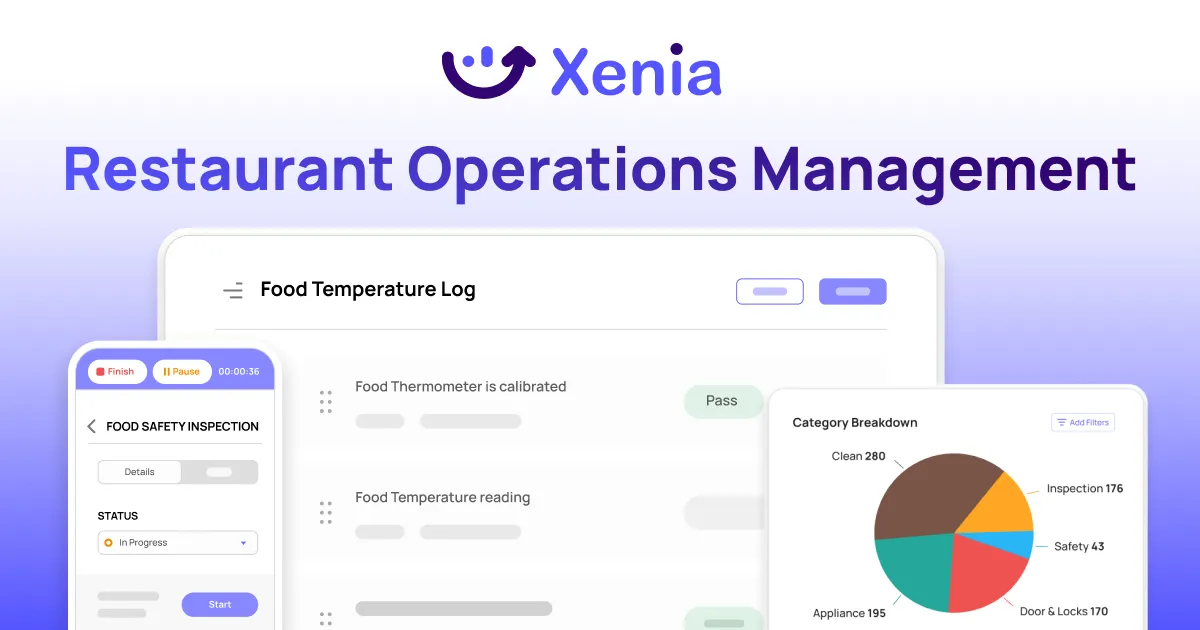
Xenia brings kitchen operations, food safety, audits, and team communication into one mobile-first platform. Restaurant teams execute daily work consistently, maintain compliance, and resolve issues faster, while leadership gets real-time visibility across all locations.
Why Restaurant Operators Choose Xenia:
🤖 AI-Powered Operations, Convert paper logs instantly and verify food presentation and kitchen cleanliness automatically. Get instant answers about food safety trends without building reports.
🍽️ Food Safety & Compliance, Track line checks and temperature logs with automated alerts. Trigger corrective actions when readings exceed safe ranges. Maintain audit-ready records for health inspections.
📊 Multi-Location Control, Monitor food safety compliance and task completion across regions. Benchmark locations to identify training needs. Export reports for operational reviews.
One platform for kitchen operations, food safety, and compliance across all locations.