

Post Summary
Most scheduling software was built for office teams.
Your team is different. They work across 50 locations. They clock in at a register, not a laptop. They change shifts last minute, pick up extra hours, and turn over faster than any office ever would.
Generic scheduling tools were not built for that. And it shows.
Uncovered shifts. Unexpected overtime. Labor costs that never seem to stay where you set them. These are not people problems. They are systems problems.
This guide covers the 6 best workforce management tools built for the way frontline businesses actually operate.
Best Workforce Management Software Comparison
**
Rank, Software, Key Differentiator, Labor Cost Control, Best For
#1, Xenia, Operations integration + AI optimization, Advanced analytics, Multi-location operations
#2, 7shifts, Restaurant-specific forecasting, Sales-based scheduling, Labor cost control
#3, Connecteam, All-in-one mobile platform, Basic budgeting, Frontline mobile teams
#4, Homebase, Budget-friendly simplicity, Budget alerts, Small businesses
#5, Deputy, AI-powered auto-scheduling, Per-user scaling, Complex shift patterns
#6, HotSchedules, Enterprise-grade reliability, Advanced forecasting, Large chains (50+ locations)
**
.svg)

.webp)
1. Xenia - Best Workforce Management Software
- What it's for: Complete workforce management solutions with AI-powered scheduling integrated into daily operations
- G2 rating: 4.9/5
- Capterra rating: 4.9/5
- Best for: Multi-location businesses needing integrated workforce management
Most workforce management software only handles scheduling. You track schedules in one system. Manage tasks in another. Monitor performance separately. Nothing connects until problems happen.
Xenia connects everything automatically. Scheduling integrates with daily tasks. Performance tracking works with operations. AI optimizes workforce allocation across all locations.
How Xenia's Workforce Management Works
Smart Scheduling with Task Integration: Most tools create a schedule. Xenia creates a complete workday.
When a manager builds the weekly schedule, the system automatically attaches the right tasks to every shift. Opening checklists, cleaning tasks, inventory counts, compliance checks. Staff open the app and see not just when they work, but exactly what they need to do.
No separate task system. No morning briefing just to explain responsibilities. Everything is already there.
AI-Powered Workforce Forecasting: This is where Xenia separates from basic scheduling tools.
The AI analyzes historical data across your locations to forecast demand before it happens. Which shifts need more staff next week? Which locations are heading toward overtime? Where are your labor costs running above target?
Instead of reacting to problems after they hit, your managers are making staffing decisions based on data. That is the difference between workforce management and workforce forecasting.
HRIS and Payroll Integrations: Xenia integrates directly with your existing HR and payroll systems.
When an employee is onboarded in your HRIS, they are automatically added to Xenia. When a shift is completed, hours flow directly into your payroll tool. No manual exports. No duplicate data entry. No payroll errors because someone forgot to update a spreadsheet.
Whether you are running Workday, ADP, or another HR platform, Xenia plugs in without disrupting your existing systems.
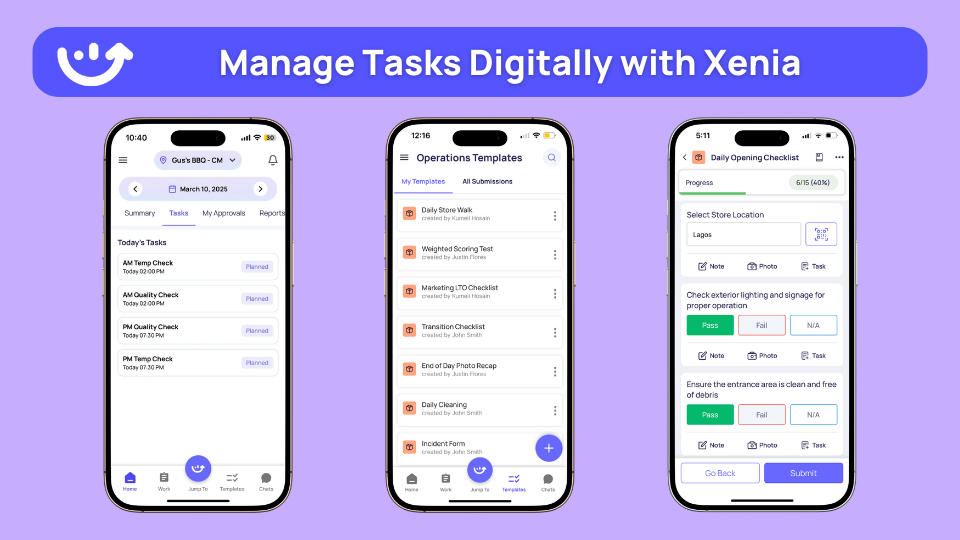
Mobile Task Management: Your frontline team never sits at a desk. Xenia was built for that.
Workers arrive for a shift, open the app, and see their full schedule plus every assigned task. They complete checklists, report issues, and communicate with the team all from their phone. Everything is tracked automatically in real time.
No clipboards. No paper logs. No manager chasing people down to verify completion.
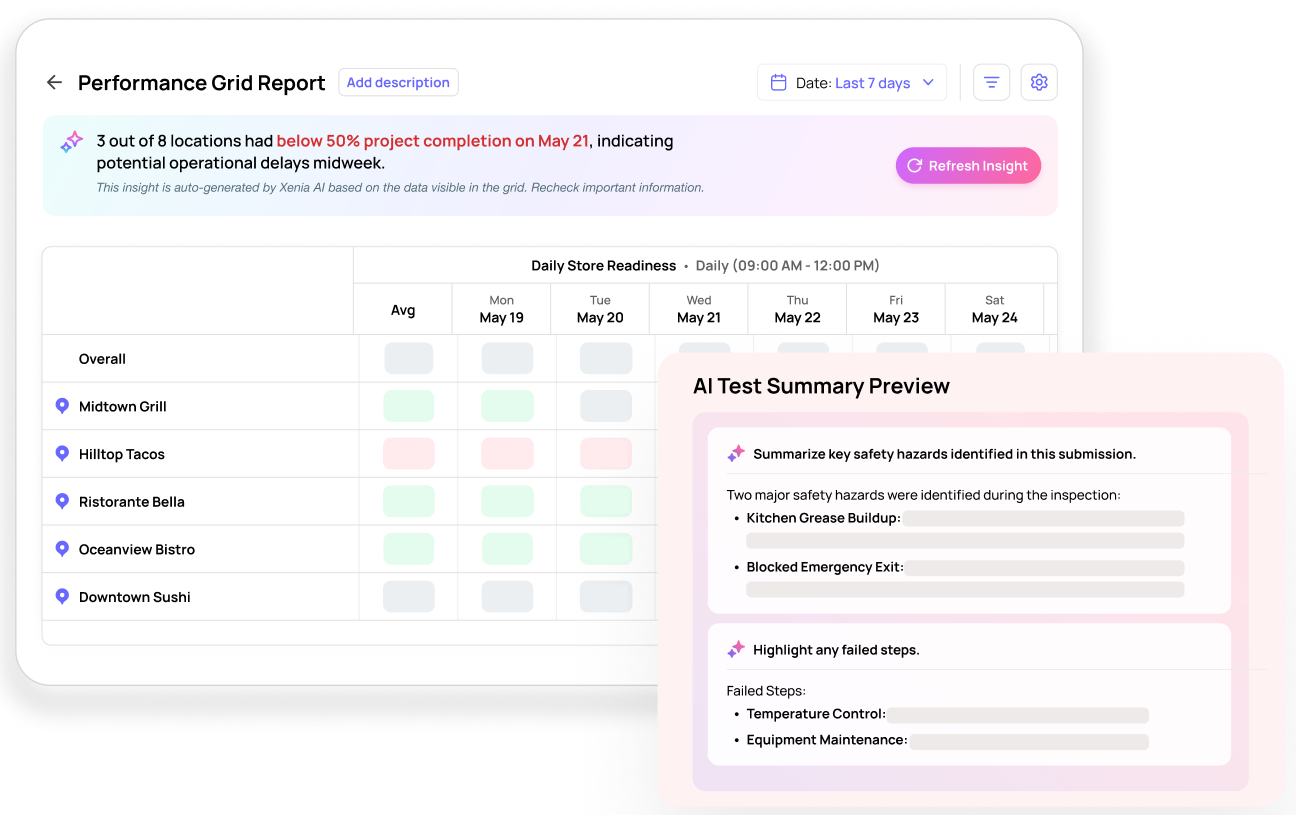
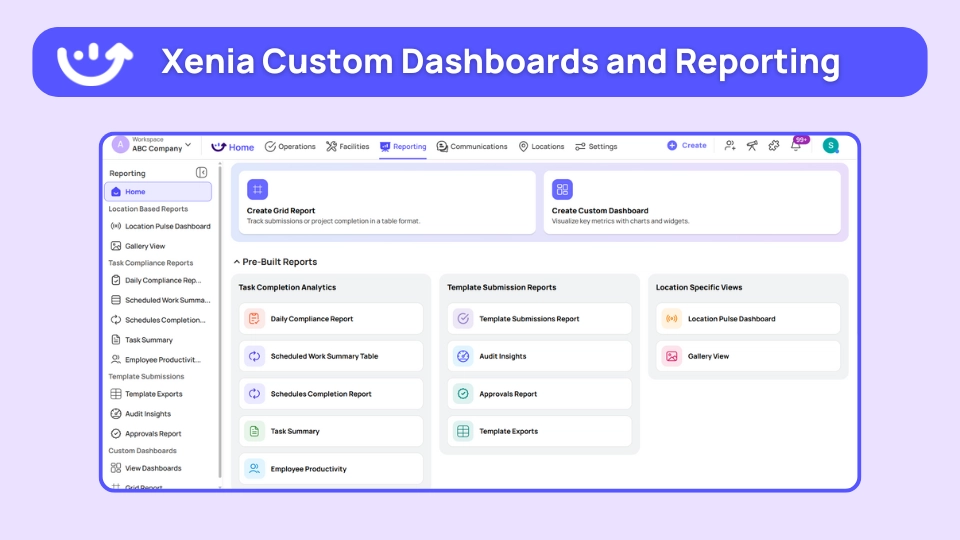
Real-Time Performance Monitoring: Which staff members complete tasks on time? Which locations need additional support? Where are efficiency gaps showing up across your network?
Managers see all of it through live multi-location dashboards. Not at month end. Right now, as it happens.
Automated Compliance Tracking: Staff approaching overtime? The system alerts the manager before it happens. Break time missed? Automatic reminder goes out. Labor law requirements are tracked automatically so violations get prevented rather than discovered after payroll runs.
How Xenia Compares to Traditional WFM Software
**
What You Need, Xenia, Traditional WFM Software
Task integration, Schedules include all daily responsibilities, Scheduling only
AI optimization, Workforce patterns and recommendations, Basic scheduling algorithms
Mobile experience, Native apps with offline capabilities, Limited mobile features
Free version, 25 tasks-5 users forever, Trials only
Multi-location, Real-time dashboards across sites, Location-by-location management
**
Bottom line: Most workforce management tools handle scheduling and stop there.
Xenia goes further. Scheduling, task management, forecasting, and HRIS integrations all in one platform, built specifically for frontline teams running across multiple locations.
If you need more than a scheduling tool, start with Xenia.

Priced on per user or per location basis
Available on iOS, Android and Web


2. 7shifts

- What it's for: Restaurant labor cost control with intelligent scheduling
- G2 rating: 4.7/5
- Capterra rating:
- Best for: Restaurants targeting 25-35% labor-to-sales ratio
- How it works: POS-integrated scheduling prevents over/under-staffing through sales forecasting.
Key features:
- Labor forecasting vs actual sales
- Auto-scheduling based on guest flow
- Shift trading and pickup pools
- Manager logbook with POS sync
- Break and overtime compliance alerts
Good if: You operate restaurants with complex forecasting needs and multiple locations.
3. Connecteam

- What it's for: Mobile-first workforce communication and scheduling
- G2 rating: 4.8/5
- Capterra rating: 4.8/5
- Best for: Hourly teams needing mobile-first management
- How it works: All-in-one app combining schedules, tasks, chat, and time clock for hourly staff.
Key features:
- Drag-drop scheduling templates
- Task lists for side work and inventory
- GPS time clock with geofencing
- Team chat with read receipts
- Digital employee handbook
Good if: Mobile adoption is critical and you need unlimited users around $29/month.
Consider if: Non-specific industry features may be unused for specialized operations.
4. Homebase

- What it's for: Small business scheduling with basic compliance
- G2 rating: 4.6/5
- Capterra rating: 4.5/5
- Best for: Independent businesses with 5-50 staff
- How it works: Free scheduling replacing paper shifts with basic labor budgeting.
Key features:
- Simple drag-drop scheduling
- Labor budget alerts vs sales
- Time clock with break tracking
- Early wage access
- Basic hiring tools
Good if: Free tier is sufficient for simple scheduling needs.
Consider if: Limited advanced forecasting and analytics capabilities.
5. Deputy
- What it's for: AI-powered shift optimization and compliance
- G2 rating: 4.6/5
- Capterra rating: 4.5/5
- Best for: Businesses with high no-show rates and complex shifts
- How it works: AI generates optimal schedules from sales data and employee availability.
Key features:
- AI auto-scheduling optimization
- No-show auto-replacement
- Shift bidding and trading
- Time tracking with overtime alerts
- Multi-location support
6. HotSchedules
- What it's for: Enterprise workforce management for large operations
- G2 rating: 4.3/5
- Capterra rating: 4.2/5
- Best for: National chains with 50+ locations
- How it works: Industry-standard platform used by 1M+ workers across large chains.
Key features:
- Advanced labor forecasting
- Multi-property hierarchies
- POS and time clock integration
- Shift notes and paging system
- Inventory and labor bundling
Good if: You need proven enterprise reliability and scale.
Consider if: Interface may feel dated and pricing is custom only.
Benefits of Using Workforce Management Software
Workforce management software gives you real business results.
Cut Labor Costs
Smart scheduling stops having too many workers automatically. Sales numbers help you staff right. Stopping overtime saves thousands every month.
Save Management Time
Auto scheduling cuts paperwork time by 75%. No more making schedules by hand. Staff can change their own shifts without bothering managers.
Improve Staff Satisfaction
Fair scheduling reduces fights. Mobile apps give staff more control. Easy shift swapping helps work-life balance.
Staff benefits: Less people quitting, better mood, more work gets done from happy teams.
Ensure Compliance Automatically
Break and overtime monitoring stops violations. Labor laws built into scheduling. Records ready for inspections.
Rule following value: Avoid expensive fines, reduce legal problems, stay good with regulators.
Make Better Business Choices
Labor numbers give staffing ideas. Past data helps plan busy seasons. Live reports show how things are going.
Common Challenges in Implementing Workforce Management Software
Understanding implementation challenges helps ensure successful adoption.
Staff Resistance to Technology
Workers worry new systems will be complicated. Fear job security concerns. Prefer familiar manual processes.
The Solution: Choose user-friendly mobile apps first. Provide hands-on training sessions. Show clear benefits for daily work. Start with simple features before adding complexity.
Integration with Existing Systems
Connecting with POS systems creates technical challenges. Payroll system integration requires careful planning. Data format mismatches cause problems.
What Works: Select tools with proven integration capabilities. Work with vendors providing dedicated support. Plan integration phases carefully. Test all connections thoroughly.
Schedule Accuracy Problems
Inaccurate sales forecasting leads to poor schedules. Staff availability data becomes outdated. Seasonal patterns not considered properly.
Best Practices: Use historical sales data for forecasting. Keep staff availability current. Account for seasonal business changes. Regular schedule optimization reviews.
Cost Control Difficulties
Labor budgets not set properly. Overtime rules not configured correctly. Multi-location cost tracking becomes complex.
Solutions: Set realistic labor budget targets. Configure compliance rules accurately. Use centralized cost tracking. Regular budget vs actual reviews.
Conclusion
Manual workforce management doesn't scale with growing businesses.
Scheduling takes too much time. Labor costs get out of control. Staff satisfaction drops with poor scheduling. Compliance becomes impossible to track manually.
The best workforce management software automates scheduling, tracks performance, and controls costs. Mobile access gives staff control over their schedules. Analytics provide insights for better decisions.
Xenia goes further. Workforce management integrates with daily operations automatically. Scheduling includes all tasks and responsibilities. AI optimizes staffing across all locations.
Start free with 25 tasks and 5 users. Book a demo to see how Xenia transforms workforce management.
Frequently Asked Questions
Got a question? Find our FAQs here. If your question hasn't been answered here, contact us.
Why do businesses need workforce management software?

Manual scheduling takes too much time. Spreadsheets get messy and outdated. Staff can't swap shifts easily. Overtime costs spiral out of control. Labor costs hit 35% when they should be 25%. Good software fixes these problems automatically.
How much does workforce management software cost?
Costs start from free (Xenia FREE Forever) and go up to $500+ monthly for big companies. Budget options like Homebase offer free versions. Mid-range solutions cost $30-100 monthly. Big enterprise platforms need custom pricing.
How long does workforce management software setup take?
Basic setup takes 2-4 weeks usually. Complex connections may need 1-2 months. Start with free trials to test things first. Train managers before staff. Roll out slowly instead of all at once.
Can workforce management software connect with existing systems?
Yes, most modern systems connect easily. They talk to POS systems, payroll software, and communication tools. Xenia integrates with Slack, Zapier, and most business systems. Everything works together smoothly.
What features matter most in workforce management tools?
Mobile access comes first. Staff need to check schedules on phones. Automated scheduling saves manager time. Time tracking prevents payroll mistakes. Labor analytics control costs. Look for platforms that put scheduling and daily tasks together. Multi-location dashboards help manage teams across different locations.
What is the best WFM software?
It depends on your operation. Our top picks are Xenia, 7shifts, and Deputy.
Xenia is best for multi-location frontline businesses needing scheduling, task management, and HRIS integrations in one place. 7shifts is the strongest pick for restaurants focused on labor cost control. Deputy works well for complex shift patterns with high no-show rates.

A Modern, AI-Powered Platform Built Specifically for Frontline Operations
Xenia brings daily operations, maintenance, audits, and compliance into one mobile-first platform. Frontline teams execute work consistently across locations while leadership gets real-time visibility.

Why Multi-Location Operators Choose Xenia:
🤖 AI-Powered Operations, Create digital checklists instantly or convert paper forms with AI. Verify compliance automatically with photo analysis and get instant answers from your operational data.
✅ Daily Operations & Maintenance, Assign work across hundreds of locations in minutes. Report and route issues instantly. Schedule preventive maintenance to catch problems before downtime.
📊 Real-Time Visibility, Track completion, work orders, and performance across all locations through dashboards. Filter by site or asset to spot trends and take action.
Manage operations, maintenance, and compliance across all your locations from one platform

.svg)
.webp)
%201%20(1).webp)

.svg)
%201%20(2).webp)





