

Conditional Audit Type
What is conditional visibility?
Conditional visibility is branching logic on audit and checklist questions that shows or hides each question based on a location's attributes. If a store's profile says it has a patio, the patio questions appear. If it does not, those questions never render, and they never count against the score.
This matters because the alternative is unfair scoring. A dine-in-only store should not get marked down on drive-thru speed of service. A fuel-only c-store should not fail on food-handler questions it has no business answering. Conditional visibility ties the questions a store sees to what that store actually is.
A few points to be clear about:
- It is deterministic, not AI. The branching reads the location record. Drive-thru yes or no, patio yes or no, tap system yes or no, espresso bar yes or no, room type, store format. It is a rule, not a prediction. Nothing "intelligently decides" which questions to show.
- It pairs with nullify scoring but is a different feature. Conditional visibility hides the irrelevant question. Nullify scoring keeps that hidden item out of the denominator, so a no-patio store can still reach a true 100 percent. State both, distinctly.
- It is not a generic form builder. Conditional visibility is purpose-built for ops audits and checklists, not arbitrary business-process forms. This is not Zapier-class automation.
For multi-location restaurant groups, the practical payoff is direct. The same audit template runs across 100 franchises, but units with drive-thrus see drive-thru questions, units with patios see patio questions, and units with espresso bars see espresso bar questions. One template handles 100+ format variations. The operator phrasing for c-store teams says it best: if a store has a tap system, the temp questions for it appear. If it does not, they do not. The audit reflects the store, not a corporate ideal of the store.
Worked example, conditional visibility in action
Here is conditional visibility on a real format spread. A 180-unit restaurant group runs one quarterly audit template carrying 44 questions. Each location's profile on the location record sets which question groups appear. A unit with a drive-thru and a patio sees all 44. A dine-in-only unit in a dense urban market sees 31, because the drive-thru and patio groups hide. Auditors never scroll past questions that do not apply, and nullify scoring keeps the hidden groups out of each store's denominator so every format can still reach a true 100 percent.
The rule logic is simple to read once you see it as a table. Each attribute on the location record controls one question group.
**
Location attribute (on the location record), Question group it controls, Stores that see it, Stores that hide it
Drive-thru set to yes, Drive-thru speed-order accuracy-menu board, Drive-thru units, Dine-in-only units
Patio set to yes, Patio cleanliness-furniture condition-outdoor signage, Patio units, No-patio units
Espresso bar set to yes, Espresso machine cleaning-milk temp-calibration, Cafe-format units, Standard units
Tap system set to yes (c-store), Tap line cleaning-cold-hold temp on tapped product, Tap-system stores, Fuel-only stores
Foodservice set to yes (c-store), Hot-hold temps-prep cleanliness-food handler check, Foodservice stores, Fuel-only stores
**
These are not hypotheticals. The format spread is the dominant reality in both verticals. In restaurants, the drive-thru is the swing lever. Drive-thru accounts for roughly 70 percent of sales at the top QSR brands and 54 percent of QSR customers call it their most-used ordering channel, per QSR Magazine's 2025 QSR Drive-Thru Report. Chains are actively building smaller, dine-room-light and drive-thru-only units. In an RBC Capital Markets survey of KFC franchisees cited in that report, 60 percent planned to reduce dining-room space on upcoming builds.
That is format divergence inside one brand, which is exactly what a single static template cannot fairly score. The franchise base that runs these mixed formats keeps growing too. Franchised QSR units were projected to grow about 2.2 percent in 2024 per the International Franchise Association, reported by Restaurant Dive.
C-stores carry the same divergence. About 80.7 percent of U.S. convenience stores sell fuel, which means roughly one in five run a non-fuel or differently-equipped format, per NACS State of the Industry data summarized by CSP Daily News. Foodservice reached 28.7 percent of in-store sales in 2024.
A chain that mixes fuel-only sites, foodservice sites, and tap-system sites cannot run one un-branched audit without scoring the fuel-only store against food-handler questions it should never see. For the format-specific deep dives, see the patio versus no-patio audit walkthrough, the drive-thru versus dine-in audit breakdown, and the tap-system versus fuel-only c-store comparison. Each one pairs naturally with weighted scoring that sets critical items at 10 points and minor items at 1, so the questions a store sees are also scored by what actually matters.
How does conditional visibility differ from static audits?
A static audit shows every question to every store. A conditional audit shows each store only the questions that match its format. The static approach forces two bad options. You either mark dozens of items N/A by hand, which is slow and error-prone and often still counts against the score, or you maintain a separate template per format, which becomes a maintenance problem at scale. Conditional visibility removes both.
**
Attribute, Static audit (one template-all questions), Duplicate-template approach, Conditional audit (Xenia)
Questions shown, Every question to every store, Only relevant ones-per template, Only relevant ones-one template
Templates to maintain, One but bloated, One per format-10 or more at scale, One
N/A handling, Manual-per audit-often still scored, Avoided but duplicated effort, Auto-hidden-auto-nullified
Score fairness, No-patio store can fail patio items, Fair only if templates stay in sync, Fair by design
Cost of a standards change, Edit one bloated template, Edit every template-risk of drift, Edit one template-all formats update
Auditor experience, Scrolls past dozens of N/A items, Clean, Clean
**
The static audit has two failure modes worth naming. The first is the unfair score. A store gets dinged on items it was never supposed to have, the way RizePoint scored a missing patio chair the same as a temperature violation. The second is template sprawl. Avoiding the unfair score by cloning a template per format means every brand-standard change has to be re-applied across every clone, and the clones drift apart. The conditional-checklist versus duplicate-templates breakdown is the deep dive on why that approach never scales.
On the competitor side, give credit first. Zenput built strong digital checklists and is an established QSR name. But its public audit material frames the quality of questions, not per-location question branching tied to the location record. The Zenput Audits and Corrective Actions page does not document question-level conditional visibility.
Crunchtime acquired Zenput in June 2022, per the Crunchtime press release, and it now runs as Crunchtime Ops Execution, which is part of why some mid-market operators hedge on roadmap continuity. RizePoint pioneered mobile auditing and is strong in food safety, but its conditional logic sells as an add-on rather than native, and its scoring is penalty-based. For the full head-to-head, the best Zenput alternatives breakdown covers the displacement case.
.svg)

Priced on per user or per location basis
Available on iOS, Android and Web


How to set up conditional visibility in Xenia
You set conditional visibility once on the template, and it runs automatically across every location after that. Setup on an existing audit is fast because you are tagging question groups, not rebuilding the audit. Here is the order of operations.
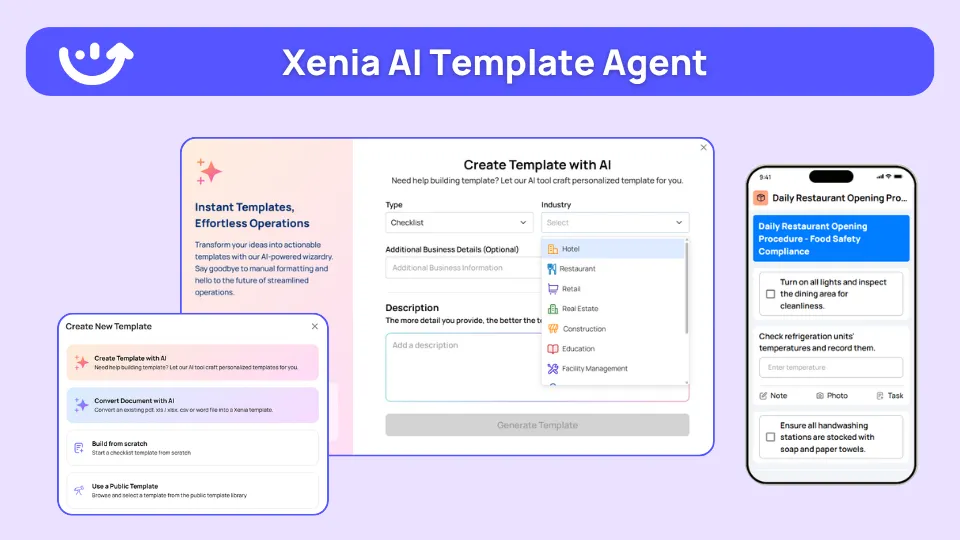
Because you are tagging existing question groups rather than rebuilding the audit, conditional visibility goes onto an existing template in the same working session, not over a multi-week rebuild. If you are starting from a written SOP, the AI Template Agent can convert that SOP PDF into a digital form with conditional logic already baked in. It transforms the SOP you give it. It does not invent audit content. The bounded promise holds throughout: one template carries 100+ format variations, not infinite ones.
Where do operators see results?
Operators see three concrete payoffs. Fairer scores that managers trust, faster audits because nobody scrolls past dozens of N/A items, and a single template that survives growth instead of multiplying into format-specific clones.
The customer evidence backs the scale claim. Newk's Eatery automated more than 100 franchises in one rollout, which is the practical test of one template across many formats. Power Market runs live across 360 locations with bilingual checklists and QR deployment, and reported 40 percent faster task resolution.
G&M Oil runs the same multi-format c-store model. The pattern is consistent across both verticals this pillar serves, restaurant groups and convenience-store chains. For the vertical view, see Xenia for convenience-store operations and Xenia for multi-unit restaurant task management. For the full cluster picture, the conditional audits overview hub maps every format-specific spoke that this pillar links down to.
Frequently Asked Questions
Got a question? Find our FAQs here. If your question hasn't been answered here, contact us.
What location attributes can drive conditional visibility?

Does conditional visibility use AI to decide which questions to show?
How is conditional visibility different from a dynamic form builder?
How many format variations can one conditional template support?
Does Zenput support question-level conditional visibility?
How long does it take to set up conditional visibility on an existing audit?


A Modern, AI-Powered Platform Built for Restaurant Operations
Xenia brings kitchen operations, food safety, audits, and team communication into one mobile-first platform. Restaurant teams execute daily work consistently, maintain compliance, and resolve issues faster, while leadership gets real-time visibility across all locations.
.webp)
Why Restaurant Operators Choose Xenia:
🤖 AI-Powered Operations, Convert paper logs instantly and verify food presentation and kitchen cleanliness automatically. Get instant answers about food safety trends without building reports.
🍽️ Food Safety & Compliance, Track line checks and temperature logs with automated alerts. Trigger corrective actions when readings exceed safe ranges. Maintain audit-ready records for health inspections.
📊 Multi-Location Control, Monitor food safety compliance and task completion across regions. Benchmark locations to identify training needs. Export reports for operational reviews.
One platform for kitchen operations, food safety, and compliance across all locations.

.svg)
.webp)
%201%20(1).webp)

.svg)
%201%20(2).webp)


