

Summary
What is a conditional audit?
A conditional audit is an audit template whose questions appear or hide automatically based on a location's attributes, so each store only answers what applies to it.
The mechanism is conditional visibility. That's branching logic that ties a question to a location attribute (has a patio, has a drive-thru, has a tap system, fuel-only format) so the question only renders where that attribute is true.
Two terms matter here, and they aren't the same thing.
Conditional visibility is the ability to show different audit questions at different locations based on store attributes. It's deterministic branching logic, not AI deciding what to show, and not a generic no-code form trick. The question fires where the attribute is true and stays hidden everywhere else.
Nullify scoring is the paired feature where items that don't apply to a store count for nothing, instead of scoring as a zero or a fail. A unit without a fryer doesn't fail on fryer temp logs. This is the nullify scoring pair-feature that keeps the score honest.
Conditional visibility lets you ask different questions at different locations without penalizing stores for N/A items, the patios-vs-no-patios problem solved.
One audit template handles the variation instead of a folder of near-identical templates. The "patio version," the "drive-thru version," and the "fuel-only version" collapse into a single audit.
A few things hold true across every conditional audit:
- The auditor on the tablet never sees the hidden questions at all. The branching resolves before the walk starts, based on the location record.
- Conditions can stack. A store can be flagged has-patio AND has-drive-thru AND Southern region, and the audit assembles the right question set from all three attributes at once.
- One template replaces many. When a brand standard changes, you edit the master, not three or four format variants.
Picture a 200-unit QSR running one quarterly brand-standards audit. Southern units have outdoor patios. Dense urban units don't.
The patio cleanliness questions render only at the units that have patios. The urban units never see them and never get dinged for them. Industry guidance backs this up: a franchise audit and compliance guide from Operandio notes that different location types, regions, and roles need different checklists, and the system should handle that variation without becoming unmanageable.
Example walkthrough, conditional audits in action
Here's one conditional audit running across three store formats inside the same chain, showing exactly which questions render where.
The setup is the same template. The trigger is the location record. The branching decides the question set. The outcome is a fair score per store.
Restaurant walkthrough
Start with a unit flagged has-patio yes, has-drive-thru no, region South.
- The audit renders walk-in temp checks, line check, hot-hold checks, patio cleanliness, patio furniture condition, and dining room standards
- It hides the drive-thru order-accuracy and drive-thru timer questions, because this unit has no drive-thru
- The missing drive-thru section is nullified, not zeroed. The unit's score reflects only the kitchen, hot-hold, patio, and dining room items it's actually responsible for
A location without a patio doesn't get dinged on patio cleanliness. A unit without a fryer doesn't fail on fryer temp logs. That's nullify scoring doing its job alongside the branching.
C-store walkthrough
This is the Huck's pattern. Huck's runs conditional checklists because, in the operator's own words, not all of their stores have a tap system.
C-store chains with mixed formats (some stores with tap systems, some without) can run one audit and hide the irrelevant questions per location group. Take a store flagged tap-system yes, food-service yes, fuel-only no.
- The audit renders cooler temp logs, tap-system cold-temp checks, food-service hot-hold checks, and the fuel price signage check
- A fuel-only store flagged tap-system no, food-service no sees only the cooler temp and fuel signage items. It never sees tap-system or hot-hold questions, and it's never marked down for equipment it doesn't have
See the full breakdown on tap-system vs. fuel-only C-store audits for the forecourt variant.
Under a static template, that fuel-only store would either get a row of N/A boxes that still count against the denominator, or force the area manager to maintain a separate fuel-only template.
Conditional audits remove both problems with one template. And on a high-risk item, a follow-up question can fire in-line: if a cooler temp reads out of range, the audit asks what was found and requires a photo at the moment of failure.
One template supports as many format variations as you have location attributes and combinations. Xenia positions this as 100+ format variations, which is the directional framing, not a hard technical cap.
How does a conditional audit differ from a static audit?
A static audit shows every question to every location, which forces auditors to mark irrelevant items N/A and lets those N/A items distort the score.
A conditional audit hides what doesn't apply before the walk begins, and pairs with nullify scoring so the score reflects only what each store is responsible for.
**
Attribute, Static audit, Conditional audit
Questions shown, Every question to every store, Only questions that match the store's attributes
Format variation, One template per format (patio version-drive-thru version-fuel-only version), One template handles all formats
N/A items, Auditor marks N/A by hand-often still counts in the denominator, Hidden automatically-nullify scoring removes them from the score
Auditor experience, Scrolls past irrelevant questions-risk of pencil-whipping N/A rows, Sees only what applies-faster-cleaner walk
Score comparability, A fuel-only store and a full-service store get scored on different denominators-hard to compare, Each store scored on its own applicable items-cross-store comparison stays fair
Template maintenance, Edit every format variant when a standard changes, Edit one template-the change propagates to all formats
**
Here's why static audits break.
When a no-patio store sees patio questions, the auditor marks them N/A. If those N/A rows count toward the denominator, the store's percentage drops for items it never had.
If they don't count but still show, the auditor wastes time and is more likely to pencil-whip the whole section. Either way, the audit score stops meaning what the ops director thinks it means. This is the patio-vs-no-patio problem in one sentence.
Conditional visibility decides which questions appear. Nullify scoring decides that the hidden or N/A items contribute nothing to the score, neither points earned nor points possible. So a store is judged only on its applicable items. The two features together are what keep the score fair across formats.
The competitors handle this unevenly.
Zenput (now Crunchtime) is an established digital-checklist platform that, by its own claim, serves 60,000+ locations across 100+ countries. The gap Xenia works in: Zenput is checklists-only with no work orders or comms, it lacks question-level conditional visibility at this depth, and its form-capped pricing means adding templates can cost more, a limitation covered in Xenia's own Zenput comparison.
RizePoint pioneered mobile auditing and runs deep in food-safety reporting, with a form builder that supports scoring algorithms and fail logic. The gap there is that conditional logic reads as an add-on rather than native, penalty-based scoring can let N/A items hurt the score, and audit data doesn't drive to corrective-action closure inside one tool.
.svg)

Priced on per user or per location basis
Available on iOS, Android and Web


How to set up conditional audits in Xenia

You set up a conditional audit by tagging your locations with attributes, then attaching show-or-hide rules to the questions that only apply to certain attributes. Build it once. Every store automatically gets its correct version.
- Tag your locations with attributes. On each location record, set the format flags that matter for your chain: the patio flag, the drive-thru flag, the tap-system flag, fuel-only vs. food service, room types for hospitality, store size band. Use plain operator language, not field-name notation.
- Build one master audit template. Add every question across every format into a single template: the kitchen items, the patio items, the drive-thru items, the fuel-signage items.
- Attach conditional visibility rules to the format-specific questions. Set the patio questions to show only where the patio flag is true, the drive-thru questions only where drive-thru is true, and so on. Questions with no condition show everywhere, your universal items.
- Turn on nullify scoring for the conditional items so hidden items contribute nothing to the score, no points possible and no points earned, instead of counting as a zero. For the point values on the items that do count, see weighted scoring for critical vs. minor thresholds.
- Add follow-up questions with required photo capture on the high-risk items. For example, if the walk-in temp is out of range, the audit asks what was found and requires a photo. These corrective action workflows branch at the question level and capture evidence at the moment of failure.
- Test on one store per format, then roll out to all locations. The single template now serves every format variation.
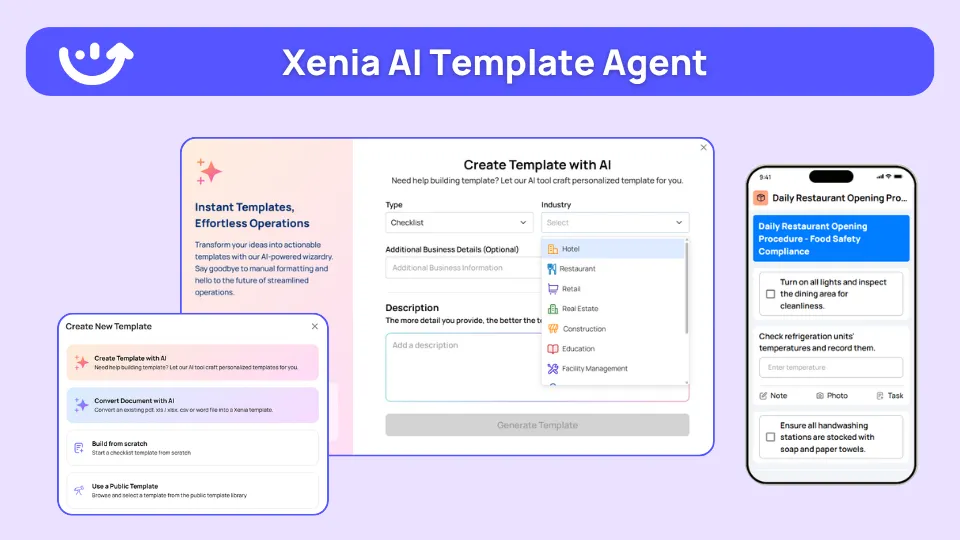
Franchise compliance teams converting legacy SOPs can use the AI Template Agent to turn an existing standard operating procedure PDF into a digital form with conditional logic and required fields. The agent transforms an SOP you already have. It doesn't invent net-new audits from a vague brief.
Because Xenia prices flat per location, not form-capped and not per-seat, adding more conditional templates or more format variations doesn't add cost. See Xenia pricing for the per-location detail. By contrast, a form-capped model charges more as you add templates, which punishes the chains that grow the most.
Where do operators see results?
Operators see conditional audits pay off in three places: faster and cleaner store walks, fair and comparable scores across formats, and far less template maintenance because one template replaces a folder of format-specific versions.
- Cleaner walks, less pencil-whipping. Auditors only answer what applies, so they don't scroll past or rubber-stamp rows of N/A items. The audit data is more trustworthy because the irrelevant questions never appeared.
- Fair cross-format comparison. With nullify scoring, a fuel-only store and a full-service store are each judged on their own applicable items. The ops director can compare scores across formats without the denominator distorting the picture.
- One template instead of many. When a brand standard changes, the compliance team edits one master instead of editing the patio version, the drive-thru version, and the fuel-only version separately. That's the franchise rollout win.
- The audit becomes the start of the fix. Audit failure leads to an automatic corrective task, tracked to resolution, with escalation if it isn't addressed by the deadline. Most platforms collect audit data. Few drive it to closure.
The named proof holds up.
Graham Enterprise (C-store) migrated from Zenput to Xenia, with facilities workflow and conditional visibility as the drivers. Huck's (C-store) runs conditional checklists for temp logs precisely because not all of its stores have a tap system, the cleanest conditional-audit validation case.
On scoring depth specifically, Dave's Hot Chicken moved off RizePoint across 321 locations for weighted scoring, Bluetooth thermometers, and corrective action workflows, not for conditional visibility.
For verified outcome numbers, Power Market runs live across 360 C-store locations with bilingual checklists and QR deployment, and reports 40% faster task resolution. Newk's Eatery automated 100+ franchise locations in one rollout, and Tempstop went paperless in 14 days. Those numbers are specific to those customers, not platform-wide claims.
To pick the right cadence for each format, pair this with the audit frequency by vertical guide.
Frequently Asked Questions
Got a question? Find our FAQs here. If your question hasn't been answered here, contact us.
Why do format variations break a normal audit template?

Can conditional audits combine multiple location attributes?
Does conditional logic affect the audit score?
How many format variations can one audit template support?
Do auditors see the conditional logic on the tablet?


A Modern, AI-Powered Platform Built for Restaurant Operations
Xenia brings kitchen operations, food safety, audits, and team communication into one mobile-first platform. Restaurant teams execute daily work consistently, maintain compliance, and resolve issues faster, while leadership gets real-time visibility across all locations.
.webp)
Why Restaurant Operators Choose Xenia:
🤖 AI-Powered Operations, Convert paper logs instantly and verify food presentation and kitchen cleanliness automatically. Get instant answers about food safety trends without building reports.
🍽️ Food Safety & Compliance, Track line checks and temperature logs with automated alerts. Trigger corrective actions when readings exceed safe ranges. Maintain audit-ready records for health inspections.
📊 Multi-Location Control, Monitor food safety compliance and task completion across regions. Benchmark locations to identify training needs. Export reports for operational reviews.
One platform for kitchen operations, food safety, and compliance across all locations.

.svg)
.webp)
%201%20(1).webp)

.svg)
%201%20(2).webp)


