

Conditional Audit Type
What is conditional visibility?
Conditional visibility is branching logic on audit questions tied to a location's format. It shows a question at a store only when that store's setup actually calls for it. A fuel-only site sees forecourt and merchandising questions. A store with a fountain and coffee bar sees those plus food-service and tap-line sanitation questions.
Two things matter here. First, conditional visibility is deterministic. It branches off the store format on the location record, not off any guesswork. It isn't AI, and it isn't a general no-code form builder for arbitrary business processes. It's built for ops audits. Second, it pairs with nullify scoring but is a separate feature. Conditional visibility hides irrelevant questions. Nullify scoring makes sure the hidden questions don't count against the score. Hide versus do-not-count. They work together, but they aren't the same thing.
For C-store operators, that pairing is the whole game. One convenience store audit template handles stores with tap systems, food service, fuel-only, or full-service formats. The irrelevant questions hide automatically per location group. You can read the full breakdown of how the two features lock together in the nullify scoring and conditional visibility pairing guide, and the wider conditional audits overview sets the category context. This is the same logic that drives patio versus no-patio restaurant audits. The vertical changes. The mechanism doesn't.
Worked example, conditional visibility in action
Here's the pattern in plain numbers. A 200-store C-store chain runs three forecourt formats: fuel-only, fuel plus food service, and full-service stores with a tap system. The audit template carries 48 questions overall. Conditional visibility decides which subset each store actually sees.
**
Store format, Questions shown, What drives it
Fuel-only, 26 forecourt and merchandising questions, Base set every store sees
Fuel plus food service, 38 questions (26 base plus 12 food-service), Food-service attribute on the location record
Full-service with tap system, All 48 (38 plus 10 tap-line sanitation and line-cleaning), Tap-system attribute adds the final 10
**
The rule reads in plain English. If the store format on the location record is tap-system, show the 10 tap-line sanitation questions. If it's fuel-only, hide them and remove them from the score. A fuel-only store is graded out of 26, not 48. It's never marked down for the 12 food-service or 10 tap-system questions it should never have seen. Every store can score 100% because nullify scoring strips the hidden questions out of the denominator.
Why does a tap-system store carry 10 extra questions a fuel-only store never sees? Because dispensed beverages are food, and the equipment that pours them needs real cleaning. Industry testing summarized by FSR Magazine cites NSF International findings that soda fountains rank among the germiest spots in quick-service settings, with coliform bacteria found in close to half of machines tested. Standard practice, per FSR and Coca-Cola's fountain dispenser cleaning guidance, is daily cleaning of nozzles, diffusers, drip trays, and valves, plus a deeper weekly line clean. The FDA Food Code treats dispensed beverages and ice as food, so this equipment falls under food-contact-surface and cleaning-frequency rules.
Those norms are exactly what the 10 tap-system questions audit: nozzle cleaning logged, line-cleaning date current, drip-tray sanitation, dispensed-beverage temperature. None of it applies to a fuel-only store.
How does conditional visibility differ from static audits?
A static audit shows every store the same questions and scores them all out of the same total, so format variation creates false negatives. A conditional audit shows each store only its relevant questions and scores it only on those.
**
-, Static audit (one template-one question set), Conditional audit
Questions per store, Same for every format, Branches by store format attribute
Fuel-only store score, Penalized for missing food-service and tap items, Scored only on its 26 questions
Template management, Duplicate templates per format (three templates-triple the upkeep), One template-100-plus format variations
N/A handling, Manual N/A entry-often still counts against the score, Nullify scoring removes hidden items from the denominator
Roll-up reporting, Scores not comparable across formats, Comparable-each store graded on its own scope
Without conditional logic, the area manager has two bad options. Build and maintain three separate templates, or run one bloated template and watch fuel-only stores show artificially low scores because the system counted food-service questions they could never answer. Both options corrupt the roll-up. The DM walks then chase phantom gaps instead of real ones.
Zenput earned its reputation as a strong digital checklist and form tool, and it supports basic branching. But its architecture is checklists-and-forms-first, not purpose-built question-level conditional visibility, and its form-capped pricing punishes operators for adding templates. RizePoint sells conditional logic as a paid add-on. Bindy's audit logic is static. You can compare the full feature set in the Zenput alternatives breakdown and the Xenia vs Zenput comparison.
.svg)

Priced on per user or per location basis
Available on iOS, Android and Web


How to set up conditional visibility in Xenia
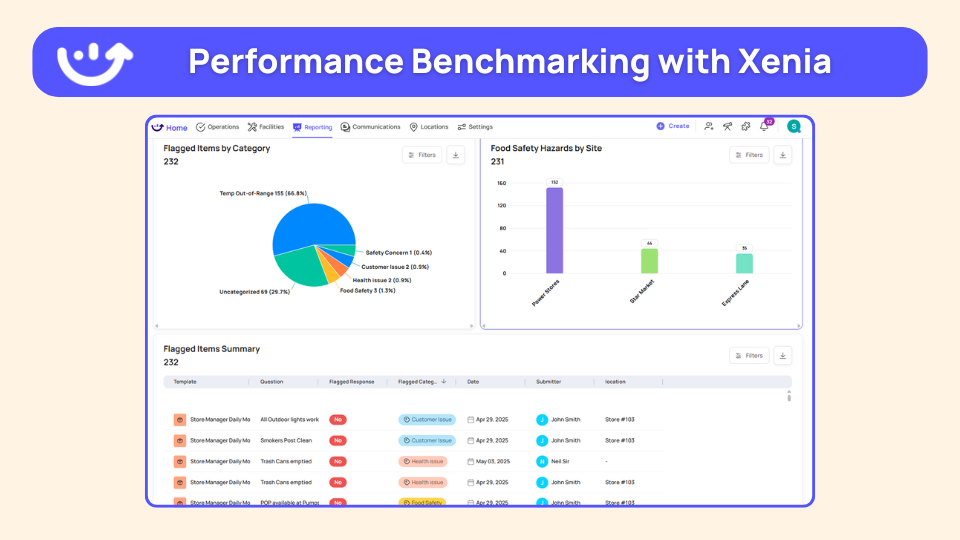
Setting up format-aware audits takes six steps and one master template. The goal is one template that branches by store format, scored fairly with weighted audit scoring and critical-item thresholds layered on top.
- Tag each location with its format. On the location record, set the store format attribute: fuel-only, fuel plus food service, or full-service tap-system. This tag is the trigger for every branching rule.
- Build one master audit template. Include all 48 questions across all formats. Don't duplicate templates per format.
- Set conditional visibility on the format-specific questions. The 12 food-service questions appear only when the format is food-service or tap-system. The 10 tap-line questions appear only when the format is tap-system.
- Turn on nullify scoring for the conditional questions. Hidden questions drop out of the denominator, so every store is scored only on what it actually sees.
- Add follow-up questions and required photo capture on the critical items. A cooler temp out of range or a fountain nozzle past its cleaning window triggers a description field plus a required photo, which auto-creates a corrective task tied to a deadline.
- Roll out and confirm the branching. Publish to all stores. A fuel-only store opens the audit and sees 26 questions. A tap-system store sees 48. Confirm in the above-store dashboard that scores are comparable across formats.
One shortcut on rollout: the AI Template Agent lets you upload an existing SOP PDF, for example a tap-line cleaning SOP, and get a digital form back with the structure already built. That cuts setup from weeks to days.
Where do operators see results?
Operators see the payoff in three places: fewer false negatives, one template instead of three, and an above-store view that finally compares apples to apples. The dashboard works best leading with an issues view, not a completion percentage. A 50-location group wants to see what's coming up as issues, not a vanity completion number.
Power Market runs the frontline-ops pattern across more than 360 convenience store locations on the West Coast, spanning multi-format sites including c-stores, beer caves, and car washes, after moving from paper checklists to a digital platform.
The operational payoff is concrete. Fuel-only stores stop showing artificially low scores, so the area manager's store walks focus on real gaps. There's one template to maintain instead of three, which matters a lot at 200 stores. And the same conditional logic that splits a tap-system audit from a fuel-only one also drives franchise-tier conditional audits and seasonal conditions audits across the rest of the portfolio.
Frequently Asked Questions
Got a question? Find our FAQs here. If your question hasn't been answered here, contact us.
Why do C-stores need different audit questions by forecourt format?

How does conditional visibility handle fuel-only versus food-service stores?
Can one audit template cover tap-system, food-service, and fuel-only stores?
How do C-store operators avoid penalizing fuel-only stores for missing food-service questions?
Does Huck's use conditional checklists, and what for?
How does Refuel keep audits consistent across 200-plus stores with format variation?


A Modern, AI-Powered Platform Built for Restaurant Operations
Xenia brings kitchen operations, food safety, audits, and team communication into one mobile-first platform. Restaurant teams execute daily work consistently, maintain compliance, and resolve issues faster, while leadership gets real-time visibility across all locations.
.webp)
Why Restaurant Operators Choose Xenia:
🤖 AI-Powered Operations, Convert paper logs instantly and verify food presentation and kitchen cleanliness automatically. Get instant answers about food safety trends without building reports.
🍽️ Food Safety & Compliance, Track line checks and temperature logs with automated alerts. Trigger corrective actions when readings exceed safe ranges. Maintain audit-ready records for health inspections.
📊 Multi-Location Control, Monitor food safety compliance and task completion across regions. Benchmark locations to identify training needs. Export reports for operational reviews.
One platform for kitchen operations, food safety, and compliance across all locations.

.svg)
.webp)
%201%20(1).webp)

.svg)
%201%20(2).webp)


