

.webp)
Post Summary
It's 10:47 am. You open in 13 minutes.
You walk in and 3 things are wrong. The reach-in cooler wasn't cleaned on close. The POS hasn't been reset. And the coffee station looks nothing like it did yesterday, because whoever closed last night did it their way.
None of that is a catastrophe. But now imagine that across 10 locations. Six days a week. With a different closer every night.
That's where it becomes an operations problem.
One ops manager at a 36-store chain told us something that stuck: "I had all of them send me their checklist because everybody has a checklist, and they all said the same thing, but none of them are the same format."
That's the problem. Not missing checklists. Inconsistent ones.
This guide fixes that. You'll get complete, ready-to-use FOH and BOH checklists for both opening and closing, with real tasks and real time windows. Plus a framework for actually making them stick across every location.
.webp)
Recommended Resources
- The Complete Restaurant Operations Management Guide
- Restaurant Task Management for Multi-Unit Operators
- Restaurant Cleaning Checklist: Daily, Weekly & Monthly Schedules
- How to Run Consistent Restaurant Audits and Inspections
Free Templates
.svg)

Priced on per user or per location basis
Available on iOS, Android and Web


Why restaurant opening and closing checklists matter
Here's a simple way to think about it.
A restaurant is a machine that has to be fully reset twice a day. Opening gets it ready to serve guests. Closing gets it ready to open again tomorrow.
When that reset is consistent, service runs clean. When it isn't, you spend the first hour of every shift putting out fires that yesterday's team created.
The bigger you get, the more this matters.
At one location, an experienced GM just knows what needs to happen. They feel when something's off. That intuition is an asset. But at 10 or 15 locations, intuition doesn't travel. The GM at location 3 runs things differently than at location 9. And when that GM leaves, their knowledge leaves with them.
Standardized checklists solve that problem. Not by adding bureaucracy. By writing down what already needs to happen.
Here's what actually works versus what doesn't:
**
What doesn't work, What does
"Check the cooler" (vague), "Log cooler temp-flag anything above 41°F" (specific)
A binder SOP nobody reads, A shift-specific task list with time windows
Each GM's personal version, One format-same across every location
Checked off = done, Manager sign-off required to close the loop
Paper clipboard in a working kitchen, Digital task with required photo on critical items
**
A VP at a 76-location restaurant group described what the move away from paper took: "It's not too long ago that our checklists and temp logs were pieces of paper on clipboards. There's a lot of resistance." After the transition, they hit 98% completion. That number doesn't happen on paper.
What goes on a restaurant opening checklist?
An opening checklist isn't about reminding people to do their jobs. It's the documented minimum standard that has to be true before a single guest walks in.
Split it by role. FOH and BOH run completely different opening tasks. Lumping them together creates confusion about who owns what.
FOH opening checklist
Start 30 to 60 minutes before service opens.
.webp)
- Confirm the dining room is clean from last night's close. Floors swept and mopped. Tables wiped. Chairs positioned.
- Set all tables to standard: silverware, glassware, napkins per the floor setup guide.
- Check both restrooms. Stocked, cleaned, no odors.
- Load reservations into the POS or reservation system. Verify the count.
- Confirm the POS is running. Print a test receipt. Check for any pending updates.
- Get 86 items and specials from the kitchen. Brief FOH staff before doors open.
- Set the host station: menus clean, waitlist app active, seating chart current.
- Manager walkthrough. Sign off on floor readiness.
That last step is the one most restaurants skip. A manager who physically walks the floor before service catches things a signed-off checklist can't. The walkthrough is the verification layer.
Use this free template to get started: FOH Opening Checklist
BOH opening checklist
Start two hours before service.
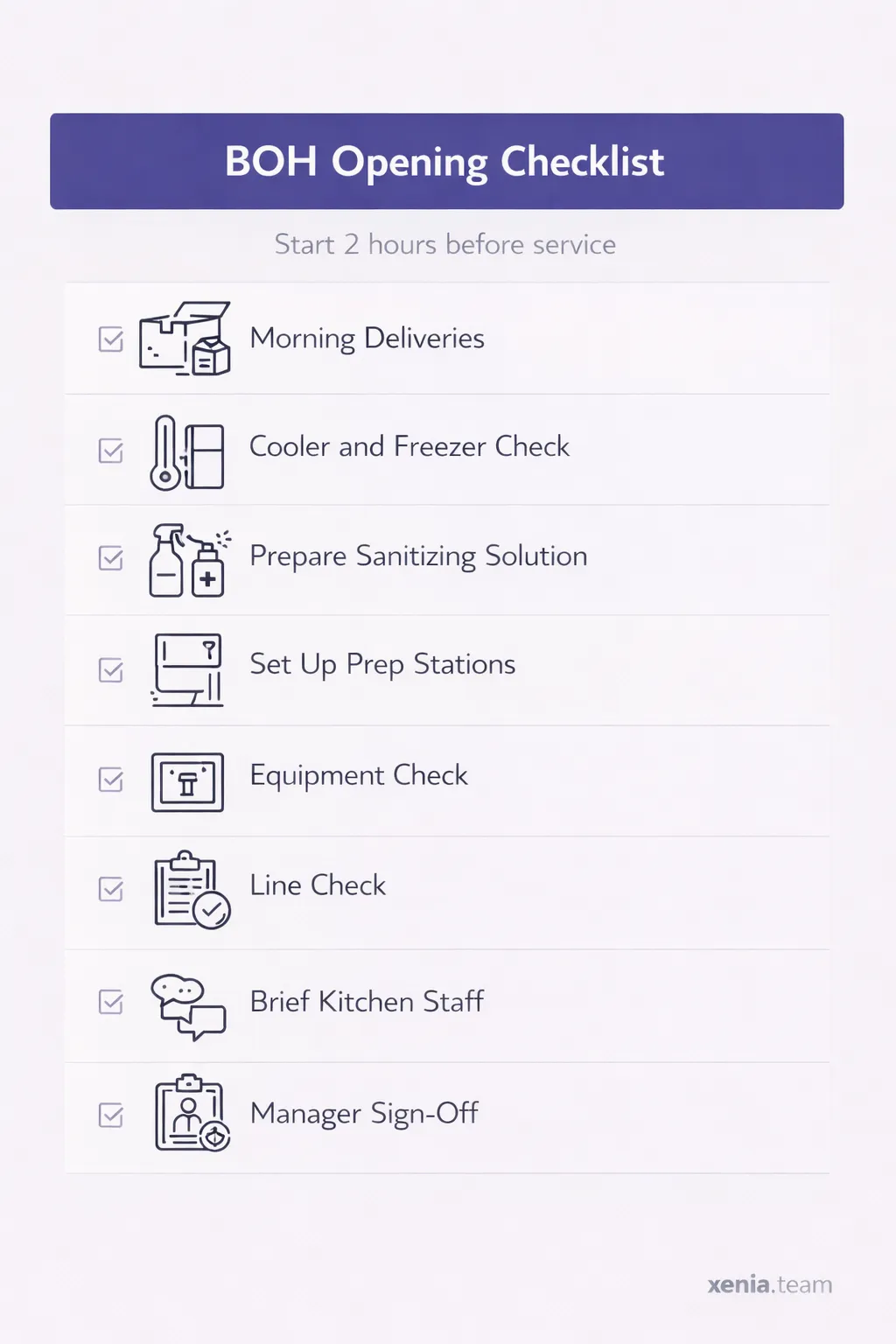
- Receive and verify morning deliveries. Log temperatures of all fresh proteins and produce on arrival.
- Check every cooler and freezer. Log the readings. Flag anything out of range immediately.
- Verify sanitizing solution concentrations at all prep stations.
- Set up every prep station per mise en place standards.
- Equipment check: fryers at temp, flat-top on, oven preheated, all units operational.
- First line check: proteins at the right temperature, labeled, FIFO organized.
- Brief kitchen staff: specials, prep needs, expected covers, any allergen flags from reservations.
- Manager sign-off: BOH ready for service.
The temperature log step is where most kitchens have a gap. A finance and operations manager at an 8-location seasonal group told us directly: "I would be shocked if any of our restaurants has a log for temperature logs for food or refrigeration." Their health inspectors came every three months. They had nothing to show them.
The cooler check at opening isn't extra work. It's the documentation that protects you when the inspector shows up unannounced.
Download the template here: Daily Restaurant Opening Checklist
Paper vs digital: what the comparison actually looks like
**
Factor, Paper checklist, Digital checklist
Completion tracking, No visibility from outside the location, Real-time by location by role
Accountability, Stack of paper in a folder, Named user-time-stamped submission
Photo verification on critical tasks, Not possible, Required before task closes
Health department documentation, Paper binder (if it still exists), Searchable-date-stamped record
Consistency across 10+ locations, Impossible to enforce, Same format-same order-every location
Manager visibility without calling, Requires a phone call, Dashboard shows status in real time
**
What goes on a restaurant closing checklist?
The closing checklist has two jobs. Keep the restaurant safe overnight. Set the opening team up to hit the ground running.
When a closer does it right, the opener never notices. When they cut corners, the opener spends 20 minutes undoing it.
FOH closing checklist
End of service:
.webp)
- Wipe and sanitize every table, chair, and booth.
- Reset tables to opening standard: silverware rolled, placemats set.
- Polish and put away all glassware.
- Clean and restock both restrooms for the next morning.
- Sweep and mop the dining room floor.
- Wipe down the host stand and all POS terminals.
- Lock the front entrance. Set the alarm.
- Manager closing walkthrough. Sign off before the team leaves.
The reset step deserves its own call-out. "Close the dining room" means different things to different people. Writing out that it includes resetting tables to opening standard removes the ambiguity.
Grab the template here: Restaurant Closing Checklist
BOH closing checklist
End of service:

- Label, date, and wrap all remaining food per FIFO protocol.
- Log final cooler and freezer temperatures for the day.
- Deep clean by station: grills, fryers, line surfaces, prep tables, floor drains.
- Break down and clean the dish machine. Leave to air dry overnight.
- Sanitize all prep surfaces, cutting boards, and smallwares.
- Empty and sanitize all trash bins. Take trash to the dumpster.
- Check and lock all back-of-house exits.
- Manager verification: every critical closing task is done before anyone leaves.
Two items here matter more than the rest.
First, FIFO labeling and dating. This isn't optional at the end of a long Saturday night. It's the first thing the health department checks.
Second, the cooling log. The FDA Food Code requires food to drop from 135°F to 70°F within two hours, and then reach 41°F within four more hours after that.
One executive chef we talked to designed a full branching checklist for this: if the temperature is out of range, the system walks the cook through checking the door seal, the shelf loading, and the internal fan before escalating to a work order. That's what a real closing cooling log looks like when someone has thought it through properly.
Use this as your starting point: Daily Restaurant Closing Checklist
How multi-unit operators enforce checklists consistently
Writing the checklist is the easy part. Getting 15 different GMs to run it the same way, every shift, across 15 different locations, that's where it actually gets hard.
Here's what works:
One template across every location. GMs can add notes. They cannot replace the format. The moment each location gets its own version, you no longer have a standard.
Every task has a named role. Not "the team." A specific role. FOH opener handles tasks 1 through 8. BOH opener handles 9 through 16. A task without an owner is a task that won't get done.
Sign-off is required, not optional. The opening manager signs off on FOH readiness. The closing manager signs off on BOH close. When something goes wrong, accountability is tied to a person, not a vague "the shift."
Audit for drift monthly. Someone should walk a location with the checklist in hand once a month and compare what's actually happening to what the checklist says. The gap between the two is your training agenda.
Update the checklist when operations change. A new piece of equipment, a menu update, a layout change. Any of these make the old checklist wrong. A stale checklist doesn't just miss things. It trains people to check the wrong things and feel confident about it.
One McDonald's franchisee owner we spoke with put the accountability problem clearly. His GMs were defaulting to floor operations because that felt urgent. Running the drive-thru. Being on the line. "That's not what we want," he said. "We got a shift runner for that. We need the GM to be running the actual business side of it." A signed-off checklist makes that role concrete.
Why checklists fail even when they exist
Most restaurants have checklists. Most of them break down somewhere in execution. Here's exactly where, and how to fix each one.
**
Failure point, What's actually happening, The fix
Checklist is too long, 45 items gets skipped entirely when a cook calls out at 6am, Cap at 15 critical items per role-organized by time window
No verification step, Checked off doesn't mean done, Require manager sign-off and photo evidence on key tasks
The GM personal version, Every new GM rewrites it to match how they were trained, One locked template across all locations-GM can annotate but not replace
Not updated after changes, New equipment-new menu-old checklist, Assign a checklist owner who reviews after any operational change
Paper in a working kitchen, A clipboard in a BOH kitchen at 7am gets wet-torn and ignored, Move to digital. Format matters as much as content
**
The paper problem is underrated. A VP of culinary described his kitchen team using what he called a "greasy pen" checklist at each station, a printed sheet, checked off during the rush. By mid-service it's unreadable. By the end of the week it's gone.
How Xenia helps
Most restaurants have checklists. The ones that run consistently across 10 or 15 locations have something else, a system that makes sure the checklist actually gets done, by the right person, at the right time, with proof.
That's where the gap usually is. Not in writing the checklist. In knowing whether it was completed.
Xenia gives multi-unit operators one place to run opening and closing checklists across every location. Tasks are assigned by role and shift. Critical items require a photo before they close. Managers get a live view of what's done and what isn't at every location, no phone calls, no waiting until something goes wrong.
When a closer skips the cooler temperature log at location 8, the system flags it before the shift ends. Not the next morning when the opener finds it. That shift.
See how Xenia works for multi-unit restaurants.
Conclusion
Checklists don't run restaurants. Systems do.
A checklist is only as good as the structure around it. Who owns each task. Who signs off. Who notices when something gets skipped. Without that layer, even the best checklist becomes a piece of paper that everyone ignores by week three.
The operators who get this right aren't doing anything complicated. They write it down. They assign it. They verify it. And they run the same standard at every location, every shift.
That's how a good restaurant stays consistent when it scales.
Frequently Asked Questions
Got a question? Find our FAQs here. If your question hasn't been answered here, contact us.
What do you do when a checklist task fails?

Document it and act on it immediately. A cooler out of temperature range at opening is not something to note at the end of the day. A broken piece of equipment at closing needs a work order before the last person leaves, not a verbal handoff that gets forgotten overnight.
Can regular staff complete the checklist or does it have to be a manager?
Staff can complete the tasks. A manager should always do the final sign-off. Completion and verification are two different things. The sign-off is what makes the checklist mean something.
How long does an opening checklist take?
FOH takes about 20 to 30 minutes if you start 45 to 60 minutes before service. BOH takes longer because of delivery receiving, temperature checks, and equipment verification. If your team is consistently running over, the checklist is too long or the time window is too short.
Should every location use the same checklist?
Yes. The core template should be identical everywhere. Individual locations can add notes for their specific setup, but the structure and critical tasks stay the same. That's what makes it a standard.
What if someone skips a task?
On paper, you won't know until something goes wrong. With a digital checklist, an incomplete task sends an alert to the manager or supervisor before the shift closes. The point isn't to punish anyone. It's to catch it before it becomes a bigger problem.
Who fills out the opening and closing checklists?
The manager on shift owns it. Most restaurants split it between an FOH lead and a BOH lead. Every task needs a specific role attached to it. When a task belongs to everyone, nobody does it.


A Modern, AI-Powered Platform Built for Restaurant Operations
Xenia brings kitchen operations, food safety, audits, and team communication into one mobile-first platform. Restaurant teams execute daily work consistently, maintain compliance, and resolve issues faster, while leadership gets real-time visibility across all locations.
.webp)
Why Restaurant Operators Choose Xenia:
🤖 AI-Powered Operations, Convert paper logs instantly and verify food presentation and kitchen cleanliness automatically. Get instant answers about food safety trends without building reports.
🍽️ Food Safety & Compliance, Track line checks and temperature logs with automated alerts. Trigger corrective actions when readings exceed safe ranges. Maintain audit-ready records for health inspections.
📊 Multi-Location Control, Monitor food safety compliance and task completion across regions. Benchmark locations to identify training needs. Export reports for operational reviews.
One platform for kitchen operations, food safety, and compliance across all locations.

.svg)
.webp)
%201%20(1).webp)

.svg)
%201%20(2).webp)




