


Post Summary
Running a restaurant chain is different from running a single restaurant well. A director managing 40 locations can’t check every temperature, checklist, or fix themselves. They need systems, not just hard work.
This guide explains how multi-location restaurant operations work in 2026, what usually fails at scale, and which tools can help manage it.
.webp)
.svg)

Priced on per user or per location basis
Available on iOS, Android and Web


What is restaurant operations management?
It is the process of running every function of a restaurant, or a portfolio of restaurants, consistently and profitably.
Food safety. Labor. Scheduling. Training. Compliance. Maintenance. Communication. All of it, every day, across every location.
At one restaurant, a manager can check everything. At many locations, that’s impossible. You need clear rules, live updates, and accountability.
The gap between operators who grow successfully and those who stall is rarely concept, food, or real estate. It is operations infrastructure.
Why does restaurant operations management break down at scale?
Most multi-unit operators inherit a patchwork of tools. One system for scheduling. Another for food safety logs. Paper checklists for audits. Spreadsheets for maintenance tracking. It works until it does not.
Here is what actually breaks:
**
Problem, What it looks like, What it costs
No cross-location visibility, VP of Ops cannot see which locations completed opening procedures today, Compliance gaps go undetected until a health inspection
Inconsistent standards, Each GM runs their own version of the checklist, Brand execution varies wildly by location
No corrective action loop, Issues get flagged but never assigned or verified, The same problem appears every audit
Paper-based documentation, Logs filled from memory-not actual readings, HACCP violations-foodborne illness liability
Reactive maintenance, Equipment fails during service, Food safety violations-downtime-unplanned repair costs
**
The pattern is consistent. Operators who grow past 10 locations without a unified platform hit a wall. The tools that worked at three locations create chaos at thirty.
What does a VP of ops actually manage day to day?
Worth being specific here. A VP of Operations at a 30 to 150-location chain is not running shifts. They are managing the systems that run shifts.
On any given day, that looks like:
- Reviewing compliance dashboards across regions to see which locations completed their assessments
- Escalating overdue corrective actions from district managers
- Monitoring food safety temperature logs for anomalies across locations
- Reviewing audit scores from the prior week's district manager visits
- Checking whether new hire training completions are on pace at high-turnover locations
- Identifying which locations are generating repeat workers' comp claims or recurring equipment flags
None of that is possible with paper. All of it is possible with the right platform.
The 6 core components of restaurant operations management
1. Food safety and HACCP compliance
HACCP is required by law for all commercial kitchens. The hard part isn’t knowing the rules, it’s making sure every location and shift follows them. Food between 40°F and 140°F for over two hours is unsafe. In 50 restaurants using manual logs, it’s almost impossible to be sure every reading is correct.
What multi-unit operators need:
- Automated temperature logging with Bluetooth thermometer integration
- HACCP-compliant corrective action workflows
- Cross-location compliance dashboards that surface gaps before a health inspector does
2. BOH operations and kitchen execution
BOH operations management covers everything before food reaches the guest. Prep procedures, line checks, equipment maintenance, cleaning schedules, shift handoffs.
The problem at scale is not that GMs do not know what to do. It is that there is no system verifying it was done. And no visibility into which locations are executing versus which are not.
3. Scheduling and labor management
Labor costs take up 30-35% of restaurant revenue. Small mistakes add up quickly when you have many locations. One extra staff member per shift or two hours of unnecessary overtime each week can become a big cost across 50 restaurants.
Good scheduling means having the right staff at the right time, tracking actual hours, and following local labor rules.
4. Training and onboarding
The average restaurant turns over 75 percent of its workforce annually. A 50-location chain may be onboarding hundreds of new employees every quarter. Training that lives in a binder does not keep up with that.
Role-based mobile training, food handler certification tracking, and allergen protocol documentation all need to be verifiable across the portfolio. See: restaurant employee onboarding.
5. Compliance and audits
Restaurant audits check food safety, brand rules, operations, and health readiness. One manager visiting each location once a month isn’t enough for many restaurants. The standard now is scored audits, photos, and automatic follow-up tasks. Paper forms don’t cut it.
6. Maintenance and equipment management
A walk-in at 48°F is a food safety risk and an operational crisis at the same time. Reactive maintenance is expensive and avoidable. Catching the problem before service is always cheaper than discovering it during a dinner rush.
Preventive maintenance scheduling, QR code access to service history, and one-click work order creation are what that looks like in practice. Related: restaurant equipment maintenance.
The 6 components at a glance:
**
Component, What it covers, The multi-unit risk if ignored
Food safety / HACCP, Temperature logging-critical control points-corrective actions, Health dept closure-foodborne illness liability
BOH kitchen execution, Prep-line checks-cleaning-shift handoffs, Inconsistent guest experience-food safety gaps
Scheduling and labor, Staffing to demand-overtime control-compliance, Labor cost overruns-scheduling law violations
Training and onboarding, Role-based training-certifications-allergen protocols, Undertrained staff-food safety incidents
Compliance and audits, Brand standards-health readiness-operational consistency, Audit failures-brand damage
Maintenance and equipment, Preventive schedules-service history-work orders, Equipment failure-food safety violations
**
What should I look for in restaurant operations software?
Before evaluating specific tools, map your actual pain points. The checklist below covers what matters at the multi-unit level.
Restaurant ops software evaluation checklist
Operations
- Use the same checklists at all locations from one system
- Staff access by role on mobile (kitchen, managers, district)
- Track opening and closing tasks
- Keep shift handoff notes visible in real time
Food Safety & Compliance
- Log temperatures with Bluetooth thermometers
- Automatic alerts and tasks if something is unsafe
- Dashboards to see compliance across all locations
- Keep audit-ready records with photos and timestamps
Corrective Actions & Accountability
- Assign tasks to specific people with deadlines
- Require proof before marking tasks done
- Escalate overdue items to higher managers
- Spot repeated problems across locations
Reporting & Visibility
- See task completion live by location or region
- Audit scores show real severity of issues
- Send regular reports to managers and VPs
- Export reports for inspections or audits
Integration & Infrastructure
- Mobile-first for staff and managers
- Works offline if internet is weak
- Connects to POS, HR, and scheduling systems
- Supports your organization structure
Scalability
- Add new checklists to all locations at once
- Handles 10–500+ locations easily
- Pricing that grows with your business, not against it
The best restaurant operations management software in 2026
Quick comparison and overview:
**
Software, Best for, Core strength, Key capabilities
Xenia, Multi-unit ops + food safety, Full ops + compliance automation, HACCP logging + auto corrective actions-dashboards-role-based access
Homebase, Small teams (5-50 staff), Scheduling + time + team comms, Drag-drop scheduling + labor budget alerts + time clock + team messaging
Square for Restaurants, Quick-service SMBs, Simple POS + basic ops, Table management + kitchen ticket routing + inventory basics + quick setup
TouchBistro, Independent full-service (1-3 locations), iPad POS + ops essentials, Floor plan management + inventory + staff scheduling + loyalty
UpMenu, Delivery-focused small restaurants, Online ordering + digital ops, Online ordering + delivery dispatch + mobile apps + marketing tools
**
1. Xenia: best for multi-unit operations execution and food safety compliance
Xenia is built for multi-unit operators who need operational consistency, food safety compliance, and real-time visibility across distributed locations.
It is the only platform on this list that combines HACCP-compliant documentation, corrective action auto-assignment, and cross-location compliance dashboards in a single mobile-first tool.
- Best for: VPs of Operations and Directors of Ops managing 10 to 500+ locations.
- Platforms: iOS, Android, Web
Why operators choose Xenia:
The problems this guide named earlier: paper logs filled from memory, corrective actions that never close, and compliance gaps invisible until a health inspector arrives. Xenia is designed around fixing those specifically.
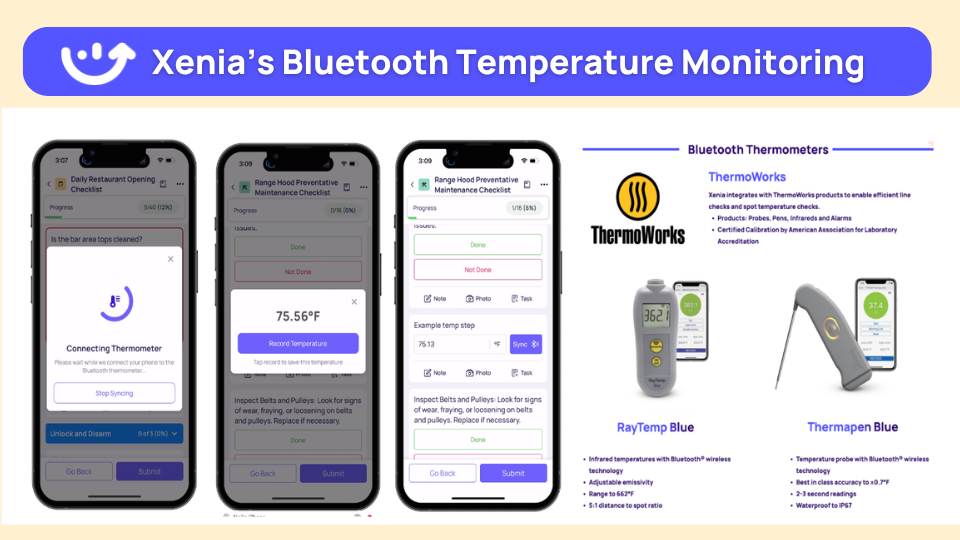
Bluetooth thermometer integration for HACCP logging. Temperature readings sync directly into the digital log. No manual entry. No memory-based logging. Every reading is timestamped, location-tagged, and audit-ready.
Corrective action auto-assignment. When a temperature check fails or a food safety flag is raised, Xenia automatically generates a corrective action record, assigns it to a named owner, and sets a deadline. Completion requires documented evidence: photo, reading, or signed confirmation. No self-reporting.
.webp)
Cross-location compliance dashboard. A VP of Ops can see in real time which locations completed their daily assessments, which have open corrective actions, and which are overdue. Gaps surface before they become violations.
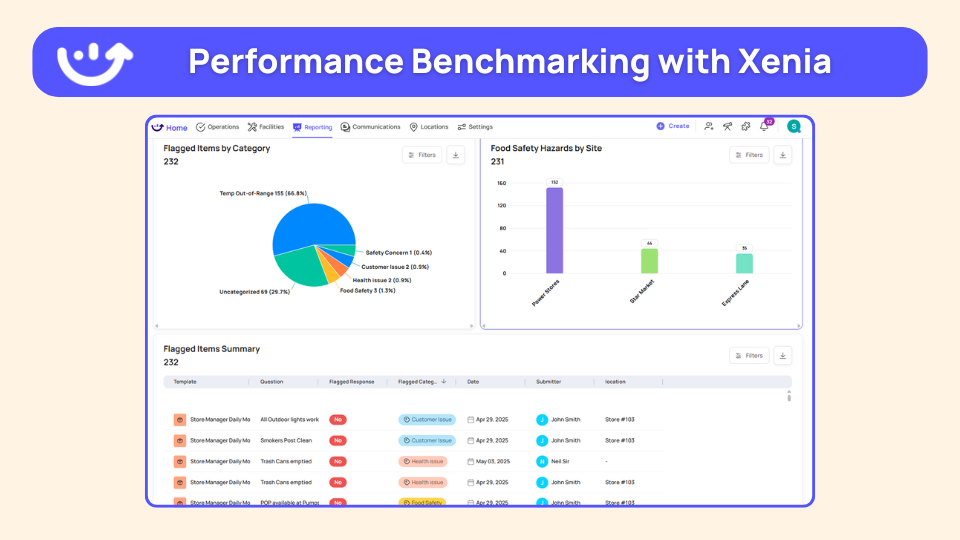
Role-based mobile access. Kitchen staff see their tasks. GMs see location-level completion. District managers see their region. VPs see the portfolio. Each role gets exactly what they need, nothing more.
.webp)
Weighted audit scoring. A failed temperature check carries more weight than a missed cleaning log. The score reflects actual operational severity, not checklist volume.
.webp)
What Xenia does especially well for multi-unit operators:
- Deploy standardized checklists to all locations simultaneously
- Surface pattern-based insights: the same equipment flagging repeatedly, the same location missing completion windows
- Integrate with HRIS systems for employee data sync and training records
- Generate audit-ready documentation without additional administrative work
See how Xenia works for restaurant operations.
2. Homebase
Homebase is a scheduling and workforce management tool built for small restaurant teams. Free tier covers shift scheduling, time clocking, and team messaging, the basics most single-location operators need without buying a full ops platform.
Best for: Cafes and independent restaurants with 5 to 50 staff.
Platforms: iOS, Android, Web
Key capabilities:
- Drag-and-drop shift scheduling
- Labor budget alerts
- Time clock with geofencing
- Team messaging
Where it falls short: No inventory, no HACCP documentation, no multi-location visibility. Works well for single-location labor management. Needs additional tools the moment ops complexity increases.
3. Square for Restaurants
Square for Restaurants is a POS-first platform adapted for food service. Free entry point makes it accessible for operators just getting off paper systems. Setup is fast and training time is minimal.
Best for: Quick-service and counter-service SMBs scaling from one to a few locations.
Platforms: iOS, Web
Key capabilities:
- Table and course management
- Kitchen ticket routing
- Basic inventory tracking
- POS integrations
Where it falls short: Reporting is basic. Operational execution beyond the POS, checklists, corrective actions, compliance tracking, requires separate tools.
4. TouchBistro
TouchBistro is an iPad-based POS built for full-service independent restaurants. Tableside ordering and floor plan management are its strengths. Designed for operators who want one device covering most front-of-house needs.
Best for: Independent full-service restaurants running one to three locations.
Platforms: iOS (iPad)
Key capabilities:
- Floor plan and table management
- Inventory and staff scheduling
- Loyalty and payments
Where it falls short: iPad-dependent hardware setup adds cost. Limited multi-location oversight and no operational compliance layer.
5. UpMenu
UpMenu is built for restaurants where online ordering and delivery are the primary revenue channel. It handles the digital storefront, dispatch, and basic loyalty, not the operational execution layer.
Best for: Delivery-focused small restaurants managing orders through their own channel rather than third-party platforms.
Platforms: Web, mobile
Key capabilities:
- Online ordering and mobile app
- Delivery dispatch
- Marketing and loyalty tools
Where it falls short: No scheduling, no compliance documentation, no kitchen ops management. Purpose-built for digital ordering, not restaurant operations broadly.
How do multi-unit operators manage operations across locations?
The answer in 2026 is not more managers. It is better systems.
Operators running 10 to 200+ locations successfully share four patterns:
They standardize before they scale. Every checklist, procedure, and compliance requirement is documented and deployed consistently before a new location opens. The platform enforces the standard. The GM executes it.
They create visibility without adding headcount. A district manager covering 15 locations cannot physically visit every site every week. Cross-location dashboards show completion rates, open corrective actions, and compliance scores across all 15 without leaving the office.
They close the corrective action loop. The difference between an operations platform and a checklist app is whether corrective actions get assigned, verified, and closed. Operators who track corrective action completion rates have fundamentally different outcomes.
They use data to find patterns. A single temperature violation is a location-level issue. The same violation at five locations in one region is a supplier problem. Pattern recognition across location data is what separates reactive management from proactive operations.
BOH vs FOH: how operations management differs
**
Dimension, BOH operations, FOH operations
Primary focus, Food safety-prep-kitchen execution-equipment, Guest experience-service speed-table management
Compliance obligations, HACCP-temperature logs-allergen protocols, Service standards-alcohol compliance-tip reporting
Risk profile, Foodborne illness-equipment failure-fire, Slip-fall-service errors-guest complaints
Accountability tools, Temperature logs-HACCP workflows-maintenance records, Service checklists-table touch verification-shift handoff notes
Who manages it, Head chef-kitchen manager-GM, FOH manager-shift lead
**
For multi-unit operators, BOH compliance failures generate the highest liability. Food safety violations, health department closures, and allergen incidents all start in the kitchen. That is where documentation and corrective action infrastructure matters most.
Conclusion
Restaurant operations management at scale is a systems problem. The operators running 50 or 100 locations well are not working harder than those struggling at 10. They have better infrastructure.
The right platform closes the corrective action loop, makes compliance visible without physical presence, and gives every level of the organization the data it needs to act.
See how Xenia works for multi-unit restaurant operations execution.
Frequently Asked Questions
Got a question? Find our FAQs here. If your question hasn't been answered here, contact us.
What should I look for in restaurant operations management software?

Look for software with cross-location visibility, easy corrective action tracking, strong food safety features, and mobile access for staff. True operations platforms let you assign, track, and close issues, not just check boxes.
How do you improve BOH operations in a multi-unit restaurant?
To improve BOH in multi-unit restaurants, standardize all procedures digitally, track corrective actions so issues get fixed, and use data across locations to spot patterns. Focus on systems, not just coaching individual sites.
How do multi-unit restaurant operators manage operations across locations?
Multi-unit operators manage 20+ locations using systems, not just supervision. They rely on standardized checklists, compliance dashboards, corrective action tracking, and reports that spot patterns. Visits still matter but are guided by real-time data.
How is BOH operations management different from FOH?
BOH manages kitchen safety, food, equipment, and compliance, with high risk if things go wrong. FOH handles guest service and experience. BOH issues are riskier, so food safety and corrective actions come first.
What are the biggest challenges in restaurant operations management?
The biggest challenges in restaurant operations are inconsistency across locations, unverified paperwork, unfinished corrective actions, training that doesn’t reach staff in time, and reactive maintenance. The main issue is lacking systems to enforce standards and catch problems early.
What does a restaurant operations manager do?
A restaurant operations manager ensures smooth daily operations, staff management, and standards. At one location, they manage directly, across multiple locations, they set systems and ensure consistency.

A Modern, AI-Powered Platform Built for Restaurant Operations
Xenia brings kitchen operations, food safety, audits, and team communication into one mobile-first platform. Restaurant teams execute daily work consistently, maintain compliance, and resolve issues faster, while leadership gets real-time visibility across all locations.
.webp)
Why Restaurant Operators Choose Xenia:
🤖 AI-Powered Operations, Convert paper logs instantly and verify food presentation and kitchen cleanliness automatically. Get instant answers about food safety trends without building reports.
🍽️ Food Safety & Compliance, Track line checks and temperature logs with automated alerts. Trigger corrective actions when readings exceed safe ranges. Maintain audit-ready records for health inspections.
📊 Multi-Location Control, Monitor food safety compliance and task completion across regions. Benchmark locations to identify training needs. Export reports for operational reviews.
One platform for kitchen operations, food safety, and compliance across all locations.

.svg)
.webp)
%201%20(1).webp)

.svg)
%201%20(2).webp)




