

.webp)
Post Summary
Your franchise has a 120-page operations manual. It covers everything. Food safety, customer service, opening procedures, HR protocols.
Last week, you visited Location 9. The closing checklist had not been completed in four days.
The manual existed. The execution did not.
That is the gap most franchise and multi-unit operators live with. The manual tells your team what the standard is. The operations execution checklist tells them what to do today, in what order, verified by whom, before the shift ends. Those are two completely different things.
This guide gives you a tiered operations execution framework built for franchise and multi-unit brands. Daily, weekly, and monthly. Role-specific. Designed for compliance you can actually measure.
Before you read further, run through this quick check:
- Does your team run the same daily checklist at every location?
- Can you see right now which locations completed their closing checklist last night?
- When a task is missed, does the right person get notified automatically?
If any answer is no, this framework is for you.
For the broader system these checklists fit inside, see the full guide on building a multi-location operations execution system.
.svg)

Priced on per user or per location basis
Available on iOS, Android and Web


Recommended Resources
- Multi-location operations execution system
- How to standardize multi-unit operations execution at 5, 50, and 500 locations
- Operations execution vs operations management
- Restaurant opening and closing checklists
- AI-powered checklist builder
What is an operations execution checklist, and how is it different from an SOP?
An operations execution checklist is the role-specific, time-bound task list that confirms daily operational standards were performed. By whom. When. And to what verification standard.
An SOP describes how a process works. The execution checklist confirms the process happened.
That distinction matters more than most operators realize. An SOP for opening procedures might be three pages long. The execution checklist distills that into 12 yes/no tasks, each assigned to a specific role, each with a completion window. The SOP is reference material. The checklist is the daily action.
For multi-unit operators, the execution checklist is the difference between documented standards and executed ones.
Why role-specific assignment matters:
A checklist assigned to "the team" gets done by nobody. Every task on an effective operations execution checklist has a specific owner. Opening manager. Closing crew. Kitchen lead. When accountability is shared, it disappears.
The three checklist types every multi-unit brand needs:
**
Checklist type, Cadence, Who owns it, What it covers
Shift-level checklist, Daily-every shift, GM-shift lead-crew by role, Daily operational tasks-safety-facility readiness
Management review checklist, Weekly, GM, Performance observations-brand standards spot-check-open corrective actions
Standards compliance checklist, Monthly, Area manager or DM, Full brand standards audit-cross-location pattern review
**
All three have to work together. The daily checklist catches shift-level issues. The weekly catches drift. The monthly catches what both missed.
For the full operations execution system context, that guide covers how these layers connect.
What goes on a daily operations execution checklist for a multi-unit brand?
The daily checklist is the heartbeat of your multi-unit brand operations. It runs every shift, every day, at every location. If it is not consistent across all locations, your brand standard is not consistent.
Organize it by role and time window, not by category. Here is what each role owns:
Opening manager checklist (first 30 minutes of shift):
.webp)
- Facility temperature check with logged reading
- Equipment inspection and condition verification
- Safety walkthrough and hazard check
- Team briefing confirmation
- Daily task assignment pushed to shift roles
Photo evidence is required for any food safety or equipment item. A checkbox without a photo is not verification for high-risk tasks.
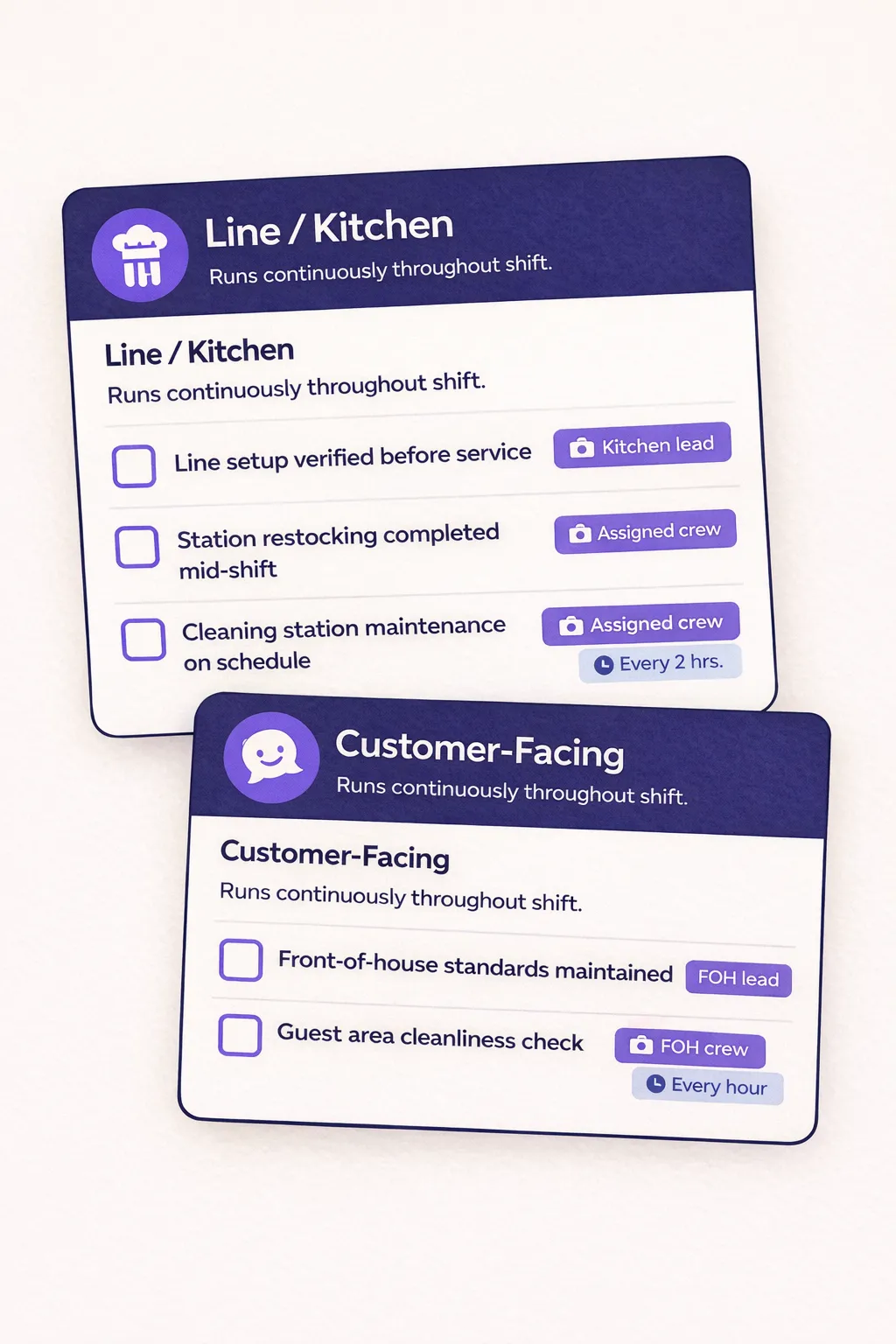
Shift-level crew checklist (runs continuously throughout shift):
These are not end-of-shift tasks. They run throughout. Each is assigned by role. Line setup, restocking, cleaning station maintenance, customer-facing standards. The crew checklist is not one list. It is several smaller lists assigned by station and role.
Closing manager checklist (before shift end):
- Facility close-down tasks with completion verification
- Next-day prep confirmation
- Structured shift handoff notes
.webp)
The shift handoff is not optional and not freeform. It is structured: what happened today that the opening manager needs to know, and what is unresolved. The closing checklist should not be marked complete until the handoff notes are written and the opening issue list is cleared.
"Daily checklists done on pen and paper or not at all, no way to verify completion or timestamp tasks." This pain shows up repeatedly across operators in convenience stores, fine dining groups, and retail chains.
The problem is not that operators do not know what needs to get done. It is that there is no system confirming it did.
Xenia assigns daily checklists to specific roles automatically. The opening manager's task list populates every morning at the configured time, with photo evidence required for critical items. No manual setup needed.
Your team should not be rebuilding their checklist from memory every shift. See how Xenia automates daily task assignment.
What goes on a weekly and monthly operations execution checklist?
Daily checklists catch shift-level issues. Weekly and monthly checklists catch drift.
Drift is the slow accumulation of small standards slipping that daily tasks do not surface. A closing step done halfway. A brand standard item that keeps getting skipped because it takes longer. A facility issue that nobody escalated. Daily checklists miss this. Weekly and monthly checklists are built to find it.
Weekly GM review checklist (15 to 20 minutes, every week):
This is the weekly reset mechanism. The GM walks the location with a structured self-inspection checklist. It is not a full audit. It is a calibrated spot check.
.webp)
- Team performance observations
- Facility condition score against standard
- Brand standards spot check across key categories
- Open corrective actions review from the previous week
The weekly review does two things. It catches what the daily checklist missed. And it makes sure corrective actions from the previous week did not quietly close without being resolved.
Monthly brand standards audit checklist:
This is the comprehensive location-level audit. Every brand standards category. Scored. Compared across locations.
.webp)
- Food safety documentation completeness
- Facility condition vs. standard
- Team compliance with brand SOPs
- Customer experience standards execution
The monthly audit is not just about the score at one location. It is about the pattern across all locations. Which locations have recurring gaps? Which categories fail most often fleet-wide? Without that pattern view, you fix symptoms instead of causes.
Monthly cross-location pattern review (area managers):
Area managers review 30 days of daily and weekly checklist data across their portfolio. Not just the audit score. The trend.
.webp)
- Which locations had three or more missed closing checklists this month?
- Which locations have the same corrective action open from last month?
- Which location is the outlier in completion rate, high or low?
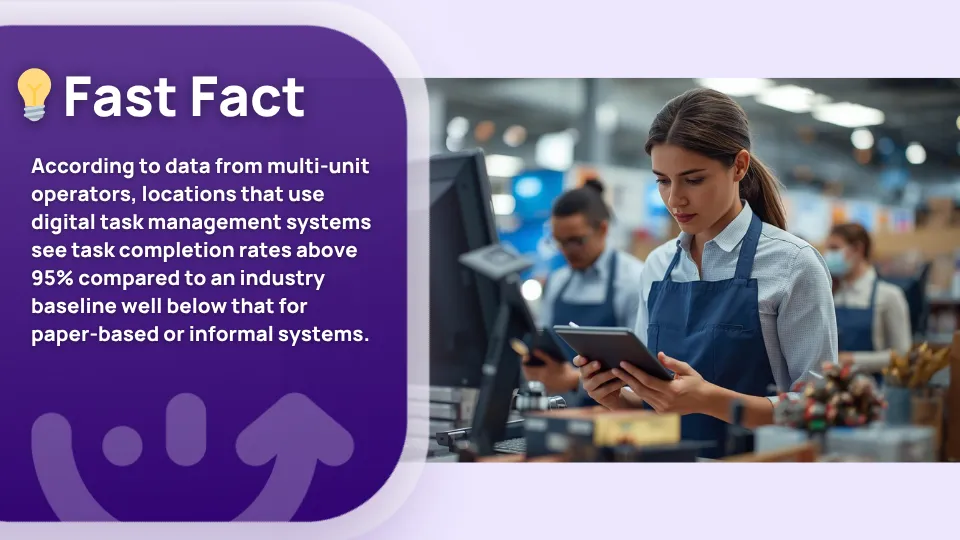
One VP of Operations at a 76-location restaurant group put a number on it: "Our goal was to get about 95% completion. Last year we were above 98%." That kind of result does not come from better checklists. It comes from a system that tracks completion and surfaces the gaps automatically.
Xenia's compliance dashboard shows daily, weekly, and monthly completion rates by location and role. Area managers see the trend, not just the last submission.
How do you make sure your operations execution checklist actually gets completed?
The checklist is only as good as the enforcement behind it. Most franchise operations checklist failures are not content problems. The tasks are right. The problem is that nobody is confirming they happened.
Three mechanisms fix this:
1. Completion windows with auto-escalation
Every checklist task has a deadline. The opening checklist must be submitted by 9am. If it is not, the GM gets a notification. If it is still not submitted 30 minutes later, the area manager gets notified.
No manual follow-up. No DM having to call around to check. The system does it.
This is what turns a missed checklist into a managed exception instead of a forgotten task.
2. Required photo evidence for high-risk items
Food safety temperature checks, equipment condition items, and facility safety items require a live photo at time of completion. Not a checkmark. A photo with a timestamp.
This eliminates pencil whipping. Staff cannot check a box they did not complete.
Pencil whipping is one of the most common pain points in frontline operations. One operations manager described it directly: staff mark tasks as done without doing them, and there is no way to verify. Required photo evidence closes that gap for the tasks that matter most.
3. Read-receipt for shift handoff notes
The incoming manager must acknowledge the outgoing manager's shift handoff notes before the outgoing shift is marked complete.
No more "I didn't know about that" at the start of the next shift. The acknowledgment is on record. The handoff either happened or it did not.
Why do operations execution checklists fail? The four most common traps
Most operators do not struggle to write checklists. They struggle to get them completed consistently. Here are the four failure modes that show up most often.
1. Checkbox theatre
Digital checklists get completed on paper but not in reality. Staff check boxes without performing the task. The completion rate looks fine. The location is not actually compliant.
Fix: required photo evidence for critical items, plus random spot-check audits that verify checklist submissions against physical reality. If the submission says the cooler temperature was logged at 8am but the photo shows a blank log sheet, that is a discrepancy worth investigating.
2. Location-specific drift
Individual locations modify the checklist to "make it work for us." They remove items that feel inconvenient. They add tasks that are not brand standard. Six months later, every location runs a slightly different checklist and fleet-wide comparison is impossible.
Fix: centralized template management. Location-level edits require HQ approval. No GM can remove a task from the master template. Want to streamline the checklist creation process? The AI-powered checklist builder can help you build and standardize templates faster.
3. Format proliferation
Different locations use different versions of the same checklist. Some still on paper. Some on an old spreadsheet. Some on the new system. Nobody is running the same thing.
Fix: one master version pushed to all locations simultaneously, with version control that shows which locations are on the current version. This is a digital SOP management problem as much as a checklist problem.
4. The completion-without-verification trap
High completion rates on paper but no verification that what is being completed matches what is being executed. This is the most dangerous failure mode because it creates a false sense of compliance.
Fix: photo evidence requirements on critical tasks, and random audit calibration that checks checklist submission data against actual physical conditions at the location.
"Staff mark tasks as done without actually doing them. No way to verify." This is a documented pain point across restaurant groups, convenience store operators, and retail chains. It is not a people problem. It is a verification problem.
**
Failure mode, What it looks like, The fix
Checkbox theatre, Completion rates look high-compliance is actually low, Photo evidence + physical spot checks
Location-specific drift, Every location runs a slightly different checklist, Centralized template management-HQ-only edits
Format proliferation, Multiple versions of the same checklist in use, One master version pushed to all locations
Completion without verification, Tasks marked done that were not done, Required photos-audit calibration
**
How Xenia Helps You Build, Assign, and Enforce Checklists Across Every Location
If you have the checklist content figured out, the next problem is building and enforcing it at scale.
Most operators already have procedures written down somewhere. A paper form, a PDF, a Google doc from two years ago.
Xenia's AI Template Agent can take that existing material and convert it into a structured digital checklist in minutes. Upload your SOP, describe what you need, or pick from 1,000+ prebuilt templates. The checklist is ready without starting from scratch.
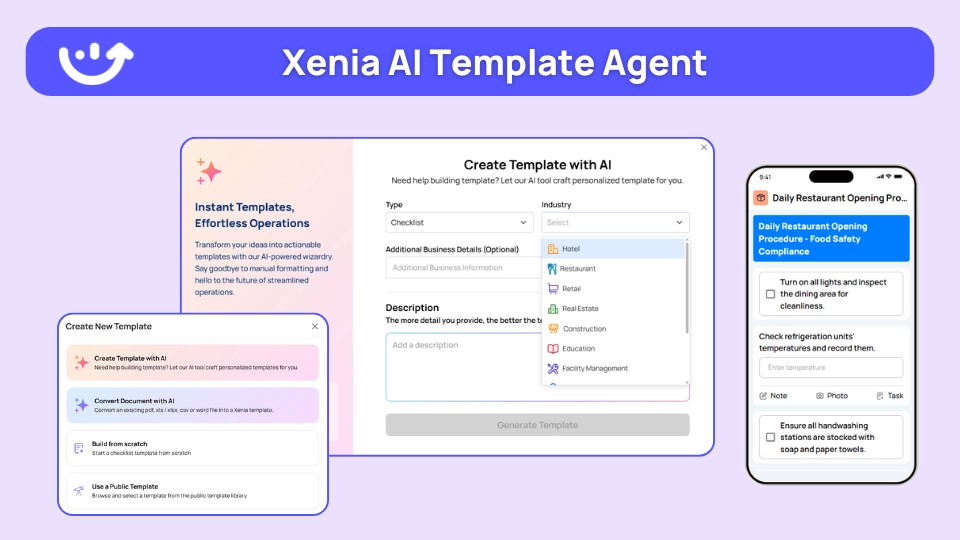
Once it is built, Xenia handles everything after that. Tasks assign automatically by role at the start of each shift. Photo evidence is required for critical items. When a task is missed past its completion window, the right person gets notified. No DM has to call anyone.
The compliance dashboard shows completion rates by location, role, and cadence. Daily, weekly, and monthly. Area managers see which locations are trending down before a monthly audit catches it.
If that sounds like the missing layer in your operations, it probably is. See it in action and book a demo or get started for free today.
.webp)
Conclusion
Most franchise and multi-unit brands have the checklist. The tasks are right. The format is fine.
What is missing is the mechanism that confirms they happened. Every shift. At every location. Without someone manually checking.
That is the difference between having an operations execution checklist and having checklist compliance.
Build the tiers first. Daily by role, weekly by GM, monthly by area manager. Then build the enforcement layer: completion windows, photo evidence, auto-escalation, and shift handoff acknowledgment.
Want to move from "we have a checklist" to "we have completion data"?
Xenia turns your operations execution checklist into a role-based daily workflow with automatic assignment, photo verification, escalation for missed tasks, and a compliance dashboard that shows you where standards are held and where they are slipping. Schedule a demo.
Frequently Asked Questions
Got a question? Find our FAQs here. If your question hasn't been answered here, contact us.
How do you prevent pencil whipping on digital checklists?

Two things work together.
First, require a photo for any food safety, equipment, or facility item. A timestamped photo taken on-site is much harder to fake than a checkbox.
Second, do random spot checks. Pull checklist submissions and compare them to what you actually see at the location. If the numbers look perfect but the location does not, that gap needs a conversation.
What does role-based task assignment mean for daily operations checklists?
It means tasks go to a specific person, not to the group chat.
When a checklist is assigned to "the team," everyone assumes someone else did it. When it is assigned to the opening manager, there is no confusion. They own it. It either gets done or it gets flagged.
What is the most common reason checklist compliance fails?
The checklist exists but nothing happens when it gets skipped.
No deadline. No alert when it is late. No way to know if what was submitted actually matches what was done. That is the real problem. Not the checklist itself.
The fix is simple in theory: add completion windows, require photos on high-risk items, and set up automatic escalation when something gets missed.
How often should a multi-unit brand operations checklist run?
Three cadences work for most brands.
Daily checklists run every shift, split by role. Weekly checklists are short GM-led walkthroughs, usually 15 to 20 minutes. Monthly checklists are full brand standards audits, scored and compared across locations.
Each tier is designed to catch what the previous one misses. Daily catches shift issues. Weekly catches drift. Monthly catches patterns.
What is the difference between a franchise operations checklist and a standard SOP?
The SOP explains how something should be done. The checklist confirms it was done today.
Think of it this way. The SOP lives in a binder. The checklist lives on a phone at the start of every shift. You need both. But one describes the work and the other tracks it.
What is an operations execution checklist?
It is a task list tied to a specific role, with a deadline and a required way to verify completion. Not a general reminder. A confirmed action.
The difference between a documented standard and one that actually runs every shift is usually this: one has a checklist behind it, the other does not.


A Modern, AI-Powered Platform Built Specifically for Frontline Operations
Xenia brings daily operations, maintenance, audits, and compliance into one mobile-first platform. Frontline teams execute work consistently across locations while leadership gets real-time visibility.

Why Multi-Location Operators Choose Xenia:
🤖 AI-Powered Operations, Create digital checklists instantly or convert paper forms with AI. Verify compliance automatically with photo analysis and get instant answers from your operational data.
✅ Daily Operations & Maintenance, Assign work across hundreds of locations in minutes. Report and route issues instantly. Schedule preventive maintenance to catch problems before downtime.
📊 Real-Time Visibility, Track completion, work orders, and performance across all locations through dashboards. Filter by site or asset to spot trends and take action.
Manage operations, maintenance, and compliance across all your locations from one platform

.svg)
.webp)
%201%20(1).webp)

.svg)
%201%20(2).webp)




