

Conditional Audit Type
What is conditional visibility?
Conditional visibility is branching logic on audit and checklist questions tied to attributes of the location or the moment. When a condition is true, the store has a patio, the region is the Gulf Coast, the heat index crosses 90°F, the related questions appear. When it's false, they stay hidden, and they don't count against the score. This is the same logic that solves the patios vs no-patios problem in multi-location audits, applied to weather and the calendar.
Two features pair together here, and it helps to keep them distinct:
- Conditional visibility decides which questions a location sees. It's deterministic location-attribute and condition branching, not AI and not a no-code form builder.
- Nullify scoring makes sure the hidden or non-applicable items count for nothing, so a store is graded only on what it's actually responsible for this season. A Florida store doesn't get dinged for skipping snow-melt application in July. For the full mechanics, see how nullify scoring pairs with conditional visibility.
For seasonal audits, the location attribute expands to include time-based and condition-based triggers. You can branch on the season or calendar window (winterization questions show October to March). You can branch on geography or climate tier (hurricane prep shows for coastal stores). You can branch on a live condition (heat-wave questions activate when the heat index crosses a threshold you set).
C-store chains with mixed formats can run one audit and hide irrelevant questions per location group. A north-tier store sees the freeze block. A southern store doesn't. Tap-system stores need cold-temp tap questions; non-tap stores don't. The branching is plain: if a store is in a freeze zone, the freeze-protocol questions appear. If it isn't, they don't.
Seasons aren't cosmetic differences. They carry real regulatory and safety weight a static template can't capture. Summer brings heat exposure: OSHA's proposed Heat Injury and Illness Prevention rule sets an initial trigger at an 80°F heat index and a high-heat trigger at 90°F, and it's in post-hearing review as of late 2025. Storm season brings power loss, where FDA guidance says to discard refrigerated perishables held above 40°F for four hours or more. Winter brings frozen pipes, slip liability on the forecourt, and frozen condensate lines.
Worked example, conditional visibility in action
Consider a 200-unit QSR running one quarterly audit template across the South, the Gulf Coast, and the upper Midwest. The audit logic reads two things off the location record (climate tier, geography) and one thing off the calendar or live conditions (season, active weather trigger). Then it shows the right block. The same template runs everywhere, but each store sees only what its season demands.
**
Condition on the location or moment, Question groups shown, Question groups hidden (don't score)
Gulf Coast region during June to November, Hurricane shutter check-generator fuel level-walk-in temp baseline-sandbag inventory-emergency contact tree posted, Snow-melt inventory-pipe heat-tape check
Upper Midwest region during November to March, Pipe insulation check-ice-melt inventory-forecourt slip-mat placement- condensate-line freeze check-snow-removal vendor confirmed, Hurricane shutters-sandbags
Heat index forecast at or above 90°F in any region, Cool-water station stocked-shaded break area set up-drive-thru fan operational-acclimatization log current for new hires, Freeze block-hurricane block
Standard day with no active trigger, Year-round food safety-cleanliness-brand-standard items only, All three seasonal blocks
**
A Tampa store in September sees the hurricane block. A Minneapolis store in January sees the freeze block. A San Diego store on a 95°F day sees the heat block. None of them sees a block that doesn't apply, and none is scored on a question it never should have answered.
Here's the fairness payoff. Without conditional visibility, the Minneapolis store either gets a static all-seasons template and scores a false 0% on the dozen hurricane questions it can't complete, or corporate has to build and version four separate seasonal templates per climate tier. Conditional visibility collapses that into one template that asks each store only what its season demands. The same logic handles format variation too, so a brand with franchise-tier conditional audits runs one template across every variant.
The C-store variant is just as concrete. A north-tier chain runs one daily-conditions audit. On a hard-freeze forecast, the audit surfaces forecourt salt-down, the pipe heat-tape check, and the cooler condensate-line inspection. The same branching that handles tap vs no-tap stores handles freeze forecast vs mild day.
How does conditional visibility differ from static audits?
A static audit shows every question to every store every time, then forces the auditor to mark dozens of items N/A, which on most legacy platforms still drags the score down. A conditional audit shows only the questions that apply to the store's season and climate, and nullify scoring means the hidden items count for nothing.
**
Static audit (legacy approach), Conditional seasonal audit
One template per season per climate tier-often 8 to 12, One template with branching logic inside
Auditor marks N/A by hand-items often still count against score, Irrelevant questions hidden-nullify scoring zeroes them out
Florida store fails snow questions-Minnesota store fails hurricane questions, Each store scored only on what its season requires
New season means a new template push and auditor retraining, Same template-the season trigger flips the questions on
Missed seasonal question relies on the auditor picking the right form, Trigger surfaces the question automatically-low miss risk
Auditor time inflated by scrolling past dozens of N/A items, Auditor sees only live questions-shorter visit
**
Reading the table for a multi-unit ops director: the static approach scales by duplication. Every new climate tier and every new season multiplies your template count, and someone has to keep all of them in sync. The conditional approach scales by branching. You maintain one template and the triggers do the sorting.
The competitor gap is specific. Zenput, now inside Crunchtime, is strong on digital checklists and form-based audits, but it lacks question-level conditional branching, which produces false negatives on N/A items, and it's checklists-only with no native facilities or work-order closure. RizePoint pioneered mobile auditing, but its conditional logic is an expensive add-on, and its scoring is penalty-based with no nullify, so N/A items can hurt the score. SafetyCulture owns the food-safety-audit category at horizontal scale, but it isn't purpose-built for the franchise, DM, and store-walk layer and doesn't match the conditional-visibility-plus-nullify depth here.
Static seasonal templates also break under everyday format variation. QSR Magazine reported that Tropical Smoothie Cafe runs drive-thrus at roughly 40% of its system, a format split inside a single brand. Layer seasonal and climate variation on top of that and the static-template count explodes.
.svg)

Priced on per user or per location basis
Available on iOS, Android and Web


How to set up conditional visibility in Xenia
Setting up a seasonal conditional audit takes six steps, and you do the work once. After that, the triggers carry the load every season without a new rollout.
- Tag each location with its climate attributes. On the location record, set the region or climate tier: Gulf Coast, north-tier freeze zone, or high-heat region. This is the field the audit reads to decide which seasonal block to show.
- Build one master template with a year-round base. Put the items every store does in every season, food safety, cleanliness, brand standards, in the always-on section.
- Add seasonal question blocks and set the trigger for each. Create a hurricane block, a freeze block, and a heat block. For each, set the condition that turns it on: a calendar window (freeze block November to March), a location attribute (Gulf Coast for hurricane), or a live condition (heat index at or above 90°F).
- Turn on nullify scoring for the conditional blocks. This guarantees a store that doesn't see a block gets nothing applied to its score for it. A Phoenix store is never graded on the freeze block.
- Attach follow-up questions and required photos to the high-risk items. If a walk-in reads above range during storm season, the form auto-asks what the auditor found, requires a photo, and opens a corrective task assigned with a deadline that escalates to the DM if not closed.
- Roll it out once and let the triggers do the work. When hurricane season opens or a freeze warning hits, the questions surface automatically. No new template push, no auditor retraining.
If the seasonal procedures already live in a corporate SOP PDF, the AI Template Agent can convert that existing SOP into a digital form with conditional logic baked in, which cuts rollout from weeks to days.
Where do operators see results?
Operators see the payoff in three places: fewer templates to maintain, fairer and more honest audit scores, and faster store visits because auditors answer only live questions. The seasonal risk that used to depend on someone remembering the right template now surfaces on its own.
Power Market is a useful proof point for rollout speed at scale: it runs the frontline-ops pattern across more than 360 convenience store locations on the West Coast, having moved from paper checklists and manual task assignment to a digital platform pushed out across the full fleet. That's the kind of large-fleet template rollout the same seasonal-branching approach depends on.
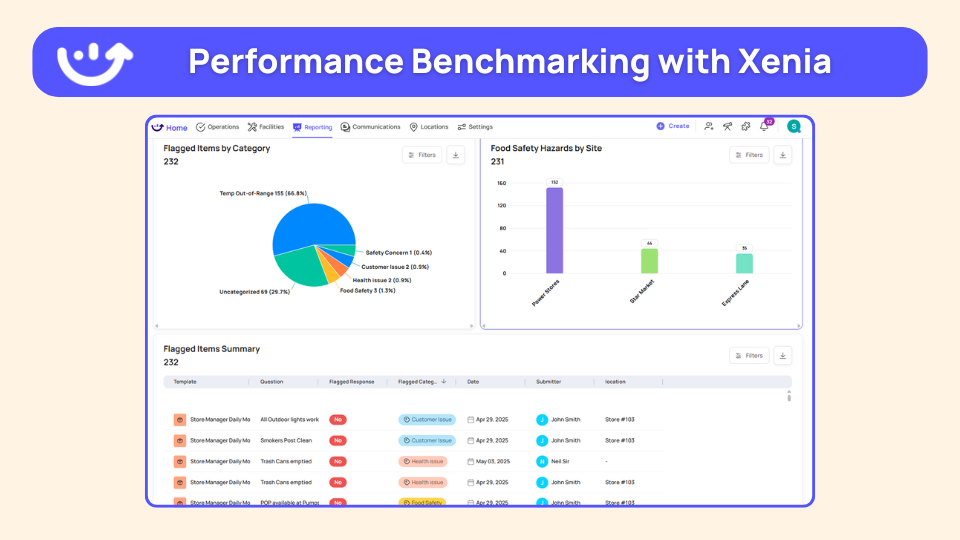
For the ops-director persona, lead with the dashboard, not the completion percentage. A 50-location group doesn't want a completion-percentage view. It wants to see what's coming up as a problem. In a seasonal context, the dashboard surfaces the stores trending toward a heat-readiness gap before the heat wave, or the Gulf Coast stores with an overdue generator check as a storm approaches. Custom dashboards surface flagged items and open corrective actions, where the next failure is forming, not just whether yesterday's tasks got done.
One honest limit. Conditional visibility is deterministic. It branches on the season, the climate tag, and the condition you set. It doesn't predict weather and it doesn't use AI to decide what to ask. The operator sets the trigger, and the system applies it every time. That predictability is the point. The right seasonal question shows up because you defined the rule, not because someone remembered the right form.
Frequently Asked Questions
Got a question? Find our FAQs here. If your question hasn't been answered here, contact us.
Why do audits need to change by season?

How does conditional logic handle hurricane prep checklists?
Can I trigger heat-wave or freeze-warning questions automatically?
Should seasonal conditions affect the audit score?
How do I keep auditors from missing a seasonal question when conditions change?
Can the same template support all four seasons?


A Modern, AI-Powered Platform Built for Restaurant Operations
Xenia brings kitchen operations, food safety, audits, and team communication into one mobile-first platform. Restaurant teams execute daily work consistently, maintain compliance, and resolve issues faster, while leadership gets real-time visibility across all locations.
.webp)
Why Restaurant Operators Choose Xenia:
🤖 AI-Powered Operations, Convert paper logs instantly and verify food presentation and kitchen cleanliness automatically. Get instant answers about food safety trends without building reports.
🍽️ Food Safety & Compliance, Track line checks and temperature logs with automated alerts. Trigger corrective actions when readings exceed safe ranges. Maintain audit-ready records for health inspections.
📊 Multi-Location Control, Monitor food safety compliance and task completion across regions. Benchmark locations to identify training needs. Export reports for operational reviews.
One platform for kitchen operations, food safety, and compliance across all locations.

.svg)
.webp)
%201%20(1).webp)

.svg)
%201%20(2).webp)


