

Conditional Audit Type
What is conditional visibility?
Conditional visibility is branching logic on audit questions that shows or hides each question based on a location's attributes. In a retail store format audit, the store-format value on the location record decides which visual-merchandising questions a store sees. A small-format kiosk never sees the fitting-room or second-floor questions a flagship gets, and it is never marked down for missing them.
The key thing to understand: conditional visibility is deterministic, not AI. The platform reads a fixed value on the location record (store format equals kiosk, standard mall, flagship, or street-level) and shows the matching question groups. No prediction. No image recognition. It is the same model the pillar guide on how conditional visibility works across multi-location audits defines for restaurants and c-stores, applied to a retail spine.
Conditional visibility pairs with a second, distinct feature: nullify scoring. The two are not the same thing. Conditional visibility hides the irrelevant question. Nullify scoring keeps that hidden item out of the score denominator, so the kiosk can still reach a true 100 percent on the questions it can actually satisfy. You need both turned on. One controls what a store sees. The other controls what counts.
Here is the retail problem in plain terms. A specialty banner running multiple formats has one brand book, but the standards on the floor are not the same. A flagship has a window-mannequin program, a second-floor merchandising plan, and a back-of-house stockroom presentation standard. A mall kiosk has a front-window fixture facing and not much else.
One static audit template either over-questions the kiosk or under-questions the flagship. Retail banners can run visual audits for locations with mannequin displays versus without, or different planogram sections per store format, without duplicating templates.
Worked example, conditional visibility in action
A specialty retailer runs three store formats off one visual-standards audit of 47 questions. A small-format mall kiosk sees 24 questions (front-window display and fixture facing, with the fitting-room group hidden because it has none). A standard mall store sees 38. A flagship sees all 47, adding the second-floor merchandising, window-mannequin, and stockroom-presentation groups. The store-format attribute on the location record decides the question set, and nullify scoring keeps the kiosk from being marked down on the flagship-only groups it could never satisfy.
Here is how it plays out on the floor:
**
Question group, Small-format kiosk, Standard mall store, Flagship, Street-level
Front-window display and fixture facing, Yes, Yes, Yes, Yes
Signage and pricing compliance, Yes, Yes, Yes, Yes
Fitting-room presentation, Hidden (none), Yes, Yes, Varies
Floor layout and traffic flow, Limited, Yes, Yes, Yes
Window-mannequin program, Hidden, Hidden, Yes, Yes
Second-floor merchandising, Hidden, Hidden, Yes, Hidden
Stockroom and back-of-house presentation, Hidden, Limited, Yes, Limited
Total questions shown (illustrative), 24, 38, 47, about 34
**
The per-row split here is illustrative of this worked example, not a fixed product spec. The load-bearing claim is that the store-format attribute decides the set. A standard visual-merchandising audit covers storefront and window displays, floor layout and traffic flow, product presentation, signage and pricing, lighting, and a sign-off section, as outlined in resources like the SafetyCulture visual merchandising audit checklist and Bindy's visual merchandising checklist.
The flagship adds the multi-floor and mannequin layers. The kiosk drops most of them. The premise that drives all of this is simple, as merchandising specialists at DotActiv put it: a planogram that fits a flagship will not fit a compact format. For the restaurant version of this same logic, see the patio versus no-patio conditional audit walkthrough, which pairs with weighted audit scoring that separates critical from cosmetic items.
How does conditional visibility differ from static audits?
A static audit shows every store the same questions, then forces field teams to mark the irrelevant ones N/A, which still drags the score. A conditional audit shows each store only its format's questions and keeps the hidden ones out of the score entirely.
**
Dimension, One static template, A separate template per format, Conditional audit (Xenia)
Templates to maintain, 1, 4 (kiosk-mall-flagship-street), 1
Update a brand standard, Edit once but every store sees it, Edit four times-drift risk, Edit once-branches stay in sync
Kiosk scored on flagship items, Yes (false negatives), No, No (nullify scoring)
DM store-walk experience, Scroll past dozens of N/A items, Right questions-wrong-template risk, Only the format's questions appear
Cross-format reporting, Distorted by N/A drag, Hard to roll up across four templates, Clean rollup-one score model
**
Duplicate-per-format is the trap most retailers fall into. When a banner adds a fifth format (say, a 5,000-square-foot small-format concept), the duplicate-template approach means a fifth template to build, version, and keep in sync with the other four every time corporate changes a standard. The branching model adds one attribute value, not one template.
Bindy owns the retail-audit lexicon, and that is worth saying plainly. Bindy ships conditional logic inside its form builder, plus geo-fencing and best-practice photos. That is a real strength. The gap shows up in two places. First, the per-seat pricing model at the DM layer means every new district manager is another license. Second, the retail-only orientation means store-level fixture repairs and signage issues live in a separate work-order tool, and team comms live in email or Slack.
For operators weighing the trade, the retail audit software buyer's guide walks the evaluation criteria. Ace Retail Group migrated from Bindy to Xenia to consolidate enterprise audits, put comms in one place, and run multi-banner audit logic, with an HRIS feed via MS Viva Engage.
.svg)

Priced on per user or per location basis
Available on iOS, Android and Web


How to set up conditional visibility in Xenia
Set up a conditional store-format audit in six steps. The whole point is one template that branches by format, never a template per format.
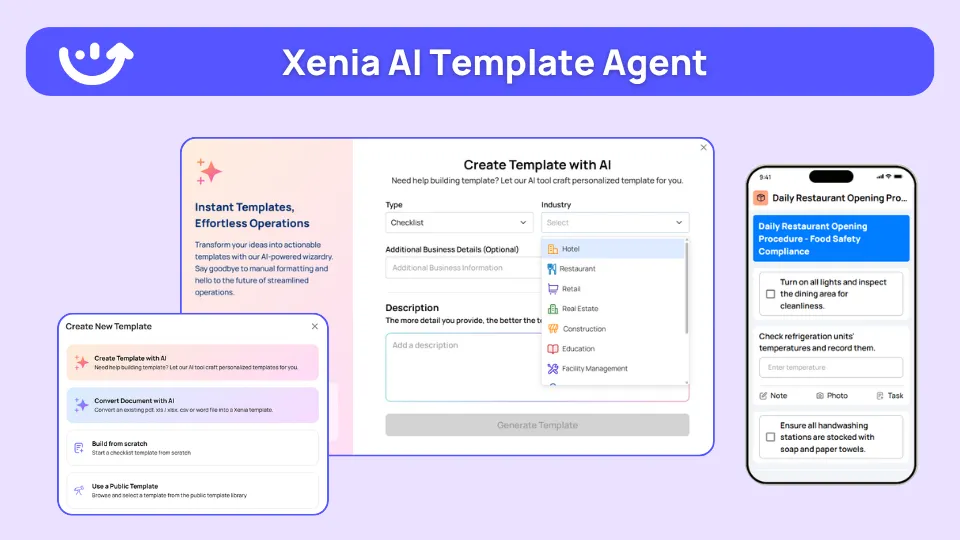
An accelerator worth knowing: the AI Template Agent turns an existing planogram or brand-standards SOP PDF into a digital audit form with conditional logic and photo-requirement fields, cutting the build from a multi-week template project to days. It transforms an existing SOP into a digital form. It does not invent a net-new audit from a vague brief.
Store-format conditional audits pair naturally with Photo Rollouts for visual merchandising. The conditional audit answers "did this store meet the right standards for its format." Photo Rollouts answer "does this store's window match the reference image corporate pushed." Push a reference photo (a new window display, an end-cap, a fixture set) to the formats it applies to, stores submit their photo back, and the DM reviews the compliance gallery to spot variance.
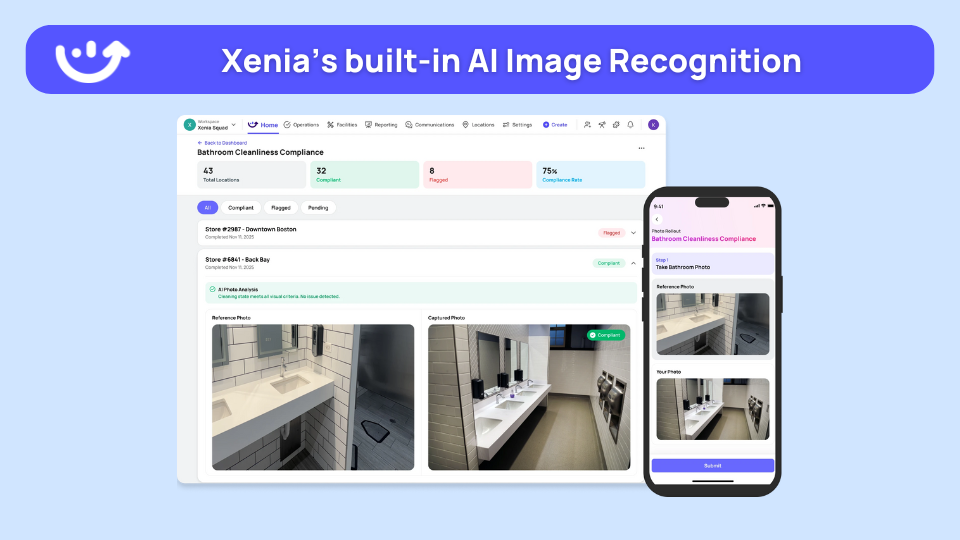
There is no automatic image-diff here. The DM reviews the gallery, and the platform organizes the submissions by store. The pairing is clean: conditional visibility scopes which visual questions a format answers, and Photo Rollouts capture proof that the format-relevant displays were executed.
Where do operators see results?
Multi-format retailers see results in three places: fair store scores that no longer punish small formats, one template instead of four to maintain, and clean cross-format reporting the regional rollup can actually trust.
- Fair scoring across formats. The kiosk and the flagship can both hit a true 100 percent on what they are each responsible for. The regional rollup stops flagging small formats as chronic underperformers when the only "failure" was questions they could never satisfy. Smaller-format stores do not get penalized for missing departments larger formats have. That is the nullify-scoring payoff.
- One template, not a template per format. A banner running four formats maintains one audit. When a brand standard changes, the edit happens once. Per-seat and per-template competitors make growth cost more. Xenia is flat per-location, so the pricing does not punish a banner for adding stores or district managers.
- Multi-banner consolidation. Ace Retail Group consolidated enterprise audits onto Xenia after Bindy, putting audits, comms, and multi-banner logic in one place, with an HRIS feed via MS Viva Engage. The same scoped-permission model means a district manager sees assigned stores while the banner sees its full estate, with no extra licenses.
- Visual compliance at scale. Adidas runs multi-banner visual compliance and Photo Rollouts on Xenia.
Market context matters here, because the number of formats a single banner runs is going up. Macy's small-format stores run about a fifth the size of full-size locations, with up to 30 new small-format stores planned from 2024 through fall 2025, as Modern Retail reported. Best Buy has opened a 5,000-square-foot small format, and IKEA's Planning Studios run 8,000 to 9,000 square feet against its mega-stores, per RetailNext. The takeaway for a retail DM: a static one-size audit breaks the moment a banner runs more than one format.
When a retailer runs a kiosk, a mall store, and a flagship under one banner, the audit should change by format, not the auditor's patience. Conditional visibility makes the store-format attribute do the work, and nullify scoring makes every store's score mean the same thing. For broader context, the conditional audits hub covers the full pattern, the franchise-tier conditional audit guide shows how tier (not just format) drives branching, and the retail-versus-restaurant audit comparison covers the cross-vertical differences (verticals, not formats within retail). Operators in eval mode can also work through the brand standards audit software guide and the retail operations software overview.
Frequently Asked Questions
Got a question? Find our FAQs here. If your question hasn't been answered here, contact us.
Why do kiosks, mall stores, and flagships need different audit questions?

How does conditional visibility handle a store format that has no fitting rooms?
Can one visual-standards template cover every retail store format?
How do you stop a small-format store from failing on flagship-only display items?
How does a store-format audit pair with photo rollouts for visual merchandising?
How did Ace Retail Group consolidate audits across multiple banners?


A Modern, AI-Powered Platform Built for Restaurant Operations
Xenia brings kitchen operations, food safety, audits, and team communication into one mobile-first platform. Restaurant teams execute daily work consistently, maintain compliance, and resolve issues faster, while leadership gets real-time visibility across all locations.
.webp)
Why Restaurant Operators Choose Xenia:
🤖 AI-Powered Operations, Convert paper logs instantly and verify food presentation and kitchen cleanliness automatically. Get instant answers about food safety trends without building reports.
🍽️ Food Safety & Compliance, Track line checks and temperature logs with automated alerts. Trigger corrective actions when readings exceed safe ranges. Maintain audit-ready records for health inspections.
📊 Multi-Location Control, Monitor food safety compliance and task completion across regions. Benchmark locations to identify training needs. Export reports for operational reviews.
One platform for kitchen operations, food safety, and compliance across all locations.

.svg)
.webp)
%201%20(1).webp)

.svg)
%201%20(2).webp)


