

Conditional Audit Type
What is conditional visibility?
Conditional visibility is branching logic on audit questions tied to a location or auditor attribute. It shows different questions, or in this case the same questions in a different language, based on that attribute, without penalizing stores for items they were never supposed to have. When the attribute is language, the same question renders in English or Spanish from one template, and the score stays identical either way.
Language is a new dimension for this mechanic, but it is mechanically distinct from physical-format branching. Physical-format branching changes which questions appear. Language rendering changes how the same question displays. The question record stays one record, not two. That distinction is the whole point. Read the parent concept in conditional visibility for multi-location audits, which covers the same branching logic this page extends to language.
A few things to keep straight on first mention:
- Conditional visibility decides what an auditor sees based on an attribute. C-store chains already use it to run one audit and hide irrelevant questions per location group, the same way tap-system versus fuel-only C-store audits handle forecourt format variation.
- Nullify scoring is the paired feature. It means N/A items do not count against the store, so a fuel-only site is not marked down for missing food-service equipment. See how nullify scoring pairs with conditional visibility to stop false negatives.
One guardrail worth stating plainly: this is deterministic attribute-based branching, not AI and not machine translation. The operator supplies the translated question text. Rendering is decided by attribute. The audit shows up in the right language because someone set the language field, not because software guessed at a translation.
Worked example, conditional visibility in action
Picture a 140-unit operator running one brand-standards template that carries 40 questions. The language attribute on the auditor's profile or the location record decides how those 40 questions render. A Spanish-primary kitchen team completes the audit with every question, follow-up prompt, and corrective-action label shown in Spanish.
An English-primary team sees the same 40 questions in English. The question set and scoring stay identical. Only the displayed language changes. A single benchmarkable score rolls up across every site, no matter which language the walk was completed in.
Here is the C-store version, which is the primary case for this page. A West Coast fuel-and-food chain runs one closing audit. The overnight team at the urban-core stores works primarily in Spanish. The suburban-store teams work in English.
The closing attendant scans in, the audit renders in their language, and the cooler-temp and fuel-price questions read in Spanish for the Spanish-primary team. When the area manager opens the above-store view at 7am, every store reports one score on the same scale. There is no "Spanish stores" report and "English stores" report to reconcile.
The restaurant variant works the same way. A QSR franchise group runs a quarterly food-safety walk. The line-check and walk-in temp questions render in Spanish for kitchen teams that work in Spanish. A 10-point critical temp failure weighs 10 points whether the auditor answered it in English or Spanish.
Here is the rule logic in plain terms:
**
Auditor or store attribute, Condition, What renders, What stays fixed
Team works primarily in Spanish, Language attribute set to Spanish, Questions-follow-up prompts-corrective-action labels in Spanish, Question set-point values-weighting-nullify rules
Team works primarily in English, Language attribute set to English, The same 40 questions in English, Question set-point values- weighting-nullify rules
Site without a tap system, Tap-system attribute off, Tap-related temp questions hidden by nullify scoring, The remaining questions and the benchmarkable score
**
Because the underlying question is one record, nullify scoring and weighting behave the same in both languages. C-store chains with mixed formats (some stores with tap systems, some without) can run one audit and hide irrelevant questions per location group, and that logic does not change when the audit renders in Spanish.
The closest sibling read here is conditional checklists versus duplicate templates, which covers why one record beats two. For the scoring mechanics that ride along, see weighted audit scoring with critical-item thresholds.
How does conditional visibility differ from static audits?
The alternative to bilingual conditional rendering is maintaining a separate Spanish template. That works until you need one number across all sites. Two templates means two question banks that drift, two score sets a compliance officer has to normalize, and weighting and nullify rules that have to be re-applied per template.
**
Attribute, One bilingual template (conditional rendering), Two duplicate templates (English plus Spanish)
Question records, One record per question, Two records per question
Editing a question, Edit once-both languages stay in sync, Edit twice-drift risk between versions
Scoring, One benchmarkable score across all sites, Two score sets-manual reconciliation
Weighting and nullify behavior, Identical-applied to one record, Must be re-set on each template-drift risk
Rolling up to corporate, One report-one scale, Merge two reports-normalize by hand
Adding a third language, Add a translation to the same record, Build and maintain a third full template
**
Read across that table for an area manager who answers to corporate. With conditional rendering, a question's weight, its nullify setting, and its follow-up logic are set once and behave identically no matter the display language. With duplicate templates, every edit happens twice and the two versions slowly fall out of sync. When the audit show-up day comes, you are normalizing two score sets by hand instead of reading one.
SafetyCulture (iAuditor) confirms the single-template-with-translations model is the right architecture, but caps it. On the Premium plan, a template is limited to one translation in addition to the original language per template, and unlimited languages require Enterprise access through a customer success manager.
Reporting carries limits too: reports can only be generated in languages supported on the web app, and multi-language is not available in Analytics for response breakdowns or question filters, per SafetyCulture's multi-language template documentation. Even the category leader treats multi-language as a tiered add-on with reporting gaps, not as a conditional dimension with one clean benchmarkable score. That is the gap Xenia fills, and it is the same one covered in the honest Xenia versus Zenput comparison for operators weighing a switch.
.svg)

Priced on per user or per location basis
Available on iOS, Android and Web


How to set up conditional visibility in Xenia
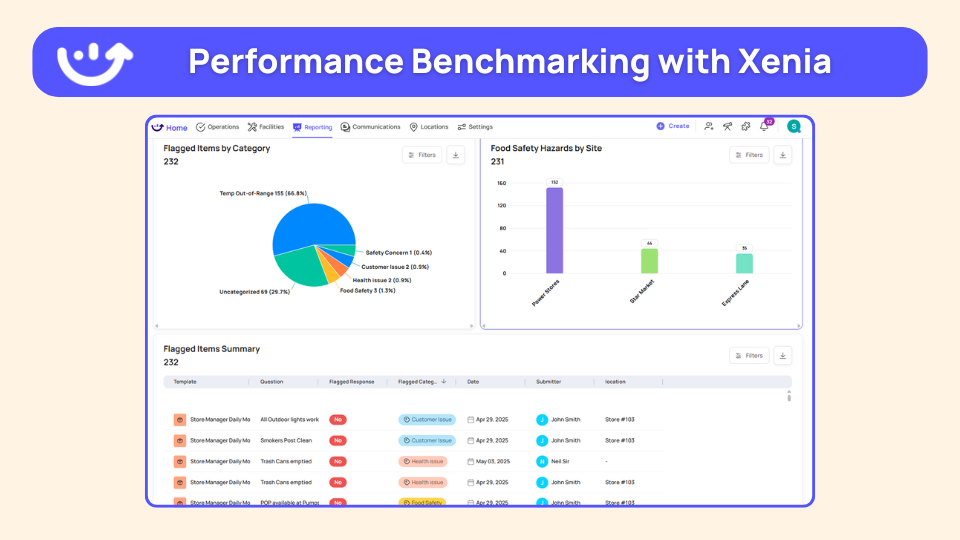
Setting up a bilingual conditional audit takes six steps, and none of them require a developer.
Two terms to keep distinct as you set this up. Nullify scoring means an item does not count for a store that was never supposed to have it. A fuel-only site is not penalized for missing food-service equipment. Weighting means an item counts more than another, so a cooler-temp failure carries more points than a shelf-label gap.
Nullify scoring still hides irrelevant questions when the audit runs in Spanish, because the rule lives on the question record, not on the language. The same tier-based branching shows up in franchise tier conditional audits, where the attribute is the unit's tier instead of the team's language.
Where do operators see results?
Operators see results in two places: audits that actually get completed correctly because the frontline team can read them, and one benchmarkable score they can roll up without reconciling two template sets.
Power Market is the lead proof point because it is bilingual, C-store, and multi-location, which is exactly this page's profile. Power Market went live across more than 360 locations with bilingual checklists and QR-code deployment, moving from paper to digital, and reported 40% faster task resolution.
That is the bar for what bilingual rendering does when the team can read the audit in their own language. For the broader vertical pattern, the convenience store operations software hub covers how fuel-and-foodservice operators run audits across mixed-format forecourts.
Bigger multi-banner operators run localized audits at scale too. Adidas runs multi-banner visual compliance with Spanish localization across its global footprint, and Ace Retail Group consolidated multiple banners onto one audit program when it left Bindy. Both are color for the same point: localized audits are how large operators keep one standard across a workforce that does not all work in English.
There is real workforce math behind this. About 28% of restaurant and foodservice employees are Hispanic, per the National Restaurant Association's U.S. restaurant employee demographics, and foreign-born workers concentrate in service occupations at 22.0% versus 15.1% for native-born, per the Bureau of Labor Statistics foreign-born workers release.
For a 140-unit restaurant or C-store operator, a meaningful share of the people physically completing the walk work primarily in Spanish. The audit has to render in their language or the data that rolls up to corporate is noise. To zoom back out to the full mechanic, the conditional audits overview hub explains how one template handles 100-plus format variations, with language as just one more dimension.
Frequently Asked Questions
Got a question? Find our FAQs here. If your question hasn't been answered here, contact us.
Why does a non-English-primary team need the audit rendered in their language?

How does conditional logic decide which language to show an auditor?
Can one template serve English and Spanish auditors without splitting the score?
How do bilingual audit scores roll up into one benchmarkable report across sites?
How is language-based rendering different from building a separate Spanish template?
Does conditional visibility still hide irrelevant questions when the audit runs in Spanish?


A Modern, AI-Powered Platform Built for Restaurant Operations
Xenia brings kitchen operations, food safety, audits, and team communication into one mobile-first platform. Restaurant teams execute daily work consistently, maintain compliance, and resolve issues faster, while leadership gets real-time visibility across all locations.
.webp)
Why Restaurant Operators Choose Xenia:
🤖 AI-Powered Operations, Convert paper logs instantly and verify food presentation and kitchen cleanliness automatically. Get instant answers about food safety trends without building reports.
🍽️ Food Safety & Compliance, Track line checks and temperature logs with automated alerts. Trigger corrective actions when readings exceed safe ranges. Maintain audit-ready records for health inspections.
📊 Multi-Location Control, Monitor food safety compliance and task completion across regions. Benchmark locations to identify training needs. Export reports for operational reviews.
One platform for kitchen operations, food safety, and compliance across all locations.

.svg)
.webp)
%201%20(1).webp)

.svg)
%201%20(2).webp)


