

Post Summary
It is 11 PM. Your closing manager just wrapped a rough shift. The walk-in is running warm, two servers called out, and a customer complaint at table 12 is sitting unresolved.
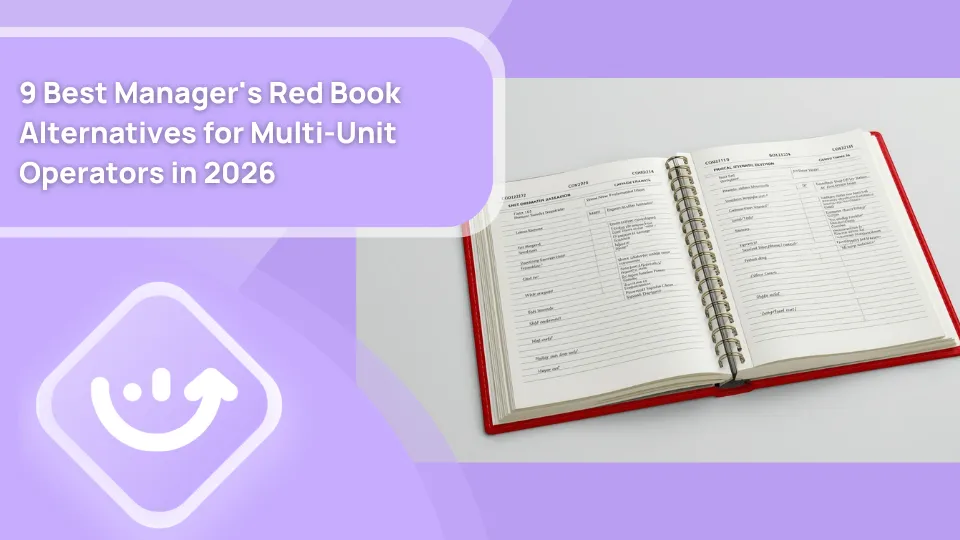
All of it goes into a spiral notebook on the counter.
By 6 AM, the opening manager skims two pages, catches half of it, and misses the walk-in note entirely. Nobody follows up. The problem gets worse.
That is not a people problem. That is a paper Red Book problem.
Every multi-unit operator running restaurants, retail stores, or c-stores has lived this. The Manager's Red Book worked for what it was. But paper cannot alert you when a flagged issue sits unresolved for 48 hours. It cannot surface which of your 20 locations has had the same refrigeration issue three weeks running. And it cannot make anyone act on what was written down.
That is why operators are moving to digital Red Book software and manager log book alternatives. In 2026, there are nine worth looking at. This article covers each one honestly, what it does, where it falls short, and who it actually fits.
What actually separates a good Red Book alternative from a mediocre one
Before comparing tools, get clear on what a real Red Book replacement needs to do. Most operators make the mistake of evaluating features instead of evaluating workflows.
Here is what actually matters.
Can your area director see what happened last night at every location, from one screen?
If not, the Red Book problem has not been solved. It has just moved online. Multi-location visibility above store level is the single biggest operational upgrade over paper. Without it, calling locations one by one every morning is still the only option.
Does a flagged issue trigger anything automatically?
A log entry that sits unread is identical to a paper note nobody followed up on. A real digital manager log book creates tasks from entries, assigns them to the right people, and tracks whether those tasks get resolved. Without that loop, the operation is still relying on someone's memory.
Does the log connect to operations, not just to notes?
The best tools pull POS sales data, labor percentages, and compliance records in automatically. Every log entry carries context, not just text. That context is what makes above-store review actually useful for regional managers and ops directors.
Is it genuinely mobile-first with offline support?
Floor managers are not at desks. If the app is clunky on a phone or requires a connection to function, managers will take photos of the notebook instead of using the tool. Offline capability matters more than most vendors admit.
Does it scale across concepts and location types?
A single-concept QSR chain has different needs than an operator running restaurants alongside retail stores and c-stores. Some tools are built for one concept only. Others handle multiple formats in one account without workarounds.
Most tools on this list handle some of these criteria well. One handles all of them. That pattern becomes clear as you read through each entry.
The 9 Manager's Red Book alternatives in 2026
.svg)
.webp)

**
Tool, Best for, Multi-site dashboard, Corrective actions, Audit workflows, Free plan
Xenia, Multi-unit ops across industries, Yes, Yes, Yes, Yes-up to 5 users
7shifts, Restaurant labor-focused logging, Yes, Basic tasks only, No, Limited
ShiftForce / ShiftNote, Restaurant and hotel log books, Yes, No, No, 30-day trial
Homebase, Small to mid-size single/multi-location, Limited, No, No, Yes-1 location
MaintainX, Maintenance-heavy facilities, Yes, Maintenance only, No, No
Workpulse rOS, Single-concept QSR chains, Yes, QSR-specific, QSR only, No
TimeForge, Labor-heavy scheduling teams, Limited, No, No, No
Red Book Keep, Teams digitizing the paper format, Yes, No, No, No
TrueContext, Unique custom log formats, Limited, No, No, No
**
1. Xenia
.webp)
Best for: Multi-unit QSR, retail, c-store, and hospitality operators who need a daily manager log connected to corrective actions, brand standard audits, above-store analytics, and frontline task execution in one platform.
Every other tool on this list captures information. Xenia makes that information do something.
That is the core difference. And for multi-unit operators who have been burned by shift notes that go nowhere, it is the only distinction that actually matters.
The daily manager log in Xenia works the way you would expect. Shift notes, flagged incidents, sales context, weather, maintenance issues, equipment flags, all logged per shift, per location, timestamped and searchable across the full portfolio.
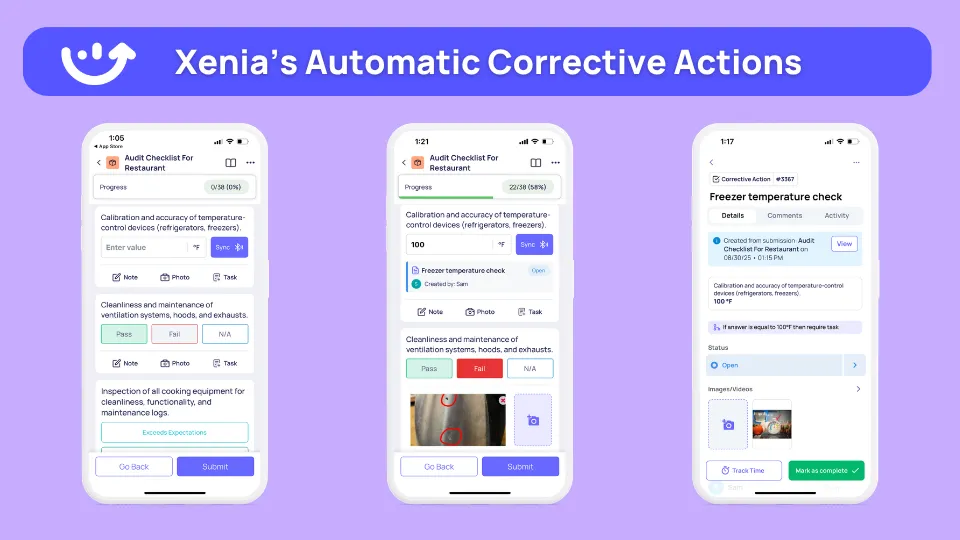
But those entries do not just sit there. When a closing manager logs a refrigeration issue at 11 PM, Xenia creates a corrective action task automatically. It assigns that task to the right person. It sets a due date. And it escalates if the issue is unresolved before the next inspection. The opening manager does not need to read last night's notes and hope someone remembered to follow through. The system already made sure someone did.
That is the practical gap between a digital shift log and a full operations execution platform like Xenia.
What Xenia does that no other tool on this list does:
- Daily manager log with corrective action triggers built in, every flagged entry becomes an assigned, trackable task automatically
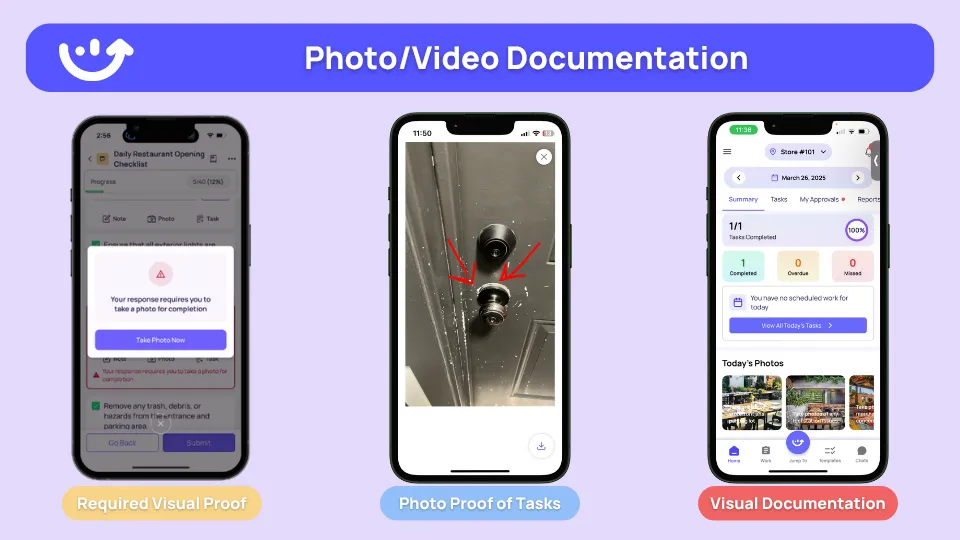
- AI Photo Analysis that requires photo evidence on log entries and reviews those photos for compliance, no checkbox without proof
- Weighted audit workflows sitting alongside the daily log in the same platform, brand standard inspections and shift notes do not need two separate tools
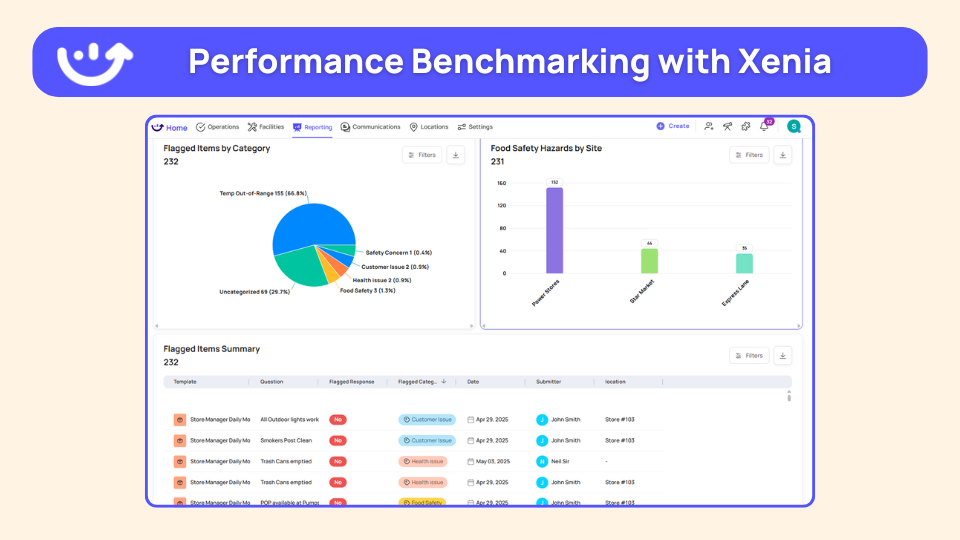
- Multi-location analytics dashboard giving regional managers a real-time read on flagged items, completion rates, recurring issues, and audit scores across every location from one screen
- AI Template Agent that builds log structures and checklists by role and concept automatically, opening a new site does not mean rebuilding forms from scratch
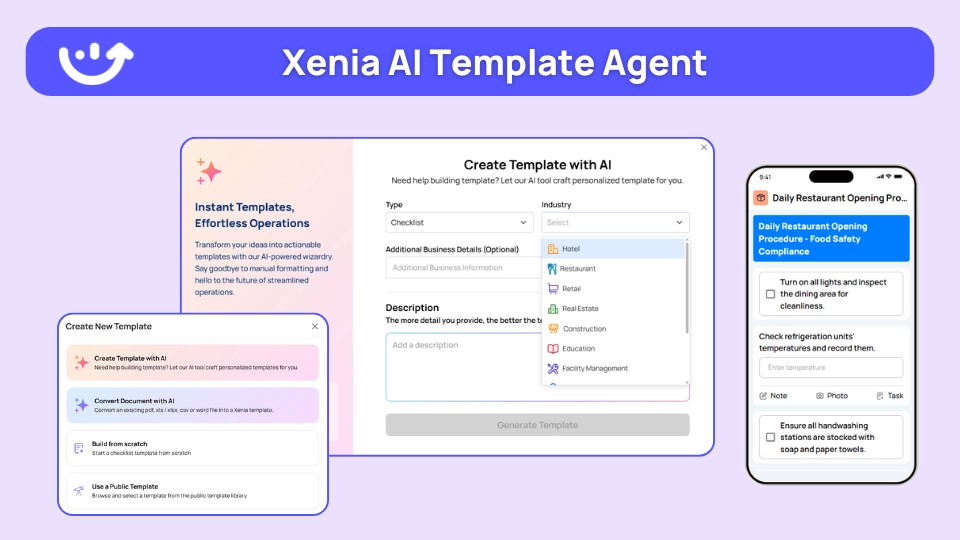
- Conditional visibility via location attributes so a c-store sees different log fields than a full-service restaurant, even within the same account

- HRIS integrations that automate user provisioning as staff turns over, one of the most overlooked friction points at scale
- Frontline communication tools that keep shift notes, announcements, and team messaging in one place instead of scattered across text threads and email chains
.webp)
The mobile app runs fully offline on iOS and Android. Rated 4.9 out of 5 on Capterra. Most multi-unit teams are live within two weeks.
See how Xenia works as an operations execution software

Priced on per user or per location basis
Available on iOS, Android and Web


2. 7shifts Manager Log Book
.webp)
7shifts built its Manager Log Book specifically for restaurants, and the POS integration is the real differentiator. Every entry is tied to a specific shift, with sales and labor cost data flowing in automatically from Toast, Square, and other major POS systems. No manual entry required.
What the log covers:
- Daily sales and labor cost pulled from POS automatically
- 86'd items, maintenance issues, and staff observations
- Customer complaints and incident notes
- Post-shift employee feedback scores
Managers can create follow-up tasks from entries and assign them forward. Multi-site owners see a consolidated view across all locations.
Where it stops short: No inspection workflows. No food safety compliance. No corrective action automation beyond basic task assignment. The log is searchable and accessible but it does not flag patterns or connect logged incidents to scheduled inspections.
Pricing: Manager Log Book add-on at $14.99/location/month. Base plans from free to $150/location/month.
Best for: Restaurant chains already using 7shifts for scheduling who want POS-synced shift notes and do not need the log to drive broader ops accountability.
3. ShiftForce / ShiftNote

ShiftNote is the most directly positioned tool on this list. It is specifically built to replace the paper Red Book, not a feature inside a broader platform.
The department-level log structure makes it useful for multi-outlet properties. A hotel running F&B, spa, housekeeping, and front desk can run separate logs per department without separate logins. GMs see everything from one dashboard.
What it includes:
- Customizable log categories per shift and department
- POS integration for daily sales
- Direct messaging alongside shift notes
- Fully searchable history across all departments and locations
- Mobile access from any device
Where it stops short: No corrective action workflows. No audit scoring. No brand standards compliance. No above-store analytics beyond reading the log entries themselves. Clean and simple, but it stops at communication.
Pricing: Contact-based. 30-day free trial.
Best for: Restaurants and multi-outlet hospitality properties that want a purpose-built digital Red Book with department-level separation.
Also a reasonable fit for hotel operations teams managing front-of-house service standards across multiple outlets who need a structured shift log without additional ops complexity.
4. Homebase

Homebase is used by small businesses. For independent cafes and single-location restaurants not ready for enterprise software, it is one of the most accessible digital manager log book options available.
The Manager Log uses a board-based structure where managers post notes to custom boards by topic or shift. Everything is searchable. AI writing assistance helps managers clean up dictated notes automatically. Smart Suggestions link employee names in log entries to HR performance profiles.
Pricing:
**
Plan, Cost, Coverage
Basic, Free, 1 location-up to 20 employees
Essentials, $24.95/location/month, Unlimited employees
Plus, $56/location/month, Departments and permissions
All-in-One, $96/location/month, HR-onboarding-compliance
**
Where it stops short: Optimized for one location. Per-location costs add up fast. No corrective action workflows, no audit tools, no brand standards layer, and no meaningful above-store analytics. Operators managing more than a handful of locations will outgrow it quickly.
Best for: Independent restaurants and small cafe groups who want a clean digital log at accessible pricing and are not yet building a structured multi-unit ops system.
5. MaintainX
MaintainX is a CMMS with shift journal and checklist capabilities. If the Red Book at your operation is primarily equipment logs, work order notes, and PM completion records, it fits well.
What it does well:
- Work order creation from log entries and maintenance requests
- Preventive maintenance scheduling with automated triggers
- QR and barcode scanning for asset identification
- Full offline capability with auto-sync
- AI Procedure Recommendations added May 2026
Won the 2025 Deloitte Technology Fast 500.
Where it stops short: A maintenance-first platform. FOH and BOH shift handover notes, food safety compliance, and brand standards tracking are outside its design. Not the right starting point for QSR or retail operators.
Pricing: Per-user per month, tiered. Contact for specifics.
Best for: Multi-site facilities managers and c-store operators whose daily log is primarily a maintenance and equipment record.
6. Workpulse rOS

Workpulse is a restaurant operating system built exclusively for QSR and fast casual. Over 6,000 QSR locations run on it, including Taco Bell and Dunkin franchisees.
What it does well:
- Digital daily log covering food safety, brand standards, and guest feedback
- Audit management with real-time visibility across locations
- Temperature recording with automated out-of-range alerts
- Facilities and equipment ticketing with automated reassignment
Where it stops short: No published pricing. Built only for restaurants. Multi-concept operators or anyone managing retail alongside restaurants need separate systems. Rigid outside the QSR mold.
Pricing: Contact-based. No public tiers.
Best for: Multi-unit QSR groups running a single concept who want a Red Book replacement with food safety and audit built in, and have no need for cross-industry flexibility.
7. TimeForge Daily Log

TimeForge's Daily Log is actually three logs in one system running simultaneously.
**
Log type, Who sees it, What it captures
Manager Log, Management only, Staffing notes-ops observations
Staff Log, All employees, Announcements-policy updates
Audit Log, Auto-generated, Schedule edits-payroll changes-timestamped
**
The Audit Log captures system events automatically without any manager input. A 2025 update improved report filters for above-store review.
Where it stops short: A labor management platform at its core. No brand standards audit workflows, no corrective action automation, no meaningful cross-site analytics. Runs out of road fast for operators who need the log to drive accountability beyond shift notes.
Pricing: Per-location or per-staff. Contact for specifics.
Best for: Multi-site operations already using TimeForge for labor scheduling who want a digital shift log in the same system.
8. Red Book Keep

Red Book Keep is the official mobile companion to the physical Manager's Red Book, built by HotSchedules, now part of the Fourth platform. Same pages. Same fields. Now cloud-stored and searchable.
What it includes:
- Permanent, searchable cloud storage of all entries
- Timestamps and manager identification on every entry
- Photo documentation on log entries
- Digital pass-downs across shifts and locations
- Above-store and ownership visibility
Where it stops short: A digital copy of the paper Red Book, nothing more. No corrective action workflows, no audit tools, no analytics. Solves the lost notebook problem. Does not solve the note-nobody-acted-on problem.
Pricing: Contact-based via Fourth and HotSchedules. Per-location.
Best for: Established QSR and retail chains with deep Red Book habits who want digital continuity with zero disruption.
9. TrueContext
.webp)
TrueContext, formerly ProntoForms, is a no-code mobile form builder. Teams design their own log structure from scratch to replicate an existing Red Book format exactly.
What it supports:
**
Feature, Details
Field types, Text-number-dropdowns-photo-signature
Logic, Conditional fields based on prior answers
Offline mode, Full functionality without connection
Export, PDF-CSV-Excel
**
Where it stops short: Zero pre-built ops logic. No task follow-up, no corrective action workflow, no above-store dashboard. The team builds and maintains everything internally. Does not scale well without dedicated internal resources.
Pricing: Per-user per month, tiered. Contact for specifics.
Best for: Multi-unit operations with unique log formats and internal capacity to build and maintain the structure.
How to pick the right manager's red book alternative
Use this table to match your situation to the right tool.
**
Your situation, Best fit
Multi-unit operator needing daily logs-corrective actions-audits and above-store analytics in one platform, Xenia
Restaurant chain already on 7shifts wanting POS-synced shift notes tied to labor data, 7shifts Manager Log Book
Restaurant or hotel group wanting a pure purpose-built digital Red Book with department-level separation, ShiftForce / ShiftNote
Independent cafe or small restaurant wanting a simple log book bundled with scheduling, Homebase
Facilities or c-store team whose Red Book is mostly equipment logs and maintenance records, MaintainX
Single-concept QSR franchise group wanting a restaurant-only operating system, Workpulse rOS
Multi-site team already on TimeForge for labor who want a shift log in the same system, TimeForge Daily Log
Existing Red Book users who want to go digital without changing their current format, Red Book Keep
Operation with a unique log format that does not fit any pre-built tool, TrueContext
**
Still not sure? Ask yourself these three questions.
Question 1: Do you need the log to capture notes, or to create accountability?
Most tools on this list capture notes well. But if a flagged issue needs to automatically become an assigned task with a due date, tracked to resolution, and escalated if it goes unresolved before the next inspection, that shortens the list fast. Most scheduling add-ons and pure log book tools were not built for that workflow. Xenia was.
Question 2: Are you managing more than one concept or industry type?
Single-concept QSR groups have solid options here. Workpulse and ShiftForce are built for that lane. But multi-concept operators running restaurants alongside retail or c-stores need a platform that handles different log structures, different compliance requirements, and different operating formats in one account without separate contracts or workarounds. Most tools on this list cannot do that. Xenia handles it natively.
Question 3: Does the log need to connect to food safety, brand standards, and corrective actions?
If yes, a scheduling platform with a log book add-on will not get you there. Food safety compliance, brand standards auditing, and corrective action workflows need to be connected by design, not bolted on as separate features. Xenia is the only tool on this list where all three exist alongside the daily manager log in the same platform.
If three out of three of those answers point toward accountability, multi-concept flexibility, and connected ops workflows, there is really only one tool on this list built for that combination.
See how Xenia works for your operation. Book a free demo.
Conclusion
The paper Red Book was the right idea in the wrong format.
The goal was always simple. Give the next manager enough context to run a good shift. Help teams communicate across shifts without relying on verbal handoffs or memory. Keep a record of what happened and why.
Every tool on this list solves some part of that problem. ShiftNote for pure log book simplicity. 7shifts for restaurant labor context. Homebase for small teams on tight budgets. Red Book Keep for operators who just want the familiar format in digital form.
But most of them stop at capturing information. For operators managing restaurant server teams across multiple locations, tracking steps of service consistency, or running cafe operations at scale, capturing information was never really the hard part. Making sure someone acts on it was.
That is the gap Xenia closes. For operators tired of shift notes that go nowhere, seeing it in action is worth the time.
Frequently Asked Questions
Got a question? Find our FAQs here. If your question hasn't been answered here, contact us.
Is Red Book Keep the same as the Manager's Red Book?

No. The Manager's Red Book is a physical paper product. Red Book Keep is the mobile app built by HotSchedules, now Fourth, that digitizes the same format and moves it to the cloud. It is a digital copy, not a new platform. Operators who need more than basic digitization will outgrow it fast.
What is the difference between the Manager's Red Book and a digital shift log?
The Red Book is a physical logbook. A digital shift log stores the same information in the cloud, searchable and shareable across locations in real time. The best platforms go further by adding corrective action automation, something paper could never do.
What should a restaurant manager log book include?
At minimum: shift date, manager name, daily sales and labor cost, staffing issues, equipment flags, food safety observations, and any incidents or complaints that need to carry forward.
Better platforms also capture photos, corrective action assignments, and follow-up task status inside each entry. Xenia's shift notes template and shift pass-on log are good free starting points.
What is the best digital manager log book for multi-unit restaurant operators in 2026?
It depends on what the log needs to do. If shift notes need to connect to corrective actions, brand standard audits, and above-store dashboards, Xenia is the strongest option on this list. If the priority is labor and POS-tied logging inside a scheduling platform, 7shifts fits well. For small independents on a tight budget, Homebase covers the basics.


A Modern, AI-Powered Platform Built Specifically for Frontline Operations
Xenia brings daily operations, maintenance, audits, and compliance into one mobile-first platform. Frontline teams execute work consistently across locations while leadership gets real-time visibility.

Why Multi-Location Operators Choose Xenia:
🤖 AI-Powered Operations, Create digital checklists instantly or convert paper forms with AI. Verify compliance automatically with photo analysis and get instant answers from your operational data.
✅ Daily Operations & Maintenance, Assign work across hundreds of locations in minutes. Report and route issues instantly. Schedule preventive maintenance to catch problems before downtime.
📊 Real-Time Visibility, Track completion, work orders, and performance across all locations through dashboards. Filter by site or asset to spot trends and take action.
Manage operations, maintenance, and compliance across all your locations from one platform

.svg)
.webp)
%201%20(1).webp)

.svg)
%201%20(2).webp)




