


Post Summary
Equipment breaks during rush hour.
Staff scrambles to find repair contacts. Technicians don't know equipment history. Kitchen loses money every minute equipment is down.
Paper work orders don't work. Forms get lost. No one tracks progress. Equipment breaks again because maintenance gets skipped.
You need work order software that creates requests on mobile, tracks repairs automatically, and schedules maintenance before breakdowns happen.
The best work order management software does three things: staff creates work orders in 2 minutes on phones, managers see repair status across all locations instantly, and preventive maintenance runs automatically.
This guide shows the 7 best work order management systems that reduce equipment downtime by 30-50%.
Best Work Order Software Comparison
**
Rank, Platform, Focus, Key Strength, Best For
#1, Xenia, Operations + Maintenance, Auto corrective actions - inspection integration - multi-location + automated work order creation, Multi-location operations (5-500+ sites)
#2, MaintainX, Mobile-First CMMS, QR asset access - free tier - easy adoption, Small teams starting digital
#3, Limble CMMS, Asset-Heavy Operations, Vendor marketplace - equipment reliability, Equipment-intensive facilities
#4, UpKeep, Modern Scaling, GPS dispatch - flexible UI - growth features, Growing multi-location businesses
#5, eWorkOrders, QR + Compliance, QR requests - food safety docs - compliance, Safety-focused operations
#6, Fiix, Predictive Analytics, AI scheduling - predictive maintenance, Data-driven enterprises
#7, Hippo CMMS, Simple Operations, Visual maps - intuitive interface, Simple maintenance needs
**
.svg)
.webp)
.webp)
1. Xenia - Best Work Order Management Software
- What it's for: Complete work order management system with automated work order creation, preventive maintenance scheduling, and operations integration
- G2 rating: 4.9/5
- Who uses it: Demos Restaurants, Power Market, Slim Chickens, multi-location restaurant and retail chains
- What makes it different: Only work order software that automatically creates work orders from failed inspections, integrates preventive maintenance with daily operations, and tracks equipment issues until completely resolved, not just documenting requests
Most software handles maintenance requests in isolation. Equipment breaks, someone creates a work order, technician fixes it, case closed.
Xenia's work order management software prevents equipment failures before they happen. Failed inspection triggers work order automatically. Preventive maintenance schedules based on actual equipment usage. Everything connects: inspections, maintenance, operations, and compliance.
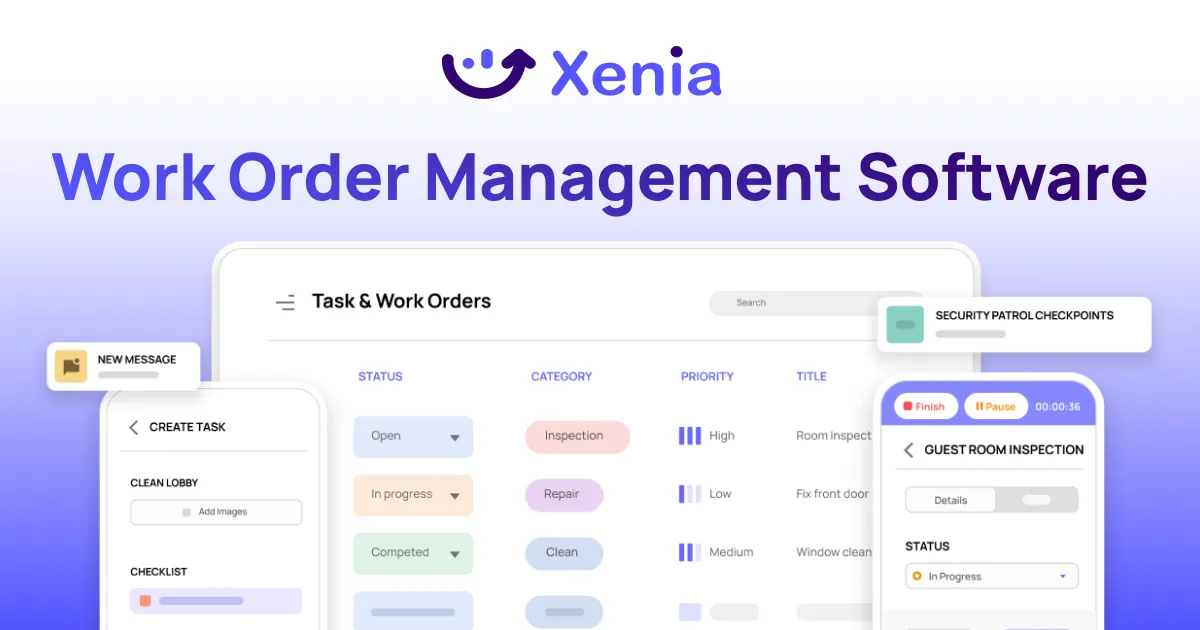
How Xenia's Work Order Management Works
Automated Work Order Creation: Equipment inspection fails? Work order created instantly. No manual request needed. Failed temperature check triggers refrigeration work order. Broken fryer during inspection becomes maintenance request immediately.
Staff doesn't need to remember to create requests. System handles it automatically based on inspection results.
QR Code Asset Access: Place QR codes on every piece of equipment. Staff scans code, sees equipment history, creates work order, or starts preventive maintenance task instantly.
Fryer acting up? Scan QR code. See last repair date. View maintenance history. Create work order with equipment details pre-filled. Everything tracked to specific assets.
Preventive Maintenance Automation: Set PM schedules for every piece of equipment. System creates recurring work orders automatically. HVAC monthly filter change? Scheduled automatically. Fryer deep clean every 90 days? Task assigned automatically.
No spreadsheets. No forgetting. Equipment maintained before it breaks.
Photo Documentation Required: Every work order requires before and after photos. Staff documents problem visually. Technicians show completed work. Managers verify repairs from their phones.
Prevents disputes. Proves work was done correctly. Creates visual equipment history.
Real-Time Multi-Location Tracking: District managers see work order status across all locations instantly. Which sites have open requests? What equipment needs attention? Where are repair costs highest?
Everything visible in real-time dashboards. No calling locations for status updates.
How Xenia Compares to Standalone Work Order Software
**
What You Need, Xenia, Standalone Work Order Software
Best for, Work orders + complete operations, Work order tracking only
Work order creation, Auto-generated from inspections, Manual request creation
Equipment tracking, QR codes with full operational history, Basic asset tracking
Preventive maintenance, Integrated with daily operations, Separate PM system
Multi-location, Real-time dashboards across all sites, Basic reporting
Operations integration, Inspections - tasks - compliance combined, Standalone maintenance tool
**
Bottom line: Use Xenia for work order management that prevents equipment problems before they cause downtime. Work orders connect to your entire operation, not just maintenance.

Priced on per user or per location basis
Available on iOS, Android and Web


2. MaintainX
Best for: Small teams starting digital maintenance management
MaintainX offers mobile-first work order management app with QR asset scanning and a generous free tier.
Key features:
- Mobile work orders with photo attachments
- QR/NFC asset scanning
- Preventive maintenance scheduling
- Real-time collaboration
- Free tier available
Good if: You're starting digital maintenance and want free entry point.
Not good if: You need advanced analytics or complex multi-location features.
3. Limble CMMS

Best for: Facilities with complex equipment requiring detailed asset management
Limble CMMS focuses on comprehensive asset management with vendor marketplace integration.
Key features:
- Detailed asset history tracking
- Vendor marketplace
- Advanced PM scheduling
- Custom reports
- Spare parts management
Good if: You have complex equipment requiring detailed maintenance history.
Not good if: You need simple work order tracking system without asset complexity.
4. UpKeep

Best for: Growing multi-location businesses
UpKeep offers modern work order management system with GPS dispatch and flexible interface.
Key features:
- Reactive/preventive work orders
- Asset/inventory tracking
- GPS technician dispatch
- Modern mobile interface
- Growth-focused features
Good if: You're scaling from single to multi-location and need modern interface.
Not good if: Bulk editing capabilities are limited for large operations.
5. eWorkOrders

Best for: Safety-focused operations requiring compliance documentation
eWorkOrders combines QR code work order request software with food safety compliance features.
Key features:
- QR work requests and PM
- Food safety compliance docs
- Multi-site templates
- Offline mobile access
- Compliance reporting
Good if: You need QR-based requests with built-in compliance documentation.
Not good if: Enterprise pricing may be high for smaller operations.
6. Fiix

Best for: Data-driven enterprises wanting predictive maintenance
Fiix offers AI-powered maintenance work order software with advanced analytics.
Key features:
- AI predictive PM scheduling
- Advanced work order analytics
- Asset management integration
- IoT sensor connectivity
- Rockwell automation integration
Good if: You want AI-driven maintenance scheduling and predictive analytics.
Not good if: Setup is intensive and requires technical resources.
7. Hippo CMMS

Best for: Simple maintenance needs with visual interface
Hippo CMMS offers intuitive facilities work order system with visual facility maps.
Key features:
- Visual facility maps
- Calendar-based scheduling
- Simple work order interface
- Basic inventory tracking
- Hospitality-friendly design
Good if: You need simple, visual interface with minimal training required.
Not good if: You need advanced predictive maintenance capabilities.
What is Work Order Management Software?
Work order management software digitizes maintenance requests and tracks repairs from start to finish.
Staff creates work orders on phones. Technicians get notifications instantly. Managers track progress in real-time. Everything documented automatically.
The best work order software prevents equipment failures through automated preventive maintenance and connects maintenance to daily operations.
How it works: Equipment needs repair. Staff creates work order on mobile with photos and priority. System assigns to appropriate technician based on location and skills. Technician gets notification with equipment history. Work completed with before/after photos. Manager verifies completion.
Benefits of Work Order Management Software
Work order management software transforms how businesses handle maintenance requests and equipment repairs.
Operational benefits:
- Reduces downtime by 30-50% through faster work order creation
- Prevents costly breakdowns with automated preventive maintenance
- Improves accountability with photo documentation from start to completion
- Centralizes all equipment history, repair costs, and service records in one place
Business advantages:
- Works across multiple locations from one dashboard
- Streamlines communication between technicians, managers, and vendors
- Reduces emergency repair costs through better planning and preventive maintenance
- Ensures compliance with digital documentation and automatic record-keeping
The most significant benefit is moving from reactive to preventive maintenance. Instead of waiting for equipment to break, maintenance work order software schedules regular maintenance automatically, keeping equipment running longer and reducing unexpected downtime.
Types of Work Order Management Software Systems
Different businesses need different types of work order software based on their size and needs.
Simple Apps create and track basic requests. Good for small businesses with easy maintenance needs. Work on phones with basic reports.
CMMS Systems handle everything, equipment history, parts inventory, and scheduling. Best for businesses with lots of equipment that need detailed records.
All-in-One Platforms combine work order management software with inspections and daily tasks. Instead of separate systems, everything works together in one app.
Big Business Solutions have advanced features like AI predictions and complex reports. Made for large companies with many locations and complicated maintenance needs.
Industry Tools are built for specific businesses, restaurants, retail stores, hospitals, or factories. They come with templates and features that match what each industry needs.
Cloud vs Local: Most new work order software works through the internet so you can use it anywhere on your phone. Some companies keep it on their own computers for extra security.
The key is picking what fits your business size and needs, not getting more features than you'll actually use.
Features to Look for in Work Order Software
The right work order software should make maintenance easier, not more complicated. Focus on features that solve your specific problems.
Essential mobile features:
- Mobile optimization for technicians working in the field
- Photo documentation requirements for before/after proof
- QR code integration for instant equipment identification
- Offline capability for locations with poor connectivity
Automation capabilities:
- Automated preventive maintenance scheduling
- Real-time notifications for all stakeholders
- Work order routing based on technician skills and location
Integration with existing business systems
Management visibility:
- Multi-location dashboards for real-time status tracking
- Reporting and analytics for identifying trends and costs
- Vendor management for tracking external contractor performance
- Asset history tracking for equipment lifecycle management
The most important feature is ease of use. If technicians can't quickly create and complete work orders on their phones, even the most advanced work order management software won't help your operation.
Choosing the Best Work Order Software App for Mobile
Mobile functionality isn't optional, it's essential. Technicians work in the field, not at desks, so your work order app must work perfectly on phones and tablets.
Mobile-first design matters. Many systems are desktop software adapted for mobile. Choose platforms built mobile-first from the ground up for better user experience and functionality.
Test these critical mobile features:
- Offline functionality that works without internet connection
- Photo requirements that are mandatory, not optional
- Instant notifications to assigned technicians
- QR code scanning for equipment identification
- GPS integration for automatic location capture
Usability in the field is crucial. Technicians should complete work orders without training. Interface must work with gloves, in noisy environments, and on small screens. Test the app in real working conditions before committing.
Multi-device sync ensures continuity. Work started on phone should continue seamlessly on tablet or computer without data loss. This flexibility helps technicians use whatever device is most convenient for each task.
The best work order software app feels natural to use on mobile devices and actually makes technicians' jobs easier, not harder.
How to Choose Work Order Request Software?
Choosing work order request software starts with understanding your biggest maintenance challenges and matching the solution to your specific needs.
Start with your biggest problem. Equipment breaking during peak hours? Get mobile software with instant notifications. Maintenance getting skipped? Get automated PM scheduling. Can't see status across locations? Get real-time dashboards.
Match software to your operation size:
- 1-5 locations: Simple mobile work orders with basic PM scheduling
- 5-50 locations: Multi-location dashboards and automated scheduling
- 50+ locations: Enterprise features with vendor management and advanced analytics
Essential features for any operation:
- Mobile-first design for field technicians
- Photo documentation requirements
- QR code asset identification
- Automated PM scheduling
- Real-time status tracking across all locations
Consider total implementation costs. Look beyond monthly software fees. Factor in implementation time, training costs, mobile device requirements, and system integration expenses. Simple solutions often cost less total than complex CMMS platforms.
Calculate maintenance ROI before buying. Most work order management software reduces downtime 30-50% through faster response and preventive maintenance. Add labor hours saved on manual tracking and reduced emergency repair costs to justify the investment.
Test with pilot locations first. Deploy at 2-3 locations, create 20-30 work orders, test PM scheduling, and track actual results before company-wide rollout. Make sure the software actually solves your problems in real working conditions.
Conclusion
Equipment downtime costs money every minute.
Paper work orders and Excel spreadsheets can't prevent breakdowns or provide real-time visibility. Problems get worse while you're figuring out what's broken.
The best work order management software changes this. Staff creates requests in 2 minutes on phones. Technicians get instant notifications. Managers see status across all locations in real-time.
Xenia connects work orders to your entire operation. Failed inspections create work orders automatically. Maintenance integrates with daily tasks. Everything tracked until resolved. See how it works.
Frequently Asked Questions
Got a question? Find our FAQs here. If your question hasn't been answered here, contact us.
What's better than Excel for work orders?

Modern work order software replaces Excel with mobile access, real-time tracking, automated PM scheduling, photo documentation, and multi-location visibility. These platforms eliminate manual spreadsheet tracking while providing better functionality.
When do you need work orders?
Work orders are needed for equipment breakdowns, preventive maintenance, safety issues, failed inspections, compliance requirements, and customer complaints. Any maintenance activity should be documented for accountability and tracking.
How does work order software help?
Work order software reduces equipment downtime 30-50% through faster requests and technician dispatch. It prevents breakdowns with automated preventive maintenance, improves accountability with photo documentation, and provides real-time visibility across multiple locations.
What is the best work order management software?
Xenia is the best work order management software because it automatically creates work orders from failed inspections, integrates preventive maintenance with daily operations, and provides real-time visibility across all locations. Free for up to 5 users.

A Modern, AI-Powered Platform Built Specifically for Frontline Operations
Xenia brings daily operations, maintenance, audits, and compliance into one mobile-first platform. Frontline teams execute work consistently across locations while leadership gets real-time visibility.

Why Multi-Location Operators Choose Xenia:
🤖 AI-Powered Operations, Create digital checklists instantly or convert paper forms with AI. Verify compliance automatically with photo analysis and get instant answers from your operational data.
✅ Daily Operations & Maintenance, Assign work across hundreds of locations in minutes. Report and route issues instantly. Schedule preventive maintenance to catch problems before downtime.
📊 Real-Time Visibility, Track completion, work orders, and performance across all locations through dashboards. Filter by site or asset to spot trends and take action.
Manage operations, maintenance, and compliance across all your locations from one platform

.svg)
.webp)
%201%20(1).webp)

.svg)
%201%20(2).webp)




