Summary
What is digital audit checklist software?
Digital audit checklist software is a tool that lets multi-unit operators build inspection forms as scored digital checklists, complete them on a phone or tablet, capture photo and signature evidence in line, and push every failed item to a tracked corrective action.
It replaces the clipboard, the printed PDF, and the shared spreadsheet with one record. That record timestamps who completed the audit, the location, and the result.
The category is sometimes called an audit checklist app or an audit checklist builder. The label matters less than the move it enables. You take the inspection you already run and make it scored, evidence-backed, and routable.
What question types belong in a digital audit checklist?
Every serious builder supports a core set of question types. Name them the way an operator would use them on a store walk:
- Pass/fail: "Hand sink stocked and accessible?"
- Multiple choice: selecting from a fixed set of conditions or causes
- Number entry: walk-in and hot-hold temps, sanitizer ppm readings
- Photo capture: required evidence on any failure or out-of-range reading
- Signature: manager or auditor acknowledgment at close
- Free text: notes for anything that doesn't fit a structured field
A restaurant line-check audit shows how these stack up. It uses number entry for walk-in and hot-hold temps, pass/fail for hand-sink and sanitizer-bucket checks, photo capture on any out-of-range reading, and a manager signature at close.
The item types themselves are table stakes. SafetyCulture (iAuditor) supports multiple choice, number, media upload, image annotation, slider rating, signature, and date/time. Lumiform's builder offers multiple choice, text, number, signature, photo, and QR code with automatic scoring. GoAudits captures photos, notes, e-signatures, and geo-locations with automated scoring. Every platform has these.
The edge is what happens to the answers. Xenia layers weighted audit scoring that separates critical items from cosmetic ones, nullify scoring so N/A items don't tank the score, conditional visibility so one template covers many store formats, and end-to-end corrective-action closure. Photo capture stores evidence. The platform doesn't interpret what the photo shows, and the scoring is deterministic point math, not a machine-learning guess.
Example walkthrough, building a scored audit checklist from a paper form
The fastest path from paper to a scored digital audit is to take an existing inspection form, rebuild each line as a typed question, assign point weights, and set a pass threshold. The form you already use becomes the form you tap through, with scoring and evidence baked in.
Start with a real artifact. A DM has been carrying a one-page printed "weekly food safety walk" on a clipboard. It has 18 line items: walk-in temp, hot-hold temps, hand-sink stocked, sanitizer bucket ppm, floor drain clean, no food on the floor, label dates current, restroom stocked, dumpster lid closed, and so on.
Here's how it becomes a scored audit:
- Each line item becomes a typed question matched to the right question type. Walk-in temp becomes number entry. Hand-sink stocked becomes pass/fail.
- Critical items get weighted heavier. Walk-in temp and sanitizer ppm are food-safety critical, 10 points each. Dumpster lid closed is cosmetic, 1 point.
- A pass threshold gets set, typically 90% with a critical-item knockout, so one major food-safety failure caps the audit regardless of the overall score.
- Follow-up questions and required photos attach to the items most likely to fail. An out-of-range temp reading triggers "what did you find?" and a required photo before the auditor can move on.
- The corrective-action workflow connects automatically. A failed item creates a task, assigns an owner, sets a deadline, and escalates if it doesn't close in time.
The Xenia shortcut: the AI Template Agent
For operators with many forms, typing each one by hand is the slow path. Xenia's AI Template Agent takes an existing SOP or inspection PDF and converts it into a digital audit form, including conditional logic and required fields.
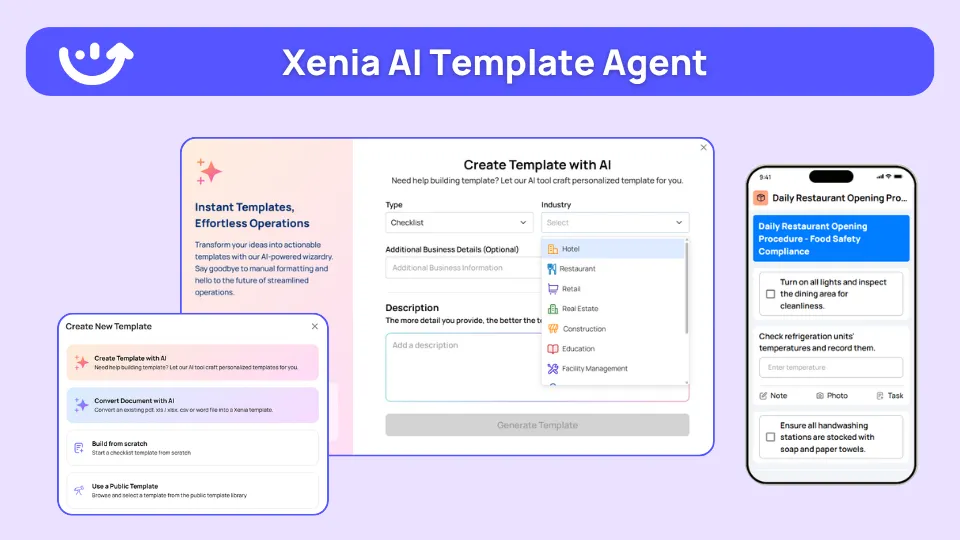
Upload a SOP PDF, and the agent converts it to a working form in minutes, not weeks. A franchise compliance officer with 14 corporate SOPs in PDF can upload them over a weekend and have working digital forms by Monday.
Be precise about what this does. The AI Template Agent transforms an existing document into a digital form. It doesn't generate a net-new audit from a vague brief. It digitizes the form you already have.
That distinction matters because the digitization category is real and competitive. Lumiform and Jotform both advertise AI-assisted form creation, and several tools convert PDFs or images into workflows. Xenia's distinction isn't the digitization step alone. It's that the digitized form lands inside a platform with weighted and nullify scoring, conditional visibility, and corrective-action closure already attached.
How does a digital audit checklist differ from a plain task checklist?
A task checklist tracks whether work got done. A scored audit checklist measures how well it was done and routes the failures.
A daily opening checklist asks "did all 22 items get checked off, yes or no." A scored audit says "this store scored 87%, the gap was a critical temp failure, and a corrective task is already assigned." The difference is scoring, weighting, and closure.
**
Dimension, Task / daily checklist, Scored audit checklist
Primary metric, Completion % (done or not done), Audit score (weighted points)
Item weighting, All items equal, Critical items count more than cosmetic
N/A handling, Item skipped, Nullify scoring-N/A doesn't lower the score
Evidence, Optional photo, Required photo on failure-timestamp-signature
Failure handling, Item left unchecked, Auto-creates a tracked corrective task
Who uses it, Store team-every shift, DM walk-compliance audit-periodic inspection
Cadence, Daily (opening-closing-mid-shift), Weekly-monthly-quarterly or ad hoc
**
The two live side by side in a restaurant. The opening checklist is a daily-ops routine the kitchen team runs at 6am, tracked by completion percentage. The weekly food safety walk is a scored audit the DM runs. Same platform, different purpose.
For the franchise compliance officer, that line is the whole point: the daily routine proves the work happened, the scored audit proves how well.
A spreadsheet can hold an inspection form. It can't timestamp completion, require a photo at the moment of failure, hide questions per store format, weight critical items, or auto-assign a corrective task. The moment a chain needs the same audit run consistently across 20-plus locations with evidence and follow-through, the spreadsheet breaks. That's the migration trigger.
The recordkeeping stakes are real for restaurants. Under the FDA HACCP principles and application guidelines, food establishments are expected to monitor critical control points, take corrective action when a deviation occurs, and maintain a record of the corrective action taken. The FDA Food Code carries the same expectation. A paper log that can't prove the action was assigned and closed reads as a documentation gap at the next inspection. A scored digital audit with corrective-action closure fills exactly that gap.
.svg)

Priced on per user or per location basis
Available on iOS, Android and Web


How to build an audit checklist in Xenia
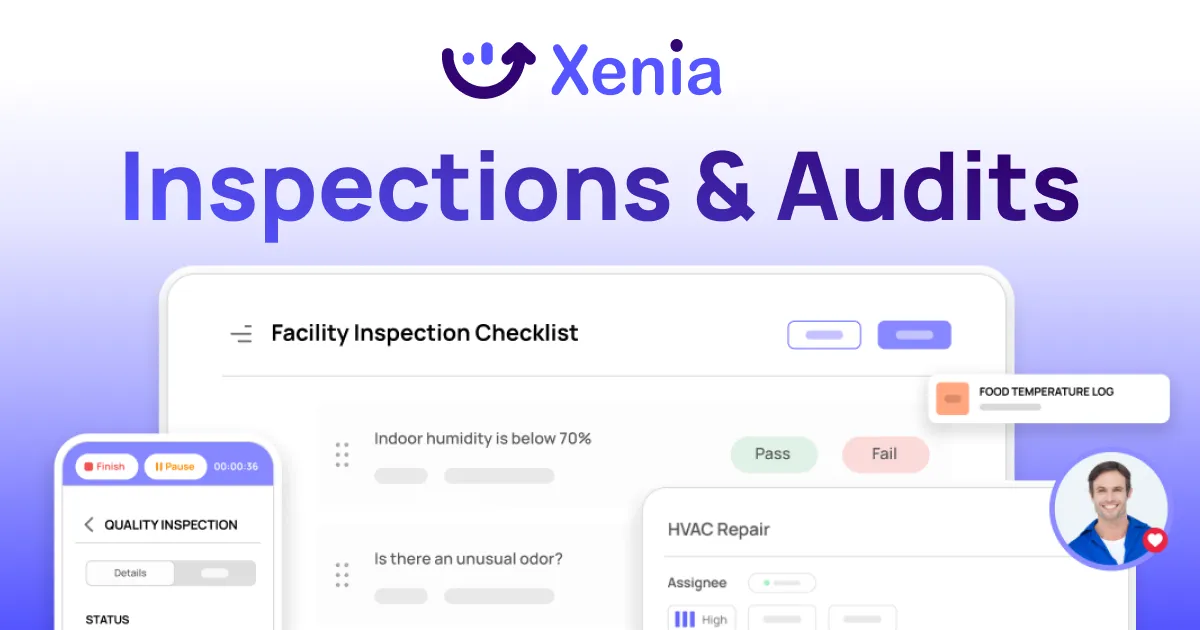
Building an audit checklist in Xenia means rebuilding your existing inspection form as typed questions, weighting the items, adding follow-up logic and required photos on failures, and setting visibility per store format. Then you assign it on a schedule. The form you already use becomes a scored, evidence-backed audit.
- Start from your existing form. Type each line item by hand, or upload the SOP or inspection PDF to the AI Template Agent to convert it to a digital form. Digitize the document you have, don't invent one.
- Set each question type. Pass/fail, multiple choice, number, photo, signature, or text, matched to what the line actually captures.
- Weight the items. Critical items (food safety, temp, fuel price) carry more points than cosmetic items (signage, label alignment).
- Turn on nullify scoring where formats differ. Stores missing a feature don't get dinged for it. This is distinct from weighted scoring, so don't conflate the two.
- Add follow-up questions with required photos on failures. An out-of-range temp triggers "what did you find?" plus a required photo, which feeds the corrective action workflow.
- Apply conditional visibility per format. Patio questions show only at patio units. Drive-thru questions show only at drive-thru units. One template, many formats.
- Set the pass threshold and color bands. Define the pass score, the callback score, and the escalation score.
- Assign and schedule. Push the audit to locations on a cadence with scoped permissions, so DMs see their district and corporate sees the rollup.
How long does it take to build an audit checklist?
A single audit checklist built by hand is a same-day task. The slow historical path was rolling many SOPs across a franchise, which used to mean weeks of template building. The AI Template Agent compresses that to days by digitizing existing PDFs in batches.
Tempstop went paperless in 14 days. Treat that as time-to-value evidence, not a promise that every chain hits the same number.
Who should own audit checklist updates?
At a multi-unit operator, the franchise compliance officer or the ops director owns the master template. Scoped permissions let DMs run audits without being able to edit the scoring logic, so the audit stays consistent across the chain. The practical line is simple: who can edit the template versus who can only run it.
Pricing follows the same fairness logic. Xenia is flat per-location, not per-form or per-seat, so adding templates or DMs doesn't inflate the bill. Form-capped tools like Zenput and per-seat tools like Bindy punish growth on exactly that axis. See the pricing model for the full picture. The signature on an audit is acknowledgment and compliance evidence, not a legally binding contract.
Where do operators see results?
Operators see the payoff of digital audit checklists in three places: faster audits with no paperwork scramble, a score that finally separates critical failures from cosmetic ones, and corrective actions that close instead of dying in a filing cabinet.
The result pattern repeats across other multi-unit operators. The three result dimensions worth structuring around:
- Faster audits. No paperwork scramble before a DM walk, no re-keying a paper form into a spreadsheet afterward.
- A score that means something. Weighted scoring separates a critical food-safety miss from a cosmetic one, so a single percentage doesn't bury the real risk.
- Corrective actions that actually close. A failed item creates a task with an owner and a deadline, tracked in the same record as the audit, instead of living in a separate spreadsheet or email thread.
For the 50-location ops director, the dashboard value is the Monday-morning issues view, not the completion percentage. Three stores with overdue corrective actions. A temp trend on one cooler model across four sites. The DM whose stores carry the most flagged items. The dashboard surfaces where the next failure is forming, not just whether yesterday's tasks got checked off.
When you're ready to evaluate the whole platform, the inspection management software buyer's guide is the next step, and the audit and inspection program hub ties the scoring methodology pages together.
Frequently Asked Questions
Got a question? Find our FAQs here. If your question hasn't been answered here, contact us.
What question types belong in a digital audit checklist?

How do I turn an existing paper inspection form into a digital audit checklist?
Can one audit checklist serve different store formats without a separate template?
Who should own audit checklist updates at a multi-unit operator?
How long does it take to build an audit checklist in Xenia?


A Modern, AI-Powered Platform Built for Restaurant Operations
Xenia brings kitchen operations, food safety, audits, and team communication into one mobile-first platform. Restaurant teams execute daily work consistently, maintain compliance, and resolve issues faster, while leadership gets real-time visibility across all locations.
.webp)
Why Restaurant Operators Choose Xenia:
🤖 AI-Powered Operations, Convert paper logs instantly and verify food presentation and kitchen cleanliness automatically. Get instant answers about food safety trends without building reports.
🍽️ Food Safety & Compliance, Track line checks and temperature logs with automated alerts. Trigger corrective actions when readings exceed safe ranges. Maintain audit-ready records for health inspections.
📊 Multi-Location Control, Monitor food safety compliance and task completion across regions. Benchmark locations to identify training needs. Export reports for operational reviews.
One platform for kitchen operations, food safety, and compliance across all locations.

.svg)
.webp)
%201%20(1).webp)

.svg)
%201%20(2).webp)