Post Summary
Asset tracking software is not just for IT departments managing laptops and servers.
That misconception costs operations teams real money. While IT teams track devices in a device management system, your operations team is managing a completely different set of physical assets: commercial freezers, walk-in coolers, HVAC units, cooking equipment, forklifts, delivery vehicles, tools, and machines.
Those assets fail, require maintenance, need inspection, and live across multiple locations. Nobody is tracking them well.
Asset tracking software for operations teams is about knowing where your physical equipment is, what condition it is in, when it needs service, and what happened the last time something went wrong. It is equipment management at scale across every location you run.
This guide covers 9 asset tracking software tools worth evaluating in 2026. Each one is reviewed with honest detail on what it does, who it is built for, and where it stops short.
What Is Asset Tracking Software?
Asset tracking software records where your equipment is, what condition it is in, and what has been done to it. For operations teams, that means more than just a list of assets.
It means knowing things like:
- Walk-In Cooler 3 at location 12 had a temperature problem last Thursday
- Its last service was six weeks ago
- There is an open work order on the door seal right now
A technician walks up to a fryer, scans a QR code, and sees the full maintenance history on their phone. No calls. No spreadsheets. No hunting for paper logs.
The tools that actually move the needle do not just store equipment records. They connect each asset to its maintenance schedule, inspections, and work orders. That is what turns a database into a real maintenance program.
How to Choose Asset Tracking Software for Operations Teams
Not every tool on this list will work for your operation. Before you book a demo with anyone, run through these five criteria. They will cut your shortlist fast.
**
Criteria, What to look for, Red flag
Mobile access and QR scanning, Scan a tag-see history-log a problem-move on, Requires desktop login for basic field tasks
Maintenance integration, Assets connected to PM schedules-work orders and inspection records, Tracks equipment but does not trigger service
Multi-site support, All assets-all locations-one dashboard with site and status filters, Built for one location-no chain-level view
Offline capability, Works without Wi-Fi-syncs automatically when back online, Needs a connection to log anything
Corrective action workflows, Inspection failure auto-creates a work order-tracked to closure, Logs the problem but nothing happens next
**
The criteria above are not equal in weight. Here is how to prioritize them based on your situation.
If your team works on the floor all day, mobile access is non-negotiable. A tool that needs a desktop login will not get used. Full stop.
If you run 10 or more locations, multi-site support and corrective action workflows matter most. You cannot manage asset health location by location. You need one view and automatic follow-through when something goes wrong.
If you operate kitchens, warehouses, or any space with patchy Wi-Fi, offline capability is not a nice-to-have, it is a basic requirement. If the app stops working when the signal drops, your team will go back to paper.
If you are still running reactive maintenance, maintenance integration is your biggest unlock. Connecting asset records to preventive maintenance schedules and work orders is what moves you from fixing things after they break to catching them before they do.
The tools that check all five boxes are the ones worth your time.
9 Best Asset Tracking Software Tools in 2026
.svg)
.webp)
.webp)
**
Tool, Primary Category, Multi-site, Mobile / Offline, Maintenance Integration, Best For
Xenia, Operations execution + asset tracking, Built-in, Offline-capable, Preventive maintenance-work orders-IoT sensors, Multi-location QSR-retail-hospitality-facilities
Limble CMMS, CMMS + asset management, Yes, Strong, Full maintenance integration, Manufacturing-facilities
EZOfficeInventory (EZO), Asset tracking + inventory, Yes, Moderate, Limited, IT and mixed asset tracking
Asset Panda, Asset tracking, Yes, Strong, Limited, Mid-market physical asset tracking
GoCodes, QR code asset tracking, Yes, Strong, Basic, Small operations-simple QR tagging
Sortly, Inventory and asset tracking, Yes, Strong, None, Small business inventory and asset tracking
Tenna, Construction equipment tracking, Yes, Strong, Moderate, Construction-heavy equipment fleets
Fiix, CMMS + asset management, Yes, Moderate, Full maintenance integration, Manufacturing-food production
Fracttal One, CMMS + asset management, Yes, Strong-offline, Full maintenance integration, Global operations-LATAM/EU
**
1. Xenia
.webp)
- Best for: Multi-location restaurant, retail, convenience store, hospitality, and facilities operations teams
- Not for: IT asset management, device tracking, or FDA-regulated manufacturing requiring validated CMMS
Xenia is a mobile-first operations execution platform built for teams managing physical equipment across multiple locations. Unlike a standalone asset tracking tool, every piece of equipment in Xenia becomes a live operational record connected to maintenance schedules, inspections, and work orders. Everything lives in one place. No separate systems, no manual cross-referencing.
What separates Xenia from a typical asset tracker is everything built around the asset record itself. You are not just logging equipment, you get AI-assisted reporting, permission controls by location, and automation that routes work without anyone manually assigning it.
Key features
- Equipment tracking and asset tagging with QR codes
- Preventive maintenance scheduling with auto-assignment by asset and location
- Work orders for equipment issues, created manually or auto-triggered from inspection failures
- Inspections and audits tied to specific assets with weighted scoring
- Corrective actions from equipment inspection failures with mandatory photo evidence
- Multi-location asset visibility dashboard with site-to-site comparison
- IoT sensor integrations for temperature monitoring on refrigeration and hot holding equipment
- SOPs and training content attachable directly to asset records
- AI-powered reporting and dashboards, with exportable PDF summaries for stakeholders who do not log into the platform
- Role-based permissions and location hierarchy, so corporate sees every site while a store manager only sees their own
- Automated routing rules that assign work orders and corrective actions by asset, location, or issue type without manual dispatching
- Offline-capable mobile app with automatic sync
Pricing: Get a quote tailored specifically to your business. A free plan is available for up to 5 users with no credit card required.

Priced on per user or per location basis
Available on iOS, Android and Web


2. Limble CMMS
.webp)
- Best for: Maintenance managers in manufacturing, facilities, and food production
- Not for: Frontline-heavy operations where every worker needs daily access
Limble consistently tops G2 and Capterra for ease of use in the CMMS category. Asset records, PM schedules, parts tracking, and multi-site reporting are all solid. Technicians scan QR tags on equipment and get the full history immediately.
The gap: it is a maintenance team tool, not a frontline tool. Store staff will not use it day to day. No daily ops checklists, no food safety workflows, no brand standards compliance built in.
Key features
- Asset tracking with full maintenance history and PM scheduling
- QR code and barcode scanning for asset lookup
- Parts inventory with low-stock alerts
- Multi-site dashboards and maintenance reporting
- Work order management with mobile access
Pricing: Around $28 per user per month. Contact for multi-site rates.
3. EZOfficeInventory (EZO)
- Best for: Organizations tracking a mix of IT gear, tools, and physical equipment
- Not for: Teams that need real maintenance management or frontline workflows
EZO tracks everything in one place: laptops, tools, physical equipment, consumable supplies. QR codes and barcodes handle the tagging. For organizations with mixed asset types that just need visibility into what they have and where it is, EZO keeps things simple.
The gap: it is a tracking tool, not a maintenance platform. PM scheduling is basic. No corrective action workflows, no IoT integration, no frontline ops capability. Works well for asset visibility. Falls short for active maintenance programs.
Key features
- QR code and barcode tracking for mixed asset types
- Check-in and check-out for tools and equipment
- Multi-location asset inventory and filtering
- Basic maintenance history and service log
- Integrations with HR and procurement tools
Pricing: From around $40 per month for small teams. Contact for enterprise pricing.
4. Asset Panda
.webp)
- Best for: Mid-market teams that need flexible asset tracking without CMMS complexity
- Not for: Teams that need preventive maintenance scheduling or IoT integration
Asset Panda lets you build your own asset tracking setup without a developer. Custom fields, photo attachments, QR scanning, location tracking. The mobile app is clean. For organizations that need asset records shaped to their specific data without a complex implementation, it is a practical option.
The gap: it is a records tool, not a maintenance platform. No PM scheduling, no work order routing, no IoT, no corrective action workflows. It tells you what you have. It does not help you keep it running.
Key features
- QR code and barcode scanning with mobile app
- Configurable asset record fields
- Photo and document attachment to asset records
- Basic maintenance log and service history
- Multi-location tracking and depreciation reporting
Pricing: Contact Asset Panda based on asset count.
5. GoCodes
- Best for: Small operations that want a simple QR-based tracking system fast
- Not for: Multi-site maintenance programs or teams needing workflow depth
GoCodes does one thing: QR code-based asset tracking. Print labels, stick them on equipment, scan with a phone, see basic details and location. That is the product. For small teams getting off paper tracking quickly, it is low-friction and easy to roll out.
The gap: that is essentially all it does. No PM scheduling, no work orders, no IoT, no corrective actions. Simple is the point. But if your operation grows or your maintenance needs get more complex, you will outgrow this fast.
Key features
- QR code label printing and scanning via mobile
- Asset location and status tracking
- Basic maintenance history and service log
- GPS location tagging on asset records
- Photo attachment and custom field configuration
Pricing: From around $500 per year. Contact for current tiers.
6. Sortly

- Best for: Small businesses tracking tools, supplies, and equipment without a CMMS
- Not for: Multi-site operations with active maintenance programs
Sortly is the simplest tool on this list. You organize assets and inventory with photos, custom labels, and QR codes. No training needed. The mobile app is clean. For a small team that needs to know what they have and where it is, Sortly gets the job done.
The gap: there is no maintenance management here at all. No PM scheduling, no work orders, no IoT, no corrective actions. It is a visual inventory tool. Great for what it is. Wrong category if maintenance is the need.
Key features
- Photo-based visual asset and inventory records
- QR code and barcode scanning
- Custom tags and field configuration
- Low-stock alerts for inventory items
- Basic reporting on quantities and status
Pricing: Free plan for individuals. Paid tiers from around $49 per month.
7. Tenna
- Best for: Construction companies and heavy equipment fleet operators
- Not for: Restaurants, retail, hospitality, or any operation without heavy mobile equipment
Tenna is built for construction. GPS tracking, telematics, and maintenance management for excavators, cranes, forklifts, and fleet vehicles. For construction companies managing expensive mobile assets across multiple job sites, Tenna delivers visibility that general asset tools cannot match.
The gap: if you are not in construction or heavy equipment fleet management, this tool is not built for you. The telematics and GPS workflows that make Tenna valuable in that context have no application in a restaurant kitchen or retail store.
Key features
- GPS and telematics for heavy equipment and fleet vehicles
- Mixed fleet tracking across owned, rented, and leased assets
- Preventive maintenance scheduling and service history
- Equipment utilization analytics
- Operator assignment and certification tracking
Pricing: Contact Tenna based on fleet size.
8. Fiix
- Best for: Manufacturing and food production facilities with complex maintenance programs
- Not for: Quick deployments or operators outside manufacturing
Fiix is part of Rockwell Automation now, and it shows. Asset hierarchies let you track components within larger systems. AI flags which assets are trending toward failure based on history. ERP integrations connect asset data to procurement and finance.
The gap: it skews industrial. Implementation takes time and pricing reflects the enterprise depth. For a restaurant or retail operator tracking commercial kitchen equipment and refrigeration units, the complexity and cost exceed what the use case actually needs.
Key features
- Asset hierarchy management with component-level tracking
- AI-assisted maintenance recommendations
- Preventive and condition-based maintenance scheduling
- ERP and operational technology integrations
- Multi-site dashboards with MTBF and MTTR tracking
Pricing: From around $45 per user per month. Contact for enterprise rates.
9. Fracttal One

- Best for: Global and LATAM-based operations needing multi-language, multi-currency asset management
- Not for: US-only operators who need tight HRIS and POS integrations
Fracttal handles the complexity that most US-centric CMMS tools ignore. Multi-language, multi-currency, multi-timezone, all native. Asset tracking, PM scheduling, work orders, and IoT sensor connections work across geographies without configuration headaches. The mobile app works offline.
The gap: the US integration ecosystem is thinner than competitors like Xenia or Limble. HRIS connections to Workday, ADP, and UKG are less developed. For US-only operations, you will find better native integration options elsewhere on this list.
Key features
- Asset tracking with QR tagging and offline mobile access
- Preventive maintenance scheduling and work order management
- IoT sensor integrations for condition monitoring
- Multi-language, multi-currency, and multi-timezone support
- Multi-site dashboards and reporting
Pricing: Contact Fracttal for current rates.
Conclusion
Your physical equipment does not manage itself. The assets in your kitchens, your stores, and your facilities are one of your most significant capital investments. Treating them reactively costs more than treating them proactively.
The right asset tracking software depends on your operation type. Construction companies tracking heavy mobile equipment should look at Tenna. Manufacturing operations with complex maintenance programs have strong options in Fiix and Limble. Small businesses tracking mixed inventories can start with Sortly or GoCodes.
For multi-unit operators in restaurants, retail, convenience stores, and hospitality who need asset tracking connected to daily operations, inspections, IoT monitoring, and corrective actions, Xenia covers the most ground in one platform. Start for free or get a demo.
Frequently Asked Questions
Got a question? Find our FAQs here. If your question hasn't been answered here, contact us.
Can asset tracking software monitor equipment temperature?

Yes, in platforms that include IoT integration. Xenia connects to Bluetooth and LoRaWAN temperature sensors mounted on refrigeration units, walk-in coolers, and hot holding equipment.
When a temperature reading goes out of the safe range, an alert fires and a corrective work order can be created automatically. This is temperature monitoring at the asset level, not just a standalone sensor dashboard.
Do I need a CMMS or an asset tracking tool?
If you only need to know where your equipment is and what its basic status is, a simpler asset tracking tool like Asset Panda or GoCodes may be sufficient.
If you need to schedule preventive maintenance, manage work orders, log inspection findings, and trigger corrective actions, you need a CMMS or an operations execution platform like Xenia. The difference is whether asset tracking is a records function or an active maintenance management function.
How does asset tracking software connect to maintenance management?
In CMMS and operations execution platforms, each asset record is linked to its preventive maintenance schedule, work order history, and inspection records. When a PM is due, the system auto-creates a work order and routes it to the right technician.
When an inspection flags an issue, a corrective action work order fires automatically. The asset record becomes a live operational document, not just a static inventory entry.
What is the best asset tracking software for restaurants and multi-location operations?
For restaurant and multi-location frontline operations, the best asset tracking software connects equipment records to preventive maintenance scheduling, inspections, IoT temperature monitoring, and corrective action workflows.
Xenia is built specifically for this use case, with offline-capable mobile access, multi-location dashboards, and IoT sensor integration for temperature-sensitive equipment.
What is asset tracking software used for in operations?
In operations, asset tracking software records the location, condition, and maintenance history of physical equipment across one or more sites.
Operations teams use it to track freezers, HVAC units, cooking equipment, vehicles, tools, and other physical assets that require regular maintenance and inspection. It is not the same as IT asset management, which tracks devices like laptops and servers.


A Modern, AI-Powered Platform Built Specifically for Frontline Operations
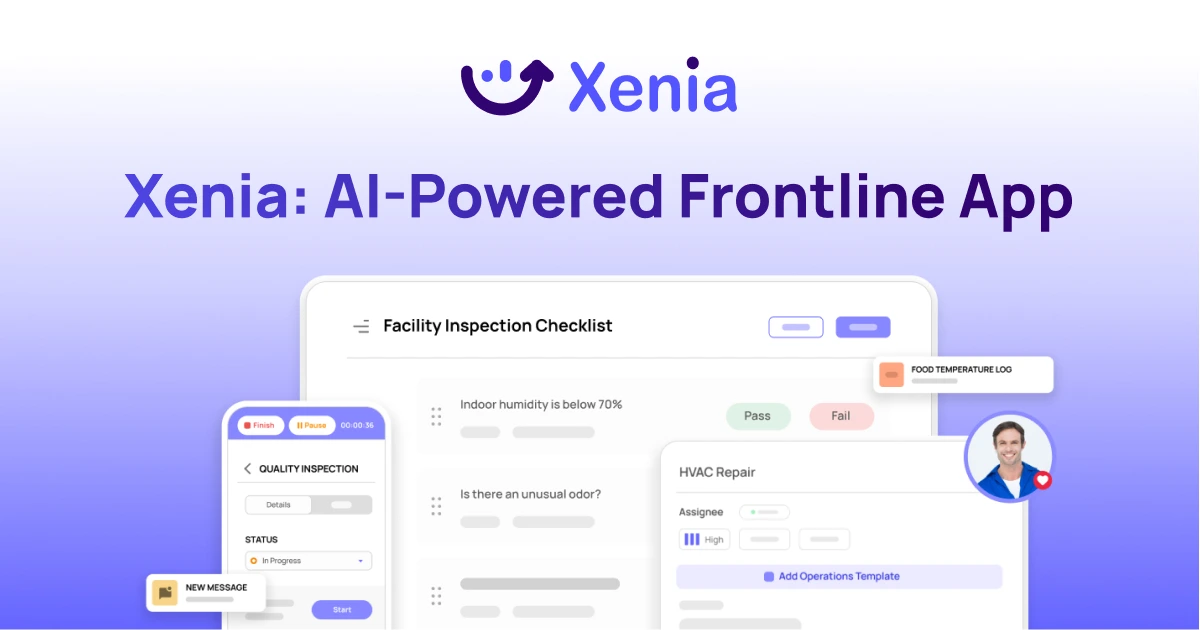
Xenia brings daily operations, maintenance, audits, and compliance into one mobile-first platform. Frontline teams execute work consistently across locations while leadership gets real-time visibility.
Why Multi-Location Operators Choose Xenia:
🤖 AI-Powered Operations, Create digital checklists instantly or convert paper forms with AI. Verify compliance automatically with photo analysis and get instant answers from your operational data.
✅ Daily Operations & Maintenance, Assign work across hundreds of locations in minutes. Report and route issues instantly. Schedule preventive maintenance to catch problems before downtime.
📊 Real-Time Visibility, Track completion, work orders, and performance across all locations through dashboards. Filter by site or asset to spot trends and take action.
Manage operations, maintenance, and compliance across all your locations from one platform

.svg)
.webp)
%201%20(1).webp)

.svg)
%201%20(2).webp)