

Summary
What is a Bluetooth thermometer setup for restaurants?
A Bluetooth thermometer setup is the act of binding a Bluetooth Low Energy (BLE) food probe to your food-safety app so its readings auto-log into a digital temperature log instead of getting hand-written on a clipboard. The probe is the input. The food-safety app is the system of record. Pairing them removes the typed-value step that creates "pencil-whipped" logs.
The operational problem this solves is simple. Clipboard temp logs fail the audit trail test because the inspector cannot tell whether the number on the page came from a real probe reading or from a line cook filling in plausible numbers at the end of a shift. Industry teams call that "dry labbing," and it is the number-one finding in routine health inspections. A Bluetooth probe eliminates the human-typed value entirely. The number that lands in the log is the number the probe took, with a timestamp the staffer cannot edit.
The setup has three moving pieces:
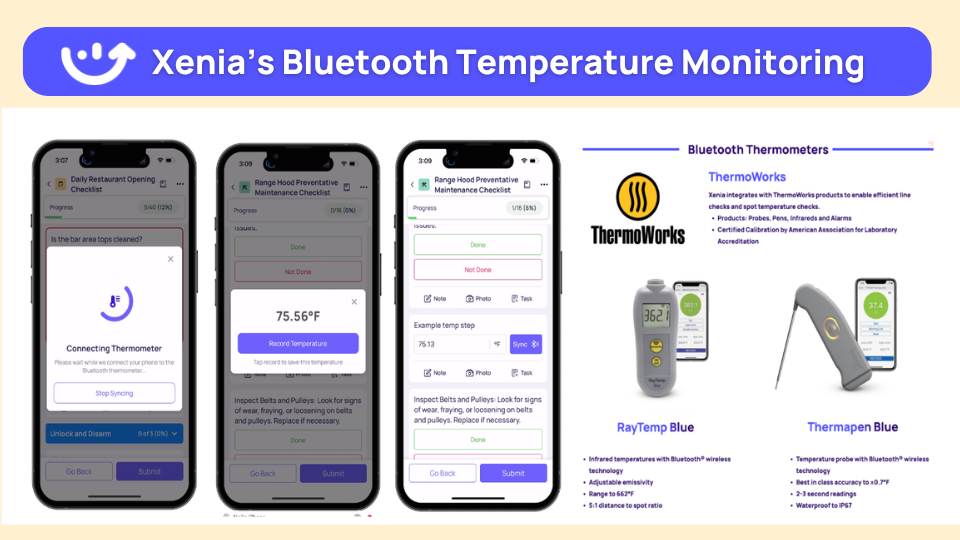
- The probe. A commercial BLE handheld (ThermoWorks Thermapen ONE Blue, TempTest 2 Blue, ThermaQ Blue, or Cooper-Atkins Blue2) accurate to ±0.7°F (±0.4°C) with a NIST-traceable calibration certificate.
- The app. A food-safety platform that reads from the probe over BLE and writes the reading into the right inspection field. Xenia, Zenput, RizePoint, and SafetyCulture iAuditor all support BLE probes.
- The bind. The probe is assigned to a station, user, or critical control point (CCP) so a line cook taking a chicken temp at 165°F doesn't scroll a 40-row log looking for the chicken line. The reading routes itself.
This is the on-ramp to digital food safety. Get the pairing right on Day 1 and the rest of the program (line checks, cool-down logs, walk-in checks, corrective actions) flows through one app. Get it wrong and the team falls back to paper inside a week.
Regulatory framework
The FDA Food Code does not require Bluetooth thermometers. It requires accurate thermometers and defensible records. A correctly paired BLE probe satisfies both, which is why every modern multi-unit food-safety program is moving off paper.
The relevant sections of the 2022 FDA Food Code are:
**
Section, Rule, What it means for BLE probes
4-203.11 (Accuracy), Food temperature measuring devices must be accurate to ±2°F (±1°C) in the intended range., Commercial BLE probes ship NIST-traceable at ±0.7°F-well inside the band.
4-204.112 (Probes), Cold and cold-hold checks require thin-mass probes appropriate for the food's profile., Thermocouple BLE probes (Thermapen Blue-Blue2) meet this on thin proteins.
4-302.12 (Provision and Use), Operation must provide a thermometer for measuring TCS food temperatures., A BLE handheld satisfies this rule and pairing makes the record defensible.
4-502.11 (Good Repair and Calibration), Devices must be in good repair-calibration checked at necessary frequency., Daily ice-bath verification at shift start is the operator-grade cadence.
**
Two other regulatory baselines sit underneath the setup:
Hazard Analysis Critical Control Points (HACCP) sits on top of the Food Code as the program-design framework. The seven principles ask you to identify hazards, set critical limits, monitor those limits, and document corrective action. Bluetooth pairing turns the monitoring and documentation steps into a one-tap workflow instead of two manual fields. For a fuller breakdown of how regulators evaluate your records, see food safety regulatory frameworks for operators.
External regulatory references inspectors actually cite: USDA FSIS Food Thermometers guidance for the cooking-temperature thresholds, and the Cornell LII summary of WAC 246-215-04248 for an example of how state code adopts the FDA accuracy rule by reference.
How does Xenia handle Bluetooth thermometer integration?
.webp)
Xenia reads the BLE probe directly into the inspection template. The reading drops into the right CCP field, conditional logic fires if the number is out of range, and a corrective-action task is created the same second. Pair Bluetooth thermometers with Xenia. Auto-log temps, auto-alert if out of range, no manual data entry. That is Dave's Hot Chicken's top driver across 321 locations.
The flow runs end to end without a manager pressing a button.
The trigger logic for follow-up questions and required image capture works the same way across food safety, sanitation, and cleanliness audits. Out-of-range readings ask "what did you find?" and require a photo of the corrective action at the moment of failure, not after. That is the evidence trail that survives a health inspection.
Compare that to the rest of the market:
**
Capability, Xenia, Zenput, RizePoint, SafetyCulture
ThermoWorks BLE support, Yes, Yes, Yes (Blue2 first-party), Yes (select models)
Cooper-Atkins Blue2, Yes, Yes, Yes, Yes
Auto-routed corrective action from temp failure, Native, Separate module, Separate module, Not native
Work order dispatch from same reading, Native, Separate tool, No, No
Weighted scoring on temp items, Yes (10 pt critical-1 pt cosmetic), Flat, Flat, Flat
Conditional follow-up plus photo on failure, Yes, Limited, Limited, Limited
**
The platform-level differentiator is the same reading that fails the audit also opens the work order and routes the corrective task. Zenput and RizePoint capture the reading but route closure through separate modules. SafetyCulture iAuditor captures the reading but does not natively dispatch a maintenance ticket. The Xenia pairing is the audit, the corrective action, and the work order on one number. For a deeper view of how Xenia scores the underlying audit, see weighted audit scoring with critical-item thresholds.
.svg)

Priced on per user or per location basis
Available on iOS, Android and Web


How to set up Bluetooth thermometers in Xenia
A clean Bluetooth thermometer setup takes six steps. The failure modes are called out at each step because most operator support tickets land on one of them.
After step 6, the probe is live. Every reading writes to the cloud, fires conditional logic if out of range, and feeds the regional dashboard.
Where do operators see results?
The headline result is labor saved on documentation. The bigger result is the walk-in failure you did not lose a Saturday's protein on. Bluetooth probes are the cheap part of the stack. The savings come from removing manual line-check labor and preventing the one cooler failure that would have spoiled the weekend.
The named outcomes operators cite:
- Dave's Hot Chicken (321 locations). Walk-in temps, hot-hold cases, and line check stations all log automatically through paired Bluetooth probes. Out-of-range readings trigger a follow-up question, require a photo of the corrective action, and assign a task to the kitchen manager with a 24-hour deadline. The food safety score finally tracked what mattered. Dave's was the canonical Bindy and RizePoint replacement for this exact stack.
- Manual logging time recovered. Industry analysis from MachineQ shows that hand-logged temp checks consume 30 to 60 minutes per day per unit, or roughly $6,000 to $12,000 in annual wages per location spent on documentation rather than guest-facing work.
- Kroger. A 5-to-1 return on operating expense attributable to temperature monitoring deployment across deli, hot bar, and prepared foods.
- Skyline Chili. 15 percent ROI, $18,000 in first-year savings using a temperature monitoring rollout.
- Eggs Up Grill. 25 percent ROI, with a single early-detection event preventing $1,000 of food waste at one location.
- Walk-in cooler failure prevention. A single prevented unit failure saves $5,000 to $15,000 in inventory loss. Typical payback for a temperature-monitoring rollout lands at 1 to 3 months.
These numbers carry across verticals. C-store foodservice programs (Refuel, OnCue, H&S Energy, G&M Oil, Huck's class) run 8 to 12 daily probe events per location across coffee bars, hot-hold cases, and walk-ins. Bluetooth probes eliminate the clipboard at the cashier station. For deeper c-store and multi-unit operator workflows, see Xenia's convenience store operations software hub. For restaurant context across QSR and full-service, see the restaurant task management hub and the broader food safety operations cluster.
The line that keeps the math honest. The probe is a $109 to $169 device. The cooler is a $15,000 inventory loss waiting to happen. The Bluetooth pairing is what connects one to the other so the loss never happens.
Frequently Asked Questions
Got a question? Find our FAQs here. If your question hasn't been answered here, contact us.
Which Bluetooth thermometers does Xenia support?

How does pairing a Bluetooth thermometer work?
What happens when a temperature reads out of range?
Does Bluetooth thermometer integration replace manual temp logs?
How does the FDA Food Code treat digital temp logs?
Can I run Bluetooth temp logs across hundreds of locations?


A Modern, AI-Powered Platform Built for Restaurant Operations
Xenia brings kitchen operations, food safety, audits, and team communication into one mobile-first platform. Restaurant teams execute daily work consistently, maintain compliance, and resolve issues faster, while leadership gets real-time visibility across all locations.
.webp)
Why Restaurant Operators Choose Xenia:
🤖 AI-Powered Operations, Convert paper logs instantly and verify food presentation and kitchen cleanliness automatically. Get instant answers about food safety trends without building reports.
🍽️ Food Safety & Compliance, Track line checks and temperature logs with automated alerts. Trigger corrective actions when readings exceed safe ranges. Maintain audit-ready records for health inspections.
📊 Multi-Location Control, Monitor food safety compliance and task completion across regions. Benchmark locations to identify training needs. Export reports for operational reviews.
One platform for kitchen operations, food safety, and compliance across all locations.

.svg)
.webp)
%201%20(1).webp)

.svg)
%201%20(2).webp)


