

Summary
What is a HACCP temperature log?
A HACCP temperature log is the written or digital record that documents every CCP measurement against your HACCP plan's critical limits, signed by the operator who took the reading and reviewed by a manager. It is the proof under HACCP Principle 7 (record-keeping) that you actually executed the monitoring required by HACCP Principle 4.
Three things must be true of any HACCP temp log to satisfy a health inspector:
- Each entry stamps the actual measurement, not a checkmark, not "OK," not a range. Most state codes require the numeric reading.
- Each entry names the person who took it and is signed off by a reviewing manager (daily or per-shift).
- Each out-of-range reading is paired with a corrective action, what was done, when, by whom, captured at the moment of failure, not back-filled at end of shift.
The single most-cited gap on paper temperature logs is missing corrective-action notes. The reading was logged, the failure was noted, but the "what we did about it" line was left blank, which means there is no defensible record of compliance for that timestamp. A HACCP checklist that captures the reading without the corrective action is half a record. The job of a digital temperature log app is to make the corrective action mandatory the moment the reading falls inside the 41°F-135°F danger zone.
The terms operators need to know on first mention: a CCP is a Critical Control Point, the step in food handling where a hazard can be controlled. A TCS food is a Time/Temperature Control for Safety food (raw poultry, dairy, cooked rice, cut leafy greens, etc.). The temperature danger zone is the 41°F-135°F window where pathogens like Salmonella and Listeria can double in as little as 20 minutes.
Regulatory framework
HACCP temperature logs are governed by the FDA Food Code, USDA FSIS HACCP guidance, and your local health authority's adopted edition, 49 of 50 states have adopted some version of the FDA Food Code. The temperature thresholds and monitoring frequencies below are the federal baseline. Verify your state and county edition for any tighter limits.
The four regulatory anchors every operator should be able to cite by section number:
The operational frequencies a multi-unit operator should bake into the daily log:
**
Log type, FDA / ServSafe minimum, Critical limit
Cold storage (walk-in-reach-in-prep table), Every 4 hours. Best practice open + mid-shift + close, ≤41°F
Hot holding (steam table-hot well-holding cabinet), Every 2 hours, ≥135°F
Cooking final temps, Every batch, Poultry 165°F-ground 155°F-whole-muscle/seafood 145°F-reheat to 165°F within 2 hrs
Cooling, Stage 1: 135°F to 70°F within 2 hrs-Stage 2: 70°F to 41°F within 4 hrs, 6 hrs total
Receiving, Every delivery-every TCS item, Cold ≤41°F-Frozen solid-Hot ≥135°F
**
Frequencies map to the ServSafe Time and Temperature Control reference from the National Restaurant Association. Why these numbers matter: the CDC MMWR review of foodborne illness outbreaks 2014-2022 found "inadequate time and temperature control during initial cooking" was a top-five contributing factor in roughly 20-24% of outbreaks. "Improper cooling" appeared in 17.3% of the most recent reporting period. The temperature log is the operator's first line of defense and the first record a health inspector pulls in an investigation.
How does Xenia handle HACCP temperature logs?
.webp)
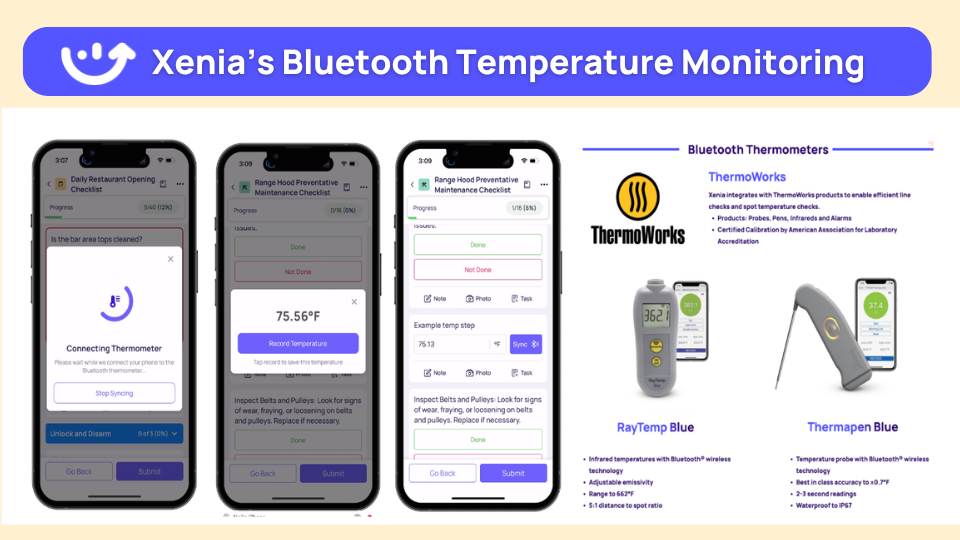
Xenia handles HACCP temperature logs as a single digital trail across two sensor types, Bluetooth probes for line checks and 24/7 wireless sensors for equipment baseline, feeding the same log, the same audit dashboard, and the same corrective-action workflow. The key design decision: a failed reading does not just alert. It auto-opens a corrective-action task with follow-up questions, an assignee, a deadline, and an escalation path.
Pair Bluetooth thermometers with Xenia. Auto-log temps, auto-alert if out of range, no manual data entry, the same setup driving Dave's Hot Chicken's food-safety program across 321 locations. Line checks at the steam table, walk-in spot checks, hot-hold cabinet readings, cooking final temps, and cooling-stage probes all stamp to the digital log with time, product, and user. Xenia's wireless ambient sensors run -40°C to 125°C with ±0.4°C accuracy, reading every 5-15 minutes inside walk-ins, freezers, hot-hold cabinets, and prep tables.
The operator workflow when a reading goes out of range:
A fast comparison of what changes when paper goes digital:
**
Attribute, Paper temp log, Xenia digital HACCP log
Readings captured, Manually written-prone to pencil-whipping, Auto-stamped from probe or 24/7 sensor
Out-of-range alert, None until weekly review, Push + SMS within minutes
Corrective action, Often blank or back-filled, Required follow-up question + photo
Multi-unit visibility, None until binders go to regional office, One dashboard-all stores-real time
Audit-ready trail, Inspector questions handwriting clusters, Tamper-evident-exportable to PDF
**
Temp logs sit alongside audit templates with weighted scoring on critical food-safety items, opening/closing checklists, work orders, and frontline comms in the same operator app, one app per frontline employee instead of four.
.svg)

Priced on per user or per location basis
Available on iOS, Android and Web


How to set up HACCP temp logs in Xenia
Setting up HACCP temp logs in Xenia takes one rollout afternoon if your HACCP plan and equipment list are already documented. The five steps a multi-unit ops director runs to deploy across a new location group:
Most operators start with the free starter tier (digital log + checklists), prove ROI on one prevented walk-in failure, then add 24/7 sensors and Bluetooth probes across the rest of the fleet. Avoid the rollout mistake of pushing sensors before the log template is dialed in, the sensor data feeds the log, so the log has to be right first.
Where do operators see results?
Operators see HACCP temp log ROI in three places: prevented product loss, defensible audit trails, and DM time saved. The pattern across the customer base is consistent, the moment a sensor catches a 2 a.m. walk-in failure that paper would have missed until Saturday lunch, the system has paid for itself.
Dave's Hot Chicken (321 locations). Pairing audits with Bluetooth thermometers across every walk-in, hot-hold, and line station replaced RizePoint as the food-safety system of record. Walk-in temps log automatically. Out-of-range readings trigger a follow-up question, a required photo of the corrective action, and a task assigned to the kitchen manager with a 24-hour deadline. If the task isn't closed, the DM gets the escalation. The food-safety score stopped being a number on a dashboard and became a process.
C-store foodservice (NACS member operators). Roller grills (≥135°F), made-to-order kitchens, walk-in beverage coolers, dairy cases, and deli displays all run the same HACCP framework. Foodservice is consistently the gross-margin engine of the c-store category per the NACS State of the Industry data, a single failed roller-grill hold is a food-safety event AND a margin event. Conditional checklists on temp logs let mixed-format operators (some sites with kitchens, some without) run one audit template across the fleet without penalizing fuel-only stores for missing food equipment.
Hotels & resorts (AHLA member properties). Banquet hot-holding boxes for 1,000-cover events, banquet cold staging, room-service holding cabinets, employee-cafeteria steam tables, all subject to the same FDA Food Code temperature thresholds, all auditable through the same digital log structure as a QSR kitchen.
Grocery and retail prepared-foods (NRF member chains). Rotisserie hot cases, sushi cases, salad bars, and deli walk-ins fall under state health-department codes that typically require posted temperature logs visible to inspectors at every served counter. Digital logs replace the printed sheet on the cooler door without losing the inspector-facing visibility.
The cross-cluster reality: HACCP temp logs do not live in isolation. They tie into food-safety audit frequency and pre-inspection workflow, the corrective action workflow that closes failures to resolution, and the regulatory frameworks that govern what a compliant log must contain. When the auditor walks in, every reading, every signature, every corrective action, and every escalation is one PDF export away.
Frequently Asked Questions
Got a question? Find our FAQs here. If your question hasn't been answered here, contact us.
What is required on a HACCP temperature log?

How often should I record walk-in cooler temps?
What temperature is a walk-in cooler supposed to be?
Does the FDA require digital temp logs?
What does a HACCP-ready audit trail look like?
Can I print a HACCP temp log for a health inspector?


A Modern, AI-Powered Platform Built for Restaurant Operations
Xenia brings kitchen operations, food safety, audits, and team communication into one mobile-first platform. Restaurant teams execute daily work consistently, maintain compliance, and resolve issues faster, while leadership gets real-time visibility across all locations.
.webp)
Why Restaurant Operators Choose Xenia:
🤖 AI-Powered Operations, Convert paper logs instantly and verify food presentation and kitchen cleanliness automatically. Get instant answers about food safety trends without building reports.
🍽️ Food Safety & Compliance, Track line checks and temperature logs with automated alerts. Trigger corrective actions when readings exceed safe ranges. Maintain audit-ready records for health inspections.
📊 Multi-Location Control, Monitor food safety compliance and task completion across regions. Benchmark locations to identify training needs. Export reports for operational reviews.
One platform for kitchen operations, food safety, and compliance across all locations.

.svg)
.webp)
%201%20(1).webp)

.svg)
%201%20(2).webp)


