

Summary
What is a walk-in cooler temperature log?
A walk-in cooler temperature log is the written or digital record proving every cold-storage unit held TCS food at 41°F or below across the shift, signed by the person who took the reading and reviewed by a manager. It is the literal monitoring artifact for HACCP Principle 4, the proof a kitchen actually executed the cold-holding control point.
Three things make a walk-in temp log defensible at a health inspection:
- Each entry stamps the actual numeric reading, not a checkmark, not "OK," not a range. Most county codes require the temperature in degrees Fahrenheit.
- Each entry names the operator who took the reading and is signed off by a reviewing manager once per shift or once per day.
- Each out-of-range reading is paired with a corrective action, what was done, when, by whom, captured at the moment of failure rather than back-filled at end of shift.
The single most-cited gap on paper walk-in logs is missing corrective-action notes. The cooler was logged at 44°F. The kitchen "fixed it." The line that says what "fixed it" actually means is blank. That blank line is the line a health inspector circles. A clipboard log captures the temperature; a Bluetooth-paired digital log captures the temperature, the alert, the corrective action, the photo, and the manager who signed off, all stamped with the time it happened.
The vocabulary every kitchen manager should be able to use on first mention. A TCS food is a Time/Temperature Control for Safety food (raw poultry, dairy, cooked rice, cut leafy greens, sliced melons, prepared sandwiches). The temperature danger zone is the 41°F to 135°F window where pathogens like Salmonella and Listeria can double in roughly 20 minutes. A walk-in cooler is the unit cold-holding all of those products between deliveries and service.
Regulatory framework
Walk-in cooler temperature logs are governed by the FDA Food Code and the local health authority's adopted edition. The federal cold-holding rule for TCS food is 41°F (5°C) or below, and 49 of 50 states have adopted some version of the FDA Food Code. Counties and cities can adopt tighter limits or shorter record-retention windows. Verify your county edition before finalizing a log template.
The four anchors a multi-unit operator should be able to cite by section number:
The Food Code does not prescribe a logging cadence. The rule fixes the temperature; cadence is your HACCP plan plus the local health authority. The frequencies a multi-unit operator should bake into the daily walk-in log:
**
Cold-holding unit, Federal critical limit, Practical logging cadence
Walk-in cooler (general TCS), 41°F or below, Every 4 hours (open-mid-shift-close at minimum)
Walk-in for raw poultry/seafood, 41°F or below (some operators tighten to 38°F), Every 4 hours
Reach-in coolers and prep tables, 41°F or below, Every 4 hours
Receiving (TCS deliveries), 41°F or below at receipt, Every delivery-every TCS item
Record retention, Local authority sets the window, 30 to 90 days on-site is typical
**
A practical note on what TCS food covers, because the walk-in cooler temp log applies to almost everything in the cold storage room. Raw meats, raw poultry, raw seafood, dairy, cooked rice, cut leafy greens, sliced melons, sliced tomatoes, cooked grains and beans, prepared sandwiches, and most batched sauces all qualify as TCS. The log applies to the air temperature of the unit; the audit-day standard during inspection is the internal temperature of the food, taken with a calibrated probe.
The macro context. The CDC estimates about 9.9 million domestically acquired foodborne illnesses, 53,300 hospitalizations, and 931 deaths annually in the United States. Cold-holding failure is a contributing pathway across several of the top pathogens. The temperature log is the operator's first line of defense and the first record a health inspector pulls in an investigation.
How does Xenia handle walk-in cooler temperature logs?
.webp)
Xenia handles walk-in cooler temperature logs as a single digital trail across two sensor types, Bluetooth probes for spot checks and 24/7 wireless ambient sensors for continuous walk-in monitoring, feeding the same log, the same audit dashboard, and the same corrective-action workflow. The design decision that separates Xenia from clipboard logs is that an out-of-range reading does not just alert. It auto-opens a corrective-action task with a follow-up question, a required photo, an assignee, a deadline, and a DM escalation path.
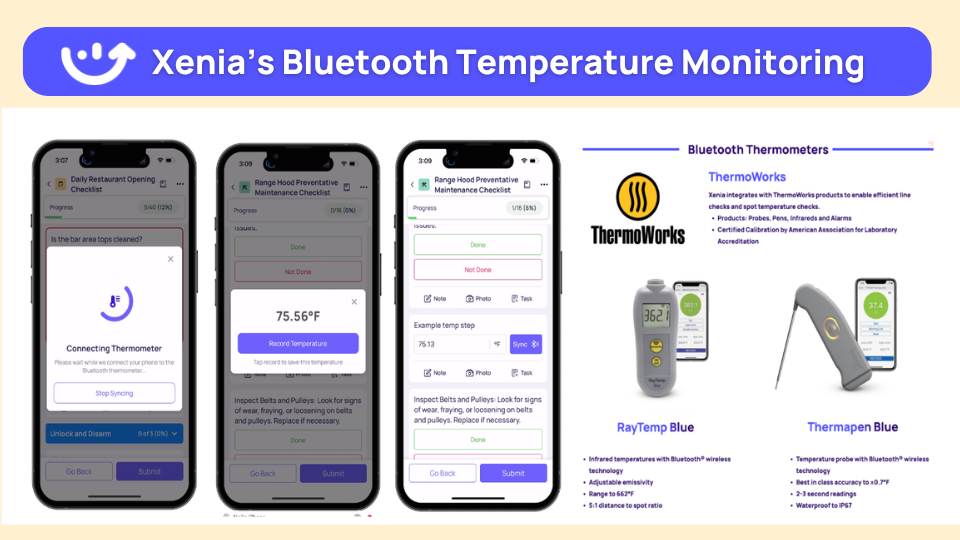
Pair Bluetooth thermometers with Xenia. Auto-log temps, auto-alert if out of range, no manual data entry. That setup drives Dave's Hot Chicken's food-safety program across 321 locations. Walk-in temps log every 15 minutes automatically. Hot-hold cabinets, line stations, and reach-in coolers all stamp to the same digital log with time, product, and the operator on shift.
The four-step closure loop when a walk-in goes out of range:
A side-by-side of what changes when paper goes digital:
**
Attribute, Paper clipboard temp log, Bluetooth-automated log in Xenia
Reading cadence, Manually written every 4 hours-often missed, Auto-stamped every 15 minutes from the sensor
Pencil-whipping risk, High-entries copied from memory or yesterday, None-sensor data feeds the log directly
Out-of-range alert, None until the next walk-through, Push and SMS within minutes of the threshold breach
Audit trail, Three handwritings on a creased sheet, Tamper-evident digital record-exportable to PDF
Corrective action, Often blank or back-filled, Required follow-up question and photo at the moment of failure
Offline behavior, Works on paper-useless to corporate, App works fully offline and syncs when connectivity returns
**
The honest comparison: SafetyCulture, Zenput by Crunchtime, and Jolt all market a Bluetooth or sensor story for the temperature reading itself. The Xenia wedge is the audit, corrective action, work order, and frontline comms layer wrapping the reading, not the reading in isolation. An out-of-range walk-in at Dave's becomes a follow-up question, a photo, a corrective task with a deadline, and a DM escalation if the task is not closed in 24 hours. That four-step closure loop is the differentiator.
A practical example of how the loop runs at Dave's. Saturday 6 a.m., a walk-in cooler reads 44°F. The push alert hits the kitchen manager's phone before any TCS product is at risk. The follow-up question prompts: door left ajar overnight, gasket failure, or compressor issue?
The manager photographs the gasket, moves at-risk product to a backup walk-in, files a work order to the maintenance vendor, and closes the corrective task before the lunch rush. By the time the DM logs in, the entire trail (sensor reading, alert, response, photo, work order, signature) is in the audit dashboard.
Walk-in temp logs sit alongside audit templates with weighted scoring on critical food-safety items, opening and closing checklists, work orders, and frontline comms in the same operator app. One app per frontline employee, not four.
.svg)

Priced on per user or per location basis
Available on iOS, Android and Web


How to set up walk-in cooler temp logs in Xenia
Setting up walk-in cooler temp logs in Xenia takes one rollout afternoon if your equipment list and HACCP plan are already documented. The numbered playbook a multi-unit ops director runs to deploy across a new location group:
Most operators start with a digital log on tablet plus Bluetooth probes, prove ROI on one prevented walk-in failure, then add 24/7 ambient sensors across the rest of the fleet. Avoid the rollout mistake of pushing sensors before the log template is dialed in. The sensor data feeds the log, so the log has to be right first.
Where do operators see results?
Operators see walk-in temp log ROI in three places: prevented product loss, defensible audit trails, and DM time saved. The pattern across the customer base is consistent. The moment a sensor catches a 2 a.m. walk-in failure that paper would have missed until Saturday lunch, the system has paid for itself.
Dave's Hot Chicken (321 locations). Dave's migrated from RizePoint to Xenia. The drivers were weighted scoring on critical food-safety items, the four-step corrective action workflow, and Bluetooth thermometer integration across every walk-in, hot-hold, and line station.
Walk-in temps log every 15 minutes automatically. Out-of-range readings trigger a follow-up question, a required photo of the corrective action, and a task assigned to the kitchen manager with a 24-hour deadline. If the task is not closed, the DM gets the escalation. The food-safety score stopped being a number on a dashboard. It became a process.
Refuel (200+ C-stores including rural fuel stops). Refuel kept Service Channel for the third-party work-order side and added Xenia for offline mode and audits. Rural fuel stops with food service face the same cold-holding rule (41°F TCS) and the same connectivity constraints.
The operator completes the temp check on the tablet, the data syncs when connectivity returns, the audit trail is intact. Offline-then-sync is the only workable cadence at sites with poor data, and it is the secondary use case that makes the same log structure work for the c-store shift handover walk that pairs the pump-to-cooler check with the cold-holding log.
The honest competitor acknowledgment for buyers comparing platforms. SafetyCulture (iAuditor) is the horizontal owner of food-safety audit SEO at scale and supports Bluetooth thermometer capture from the inspection question. Zenput by Crunchtime integrates with ThermoWorks and Cooper-Atkins probes and runs a continuous-monitoring sensor product.
Jolt sells its own Bluetooth probes with un-editable digital logs. Each has a credible temperature reading story. The buyer question worth asking on this page is not "who can read a thermometer" but "who closes the loop after the reading goes out of range," which is where the four-step Xenia workflow earns its place against audit-and-compliance-first incumbents like RizePoint.
The cross-cluster reality. Walk-in temp logs do not live in isolation. They tie into HACCP temperature logs across every CCP, Bluetooth thermometer setup for restaurants, the corrective action workflow that closes failures to resolution, and the regulatory frameworks that govern what a compliant log must contain. When the inspector walks in, every reading, every signature, every corrective action, and every escalation is one PDF export away.
Frequently Asked Questions
Got a question? Find our FAQs here. If your question hasn't been answered here, contact us.
What temperature should a walk-in cooler be?

How often should walk-in cooler temps be checked?
What does the FDA Food Code say about cold storage?
Is a paper walk-in temp log enough for a health inspection?
How do Bluetooth thermometers replace clipboard temp logs?
What happens when a walk-in goes out of range?


A Modern, AI-Powered Platform Built for Restaurant Operations
Xenia brings kitchen operations, food safety, audits, and team communication into one mobile-first platform. Restaurant teams execute daily work consistently, maintain compliance, and resolve issues faster, while leadership gets real-time visibility across all locations.
.webp)
Why Restaurant Operators Choose Xenia:
🤖 AI-Powered Operations, Convert paper logs instantly and verify food presentation and kitchen cleanliness automatically. Get instant answers about food safety trends without building reports.
🍽️ Food Safety & Compliance, Track line checks and temperature logs with automated alerts. Trigger corrective actions when readings exceed safe ranges. Maintain audit-ready records for health inspections.
📊 Multi-Location Control, Monitor food safety compliance and task completion across regions. Benchmark locations to identify training needs. Export reports for operational reviews.
One platform for kitchen operations, food safety, and compliance across all locations.

.svg)
.webp)
%201%20(1).webp)

.svg)
%201%20(2).webp)


