

.webp)
Post Summary
Restaurant HR is a different problem than general HR. Tipped wages, split shifts, variable demand, high turnover, labor law compliance across multiple states, the tools that work for an office don't work here.
Most restaurants patch this together with a scheduling app, a payroll tool, a paper binder for food safety, and a group chat for everything else.
The right software closes those gaps. Some close the workforce side. Others go deeper into what happens on the floor during the shift itself.
This guide covers the 13 best restaurant HR software options in 2026, and where each one fits.
Restaurant HR software comparison
**
Rank, Software, Key differentiator, G2 rating, Best for
#1, Xenia, Food safety and operations execution, 4.9/5, Multi-unit operators needing compliance depth
#2, Restaurant365, Accounting plus HR in one system, 4.1/5, Multi-unit groups controlling food and labor costs
#3, Homebase, Free scheduling for single-location restaurants, 4.2/5, Startups and small eateries
#4, Legion, AI-powered labor forecasting, 4.7/5, Multi-location chains with volatile demand
**
.svg)
.webp)
.webp)
1. Xenia - Best Operations Execution Platform for Restaurants
- What it's for: Complete restaurant operations execution from digital checklists to food safety compliance, built to work alongside your existing HR and scheduling tools
- G2 rating: 4.9/5
- Capterra rating: 4.9/5
- Who uses it: Multi-unit restaurant operators across casual dining, fast casual, franchises, and hospitality groups managing 10 or more locations

Here's what restaurant HR software doesn't cover.
ADP runs your payroll. Deputy tracks attendance. None of them can tell you whether the line check happened before service. None of them document that the walk-in cooler held temperature through the night. None of them know whether the closing team completed the sanitation walkthrough or just said they did.
That gap is where health violations happen. It's where food safety audits catch restaurants unprepared. It's where the inconsistency between locations compounds quietly until it becomes a brand problem.
Xenia is not restaurant HR software. It's the operational execution layer that works alongside your HR stack, handling the compliance and daily ops work that lives outside those systems. It connects directly with 7shifts, ADP, UKG, and Workday so your teams stay in the tools they already know.
What Xenia covers
Food safety compliance workflows: Most operators still manage food safety documentation on clipboards and paper binders, which health inspectors find in nearly every kitchen.
Xenia provides digital HACCP-aligned templates, corrective action automation when critical control points fail, and audit-ready documentation with timestamps and geo-tagged evidence for every submission.
.webp)
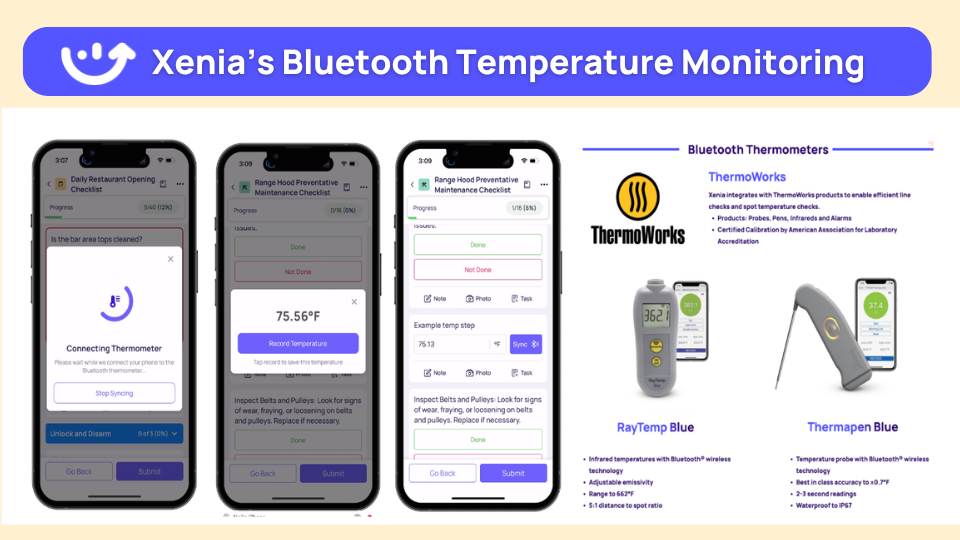
Temperature monitoring via Bluetooth and LoRaWAN sensors: FDA requires documented temperature checks.
Xenia connects directly to Bluetooth thermometers and LoRaWAN sensors, providing 24/7 automated monitoring across refrigeration units and hot holding equipment. Alerts fire when readings enter the danger zone. The audit log builds itself continuously without anyone initiating a manual check.
AI template builder for SOPs: Restaurant onboarding depends heavily on SOPs for food prep, safety protocols, and service standards. Most managers build these from scratch or never update them.
Xenia's AI generates SOP templates from plain language descriptions or existing PDF documents, cutting the time spent creating and distributing training materials to a fraction of what it currently takes.

Digital checklists with weighted scoring: Opening procedures, line checks, cleaning verification, and closing walkthroughs can all run as scored checklists with conditional logic and mandatory photo evidence.
A failed item doesn't just get recorded. It triggers a corrective task, routes to the right person, and gets tracked to resolution. The paper binder on the back office shelf gets retired.
.webp)
HRIS integrations: This is the critical point. Xenia doesn't replace restaurant HR tools. It connects to them. Employee data syncs automatically from your existing HRIS. New hires provisioned in 7shifts or Workday get immediate access to Xenia without manual setup. The integration makes Xenia an addition to your current stack, not a disruption of it.
Honest limitation: Xenia is not HR software. It does not process payroll, manage benefits, post jobs, or handle core HR administration. Restaurant operators who need a single platform for both HR and operations will need to pair Xenia with a dedicated HR or payroll system. That pairing is the intended use.

Priced on per user or per location basis
Available on iOS, Android and Web


2. Restaurant365
- What it's for: Integrated back-office platform combining HR, payroll, scheduling, inventory, and accounting for restaurant groups
- G2 rating: 4.1/5
- Capterra rating: 4.1/5
- Best for: Multi-unit chains where controlling food and labor costs together is the primary business pressure

Restaurant365 connects finances and workforce management in one place. Scheduling ties to live POS data. Payroll runs straight from tracked hours.
Labor variance reports tie directly to the P&L. For growing groups where finance and operations need to share a data layer, R365 removes the reconciliation work that happens when those systems are separate.
The $499/month starting price reflects its positioning. It's built for chains with the operational complexity to justify it.
Key features:
- Scheduling tied directly to inventory and sales data
- Full payroll with benefits administration
- Applicant tracking and digital onboarding
- Labor variance analytics against financial targets
- Multi-location reporting across the entire portfolio
Good if: You run multiple locations and need workforce data and financial data in the same system
Consider if: You're a single location or your monthly spend ceiling sits below what R365 requires
3. Homebase
- What it's for: Free scheduling, time tracking, and basic team communication for small restaurant operations
- G2 rating: 4.2/5
- Capterra rating: 4.6/5
- Best for: Single-location restaurants and startups with under 50 staff that need a working system without upfront cost

Homebase costs nothing to start. One location, unlimited staff, no expiration date. Scheduling, GPS clock-in, labor budgeting, and team messaging all come included. For independent restaurant operators who need a working system without the budget conversation, it fits.
Key features:
- Drag-and-drop schedule builder
- GPS-verified clock-in with geofencing
- Labor spend tracking against sales targets
- Team messaging and availability management
- Optional payroll processing add-on
Good if: You need a functional scheduling and time tracking system immediately at no cost
Consider if: Multi-state compliance, advanced forecasting, or multi-location management become priorities as you grow
4. Legion
- What it's for: AI-powered scheduling and labor forecasting for restaurants with unpredictable demand
- G2 rating: 4.7/5
- Capterra rating: 4.6/5
- Best for: Multi-location chains and busy casual dining operations with 50 or more staff per location
.webp)
Legion looks at POS data, weather, and local events to predict how many people you need and when. Schedules build themselves from those forecasts. Employees accept shifts 80% faster compared to manual scheduling, and restaurants typically see 3 to 7% in labor savings.
Key features:
- AI demand forecasting from POS and external data
- Auto-scheduling with employee preference matching
- Skills-based shift optimization
- Real-time labor cost dashboards
- Compliance guardrails with mobile self-service for employees
Good if: Your volume is hard to predict and manual scheduling keeps getting it wrong
Consider if: Your operation is small or straightforward enough that AI forecasting is more than you actually need
5. HotSchedules (Fourth)
- What it's for: Enterprise scheduling for large chains with deep POS integrations and built-in compliance
- G2 rating: 4.4/5
- Capterra rating: 4.4/5
- Best for: High-volume multi-location chains running Toast, NCR, or other enterprise POS systems
.webp)
Used by 150,000-plus locations. Deep POS integrations, overtime alerts, weather-based forecasting, and a built-in LMS make it a standard piece of infrastructure for large chains. Now part of the Fourth workforce management suite.
Key features:
- Demand forecasting with weather and sales data
- Overtime alerts and compliance tools
- Mobile self-service for shift management
- Toast, NCR, and major POS integrations
- Built-in training LMS
Good if: You're a large chain that needs scheduling plugged directly into enterprise POS
Consider if: You're a smaller operator, the implementation overhead may not be worth it
6. Gusto
- What it's for: Payroll with native tip credit handling, multi-state tax filing, and digital onboarding
- G2 rating: 4.6/5
- Capterra rating: 4.5/5
- Best for: Restaurants setting up their first real payroll system

Not restaurant-specific, but it handles what restaurants need from payroll well. Tip pooling, multi-state tax compliance, and next-day direct deposit are all included. Setup takes a day.
Key features:
- Tip pooling and tip credit management
- Multi-state payroll tax filing
- Digital onboarding and new hire forms
- Next-day direct deposit
- Scheduling via integrations
Good if: Payroll is still handled manually and you need a clean fix fast
Consider if: You need scheduling or POS integration built in from day one
7. BambooHR
- What it's for: Core HR with applicant tracking, digital onboarding, and performance management
- G2 rating: 4.5/5
- Capterra rating: 4.6/5
- Best for: Operators focused on reducing turnover through better hiring and onboarding

Built around finding, onboarding, and keeping people. ATS, e-signatures, performance reviews, and custom HR reporting are all included.
Key features:
- Applicant tracking with job postings
- Digital onboarding with e-signatures
- Performance reviews and goal tracking
- Custom HR reporting
- Employee directory and org charts
Good if: Turnover is your biggest cost and you want proper systems around hiring and retention
Consider if: You need scheduling or payroll built into the same platform
8. Rippling
- What it's for: All-in-one HR, payroll, benefits, and device management for growing restaurant groups
- G2 rating: 4.8/5
- Capterra rating: 4.9/5
- Best for: Multi-location chains expanding fast that want HR, payroll, and IT provisioning in one system

When a new hire goes into Rippling, payroll, system access, and device provisioning can all trigger automatically. Over 500 integrations cover most scheduling and POS tools. Requires more configuration than a purpose-built restaurant tool but the coverage is hard to match.
Key features:
- Automated onboarding and payroll
- Global payroll and compliance
- Benefits administration
- Device and app provisioning
- 500-plus integrations
Good if: You're opening locations quickly and want one system handling HR, payroll, and IT
Consider if: Tip pooling or POS labor forecasting are immediate requirements
9. Paycor
- What it's for: HR and payroll with analytics dashboards and multi-state compliance tools
- G2 rating: 4.4/5
- Capterra rating: 4.5/5
- Best for: Data-driven operators who want turnover metrics, labor variance, and compliance in one place
More analytics-forward than basic payroll platforms. Custom dashboards give finance teams the labor reports they need without manual exports. Multi-state compliance handles different break and overtime rules across locations.
Key features:
- Custom HR analytics dashboards
- Turnover and retention metrics
- Multi-state payroll compliance
- Workforce forecasting
- Time and attendance tracking
Good if: You want real analytics alongside payroll, not just a report or two
Consider if: You're single-location or the base fee plus per-user cost sits above your budget
10. TriNet
- What it's for: Fully outsourced HR, payroll, and benefits through a professional employer organization
- G2 rating: 4.3/5
- Capterra rating: 4.4/5
- Best for: New restaurant owners who want HR handled externally

You co-employ your staff through TriNet. They handle payroll, benefits, compliance, and HR support. For operators opening their first restaurant who don't want to become HR experts overnight, that's the appeal. The tradeoff is control, you're handing HR administration to a third party.
Key features:
- Fully managed payroll and tax filing
- Benefits administration with group health options
- Dedicated HR advisors
- Employment law compliance support
- Employee self-service platform
Good if: You're new to running a restaurant and want HR off your plate from day one
Consider if: You want full ownership of your HR systems and data
11. Altametrics
- What it's for: AI-powered scheduling, inventory analytics, and payroll for multi-branch QSR
- G2 rating: 4.5/5
- Capterra rating: 4.5/5
- Best for: Multi-unit QSR operators managing labor costs alongside COGS

Connects labor management to inventory analytics and POS data in one system. The AI scheduling engine adjusts against projected sales and cost targets simultaneously, useful when you're hitting prime cost percentages across 20 or 30 locations at once.
Key features:
- AI labor optimization against sales forecasts
- Inventory analytics and COGS tracking
- POS integration
- Multi-location labor cost controls
- Payroll processing
Good if: You need scheduling and inventory tied together across multiple QSR locations
Consider if: You're a smaller or independent operator where that level of integration is more than you need
12. Zimyo
- What it's for: Mobile-first HRMS with geo-attendance, payroll, and local tax compliance for Asian markets
- G2 rating: 4.4/5
- Capterra rating: 4.4/5
- Best for: Restaurant and hospitality chains operating in India and across Asia

Geo-tagged attendance, local tax handling, and payroll automation built for Asian compliance requirements. Mobile-first design works for deskless kitchen and floor staff.
Key features:
- Geo-tagged attendance without hardware
- Local tax and payroll compliance
- Performance and engagement tools
- Roster and shift management
- Mobile-first for frontline staff
Good if: You're running hospitality operations in Asia and need local compliance built in
Consider if: Your operations are in North America or Europe where the compliance features don't apply
13. SpeedLine
- What it's for: POS-integrated workforce and workflow management for pizza and QSR delivery operations
- G2 rating: 4.3/5
- Capterra rating: 4.3/5
- Best for: Pizza chains and delivery-heavy QSR where staffing and order volume need to move together

A POS platform with workforce workflow tools built in. Order management, routing, and scheduling run from one system. For delivery-focused operations currently switching between a POS and a separate scheduling tool, it removes that friction.
Key features:
- Workflow automation tied to order management
- Scheduling integrated with delivery volume
- Efficiency tracking for delivery and counter staff
- POS and HR data in one system
Good if: You run a pizza chain or delivery-heavy QSR and want staffing tied to order volume
Consider if: You're outside pizza or delivery, the specialization works against you if the use case doesn't fit
Conclusion
Restaurant HR software covers the workforce. Scheduling, payroll, compliance, hiring. Those are solved problems for most operators who have the right tool in place.
The harder problem is what happens during the shift. Whether locations are running food safety protocols correctly. Whether equipment issues get flagged and fixed before service. Whether the standard that gets trained actually gets executed consistently across every location every day.
Xenia handles the part that none of the other tools were built for. Pair it with whichever HR or scheduling tool fits your workforce needs and the operational compliance gap closes. See how.
Frequently Asked Questions
Got a question? Find our FAQs here. If your question hasn't been answered here, contact us.
What do multi-unit restaurant operators typically add Xenia for?

Operators with 10 or more locations typically add Xenia to handle food safety documentation, standardized opening and closing procedures, equipment maintenance tracking, and cross-location compliance reporting.
Most are already using a scheduling tool and a payroll system. Xenia fills the gap between those tools and the daily operational compliance work that currently runs on paper.
Does any restaurant HR software handle food safety compliance?
No. None of the platforms on this list handles food safety compliance: no HACCP workflows, no temperature monitoring, no health inspection documentation.
That requires a dedicated operations platform. Xenia covers that layer and connects directly with most major restaurant HR tools.
What is the difference between restaurant HR software and an operations execution platform?
Restaurant HR software handles the workforce side: scheduling, payroll, benefits, hiring, and labor compliance. An operations execution platform like Xenia handles what actually happens during the shift. Did the line check get done? Was the temperature logged? Was the kitchen clean before closing? The two solve different problems and work best when used together.


A Modern, AI-Powered Platform Built for Restaurant Operations
Xenia brings kitchen operations, food safety, audits, and team communication into one mobile-first platform. Restaurant teams execute daily work consistently, maintain compliance, and resolve issues faster, while leadership gets real-time visibility across all locations.
.webp)
Why Restaurant Operators Choose Xenia:
🤖 AI-Powered Operations, Convert paper logs instantly and verify food presentation and kitchen cleanliness automatically. Get instant answers about food safety trends without building reports.
🍽️ Food Safety & Compliance, Track line checks and temperature logs with automated alerts. Trigger corrective actions when readings exceed safe ranges. Maintain audit-ready records for health inspections.
📊 Multi-Location Control, Monitor food safety compliance and task completion across regions. Benchmark locations to identify training needs. Export reports for operational reviews.
One platform for kitchen operations, food safety, and compliance across all locations.

.svg)
.webp)
%201%20(1).webp)

.svg)
%201%20(2).webp)





