.webp)
Post Summary
Most multi-unit restaurant operators are running the same forms problem.
Temperature logs on clipboards. Opening checklists in someone's email. Incident reports that never made it to HQ. And a GM-built PDF that three locations are still using from 2019.
The FDA has linked missing or illegible records to foodborne illness investigations. Paper does not fail because your staff are careless. It fails because paper cannot enforce a rule, flag a missed step, or prove anything in an audit.
Generic form builders do not solve this. JotForm and Typeform were built for marketing surveys, not line checks. They have no conditional logic, no photo evidence trail, and no way to push a form to 50 locations at once.
This article is for operators who want to digitize every restaurant form in one platform built for how restaurant operations actually work.
.webp)
Related resources
- How Xenia handles restaurant audits and inspections
- Restaurant task management: how multi-unit operators run daily ops
- How to pass a restaurant health inspection
- Restaurant line checks vs compliance audits: what is the difference
- Digital food safety management system: what operators need to know
The 6 categories of restaurant operational forms
Most multi-unit operators are running forms across six distinct categories. Digitizing means covering all six, not just the obvious ones.
1. Food safety and temperature logs
These are your highest-risk forms. A missed temperature reading or an incomplete log is a health department violation waiting to happen.
- Hot and cold line check logs
- Walk-in cooler and freezer temperature records
- Cooling and reheating documentation
- HACCP critical control point logs
2. Audit and inspection forms
These run at two levels: internal audits your managers conduct, and third-party inspections your brand or health department runs.
- Internal brand standards audit
- Health inspection readiness checklist
- District manager store visit form
- Third-party food safety audit
3. Opening and closing checklists
These are the forms most operators try to digitize first, and the ones where conditional logic matters most.
- FOH opening checklist
- BOH opening checklist
- Manager closing checklist
- Equipment shutdown verification
4. Incident and accident reports
These forms need to be consistent, timestamped, and stored in a way that holds up legally.
- Employee incident report
- Customer accident form
- Food safety incident log
- Near-miss report
5. Employee and shift forms
High turnover makes this category more important than most operators realize.
- Tip declaration form
- Shift attestation and sign-off
- Training completion verification
- New hire onboarding checklist
6. Vendor and delivery forms
Receiving is where food safety compliance starts. Most restaurants track it on paper.
- Delivery receiving log
- Vendor compliance checklist
- Food storage verification
- Invoice discrepancy form
10 features multi-unit restaurants need in a form builder
Score every platform against this list. A generic form builder will fail on at least half of these. A restaurant-specific operations platform should pass all ten.
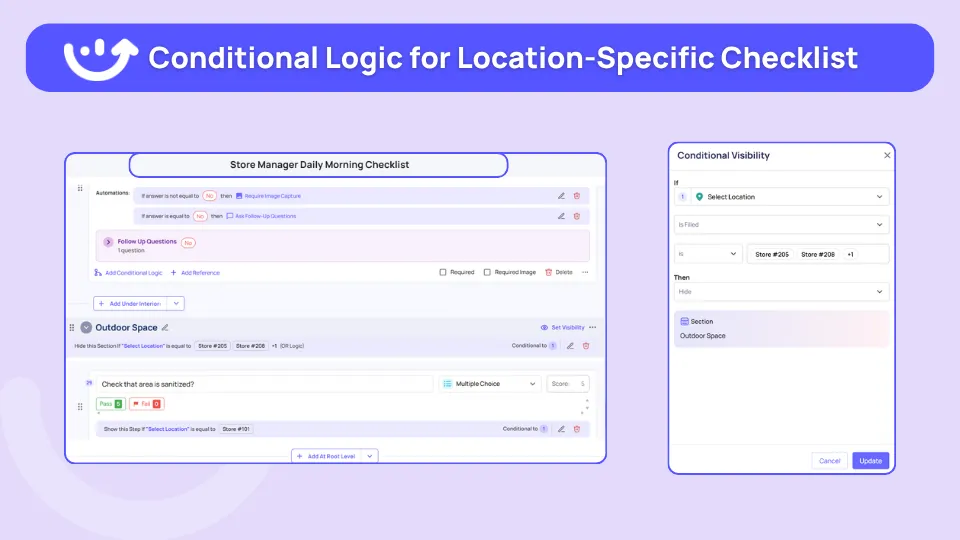
1. Conditional logic
If a temperature reading is out of range, the form should automatically prompt a corrective action. Static yes/no forms do not cut it in a compliance environment.
2. Photo evidence capture
Every audit form, every line check, every delivery receiving log should support photo attachment with timestamp. Without it, you have a record but not proof.

3. Digital signature and shift attestation
Tip declarations, training sign-offs, and shift acknowledgments all need a legal signature trail. A checkbox is not a signature.
4. Multi-location rollout
Build the form once at HQ and push it to every location simultaneously. Any platform that requires manual distribution is not built for multi-unit operations.
5. Role-based access
A line cook should not see the district manager audit form. A GM should not be able to edit the corporate brand standards template. Role-based access is not optional.
6. Audit trail with timestamp and GPS
Who submitted the form, at what time, from which location. This is what a health inspector or franchisor asks for. A completion log without location data is not an audit trail.
7. Offline mode for back-of-house
Walk-in coolers, storage areas, and loading docks have poor connectivity. The form needs to work offline and sync when connection returns.
8. Auto-routing of form failures
If an equipment check fails, it should automatically generate a work order or maintenance ticket. Manual follow-up is how things fall through the cracks.
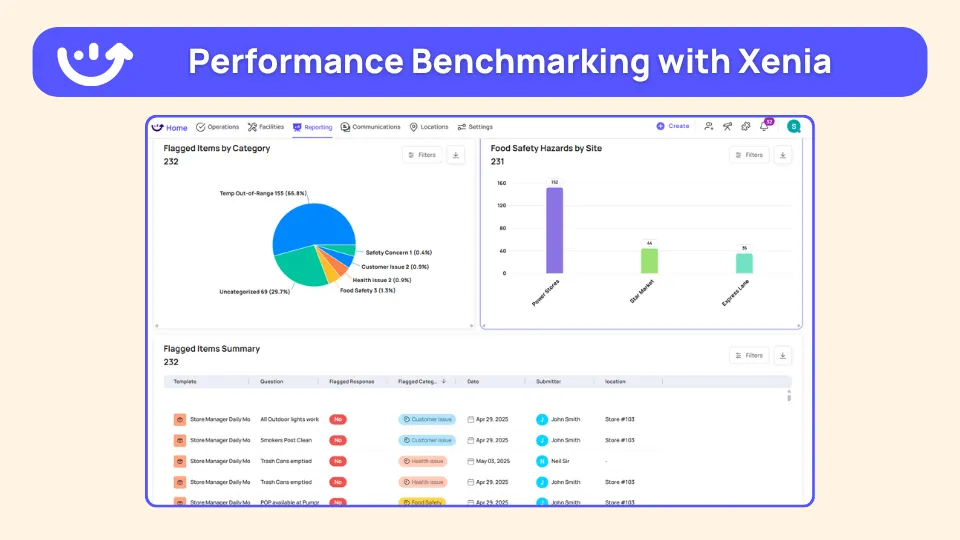
9. Reporting and dashboards across locations
A completed form is data. You need to see completion rates, failure trends, and audit scores across every location from one dashboard, not location by location.
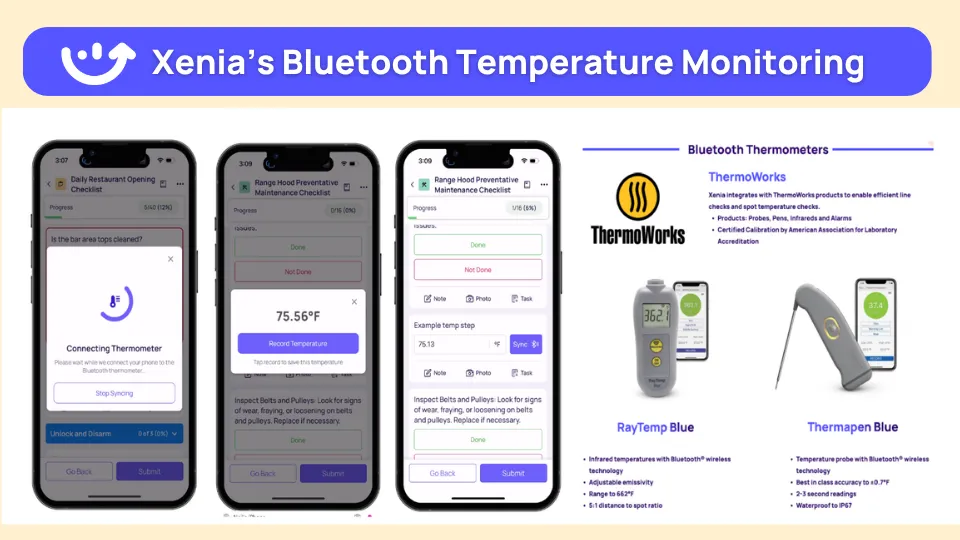
10. Integration with temperature monitoring
The best restaurant form platforms connect directly to IoT temperature sensors so manual logs and automated sensor data live in the same record.
Generic form builders vs restaurant-specific platforms
Here is the honest comparison most listicles skip.
**
Aspect, Generic form builders, Restaurant operations platforms
Examples, JotForm-Typeform-Google Forms-Wufoo, Xenia
Built for, Marketing-HR-surveys, Restaurant ops-food safety-compliance
Conditional logic depth, Basic branching, Multi-level logic with corrective action triggers
Photo evidence, Attachment only, Timestamped-mandatory-linked to audit trail
Multi-location rollout, Manual distribution, Publish once-deploy everywhere
Offline BOH mode, Limited or none, Full offline with auto-sync
Audit trail, Basic submission log, Timestamped-GPS-stamped-role-verified
Temperature integration, None, Direct IoT sensor connection
Pricing model, Per form or per user, Per location-built for scale
**
The problem is not that JotForm is a bad product. It is that "form builder" is the wrong category to shop in. What a multi-unit restaurant needs is not a form builder. It is a restaurant operations platform that includes a form builder as one of its core capabilities.
The 4 best form builder platforms for multi-unit restaurants in 2026
.svg)
.webp)
.webp)
1. Xenia
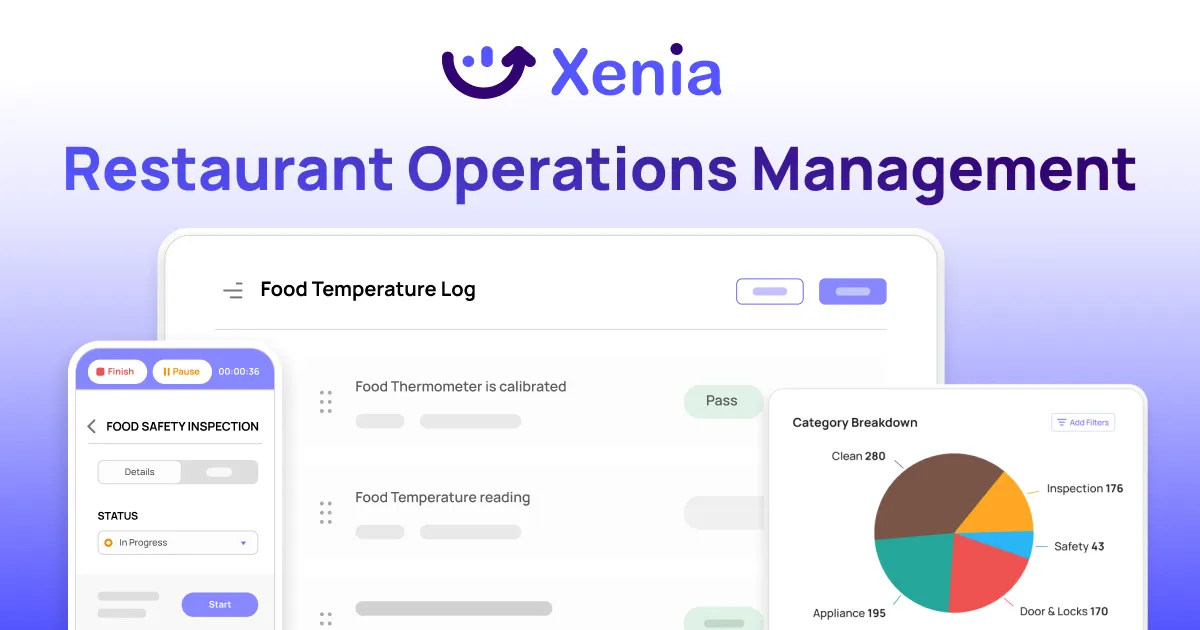
Xenia is built specifically for multi-unit restaurant operations. It handles the entire forms layer, from food safety logs to incident reports to brand standards audits, in one mobile-first platform.
The audits and inspections module runs weighted scoring audits with automatic corrective action generation when something fails. If a line check temperature is out of range, the platform flags it, generates a corrective action, and assigns it to the kitchen manager with a timestamp. The audit trail is GPS-stamped and stored by location.
The checklists and sops module handles opening and closing procedures, shift handovers, and station-specific setup forms. Conditional logic means staff only see the steps relevant to their role and shift. Photo evidence is mandatory on critical steps. Digital signatures capture shift attestation and training sign-offs.
Brand standards compliance covers the brand audit layer. District managers run standardized store visit forms with photo documentation of food presentation, cleanliness, and brand execution. Weighted scoring gives HQ an accurate picture of compliance risk across every location.
Xenia connects directly to Bluetooth and LoRaWAN sensors for temperature monitoring, so automated sensor data and manual HACCP logs live in the same record. When a walk-in cooler drifts into the danger zone at 2 a.m., the form record updates automatically, and an alert fires to the right person.
The AI Template Agent builds new forms from natural language prompts, cutting build time from hours to minutes. And if you would rather not build from scratch at all, Xenia's library of 1,000+ pre-built templates covers the most common restaurant forms out of the box.
Temperature logs, HACCP records, opening checklists, incident reports, brand standards audits. Most operators find what they need, make minor adjustments for their brand, and are live the same day. For a 50-location brand digitizing 30-plus paper forms, that combination cuts weeks off the rollout.
Get started now with Xenia’s 14-day free trial.

Priced on per user or per location basis
Available on iOS, Android and Web


2. Taqtics

Taqtics covers task management, digital audits, and basic checklists for restaurant and retail brands. It works for teams moving off paper for the first time with simple day-to-day task tracking needs.
The gap is depth. No weighted audit scoring, no IoT temperature integration, no advanced conditional logic, and limited reporting. A starting point, not a full operational forms solution.
**
Best for, Small restaurant brands doing basic task digitization for the first time
Pricing, From $4 per user per month
Gap, No weighted scoring-no temperature integration-limited reporting
**
3. FreshCheq
.webp)
FreshCheq automates food safety temperature logs and basic checklists. It works for small restaurants that need to move temperature records off paper quickly and without much setup.
The gap is breadth. No incident forms, no vendor receiving logs, no shift attestation, no brand standards audits. It covers one slice of the forms layer. Operators with 20-plus locations and complex compliance needs will outgrow it fast. For operators who have considered it, FreshCheq Alternatives covers where it falls short.
**
Best for, Small single-site restaurants needing basic temperature logs and food safety checklists
Pricing, From $50 per month or $499 per year
Gap, Temperature logging only; no incident forms-no brand audits-no full operational forms layer
**
4. Bindy
.webp)
Bindy handles store visit checklists, corrective actions, and inspection scheduling. Inspections work online and offline with photo verification and GPS stamps.
The gap is that it stops at store visit capture. No daily operational forms, no shift attestation, no vendor forms, no temperature monitoring. It records what happened during a visit but does not manage the daily procedures that prevent issues from occurring in the first place.
**
Best for, Small retail and hospitality teams that only need store visit audit tracking
Pricing, From $99 per month-usage-based pricing
Gap, Store visit only; no daily forms-no temperature integration-no shift or vendor forms
**
How to migrate from paper forms to digital: a 30-day rollout
Moving 30-plus paper forms to a digital platform does not have to be a six-month project. Here is a four-week framework that works.
Week 1: Inventory all forms currently in use
Walk every location and collect every form your team runs on paper or PDF. Include the forms GMs created on their own that never made it to HQ. You will find more than you expect.
Week 2: Prioritize by audit risk
Food safety forms go first. Temperature logs, HACCP records, and health inspection checklists carry the highest regulatory risk. Digitize these before anything else.
Week 3: Build digital versions, pilot in two locations
Do not recreate paper forms 1:1. Redesign them for mobile. Add conditional logic where a response should trigger an action. Make photo evidence mandatory on critical steps. Pilot in one high-performing location and one that struggles with compliance.
Week 4: Train, roll out across the portfolio, remove the paper
Push the forms to every location from HQ. Train GMs on mobile submission and audit trail access. Then physically remove the paper forms from locations. As long as paper is still available, some staff will default to it.
Start with Xenia’s free template library.
Common mistakes restaurants make when digitizing forms
Most operators make at least two of these. Knowing them in advance saves weeks of rework.
Recreating paper forms 1:1 instead of redesigning for mobile
A paper form has 40 fields because paper has no logic. A digital form for the same process might need 12 fields, with 28 others appearing conditionally. If you just photograph your paper form and rebuild it digitally, you have not fixed anything.
Skipping the audit trail
Some operators turn off timestamp requirements or GPS stamping to make forms faster to complete. That defeats the legal and compliance purpose entirely. The audit trail is the point.
Letting each GM keep a paper backup
Paper backups undermine adoption. If staff know they can fall back to paper, they will. Set a hard cutoff date for paper forms and stick to it.
Choosing a generic form builder because it is cheaper
JotForm costs less per month than a restaurant operations platform. It also cannot enforce conditional logic for line checks, cannot route a failed temperature reading to a maintenance ticket, and cannot give your DM a cross-location compliance dashboard. The savings on software cost more in compliance risk.
Conclusion
Paper forms are not a cost-saving measure. They are a liability. They cannot enforce compliance, cannot prove completion, and cannot scale across 50 locations without creating 50 slightly different versions of the same form.
The operators who solve this stop thinking about forms as a category. They think about their operations execution layer instead. The forms are just one part of it.
Xenia replaces your paper forms, your checklist apps, and your shared PDF drives with one platform built for how restaurant operations actually work.
Conditional logic, photo evidence, digital signatures, multi-location rollout, and a compliance audit trail that holds up when a health inspector walks in.
Replace 30 paper forms with one platform. Book a demo.
Frequently Asked Questions
Got a question? Find our FAQs here. If your question hasn't been answered here, contact us.
What is the difference between a form builder and a checklist app?

A form builder collects data. A checklist app tracks task completion. You need both connected in one platform. When a checklist item fails, it should automatically trigger a corrective action. Generic form builders and standalone checklist apps do not connect those two things. A restaurant operations platform does.
How do you digitize restaurant compliance forms?
Start with your highest-risk forms first: temperature logs, HACCP records, health inspection checklists. Pick a platform with conditional logic, mandatory photos, digital signatures, and offline mode. Redesign forms for mobile, do not just recreate paper on a screen. Pilot in two locations before rolling out everywhere.
Can JotForm be used for restaurant audits?
It can collect responses. That is it. No corrective action triggers, no GPS-stamped audit trail, no cross-location compliance dashboard. For a single site collecting basic data, fine. For a multi-unit brand running compliance audits, it falls short on almost everything that matters.
What is the best form builder software for restaurants?
Not JotForm or Google Forms. Those were built for surveys, not kitchen operations. You need a restaurant operations platform with a built-in form builder that handles conditional logic, photo evidence, multi-location rollout, and compliance audit trails. Xenia is built for exactly this.


A Modern, AI-Powered Platform Built for Restaurant Operations
Xenia brings kitchen operations, food safety, audits, and team communication into one mobile-first platform. Restaurant teams execute daily work consistently, maintain compliance, and resolve issues faster, while leadership gets real-time visibility across all locations.
.webp)
Why Restaurant Operators Choose Xenia:
🤖 AI-Powered Operations, Convert paper logs instantly and verify food presentation and kitchen cleanliness automatically. Get instant answers about food safety trends without building reports.
🍽️ Food Safety & Compliance, Track line checks and temperature logs with automated alerts. Trigger corrective actions when readings exceed safe ranges. Maintain audit-ready records for health inspections.
📊 Multi-Location Control, Monitor food safety compliance and task completion across regions. Benchmark locations to identify training needs. Export reports for operational reviews.
One platform for kitchen operations, food safety, and compliance across all locations.

.svg)
.webp)
%201%20(1).webp)

.svg)
%201%20(2).webp)