

Summary
FDA food holding temperature ranges (hot ≥135°F, cold ≤41°F)
Hot TCS food must be held at 135°F (57°C) or above and cold TCS food at 41°F (5°C) or below, per FDA Food Code section 3-501.16. These two numbers are the spine of every food holding temperature chart in a US kitchen. TCS food is any food that needs time and temperature control to stay safe, like cooked rice, cut leafy greens, dairy, cooked proteins, and cut tomatoes. For the full list, see the TCS food safety guide and the breakdown of potentially hazardous food and TCS classification.
The cold holding number used to be 45°F. The FDA lowered it to 41°F in the 2013 Food Code cycle, and 41°F remains the standard in the 2022 Code. If your old chart still says 45°F, it is out of date and will not match what a health inspector expects.
Here is the quick reference operators keep posted at the line.
**
Holding type, Safe range, Source
Hot holding, 135°F (57°C) or above, FDA Food Code 3-501.16
Cold holding, 41°F (5°C) or below, FDA Food Code 3-501.16
Danger zone, 41°F to 135°F, FDA Food Code
Reheat for hot holding, 165°F for 15 seconds within 2 hours, FDA Food Code 3-403.11
**
C-store food service follows the same rules. A hot-hold case for roller grills or fried chicken holds at 135°F or above. A cold grab-and-go cooler holds at 41°F or below. The format changes, the numbers do not.
The time-temperature relationship and the danger zone
The temperature danger zone is 41°F to 135°F, the range where bacteria multiply fastest under the FDA Food Code. Food does not become unsafe the instant it enters the danger zone. It becomes unsafe based on how long it stays there. That time-temperature relationship is what every holding rule is built on.
USDA FSIS frames the consumer danger zone slightly wider, at 40°F to 140°F, and notes bacteria can double in as little as 20 minutes inside it. The FDA foodservice standard is the tighter 41°F to 135°F. Operators see both numbers, so it helps to know the FDA Code range is the one a health inspector enforces in your kitchen.
Time also works as a control on its own. Under FDA Food Code 3-501.19, TCS food held without temperature control can be kept for a maximum of 4 hours, then it must be discarded, if it started at a safe temperature. Cold food held at or below 70°F can use a longer 6-hour window. These are the rules behind a buffet or catering line running without a steam table.
Two more time rules matter at the holding stage:
- Cooling (FDA Food Code 3-501.14): cool from 135°F to 70°F within 2 hours, then 70°F to 41°F within 4 more hours, 6 hours total.
- Reheating for hot holding (FDA Food Code 3-403.11): reheat rapidly to 165°F for 15 seconds within 2 hours before it goes back on the line.
The line that matters for an AI overview or a health inspector is simple. The danger zone is 41°F to 135°F. Food held in that range for more than 4 hours must be discarded, not re-served.
The temperature log workflow: capture, sign, audit
A food holding temperature log only works if it captures the reading, the time, the staff member, and the corrective action in one place. The regulatory minimum check frequency is every 4 hours, but the industry best practice is every 2 hours (WebstaurantStore food safety temperatures). Checking every 2 hours leaves time to fix a problem before food crosses the 4-hour discard threshold.
A clipboard log fails the audit-trail test for one reason. Nobody can prove when it was filled in. A binder that gets "completed" the morning of the inspection is the classic pencil-whipping risk every DM knows. A digital log with a timestamp and a staff PIN removes that doubt.
Here is the line-check workflow operators run in Xenia.
This is the same loop covered in the HACCP temperature log guide and the walk-in cooler temperature log workflow. The follow-up question and required photo are what separate a digital form from a static checklist. Evidence gets captured at the moment of failure, not reconstructed after.
.webp)
.svg)

Priced on per user or per location basis
Available on iOS, Android and Web


Bluetooth thermometer integration: from manual logs to automated capture
Bluetooth thermometer integration pairs a probe or sensor with Xenia so temps log automatically, with no manual data entry. Readings log at intervals, for example every 15 minutes, and an out-of-range reading triggers an alert the moment it happens. This is the Bluetooth thermometer setup most multi-unit operators move to once the paper log becomes a liability. Integration is hardware-partner-dependent, so check Xenia's temperature monitoring page for supported devices rather than assuming every brand pairs.
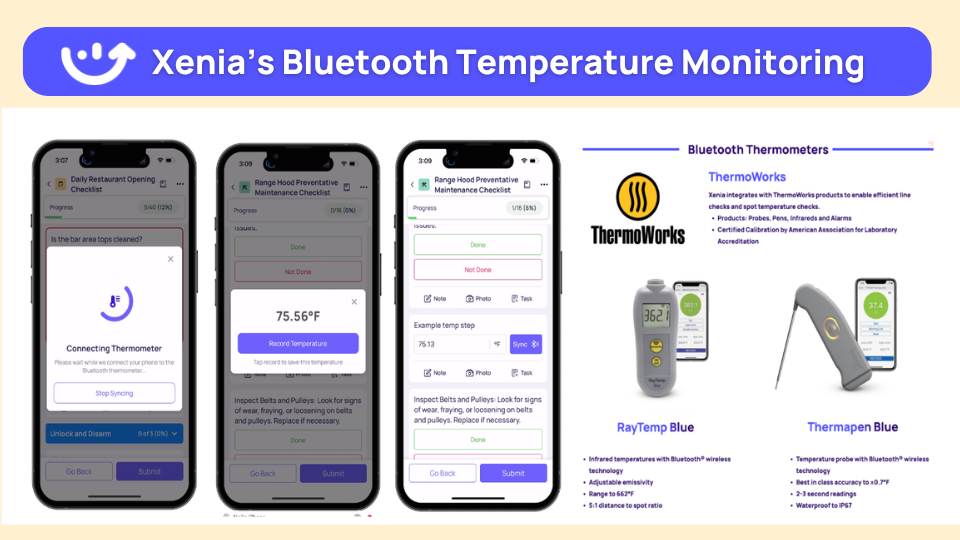
The difference between a manual log and an integrated one shows up fastest during an inspection.
**
Aspect, Manual clipboard log, Bluetooth thermometer + Xenia
Data entry, Hand-written-transcribed later, Auto-logged at intervals (for example-every 15 minutes)
Out-of-range alert, Caught at next manual check or not at all, Auto-alert the moment a reading is out of range
Audit trail, Paper binder-filled in before inspection, Timestamped record with staff attribution
Corrective action, Verbal-undocumented, Auto-creates a corrective task with a deadline and escalation
Inspector readiness, Reconstruct from memory, Pull the log on the tablet on the spot
**
For restaurant teams, that means line checks, walk-in temps, and hot-hold monitoring all feed one compliance-ready trail. Out-of-range readings trigger an alert and a corrective-action follow-up automatically. The photo gets stored as evidence. Xenia does not interpret the photo content. A person still makes the call, but now there is proof the call was made.
How Dave's Hot Chicken runs Bluetooth temp logs across 321 locations
Dave's Hot Chicken runs Bluetooth thermometers across 321 locations and uses them as the backbone of food holding temperature compliance. The chain migrated from RizePoint. RizePoint pioneered mobile auditing, but its scoring and follow-up logic could not keep pace with the format variation across 321 units, so Dave's rebuilt the program in Xenia.
The migration drivers were specific. Weighted scoring so temp failures count more than cosmetic items. Bluetooth thermometer integration across every walk-in, hot-hold, and line station. Corrective action workflows with a deadline and escalation. Temps log automatically every 15 minutes.
An out-of-range reading triggers an alert and a follow-up question on the next audit cycle. The food safety score stopped being a flat number on a dashboard and became a process the DM walks can act on. (Dave's Hot Chicken's customer story page is not published, so there is no link here, just the named outcome.)
The same model works in C-store food service. Power Market runs Xenia across 360 convenience store locations with bilingual checklists, QR-code deployment, and 40% faster task resolution, the cross-vertical proof that automated logs and corrective workflows are not restaurant-only.
For more on how restaurant and multi-unit teams structure this, see restaurant task management and the broader food safety operations hub. Cook Out runs line-check temperature capture across 335 locations, and H&S Energy uses continuous sensor deployment across 360-plus stores, two more confirmed examples of the same approach.
The food holding temperature checklist (free download)
A food holding temperature checklist turns the FDA ranges into a daily ops habit your team actually runs. Below is the corrective-actions reference that anchors a solid line-check checklist. Pair it with the free temperature log template to put it on a tablet today.
**
Situation found, Temperature, Corrective action
Hot food below 135°F-under 4 hours, 120°F to 134°F, Reheat to 165°F within 2 hours-then return to hot holding
Hot food below 135°F-over 4 hours, Any, Discard. Do not reheat or re-serve
Cold food above 41°F-under time window, 42°F to 70°F, Move to colder unit or rapidly chill-recheck in 1 hour
Cold food above 41°F-past time window, Any, Discard
Steam table not pre-heated, Below 135°F, Pre-heat 15 minutes before loading food
Reheated food under 165°F, Below 165°F, Continue reheating until it hits 165°F for 15 seconds
Equipment failure (cooler or warmer down), Out of range, Move product-open a work order-log the disposal
**
For the regulatory baseline behind this checklist, review the HACCP overview and the food safety regulatory frameworks guide. Xenia is not a HACCP-certification platform. It supports HACCP-aligned audits and keeps the evidence trail, but submission to a health authority stays operator-driven.
Want to see the temp-log workflow Dave's Hot Chicken runs at 321 locations? Book a demo to see Bluetooth temp logs in action and watch the capture, sign, audit, and corrective-action loop run end to end.
When a reading is out of range: the corrective action workflow
When a temperature reading is out of range, the audit failure should lead to an automatic corrective task, tracked to resolution, with escalation if it is not fixed by the deadline. Most platforms collect the bad reading and stop. The gap is closure. In Xenia, an out-of-range reading auto-presents a follow-up question asking what the staff member found and requires a photo of the corrective action.
From there the loop runs on its own:
This is the tie to the regulatory hook. Hot food below 135°F past 4 hours, or cold food above 41°F past its time-control window, must be discarded. The corrective task documents the disposal, which is exactly what an auditor wants to see. This is a purpose-built audit-closure loop, not a general automation tool.
For the full pattern, see the food safety corrective action workflow and how it pairs with weighted audit scoring that flags critical items. Temperature failures score as critical (10 points). A smudged label scores as minor (1 point). The audit score finally tracks what matters.
Frequently Asked Questions
Got a question? Find our FAQs here. If your question hasn't been answered here, contact us.
What is the FDA food holding temperature?

What is the temperature danger zone?
How long can hot food be held above 135°F?
Do you need a digital temperature log to pass an inspection?
How does Bluetooth thermometer integration work?
What happens when a temperature reading is out of range?


A Modern, AI-Powered Platform Built for Restaurant Operations
Xenia brings kitchen operations, food safety, audits, and team communication into one mobile-first platform. Restaurant teams execute daily work consistently, maintain compliance, and resolve issues faster, while leadership gets real-time visibility across all locations.
.webp)
Why Restaurant Operators Choose Xenia:
🤖 AI-Powered Operations, Convert paper logs instantly and verify food presentation and kitchen cleanliness automatically. Get instant answers about food safety trends without building reports.
🍽️ Food Safety & Compliance, Track line checks and temperature logs with automated alerts. Trigger corrective actions when readings exceed safe ranges. Maintain audit-ready records for health inspections.
📊 Multi-Location Control, Monitor food safety compliance and task completion across regions. Benchmark locations to identify training needs. Export reports for operational reviews.
One platform for kitchen operations, food safety, and compliance across all locations.

.svg)
.webp)
%201%20(1).webp)

.svg)
%201%20(2).webp)


